Archive for the ‘Apple’ Category
Posted by jpluimers on 2014/06/20
Just in case I need the youngest Microsoft Remote Desktop Connection Client for Mac, I should start at Microsoft Remote Desktop Connection Client for Mac Search results – Microsoft Download Center.
At the time of writing was the 2011 Microsoft Remote Desktop Connection Client for Mac 2.1.1 which – though it indicates it runs from Mac OS X 10.5.8 until 10.6.x – runs find on Leopard, Snow Leopard, Lion, Mountain Lion, not Tiger including Retina displays.
Do not go through Remote Desktop Connection Client for Mac | Office For Mac , as is a marketing page that makes it hard to find what you are looking for (but easy to to get you into Office for Mac).
–jeroen
Posted in Apple, Mac, Mac OS X / OS X / MacOS, Mac OS X 10.5 Leopard, Mac OS X 10.6 Snow Leopard, Mac OS X 10.7 Lion, MacBook, MacBook Retina, MacBook-Air, MacBook-Pro, OS X 10.8 Mountain Lion, Power User | Leave a Comment »
Posted by jpluimers on 2014/06/13
I always wonder how people can remember the character combinations to type special characters from a regular US international keyboard on a Mac with OS X, or Windows computer.
When having to type a lot of international text, I often use the United States-International keyboard layout in Windows 7, in Windows Vista, and in Windows XP.
When not, I often use Character Map. Too bad there is no shortcut for it.
 Choosing the U.S International – PC on a Mac OS X (as it behaves exactly like the PC counterpart on Windows) however introduces problems when using Remote Desktop Connection or virtualization software like VMware Fusion or Parallels.
So I sometimes revert to “Special Charters” (option-command-T) under the Edit menu (also called Character Viewer), but usually take advantage that ApplePressAndHoldEnabled by default is enabled: that allows the press-and-hold feature for vowel keys, and then either use the digit keys or arrows to select the target accented character.
On both systems, there are other ways to type special characters using keyboard shortcuts that I find very hard to remember. For people with a good memory, you can try these:
–jeroen
via: Macintosh OSX Keyboards (Penn State).
Posted in Apple, Keyboards and Keyboard Shortcuts, Mac, Mac OS X / OS X / MacOS, Mac OS X 10.6 Snow Leopard, Mac OS X 10.7 Lion, MacBook, MacBook Retina, MacBook-Air, MacBook-Pro, OS X 10.8 Mountain Lion, Power User | Leave a Comment »
Posted by jpluimers on 2014/05/16
Reminder to self: how to decrease vmdk disk size of guest OS (check if it works with Windows guests) using VMware Fusion on Mac OS X.
–jeroen
via: Reduce size of guest vmdk disks with VMware Fusion 4.1.3 on OS X 10.8 | aitrusblog.
Posted in Apple, Fusion, Mac, Mac OS X / OS X / MacOS, Mac OS X 10.7 Lion, MacBook, MacBook Retina, MacBook-Air, OS X 10.8 Mountain Lion, Power User, VMware | Leave a Comment »
Posted by jpluimers on 2014/05/12
Recent Retina and MacBook Air’s do not have an optical drive, so they do without the Eject button on the keyboard.
The quick keyboard shortcut Control+Shift+Eject is not directly available, so what is the replacement?
A few people that answered this are jr00ck and Evil Rob:
For newer Retina and MacBook Air’s, control+shift+fn+power button replaces control+shift+eject.
In fact you can even press Fn+Power and get a small dialog that lets you choose what to do and offers a “Reopen windows when logging back in” checkbox:
Read the rest of this entry »
Posted in Apple, Mac, Mac OS X / OS X / MacOS, Mac OS X 10.7 Lion, MacBook, MacBook Retina, MacBook-Air, OS X 10.8 Mountain Lion, Power User | Leave a Comment »
Posted by jpluimers on 2014/05/06
Copying the path from the Finder to the clipboard is a bit cumbersome.
A simple way contains a bit of repetitive steps, and to read Mac OS X: Open a Terminal at Folder from Finder:
- Open a Terminal window in the finder
- Type this command in the Terminal window
pwd | pbcopy
This simple way was suggested my User Kyle Cronin, thanks!
Some notes:
- pwd prints the current working directory.
- pbcopy copies the input to the clipboard.
Another way is using Automator. It is a bit more complex to setup, but the actual usage is easier:
- Select the folder or file in the Finder
- Right click
- For a folder: select “Services”
- Select “Copy File Path”
Setting this up is a bit more complex and requires the first 5 steps from Copy file or folder path to the clipboard in Mac OS X Lion | MacYourself:
- Launch Automator from your Mac’s Applications folder. If you’ve never used Automator before, that’s not a problem. This is going to be so simple anyone can do it.
- Double-click the Service icon from Automator’s start menu.
- Toward the top of the right column, you’ll see this line of text: “Service receives selected _____ in _____”. Choose “Files or Folders” from the first menu and “Finder” from the second.
- Next, click on Utilities in the Actions library on the left side. Double-click “Copy to Clipboard” in the middle column. You’ll notice that this action has been added to our workflow on the right.
- Go to File > Save in the menu bar and name your service Copy File Path. Our work with Automator is now done, so you can safely quit it once the service is saved.
I’ve skipped the other steps, as I don’t need a keyboard shortcut for this.
–jeroen
via: Copy file or folder path to the clipboard in Mac OS X Lion | MacYourself.
Posted in Apple, Development, Mac, Mac OS X / OS X / MacOS, Mac OS X 10.7 Lion, MacBook, MacBook Retina, MacBook-Air, MacBook-Pro, OS X 10.8 Mountain Lion, Power User, Scripting, Software Development | 3 Comments »
Posted by jpluimers on 2014/05/05
Fun project with potential: pickhardt/betty that was pointed to me by Ilya Grigorik – Google+.
Betty is a natural language (for now: English based) front end for tools like curl, find, wc, whoami, find, etc.
It requires ruby, and runs on *nix or Mac OS X (where it uses osascript for iTunes).
–jeroen
via: Ilya Grigorik – Google+ – Betty is an english-like interface for your command line:….
Posted in *nix, Apple, Development, Mac, Mac OS X / OS X / MacOS, MacBook, MacBook Retina, MacBook-Air, MacBook-Pro, OS X 10.8 Mountain Lion, OS X 10.9 Mavericks, Power User, Ruby, Software Development | Leave a Comment »
Posted by jpluimers on 2014/05/02
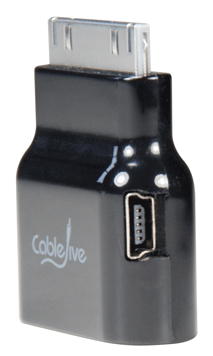
Interesting device I want to try out (probably from Amazon.com: CableJive dockStubz+).
It is a 30-pin Pass-Through adapter for iPod/iPhone/iPad (lets call them iDevice).
Reasons to get one (or more depending on the number of devices/chargers you use regularly):
- Use the connector to connect a compatible device, while still charging through the side micro-USB power port on the adapter.
- Charge modern iDevice with old chargers and old iDevice with modern chargers.
- Put your iDevice in a dock even when you have a bumper or case around it.
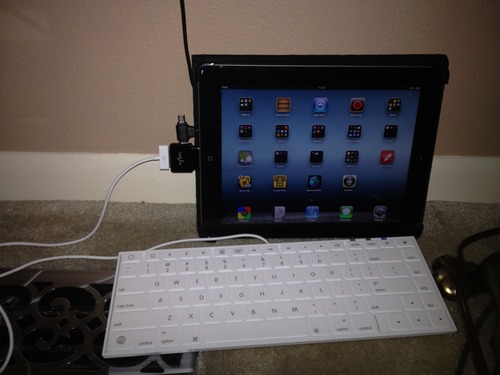
A few pictures showing their use are below.
Basically, there are two verions of charging circuitry: USB based and FireWire based.
I will make sure to get the + version, as it combines these two:
dockStubz+ model includes charge conversion circuitry for those older docks and accessories that don’t charge while they are connected. Safely connect your mobile device to any dock and get the charging you need.
–jeroen
via: dockStubz Charge Converter and 30-pin Pass-Through Adapter.


 (een larger)
Posted in Apple, iOS, iPad, iPhone, iPod, iPod touch, Power User | Leave a Comment »
Posted by jpluimers on 2014/04/27
At USD 50, this seems like a bargain for Apple I / Apple II lovers.
From the The WOZPAK Special Edition – Overview page:
In 1978, The WOZPAK was a 300 page technical manual produced by Apple Pugetsound Program Library Exchange. The poor resolution of copy machines and fax machines of the era made The WOZPAK an illegible and challenging to use collection of handwritten and typed notes. This collection as a whole was provided to the A.P.P.L.E. by Apple Computer, Inc. co-founder Steve Wozniak and then company president Mike Scott.
…
Thanks to the encouragement of a number of computer industry legends, and the efforts of Apple historians, Brian Wiser and Bill Martens, we now have a completely refurbished and dramatically enhanced version of The WOZPAK. The WOZPAK Special Edition comes complete with the original materials from The WOZPAK and The WOZPAK II as well as some new materials provided by Apple legends from their personal libraries.
–jeroen
via: The WOZPAK Special Edition – Overview.
Posted in //e, 6502, Apple, Apple Pascal, Apple ][, Assembly Language, Development, History, Pascal, Power User, Software Development | Leave a Comment »
Posted by jpluimers on 2014/04/19
Reaver-WPS is an excellent tool to test the security of your WPA/WPA2 secured network against the WPS vulnerability.
Getting Reaver 1.4 (which contains wash to scan WiFi networks) to compile out of the box on OS X Mavericks (which is 10.9; why can’t they keep a successive version number in the product name?) didn’t work.
So I downloaded the adapted source pack from one of the comments in Issue 245 – reaver-wps – Support for Mac OS X? – Brute force attack against Wifi Protected Setup – Google Project Hosting (as the diff still not has been applied to the codebase)..
wash will detect most, but not all networks. I’ve net yet tried WireShark, wpscan and wspy yet (they re supposed to get all of them).
To speed up the checking process I tried on install aircrack-ng to associate a Mac with the target network. Compiling aircrack-ng on a Mac from source didn’t work at all. But after installing MacPorts, I could get the MacPorts version of aircrack-ng to work. The bad news: I could not get aircrack-ng to associate to the network.
So these were the commands I used: Read the rest of this entry »
Posted in *nix, *nix-tools, Apple, Mac, Mac OS X / OS X / MacOS, MacBook, MacBook Retina, MacBook-Air, MacBook-Pro, Monitoring, OS X 10.9 Mavericks, Power User | Leave a Comment »
Posted by jpluimers on 2014/04/18
Boy, I wish I had found this far earlier:
- in Windows Explorer this is called cut & paste:
Ctrl+X & Ctrl+V
- in Mac OS X Finder this is called copy & move items here:
Command+C & Command+Option+V
Read the rest of this entry »
Posted in Apple, Keyboards and Keyboard Shortcuts, Mac, Mac OS X / OS X / MacOS, Mac OS X 10.7 Lion, MacBook, OS X 10.8 Mountain Lion, Power User | 3 Comments »




 The Wiert Corner - irregular stream of stuff