The Wiert Corner – irregular stream of stuff

Jeroen W. Pluimers on .NET, C#, Delphi, databases, and personal interests

  • My badges

  • Twitter Updates

  • My Flickr Stream

  • Pages

  • All categories

  • Enter your email address to subscribe to this blog and receive notifications of new posts by email.

    Join 1,860 other subscribers

Archive for the ‘Font’ Category

Segoe Fluent Icons font – Windows apps | Microsoft Learn

Posted by jpluimers on 2025/08/28

For modern scaleable UI applications, it helps a lot when one has a consistently designed scalable icon set with icons having the same dimensions and features.

In more than just one sense, designing and developing such sets is a lot like developing and designing scaleable fonts. It is not surprising that by now many of these are available as fonts.

Ons of them is [Wayback/Archive] Segoe Fluent Icons font – Windows apps | Microsoft Learn which on the page has the complete list: an impressive one indeed and as such a leap from the old dingbat fonts like Zapf Dingbats fonts (yes, I am more than ITC Zapf Dingbats old; most glyphs ended up in the Dingbats (Unicode block) in 1991), Wingdings from Microsoft Windows 3.1 on, Wingdings 2 and Wingdings 3 in Microsoft Office versions until Office 2010, and the – now part of Core fonts for the webWebdings as of Internet Explore 4.

Those old fonts only had small sets of icons – usually no more than 230, some just dozens – and Segoe Fluent Icons has a huge set of icons.

Via Read the rest of this entry »

Posted in Development, Font, Icon Font, Musescore, Power User, Software Development, UI Design | Tagged: | Leave a Comment »

Wakamai Fondue, the tool that answers the question “what can my font do?”

Posted by jpluimers on 2025/07/24

What Can my Font do - beta pageVery cool web site that I only discovered last year, with the clever name: [Wayback/Archive] Wakamai Fondue, the tool that answers the question “what can my font do?”

Drop a font!
Fonts aren’t uploaded,
they stay on your computer

Back then I used it to investigate some properties of SMuFL (Standard Music Font Layout) fonts as sometimes editing a PDF is easier than manually entering/transcribing it in MuseScore.

Of course you can use local font tools, but this is far easier for occasional use.

The beta can do even more at the risk of bumping into bugs: [Wayback/Archive] Wakamai Fondue, the tool that answers the question “what can my font do?”

Note the colour matching of the text around the circle with the fondue background image.

Oh: it is open source too, written mainly in JavaScript, CSS and a tiny bits of HTML and Python, based on Vue.js and npm, and available as parts in the repositories of [Wayback/Archive] Wakamai Fondue · GitHub:

Read the rest of this entry »

Posted in CSS, Development, Font, HTML, JavaScript/ECMAScript, npm, Python, Scripting, Software Development, Vue.js, Web Development | Leave a Comment »

Why do we call it “boilerplate code?” • Buttondown

Posted by jpluimers on 2025/05/30

[Wayback/Archive] Why do we call it “boilerplate code?” • Buttondown (via [Wayback/Archive] Hillel on Twitter: “New newsletter! “Why do we call it boilerplate code” is a short history of the term, traced through the industrial revolution and rise of modern newspapers.”).

TL;DR: it is a combination of

  • boiler plate being a kind of sheet metal
  • in typesetting, the Linotype produced thin sheets of lead with letters

Read the rest of this entry »

Posted in Font, History, Power User | Leave a Comment »

Kenteken Font | dafont.com

Posted by jpluimers on 2025/03/07

This is cool when one needs a temporary 1-day Dutch license plate (for instance when importing a car): [Wayback/Archive] Kenteken Font | dafont.com

Download:

Read the rest of this entry »

Posted in cars, Font, LifeHacker, Power User | Leave a Comment »

Poppins – Google Fonts

Posted by jpluimers on 2024/06/03

A while ago, I bumped into a page that at first thought was using the Century Gothic font, later the Futura (which has many digitisations), Twentieth Century, and ITC Avant Garde fonts, but instead of older, it was newer: it was a new font I had not seen yet (it’s been quite a few decades I have been outside the font industry).

It’s [Wayback/Archive.is] Poppins, is open source ([Wayback/Archive.is] itfoundry/Poppins: Poppins, a Devanagari + Latin family for Google Fonts.) and has both Latin and Devanagari scripts.

The initial confusion isn’t a coincidence, as Poppins builds on the geometric sans serif typefaces that evolved from 1920’s modernism in Europe.

I love it!

From the git repository:

During the 1920s, Central European type foundries joined the modernists movements in art and design. Modernism was truly international in scope; only three years after the founding of the German Bauhaus school, several of its painting instructors were already exhibiting their work in Calcutta.

Geometric sans serif typefaces have been a popular design element ever since these actors took to the world’s stage. Poppins is one of the newest comer to this long tradition. An open source family supporting both Devanagari and Latin, this typeface is an internationalist take on the geometric sans genre. Many of the Latin glyphs — the ampersand, for instance — are far more constructed and rationalist than in previously released geometric typefaces. Poppins’s Devanagari design is particularly new. It is likely the first-ever large Devanagari family in this style that has been brought to market.

The Poppins family includes five weights, from Light through Bold. Each font includes 1014 glyphs, including all of the unique conjunct forms necessary for typesetting Indian languages like Hindi, Marathi, Nepali, etc. Just like the Latin glyphs, the Devanagari forms in Poppins are based pure geometry (particularly circles). Poppins’s letters are practically monolinear, although optical corrections have been applied to stroke joints where necessary, to maintain an even colour in text. The Devanagari base character height and the Latin ascender height are equal; Latin capital letters are shorter than the Devanagari characters, and the Latin x-height is set rather high.

The Devanagari glyphs in Poppins were designed by Ninad Kale. The Latin is from Jonny Pinhorn. The Indian Type Foundry first published Poppins in 2014.

Picture of the archived [Wayback/Archive.is] Poppins – Google Fonts page:
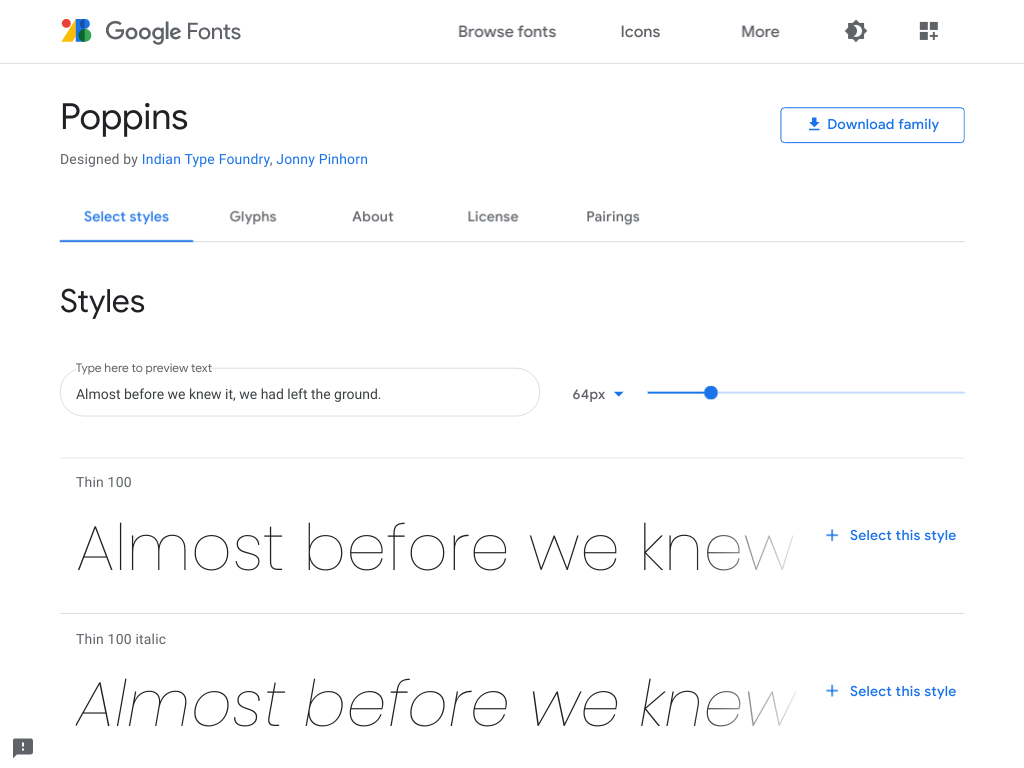
–jeroen

Posted in Font, Power User, Typography | Leave a Comment »

Legacy Windows: Why are console windows limited to Lucida Console and raster fonts? – The Old New Thing

Posted by jpluimers on 2022/08/15

I think this holds to or maybe even including Windows Vista: [Wayback] Why are console windows limited to Lucida Console and raster fonts? – The Old New Thing

The workaround is in KB247815.

Luckily, many old KB articles are still in the BetaArchive (see the blog post Source: Missing a KB article? Try the Microsoft KB Archive – BetaArchive Wiki last month), including [Wayback/Archive.is] Microsoft KB Archive/247815 – BetaArchive Wiki

Windows NT 4 / Windows 2000: Necessary criteria for fonts to be available in a command window

An unsupported work around is available by adding the following font specific entry:

Add a String Value
Name=00
Data=Font Name” (without “”)

Into the following registry:

HKLM\Software\Microsoft\WindowsNT\CurrentVersion\Console\TrueTypeFont

The name needs to be incrimented with “0” for each additional font. The Data entry needs to match the font’s entry in the following registry location:

HKLM\Software\Microsoft\WindowsNT\CurrentVersion\Fonts

Via: [Wayback/Archive.is] Hack does not show up in the font list for Windows command-prompt · Issue #147 · source-foundry/Hack

–jeroen

Posted in Font, Lucida Console, Power User, Programmers Font, Windows | Leave a Comment »

How isotopp became the online handle of Kristian Köhntopp

Posted by jpluimers on 2022/06/09

Like me, [Archive.is] Kristian Köhntopp is a nerd.

Unlike me, Kris bumped into character encoding issues for just about all his digital life. That started about the same time as mine, but again unlike me: he was way more involved in the technical aspects of it.

First a series of Tweets:

Read the rest of this entry »

Posted in ASCII, C++, Development, Encoding, EPS/PostScript, Font, ISO-8859, ISO8859, Power User, Software Development, Times New Roman | Leave a Comment »

JetBrains Mono: A free and open source typeface for developers | JetBrains: Developer Tools for Professionals and Teams

Posted by jpluimers on 2021/09/30

Font I want to try out: [Archive.is] JetBrains Mono: A free and open source typeface for developers | JetBrains: Developer Tools for Professionals and Teams.

It has a large X-height and is sans serif, just like the lovely [WayBack] Lucida Console font, which I have been using for almost 3 decades.

So I wonder if JetBrains Mono can convince me to switch away from Lucida Console: no other monospaced font has convinced me yet (:

Via: [Archive.is] Matt Ellis on Twitter: “JetBrains Mono. A really nice, open source, ligature friendly, developer typeface. I’ve been using this for a while now, it’s my default font. And a really cool landing page! “

Edit 202109301T1300

JetBrains is discussing on how to update the Chocolaty support, see the twitter posts below:

Referred repositories in that thread:

–jeroen

Read the rest of this entry »

Posted in Development, Font, JetBrains Mono, Lucida Console, Power User, Programmers Font, Software Development | Leave a Comment »

KIX-code: informatie en downloaden | PostNL

Posted by jpluimers on 2021/08/20

PostNL maakt bij de sortering van post gebruik van een streepjescode: de KIX (KlantIndeX). Deze code voegt u toe aan de adresgegevens. De KIX bevat de gegevens die wij nodig hebben om uw post met de modernste sorteermachines te verwerken. Door de KIX bij het adres af te drukken helpt u ons om de kwaliteit van de dienstverlening te verbeteren.

Note that in order to install the KIX font on macOS/OS X/Mac OS, you

  1. need [WayBack] StuffIt Expander – Wikipedia from the app store at [Archive.is] ‎StuffIt Expander 16 on the Mac App Store.
  2. uncompress KIX-font-barco-sit-PostNL_tcm10-12655.zip (see link below) into KIX-Barcode.sit StuffIt archive
  3. uncompress KIX-Barcode.sit to the KIX-Barcode Font Suitcase
  4. install KIX-Barcode using steps from [WayBack] How to install and remove fonts on your Mac – Apple Support
    1. Double-click the font in the Finder
    2. Click Install Font in the font preview window that opens.
    3. After your Mac validates the font and opens the Font Book app, the font is installed and available for use.

    More on FontBook at [WayBack] Welcome to Font Book on Mac – Apple Support.

Read the rest of this entry »

Posted in Font, KIX Font PostNL, LifeHacker, Power User | Leave a Comment »

Do you like/use the Slate font by OnePlus? Do you prefer it over Roboto? – Quora

Posted by jpluimers on 2020/11/02

No, I do not like the OnePlus Slate font, despite the lower x-height.

Background:

The fonts (images from Wikipedia):

Roboto – Wikipedia

Slate (typeface) – Wikipedia

–jeroen

Read the rest of this entry »

Posted in Android Devices, Font, LifeHacker, OnePlus Five, OnePlus Six, Power User | Leave a Comment »