Archive for the ‘Lucida Console’ Category
Posted by jpluimers on 2026/01/05
It took me a few queries to find the correct online solution for this problem: after adding a TrueType (and it’s extension: OpenType) font using the built-in MacOS Font Book, they do not show up in Pages or Preview, not even after validating the fonts in Font Book.
Solutions:
- reboot (found this out myself)
- killing the fontd font daemon from the Activity Monitor
- restart font daemon (found out via the link below)
launchctl kickstart -k gui/`id -u`/com.apple.xtyped
The last one does not work on my Apple Silicon machine, the first two work fine.
For Preview, you have to Force Quit it then start it (so it re-opens all the previous files) to take effect.
I needed this, because I
Read the rest of this entry »
Posted in Apple, Barcode, Development, Font, KIX, Lucida Console, Mac, Mac OS X / OS X / MacOS, macOS 13 Ventura, macOS 14 Sonoma, Power User, RM4SCC, Software Development | Leave a Comment »
Posted by jpluimers on 2020/08/31
Font comparisons:
Via: [WayBack] I forgot in which version of Windows, the command prompt defaulted to the Consolas font… – Jeroen Wiert Pluimers – Google+
Based on this, I found more font identification sites:
I tried both at  and
and  (used bySource: “techorama” – Google Search), but only WhatTheFont managed to get the glyphs and font similar fonts on both, and Matcherator got the glyphs wrong in both images, even after manually cropping.
Read the rest of this entry »
Posted in Font, Lucida Console, Power User, Programmers Font | Leave a Comment »
Posted by jpluimers on 2016/10/11
On my list of mono-spaced programmer fonts to try (and see how it compares to my beloved [Wayback] Lucida Console):
[Wayback] fantasque-sans – A font family with a great monospaced variant for programmers (yes I know it was called Comic Sans Neue Mono, but don’t extend your Comic Sans hatred there).
Source: [Wayback] Fantasque Sans Mono:
Fantasque Sans Mono: A programming font, designed with functionality in mind, and with some wibbly-wobbly handwriting-like fuzziness that makes it unassumingly cool. Development hosted on Github: [Wayback] https://github.com/belluzj/fantasque-sans OFL (SIL Open Font License). Category: Monospaced
Via: Ein Font für Ruby on Rails-Entwickler: Comic Sans Neue Mono – Kristian Köhntopp – Google+
Another font on that list is [Wayback/Archive.is] Hack where I have to do a bit work on fiddling with line spacing.
These are for my TODO:
–jeroen
Posted in Development, Fantasque Sans Mono, Font, Hack Font, Lucida Console, Power User, Programmers Font, Software Development | Leave a Comment »
Posted by jpluimers on 2016/07/25
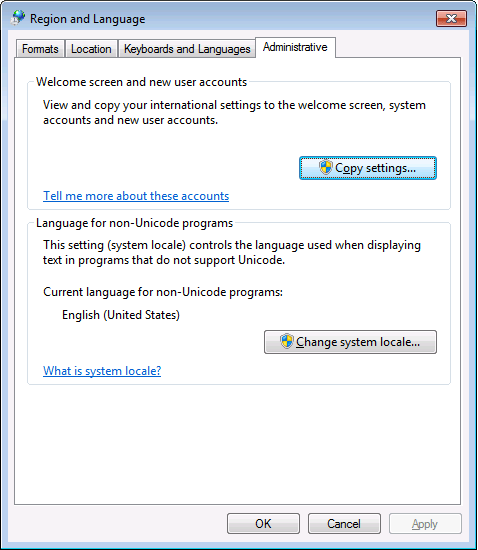
PowerShell 4.0 is madly in love with “English (United States)”
A long time ago I started writing up my blog post like this in March 2015 when I bumped into this the first time when upgrading from PowerShell 2 to PowerShell 4:
It seems there is no real workaround:
Good and not so good news: after reading the below linked posts, this is what works:
- PowerShell 4 and up works fine with any [Wayback] Lucida Console size (including 12) and boldness
- only when the “Language for non-Unicode programs” is set to “English (United States)”.
- PowerShell 4 works fine with [Wayback] Consolas on any size and boldness
- for any “Language for non-Unicode programs”
So if you’re like me and switch between “Dutch (Netherlands)” and “English (Ireland)” a lot (both use the EURO as currency, but have distinct enough other locale settings to cover a lot of European stuff) then you need to get used to the Consolas font.
Source:
Edit 20210930: a possible solution
I need to fire up some old systems having PowerShell v3 or v4 on them to test the below possible solution.
Read the rest of this entry »
Posted in CommandLine, Development, Font, Lucida Console, Power User, PowerShell, PowerShell, Scripting, Software Development, Windows, Windows 10, Windows 7, Windows 8, Windows 8.1, Windows 9 | Leave a Comment »
Posted by jpluimers on 2013/05/08

Lucida Console Sample (thanks Wikimedia!)
I’m in search to see if there is a better programmers font than the monospaced Lucida Console mainly to be used in Visual Studio, Delphi, the Windows console, Xcode and Eclipse. What I love about Lucida Console design is the relatively large x-height combined with a small leading (often called “line height”). This combines very readable text, and a lot of code lines in view. Lucida has two small drawbacks, see the second image at the right:
- The captial O and digit 0 (zero) are very similar.
- Some uppercase/lowercase character pairs are alike (because of the large x-height)
But, since the font hasn’t been updated for a very long time, lots of Unicode code points that are now in current fonts, are missing from Lucida Console (unless you buy the [Wayback] most recent version that has 666 characters from Fonts.com) Well, there are dozens of monospaced fonts around, so I wonder: which ones do you like? In the mean while, I’m going to do some experimenting with fonts mentioned in these lists:
A few fonts I’m considering (I only want scalable fonts, so raster .fon files are out):
I have tried Adobe Source Code Pro about half a year ago. That didn’t cut it: problem with italics in Delphi, and not enough lines per screen. [Wayback] New Open Source monospaced font from Adobe: Source Code Pro.
–jeroen
Posted in .NET, Adobe Source Code Pro, Apple, Delphi, Delphi 2007, Delphi XE3, Development, Encoding, Font, Lucida Console, Mac, Mac OS X / OS X / MacOS, Power User, Programmers Font, Software Development, Typography, Unicode, Visual Studio 11, Visual Studio 2005, Visual Studio 2008, Visual Studio 2010, Visual Studio and tools, Windows, Windows 7, Windows 8, Windows Server 2008 R2, Windows XP, xCode/Mac/iPad/iPhone/iOS/cocoa | 43 Comments »
Posted by jpluimers on 2012/09/30
Last week, Adobe launched the monospaced Open Source font [Wayback] Source Code Pro designed by [Wayback] Paul D. Hunt.
It is a follow-up of the (also designed by Paul) [Wayback] Source Sans Pro family of Open Source Fonts which got released early last month.
I did a quick look to see if it would get the same number of vertical lines as Lucida Console does at 8 points.
- Lucida Console: 50 lines
- Source Code Pro: 40 lines
Too bad, as the general font design is awesome.
One big missing thing is italic/oblique, which is often used in code editors. Hopefully a future version will include those.
For embedding source code examples in documentation, it is very legible, so I will keep it installed on my system.
You can try Source Code Pro yourself as well: it is available [Wayback] on SourceForge – that also hosts [Wayback] Open@Adobe – [Wayback] on GitHub, where you can fork it, as well as [Wayback] on Google Web Fonts, [Wayback] on typekit, and [Wayback] on WebINK.
–jeroen
via: [Wayback] Announcing Source Code Pro « Typblography.
Posted in Adobe Source Code Pro, Font, Lucida Console, Power User, Programmers Font, Typography | Tagged: adobe font, design, documentation, editors, font design, fonts, google, open source, software, sourceforge, technology, vertical lines, web fonts | 2 Comments »


 The Wiert Corner - irregular stream of stuff