The Wiert Corner – irregular stream of stuff

Jeroen W. Pluimers on .NET, C#, Delphi, databases, and personal interests

  • My badges

  • Twitter Updates

  • My Flickr Stream

  • Pages

  • All categories

  • Enter your email address to subscribe to this blog and receive notifications of new posts by email.

    Join 1,861 other subscribers

Archive for the ‘Google’ Category

Cool Google stuff: Trivia Template for the Google Assistant

Posted by jpluimers on 2017/07/11

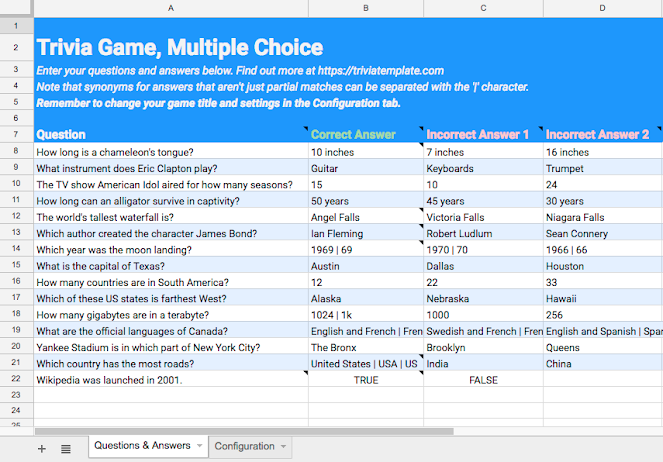
This is soo cool: [Archive.isTrivia Template to make Google Assistant trivia questionaires.

It reminds me of a project a few years back where we did a similar thing to create automated interviews.

The trivia template tool lets you build apps for the Google Assistant without writing a single line of code.

Source: [WayBackGoogle Assistant Trivia Template – Leon Nicholls – Medium

Via: [WayBack] Trivia Template: Nandini Stocker and I just launched a template tool to create trivia games for the Google Assistant. The template turns your questions and answers from a spreadsheet into a fully functioning game without writing any code… – Leon Nicholls – Google+
–jeroen

Posted in Development, Google, Google AI, Power User, Software Development | Leave a Comment »

Droste effect… best torrent sites – Google Search

Posted by jpluimers on 2017/07/11

Likely the Droste effect won’t last long: best torrent sites – Google Search and https://www.google.com/#q=best%20torrent%20sites both give this list at the top and a recursive link about stories with the search links at the bottom.

via many, including:

–jeroen

Read the rest of this entry »

Posted in Fun, Google, GoogleSearch, Power User | Leave a Comment »

If only there was a plugin to convert a Google Suite Document into Markdown S…

Posted by jpluimers on 2017/06/29

via If only there was a plugin to convert a Google Suite Document into Markdown Syntax… – Kristian Köhntopp – Google+ [WayBack]

GitHub – mangini/gdocs2md: Convert a Google Drive Document to the Markdown format, suitable for publishing. [WayBack]

In the gapps language: Apps Script  |  Google Developers

Maybe one day – when I use Google Docs more often – I make a reStructuredText version

–jeroen

Posted in Development, gapps Google Apps Script, Google, Google Apps, Lightweight markup language, MarkDown, Power User, reStructuredText, Scripting, Software Development | Leave a Comment »

Google Drive stuck forever on “One Moment Please” during initial login on Windows Server based systems.

Posted by jpluimers on 2017/05/29

Basically the Google Drive sign-in user interface is a wrapper around Internet Explorer.

If you have tight Internet Option settings, then your sign-in can fail without telling you why:

There is a older list of exceptions to add to the Internet Options Application Development: sign in to google drive … stuck in one moment please, but since Google has moved quite a few domains around (they now for instance use 1e100.net for part of the traffic).

The easiest way is to get the URLs right is to play back what Google Drive sign-in does from within Internet Explorer. These are the steps:

Read the rest of this entry »

Posted in Google, GoogleDrive, Power User | Leave a Comment »

Google DNS, Open DNS or your ISP DNS servers?

Posted by jpluimers on 2017/05/26

There are various arguments for using Google DNS (8.8.8.8 or 8.8.4.4) or Open DNS servers or not. A few are listed here:

It basically comes down to two things:

  1. DNS speed
  2. CDN speed (Contend Delivery Network providers like CloudFlare, Akamai, etc)

If your DNS server isn’t close to you, it might select a CDN server that is far from you. If you rely on CDN, then you need to weight in that factor.

This is how I decide:

  • devices not needing CDN: use Google DNS or Open DNS
  • devices needing CDN: use Namebench to pick fast DNS servers that are nearby based on Namebench reports with “Recommended configuration (fastest + nearest)”

–jeroen

Posted in Akamai, CDN (Content Delivery Network), Cloud, Cloudflare, DNS, Google, Infrastructure, Internet, Power User | Leave a Comment »

Tested the CastBuddy extension from the Chrome Web Store: nice, but high CPU usage even when no videos

Posted by jpluimers on 2017/04/21

CastBuddy – Chrome Web Store:

This extension finds videos on the web sites you are browsing and allows you to play them on your Chromecast device.

Works nice if you need it, but uses a lot of CPU (on my Retina MacBook with latest chrome: about 75% of one CPU core) so it drains battery fast.

You can view this high CPU usage in the Chrome Task Manager (which used to be available through chrome://tasks, but this is one of the use full Find Hidden Features On Chrome’s Internal Chrome:// Pages features they removed). Fire up the Chrome Task Manager through the Window menu.

Verdict

Enable only when you need it. Disable after use in chrome://extensions

–jeroen

via: CastBuddy – Chrome Web Store:

When it finds Chromecast comptible videos ( .webm, .mp4, .mkv etc), count of videos is shown over extension’s menubar icon, which you can click to Select a video and extension will send it to your Chromecast device. Once a casting session is established, you can control video playback from Extension’s popup page.

Posted in Chrome, Google, Power User | 2 Comments »

Forcing Chrome to use google.com as search engine

Posted by jpluimers on 2017/04/14

I tried the obvious things to force Chrome on my Mac and Windows to use google.com as search engine when searching through the address/search box (omnibox). On Windows, this works fine, but Chrome on Mac (both are linked through my gmail account) keeps insisting to use google.nl no matter what, as all these fail:

There are tons of reports on the google.com/ncr not working (you see the https://google.nl domain, in that search right?).

For me, google.com/ncr redirects to https://www.google.com/?gws_rd=ssl, so it does redirect, but somehow doesn’t mark it to use as default.

In Chrome, my search settings in chrome://settings/searchEngines are these:

Google (Default) search settings

Google (Default) search settings

I’ve never changed it, so it still points to {google:baseURL}search?q=%s&{google:RLZ}{google:originalQueryForSuggestion}{google:assistedQueryStats}{google:searchFieldtrialParameter}{google:searchClient}{google:sourceId}{google:instantExtendedEnabledParameter}{google:contextualSearchVersion}ie={inputEncoding}

So basically, Chrome screws up the {google:baseURL} portion and there is no way to force {google:baseURL} to a certain value as the 2008 bug 1521 was marked “wontfix” in 2010 and nobody at Google seems to care (except a Google employee wanting expense paid trips abroad).

The totally odd thing is that when I start on https://google.com then search for say “Mac OS X start second atom instance”, I get to https://www.google.com/#q=Mac+OS+X+start+second+atom+instance

Poor mans solution

So I’ve defined two new search engine settings:

When Google.com lets you down, force it to use Google.com

When Google.com lets you down, force it to use Google.com

In case you want to copy the text:

Read the rest of this entry »

Posted in Chrome, Google, Power User | 2 Comments »

Mac OS X: restarting Google Drive when it shows a spinning wheel

Posted by jpluimers on 2017/03/29

Every now and then, Google Drive on Mac OS X gets confused and starts showing the spinning wheel when hovering over the menu bar icon similar to for instance DropBox does every once in a while.

This is how to terminate and restart Google Drive from the terminal (no need for su):

killall -v -SIGKILL Google\ Drive
open -a Google\ Drive

Alternatively you can start Google Drive using this:

/Applications/Google\ Drive.app/Contents/MacOS/Google\ Drive &

I found this executable through osx – Find all executable files within a folder in terminal – Ask Different

Note that this won’t kill Google Drive as it sends the TERM signal (SIGTERM):

killall -v Google\ Drive

–jeroen

Posted in Apple, bash, Development, Google, GoogleDrive, iMac, Mac, Mac OS X / OS X / MacOS, MacBook, MacBook Retina, MacBook-Air, MacBook-Pro, MacMini, OS X 10.10 Yosemite, OS X 10.11 El Capitan, OS X 10.8 Mountain Lion, OS X 10.9 Mavericks, Power User, Scripting, Software Development | 1 Comment »

Decode URLs from The Great Suspender after a browser restart fails to reload them

Posted by jpluimers on 2017/03/16

Hosted at: Decode URLs from The Great Suspender after a browser restart fails to reload them

Converts URLs like these:
chrome-extension://klbibkeccnjlkjkiokjodocebajanakg/suspended.html#url=http%3A%2F%2Fwww.barryodonovan.com%2F2012%2F06%2F29%2Fmigrating-svn-with-branches-and-tags-to-git
back into
http://www.barryodonovan.com/2012/06/29/migrating-svn-with-branches-and-tags-to-git

Source below.

It decodes a URL encoded by The Great Suspender which is a cool Google Chrome plugin that suspends pages after some idle time.

The uncool thing is that when Google Crome restarts after a crash (it’s software, it does that, especially as it consumes truckloads of memory and is full of memory leaks) it often fails to restore some (but not many) of the suspended pages into a usable state: it shows only the encoded URLs.

–jeroen


<!DOCTYPE html>
<!–
Resurrect
Based on 20160531-Google-Plus–403.-That’s-an-error.–Your-client-does-not-have-permission-to-get-URL–sorry–IndexRedirect–workaround.html
at https://gist.github.com/jpluimers/4f07a2f3f9b9890a3a44e184c1abadf2
Converts URLs like these:
chrome-extension://klbibkeccnjlkjkiokjodocebajanakg/suspended.html#url=http%3A%2F%2Fwww.barryodonovan.com%2F2012%2F06%2F29%2Fmigrating-svn-with-branches-and-tags-to-git
back into
url=http://www.barryodonovan.com/2012/06/29/migrating-svn-with-branches-and-tags-to-git
The Great Suspender Google Extension:
https://chrome.google.com/webstore/detail/the-great-suspender/klbibkeccnjlkjkiokjodocebajanakg
Test at http://jsbin.com/yukidaferu/1/edit?html,console,output
–>
<html>
<title>Decode URLs from The Great Suspender after a browser restart fails to reload them</title>
<body>
<h1>Decode URLs from The Great Suspender after a browser restart fails to reload them</h1>
<p>Please URL encoded by <a href="https://github.com/deanoemcke/thegreatsuspender&quot; target="_blank">The Great Suspender</a>:</p>
<input id="suspenderUrl" size="200">
<button type="button" onclick="decodeSuspenderUrlMethod()">Submit</button>
<div id="decodedUrlsCaptionDiv">
<p id="decodedUrlsCaption">Here you will see the decoded URLs so you can follow them:</p>
</div>
<ul id="decodedUrlsUl">
</ul>
<script>
// based on http://www.w3schools.com/js/tryit.asp?filename=tryjs_intro_validate
function decodeSuspenderUrlMethod() {
var decodedUrl = "";
var errorText = "";
// Get the value of the input field with id="numb"
var suspenderUrl = document.getElementById("suspenderUrl").value;
var stripPrefix = "chrome-extension://klbibkeccnjlkjkiokjodocebajanakg/suspended.html#url=";
var prefix = stripPrefix + "http";
// Am I a SO developer now? At least I'm quickly learning some JavaScript basics…
// http://stackoverflow.com/questions/1767246/check-if-string-begins-with-something/9430330#9430330
// https://developer.mozilla.org/en/docs/Web/JavaScript/Reference/Global_Objects/String/substring
if (suspenderUrl.indexOf(prefix) == 0) {
// now strip the bits we don't need, then decode what is left.
// I always wondered why they call it substring instead of subString
var googlePlusEncodedUrl = suspenderUrl.substring(stripPrefix.length);
// decoding got a new new a while ago: http://stackoverflow.com/questions/4292914/javascript-url-decode-function/4292961#4292961
decodedUrl = decodeURIComponent(googlePlusEncodedUrl);
} else {
errorText = "URL is missing this prefix: <<" + prefix + ">>";
};
// for now, just add the output; in the future, only add unique output.
// Based on http://stackoverflow.com/questions/5519747/how-to-add-anchor-tags-dynamically-to-a-div-in-javascript/5519795#5519795
var decodedUrlsUl = document.getElementById("decodedUrlsUl");
var decodedUrlLi = document.createElement('li');
if (errorText == ""){
var aTag = document.createElement('a');
aTag.setAttribute('href', decodedUrl);
aTag.innerHTML = decodedUrl;
decodedUrlLi.appendChild(aTag);
} else {
var aDiv = document.createElement('div');
aDiv.innerHTML = errorText + " " + suspenderUrl;
decodedUrlLi.appendChild(aDiv);
}
decodedUrlsUl.appendChild(decodedUrlLi);
}
</script>
</body>
</html>

Posted in Chrome, Development, Google, HTML, HTML5, JavaScript/ECMAScript, Power User, Scripting, Software Development, Web Development | Leave a Comment »

Nexus 5 battery replacement

Posted by jpluimers on 2017/03/03

Because the battery was getting very bad:

Note the battery adhesive was so strong that one of my plastic opening tools broke.

–jeroen

Read the rest of this entry »

Posted in Google, Power User | Leave a Comment »