The Wiert Corner – irregular stream of stuff

Jeroen W. Pluimers on .NET, C#, Delphi, databases, and personal interests

  • My badges

  • Twitter Updates

  • My Flickr Stream

  • Pages

  • All categories

  • Enter your email address to subscribe to this blog and receive notifications of new posts by email.

    Join 1,860 other subscribers

Archive for the ‘Hardware’ Category

How to remember password in FortiClient VPN? – Stack Overflow

Posted by jpluimers on 2021/04/12

In [WayBack] How to remember password in FortiClient VPN? – Stack Overflow, the consensus seems to be “it varies, and usually is unreliable”.

Time to write a tool that snifs the Windows GUI and auto-enters the credentials.

That would be much like the Linux expect solution: [WayBack] Continuous run Forticlient VPN using expect. Automatically restart VPN if get disconnected or session closed. · GitHub

Via: [WayBack] Forticlient 5.6 – Save Credentials | Fortinet Technical Discussion Forums

–jeroen

Posted in FortiGate/FortiClient, Network-and-equipment, Power User, VPN | Leave a Comment »

Need to do some reading on local domains on the internal network

Posted by jpluimers on 2021/04/09

A long time I wondered why I saw ESXi systems on my local network have two entries in their /etc/hosts file:

[root@ESXi-X10SRH-CF:~] cat /etc/hosts
# Do not remove the following line, or various programs
# that require network functionality will fail.
127.0.0.1   localhost.localdomain localhost
::1     localhost.localdomain localhost
192.168.71.91   ESXi-X10SRH-CF ESXi-X10SRH-CF

Then I bumped into someone who had a different setup:

[root@ESXi-X10SRH-CF:~] cat /etc/hosts
# Do not remove the following line, or various programs
# that require network functionality will fail.
127.0.0.1   localhost.localdomain localhost
::1     localhost.localdomain localhost
192.168.0.23    esxi.dynamic.ziggo.nl esxi

So now I knew that the first entry can have a domain resolving it (it still makes be wonder why ziggo is using a top-level domain to resolve local stuff; but searching for  dynamic.ziggo.nl did not get me further on that).

So I installed a quick ESXi machine on that local network, and got the same.

When back home the machine still thought it was esxi.dynamic.ziggo.nl, though clearly I was outside a Ziggo network

I wanted to get rid of it, but that was hard.

Since I forgot to take screenshots beforehand, I can only provide the ones without a search domain bellow.

Reminder to self: visit someone within the Ziggo network, then retry.

Normally you can edit things like these in the default TCP/IP stack. There are two places to change this:

Neither of these allowed me to change it to a situation like this, but luckily the console did.

In the below files, I had to remove the bold parts, then restart the management network (I did keep a text dump, lucky me):

[root@esxi:/etc] grep -inr ziggo .
./vmware/esx.conf:116:/adv/Misc/HostName = "esxi.dynamic.ziggo.nl"
./resolv.conf:2:search dynamic.ziggo.nl 
./hosts:5:192.168.71.194    esxi.dynamic.ziggo.nl esxi
[root@esxi:/etc] cat /etc/resolv.conf 
nameserver 192.168.71.3
search dynamic.ziggo.nl 
[root@esxi:/etc] cat /etc/hosts
# Do not remove the following line, or various programs
# that require network functionality will fail.
127.0.0.1   localhost.localdomain localhost
::1     localhost.localdomain localhost
192.168.71.194  esxi.dynamic.ziggo.nl esxi

Future steps

  1. Read more on local domains, search domains and related topics
  2. Configure a local domain on my local network, so DHCP hands it out, and DHCP handed out host names are put in the local DNS
  3. Test if all services on all machines still work properly

Reading list

Read the rest of this entry »

Posted in DNS, ESXi6.5, ESXi6.7, Hardware, Internet, Mainboards, Network-and-equipment, Power User, SuperMicro, Virtualization, VMware, VMware ESXi, X10SRH-CF, X9SRi-3F | Leave a Comment »

Supermicro Single CPU Board for ESXi Home lab – Upgrading LSI 3008 HBA on the X10SRH-CLN4F | ESX Virtualization

Posted by jpluimers on 2021/04/09

This LSI 3008 HBA update to TI firmware is still on my wish list, but I could not find it when I bought the board in 2018.

[WayBack] Supermicro Single CPU Board for ESXi Home lab – Upgrading LSI 3008 HBA on the X10SRH-CLN4F | ESX Virtualization:

As you know my lab got an addition this year with Supermicro’s Single CPU board, the X10SRH-CLN4F. In this post we will be upgrading LSI 3008 HBA on the X10SRH-CLN4F.

I have learned a new way to patch via UEFI. In fact, it’s same (or easier) than through DOS-based bootable USB. The IT firmware can be reverted back to IR firmware as in the ZIP package there are both versions there. So in case you need a server with hardware RAID, you can use the IR version. I was actually wondering what it means the IT and IR and here is what I have found at LSI (Avago) website:

“IT” firmware maximizes the connectivity and performance aspects of the HBA. “IR” firmware offers RAID functionality via RAID 0, 1, and 10 capabilities.

Via:

SR-IOV?

The step afterwards is to enable SR-IOV for this LSI 3008 HBA.

These links should help with that:


–jeroen

Posted in ESXi6.5, ESXi6.7, Hardware, Mainboards, Power User, SuperMicro, Virtualization, VMware, VMware ESXi, X10SRH-CF | Leave a Comment »

CP1500EPFCLCD – Backup UPS Systems | CyberPower

Posted by jpluimers on 2021/04/05

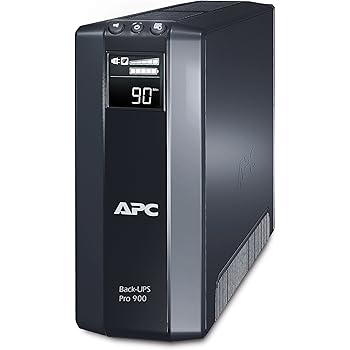
Reminder to self to write a bit more on the usage of a UPS my brother has got for a while now: CyberPower CP1500EPFCLCD which is Line-Interactive with Pure Sine Wave output.

Before buying the ESXi support seemed incredible.

Some links to start with:


Read the rest of this entry »

Posted in CP1500EPFCLCD, CyberPower, Hardware, Power User, UPS | 2 Comments »

The tale of [SSH into ESXi 6.7 box resulting in “debug1: expecting SSH2_MSG_KEXDH_REPLY”, delay and after entering password “Permission denied, please try again.”]

Posted by jpluimers on 2021/04/02

A similar ESXi 6.5 box worked well to ssh into, but on ESXi 6.7 it failed:

SSH into ESXi 6.7 box resulting in “debug1: expecting SSH2_MSG_KEXDH_REPLY“, delay and after entering password “Permission denied, please try again.

I had a hard time figuring out why: Login with the same user+password on the web user interface, DCUI and console shell work fine (see [WayBack] Enable SSH on VMware ESXi 6.x – VirtuBytes).

Searches that led me to EBCAK:

Read the rest of this entry »

Posted in ESXi6.5, ESXi6.7, Hardware, IPMI, Mainboards, Power User, PowerCLI, SuperMicro, Virtualization, VMware, VMware ESXi | Leave a Comment »

Build your own Infrared reader head for electriciti smart meters for around USD 6: haus-automatisierung.com [4K] – YouTube

Posted by jpluimers on 2021/03/24

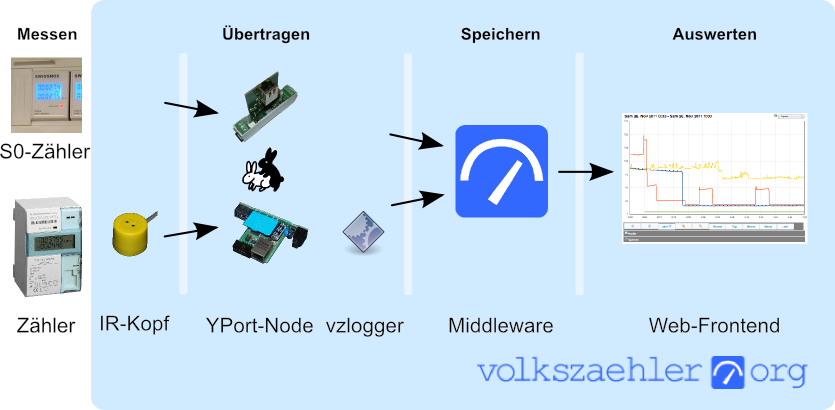
In German, but very interesting IR-Lesekopf für SmartMeter selber bauen | haus-automatisierung.com [4K] – YouTube:

I could not find the promised follow-up video at haus-automatisierung.com – YouTube, but the manual steps and the site below have enough information for me.

Too bad the site is way to big to fully archive in the WayBack machine. I only saved the top pages:

Related: [WayBack] MQTT-Grundlagen-Kurs – haus-automatisierung.com

–jeroen

Read the rest of this entry »

Posted in Development, Hardware Development, Hardware Interfacing, IoT Internet of Things, Raspberry Pi, Software Development | Leave a Comment »

Running SuperMicro IPMIView on MacOS

Posted by jpluimers on 2021/03/16

I wrote about SuperMicro mainboards and IPMIView recently, but that ran only on Windows and Linux. Since I focus my desktop mainly on MacOS, and never on Linux, I did not want to use the Windows IPMView (though it did work most of the time).

Not having a MacOS version sounded odd, as there was an iOS version:

[WayBack] ‎Supermicro IPMIView on the App Store “This app is only available on the App Store for iOS devices.”

A quick search made me find a few links:

The last one looked most promising, so I forked it.

Following the steps already made me write down a few notes for changes in the README.md file.

But then I bumped into a strange error when wanting to use the KVM Console from IPMIView, as it threw the same error all the time:

".jre/Contents/Home/bin/java": error=2, No such file or directory

I made a quick note in [WayBack] KVM Console cannot start due to java not found · Issue #1 · jpluimers/IPMIView.app · GitHub:

When starting a KVM Console, you get this error: ".jre/Contents/Home/bin/java": error=2, No such file or directory

Try to fix this.

Later I dug a bit deeper, and managed to fix it in the script steps of the README.md:

git clone https://github.com/TheCase/IPMIView.app
pushd IPMIView.app/
mkdir -p Resources/IPMIView
pushd Resources/IPMIView/
tar -zxvf ~/Downloads/IPMIView*.tar.gz --strip=1
pushd jre/
mkdir -p Contents/Home/bin
pushd Contents/Home/bin
ln -s `which java` java
popd
popd
popd
popd
rsync -avlo IPMIView.app/ ~/Applications/IPMIView.app/

Of course I ran into another problem on one of my SuperMicro machines: the KVM Console would consistently crash. Luckily that was solved by a IPMI Firmware Upgrade:

[WayBack] java – Supermicro IPMIView KVM Console does not work at all – Server Fault

The problem was the firmware for the IPMI on these boards was too old (not the same as the BIOS – updating the BIOS will not help in this case). Digging around SuperMicro’s site (never did get a reply from them), I found the Firmware Revision of 3.20 & was able to install it. On the IPMI device tab, under “Device Information”, you should see: Firmware Revision 3.20 IPMI Revision: 2.0 I can now see the KVM Console in both the IPMIView software

–jeroen

Posted in Hardware, IPMI, Mainboards, Power User, SuperMicro, X10SRH-CF, X9SRi-3F | Leave a Comment »

Supermicro | Products | Motherboards | Xeon® Boards | X9SRi-3F

Posted by jpluimers on 2021/03/12

I still like this board: Supermicro | Products | Motherboards | Xeon® Boards | X9SRi-3F.

It has been in a storage solution for a while, uses OK power, has not many SATA ports, but enough slots for expansion cards, and comes with two network connections and 8 slots which I fitted with a total of 256 gibibyte of memory.

Some links, as SuperMicro tends to hide them behind POST requests:

Note that IPMI over je Java Web Start.app runs into certificate signing issues, so better use Supermicro IPMIViewer for this:

IPMIView links via:

The errors when running the KVM Console from your web browser are waved away by SuperMicro, but more and more people bump into them:

–jeroen

Posted in Development, Hardware, Mainboards, Power User, Software Development, SuperMicro, Virtualization, VMware, VMware ESXi, X9SRi-3F | Leave a Comment »

I still print (relevant parts of) code. Have been for a long time. Will keep doing it.

Posted by jpluimers on 2021/02/24

In a response to [WayBack] Iris Classon on Twitter: “I’m curious, how many of you guys and gals have printed out code on paper to read later? Doing it during earlier years also counts 🤓”, I started the long read below starting with [WayBack] Jeroen Pluimers on Twitter: “Still do.… “.

Basically a more in depth coverage of my 2017 post Happy 60th birthday, Fortran.

[WayBack] Thread by @jpluimers: “@IrisClasson Still do. @IrisClasson There is a story behind these 1988 tractor feed print outs, which follows shortly. I should put dinosaur […]”

Still do.

There is a story behind these 1988 tractor feed print outs, which follows shortly.

I should put dinosaur or old-fart on my job description.

CC @isotopp

The story has to do with this.
A “translation” of [WayBack] Programming Fortran 77: A Structured Approach (ISBN-10: 0835956717) but I wish I had had the original back then, as in fact it was a knock off, mostly covering FORTRAN IV and 66.

Sidestory: these books were from the same era.

Machine learning and AI modern?

They are about as modern as AWK. Both still relevant though.

AWK is indispensable on many *n*x related systems, especially the low powered one. The book is still the ultimate source on it; see [WayBack] stackoverflow.com/a/703174/29290

text processing – Is there still any reason to learn AWK? – Stack Overflow

If you quickly learn the basics of awk, you can indeed do amazing things on the command line.

But the real reason to learn awk is to have an excuse to read the superb book The AWK Programming Language by its authors Aho, Kernighan, and Weinberger. You would think, from the name, that it simply teaches you awk. Actually, that is just the beginning. Launching into the vast array of problems that can be tackled once one is using a concise scripting language that makes string manipulation easy — and awk was one of the first — it proceeds to teach the reader how to implement a database, a parser, an interpreter, and (if memory serves me) a compiler for a small project-specific computer language! If only they had also programmed an example operating system using awk, the book would have been a fairly complete survey introduction to computer science!

Famously clear and concise, like the original C Language book, it also is a wonderful example of friendly technical writing done right. Even the index is a piece of craftsmanship.

Awk? If you know it, you’ll use it at the command-line occasionally, but for anything larger you’ll feel trapped, unable to access the wider features of your system and the Internet that something like Python provides access to. But the book? You’ll always be glad you read it!

Back to the story. With some side-steps to (:

Here we go…

This is end 1980s. I was a student. A year later I started my own consultancy as a side-thing.

The reason is that I had a client prospect for some PC Turbo Pascal programming. So I needed to buy some hardware. Only companies could buy hardware. So I started one.

en.wikipedia.org/wiki/Turbo_Pascal

2 years later, I was selling PC network hardware to a university research group, so they could connect to the internet. At 75% of what they would pay via their regular channels. My profit was large enough to cover for that year of studying.

Back to the print-outs.

They were on tractor-feed paper en.wikipedia.org/wiki/Continuous_stationery
We had a class: computer usage for chemistry students. It was mandatory. They were teaching from a FORTRAN 77 book that was in fact more FORTRAN IV and FORTRAN 66. Found a link to it too: [WayBack] Cursus Fortran 77, R.C. Holt, J.N.P. Hume

The way you would program in that class was via PC terminals with serial terminal emulation, connected to a VAX 11/780 machine running VAX/VMS 4.7.

The connection was through a multiplexed serial over an unshielded ribbon cable some 300 yards long.
The connection was very reliable: about 90% of the characters would transmit correctly.

So I had to reset the VT52 terminal emulation over the Kermit protocol every minute or so, then wait a dozen seconds for the screen to re-draw.

At the chemistry department it was still a VAX 11/780 machine called HLERUL5, but at the computing department they had an 11/750 called RULCRI which was faster.

They also had a bunch of VT100 terminals that could do 132-columns instead of 80, with a far more reliable connection.

en.wikipedia.org/wiki/VT100

Later the chemistry department also got their own VAX 11/750, renamed the old one to HLERUL52 for the 2nd years studens to to work on, and kept the old HLERUL5 name.

The machines were networked too, so you could connect to one, then daisy-chain your logon to the others.

Long story short: later I managed to get official accounts on both chemistry department machines, and borrow an account on the computing department one. So I had accounts on HLERUL5, HLERUL52 and access to RULCRI when needed.
Later too, I found out that the room above the VAX 11/780 also had VT100 terminals (later even two VT240 terminals!). It wasn’t meant for student use though. But with some social engineering…

In the mean time, I wanted to make better use of the VAX/VMS FORTRAN compiler.

Apart from that it fully supported FORTRAN 77, it also had many more language features and had support for 132 columns instead of just 80.

Given FORTRAN had limited use of the leftmost 8 columns, having 124 usable columns instead of just 72 made a huge difference in readability.
There was no book in the library on VAX/VMS FORTRAN, but the on-line help was great: both vast and in-depth. With the bad serial documentation though, it was very hard to read on-line.

The easiest way to read things was on paper. I think the printer back then was a LA36 DecWriter II or LA120 DecWriter III

www.youtube.com/embed/T3TifjAX51I
www.youtube.com/embed/tJ1jkINFVho

www.youtube.com/embed/T3TifjAX51I

Printing one topic at a time however was cumbersome. Print jobs were not always printed in the right order, and sending like a 100 print commands that all were slightly different was hard too.
Luckily I found out two things:
  1. you could dump the output of a FORTRAN HELP page to a file
  2. you could recursively generate all FORTRAN HELP, then redirect that to a file
The recursion was great, as it would output everything in an orderly fashion. What was lacking though is a good table of contents. More on that in a bit.
So I decided to send that file to the printer. Of course I knew that would take something like an hour, so I printed it during lunch time.
I was back from lunch early to monitor the printing progress (VAX/VMS had queues for everything, and you could monitor the ones or the parts of ones you had access to!).

The printer was right next to the VAX 11/780 and both of them were very noisy. The climate control was even noisier, which meant you wanted to avoid that room whenever possible.

So shortly after my job was ready, I wanted to pick it up and make the 300 meter walk twice.

Right at that moment, the student assistent walked in with a red face, madly screaming “who the hell printed this one inch stack of FORTRAN help”.
I responded that I did. At first she (this was a time when we had a way better balanced female/male ratio in STEM) would not even want to give my output, refusing to believe I would read it.
She also would not believe that you cour recursively send the help to a file, then print it. But the stack of paper demonstrated otherwise.
I explained that I was going to read the whole stack. It took a long weekend, as after reading, I manually made the hand written table of contents on the front.
In addition, I colour marked the sides of the paper matching the entries in the table of contents.

Now I could index into the right topics very quickly.

She was amazed I did all that in just a weekend. Apparently, that’s how my brain copes with information: need something, read something, read something, use something.

Later she actually made use of that stack of paper, as it was a great way for other people too to figure out some things faster than doing it on-line.
Back to my side-business: that’s the reason for the PASCAL stack of paper. It’s the output of the VAX/VMS help for the PASCAL compiler. It was great and helped me learn a lot on the language.

That print job took far less time: it was printed from RULCRI to the printer at the computing department. Their printer was not a dot-matrix one, line printer. It was orders of magnitude faster.

3 years later, I started doing more and more work with Turbo Pacscal and made the business my full time work.

Only a decade later, I found out why I had deverted less and less energy into my studies and more into work.

Two reasons: computers are way easier to cope with than people, and a theoretical university was totally the wrong kind of environment for my learning mode: I am an auto-didactic person. I need to do things in order to learn.
By now I have slowly learned way and way more about people. Coping with them is still tough, taking a lot of energy. But by now it is also a lot of fun. Though doing both at the same time is still very very hard for me.

Finally back to the STRUCT print job:

That was actually the FORTRAN program I developed for the assignment.

You could choose from multiple problems to solve during the assignment.

As one of the few students, I managed to finish it in-time.

I was the only one that took this particular problem.

The essence is that you got a few tables with data:

  • atom numbers, atom abbreviation and atom covalence (the number of other atoms they can bond with)
  • bond pairs with abbreviations and minimum/maximum distance
  • atom locations (abbreviation plus X/Y/Z coordinate)
The goal was to find which atoms were connected, and describe any cycles.

Only after reading the tables, then trying to solve the problem, I found out a recursive solution was needed to solve it.

Boy was I surprised that FORTRAN did not support recursion.

In the end, I implemented my own recursion with stacks citing a Dire Straits song with “and when you finally reappear, at the place where you came in…”.

A long story to explain I started printing on things to read very early on (:

/end

–jeroen

Read the rest of this entry »

Posted in Algorithms, Development, Fortran, Power User, Printers, Software Development | Leave a Comment »

Automatically closing ABBY Finereader 5.0 windows after scanning is completed

Posted by jpluimers on 2021/02/23

Both my Fujitsu ScanSnap ix500 and ix100 scanners can be used from Windows to automatically scan to PDF.

PDF conversion is done through the included ABBYY FineReader 5.0 software.

However, on each scan, it keeps a dialog open with the scan results, even if scanning went fine.

When scanning lots of documents, lots of dialogs are open, causing two problems:

  • a lot of memory and window handle resource usage
    • this can be ~100 megabytes per instance
  • a lot of disk usage:
    • it keeps both the non-OCR and OCR PDF files active (only when closing, the non-OCR PDF file is deleted)

I wanted to close that dialog automatically, but none of the configuration settings allow it.

So I wrote a quick and dirty solution, that could have been in any tool supporting the Windows API and call backs. The solution below should easily translate to tools other than Delphi.

These are the only Windows API functions used:

these types:

and these constants:

The basic structure is an EumWindows call passing a callback that gets called for all top level Windows, then in the callback, for matching captions: call EnumChildWindows with another callback. In that callback, for matching captions and child captions, perform a click or close.

Related posts:

Log of Windows related to both programs:

ParentHWnd=$00000000;HWnd=$00030602;IsVisible=-1;IsOwned=0;IsAppWindow=-1;WindowTextLength=33;WindowText="ABBYY FineReader for ScanSnap 5.0"
> Recursive child windows for ABBYY
  ParentHWnd=$00030602;HWnd=$000205E2;IsVisible=-1;IsOwned=0;IsAppWindow=0;WindowTextLength=0;WindowText=""
  ParentHWnd=$00030602;HWnd=$000205E0;IsVisible=-1;IsOwned=0;IsAppWindow=0;WindowTextLength=0;WindowText=""
  ParentHWnd=$00030602;HWnd=$000205EC;IsVisible=-1;IsOwned=0;IsAppWindow=0;WindowTextLength=0;WindowText=""
  ParentHWnd=$00030602;HWnd=$000205EA;IsVisible=-1;IsOwned=0;IsAppWindow=0;WindowTextLength=74;WindowText="Register your copy of ABBYY FineReader and receive the following benefits:"
  ParentHWnd=$00030602;HWnd=$000205E8;IsVisible=-1;IsOwned=0;IsAppWindow=0;WindowTextLength=25;WindowText="- Free technical support;"
  ParentHWnd=$00030602;HWnd=$000205E6;IsVisible=-1;IsOwned=0;IsAppWindow=0;WindowTextLength=51;WindowText="- Information about new versions of ABBYY products."
  ParentHWnd=$00030602;HWnd=$000205E4;IsVisible=-1;IsOwned=0;IsAppWindow=0;WindowTextLength=12;WindowText="Registration"
  ParentHWnd=$00030602;HWnd=$000205FC;IsVisible=-1;IsOwned=0;IsAppWindow=0;WindowTextLength=0;WindowText=""
  ParentHWnd=$00030602;HWnd=$000205FA;IsVisible=-1;IsOwned=0;IsAppWindow=0;WindowTextLength=6;WindowText="&Close"
  > Child is Close button: clicking.
  < ParentHWnd=$00000000;HWnd=$00030602;IsVisible=-1;IsOwned=0;IsAppWindow=-1;WindowTextLength=33;WindowText="ABBYY FineReader for ScanSnap 5.0"
  ParentHWnd=$00030602;HWnd=$000205F6;IsVisible=-1;IsOwned=0;IsAppWindow=0;WindowTextLength=34;WindowText="Processing finished (warnings: 1)."
  ParentHWnd=$00030602;HWnd=$000205F4;IsVisible=-1;IsOwned=0;IsAppWindow=0;WindowTextLength=31;WindowText="Converting to searchable PDF..."
  ParentHWnd=$00030602;HWnd=$000205F0;IsVisible=-1;IsOwned=0;IsAppWindow=0;WindowTextLength=0;WindowText=""
  ParentHWnd=$00030602;HWnd=$000205EE;IsVisible=-1;IsOwned=0;IsAppWindow=0;WindowTextLength=0;WindowText=""
  ParentHWnd=$00030602;HWnd=$000205D2;IsVisible=-1;IsOwned=0;IsAppWindow=0;WindowTextLength=63;WindowText="Page 1. Make sure the correct recognition language is selected."

ParentHWnd=$00000000;HWnd=$00010248;IsVisible=-1;IsOwned=-1;IsAppWindow=0;WindowTextLength=14;WindowText="Creative Cloud"
> Recursive child windows for Creative Cloud
  ParentHWnd=$00010248;HWnd=$0001024A;IsVisible=-1;IsOwned=0;IsAppWindow=0;WindowTextLength=28;WindowText="Main Container Client Dialog"
  ParentHWnd=$00010248;HWnd=$0002034A;IsVisible=-1;IsOwned=0;IsAppWindow=0;WindowTextLength=3;WindowText="IMS"
  ParentHWnd=$00010248;HWnd=$0001035A;IsVisible=-1;IsOwned=0;IsAppWindow=0;WindowTextLength=0;WindowText=""
  ParentHWnd=$00010248;HWnd=$00020350;IsVisible=-1;IsOwned=0;IsAppWindow=0;WindowTextLength=18;WindowText="Sign in - Adobe ID"
  > Child is Signin button: closing parent.
  < ParentHWnd=$0003011A;HWnd=$00010248;IsVisible=-1;IsOwned=-1;IsAppWindow=0;WindowTextLength=14;WindowText="Creative Cloud"
    < ParentHWnd=$00000000;HWnd=$0003011A;IsVisible=0;IsOwned=0;IsAppWindow=0;WindowTextLength=4;WindowText="Core"

It appears that ABBYY has a different set of booleans than Creative Cloud.

This is kind of odd, as delphi – How to get captions of actual windows currently running? – Stack Overflow points to Window Features – Windows applications | Microsoft Docs: Owned Windows stating:

The Shell creates a button on the taskbar whenever an application creates a window that isn’t owned. To ensure that the window button is placed on the taskbar, create an unowned window with the WS_EX_APPWINDOW extended style. To prevent the window button from being placed on the taskbar, create the unowned window with the WS_EX_TOOLWINDOW extended style. As an alternative, you can create a hidden window and make this hidden window the owner of your visible window.

Apparently, ABBYY fully plays by the rules, but Creatheive Cloud cheats a bit: none of the Windows are WS_EX_APPWINDOW, but the hidden unowned “Core” owner of the “Creative Cloud” still makes it appear on the taskbar.

–jeroen

Read the rest of this entry »

Posted in Delphi, Development, Fujitsu ScanSnap, Hardware, ix100, ix500, Power User, Scanners, Software Development, Windows Development | Leave a Comment »