Archive for the ‘Hardware’ Category
Posted by jpluimers on 2016/03/28
20150412 ping statistics from WiFi -> ADSL -> VPN -> fiber (where ADSL and fiber both are Fritz!Box machines having LAN-LAN VPN to each other):
PING 192.168.71.1 (192.168.71.1): 56 data bytes

64 bytes from 192.168.71.1: icmp_seq=0 ttl=63 time=19.190 ms

...64 bytes from 192.168.71.1: icmp_seq=1 ttl=63 time=18.905 ms

64 bytes from 192.168.71.1: icmp_seq=2 ttl=63 time=19.261 ms

64 bytes from 192.168.71.1: icmp_seq=3 ttl=63 time=19.982 ms

64 bytes from 192.168.71.1: icmp_seq=4 ttl=63 time=19.332 ms

64 bytes from 192.168.71.1: icmp_seq=5 ttl=63 time=26.800 ms

64 bytes from 192.168.71.1: icmp_seq=6 ttl=63 time=20.139 ms

64 bytes from 192.168.71.1: icmp_seq=7 ttl=63 time=19.498 ms

64 bytes from 192.168.71.1: icmp_seq=8 ttl=63 time=18.915 ms

64 bytes from 192.168.71.1: icmp_seq=9 ttl=63 time=19.200 ms

64 bytes from 192.168.71.1: icmp_seq=10 ttl=63 time=18.948 ms

64 bytes from 192.168.71.1: icmp_seq=11 ttl=63 time=19.524 ms

64 bytes from 192.168.71.1: icmp_seq=12 ttl=63 time=19.511 ms

64 bytes from 192.168.71.1: icmp_seq=13 ttl=63 time=20.417 ms

64 bytes from 192.168.71.1: icmp_seq=14 ttl=63 time=19.350 ms

64 bytes from 192.168.71.1: icmp_seq=15 ttl=63 time=18.690 ms

64 bytes from 192.168.71.1: icmp_seq=16 ttl=63 time=18.632 ms

64 bytes from 192.168.71.1: icmp_seq=17 ttl=63 time=18.912 ms

64 bytes from 192.168.71.1: icmp_seq=18 ttl=63 time=19.397 ms

64 bytes from 192.168.71.1: icmp_seq=19 ttl=63 time=19.257 ms

64 bytes from 192.168.71.1: icmp_seq=20 ttl=63 time=18.147 ms

64 bytes from 192.168.71.1: icmp_seq=21 ttl=63 time=18.601 ms

^C

--- 192.168.71.1 ping statistics ---

22 packets transmitted, 22 packets received, 0.0% packet loss

round-trip min/avg/max/stddev = 18.147/19.573/26.800/1.657 ms
same but LAN –> fiber -> VPN -> ADSL
Pinging 192.168.24.1 with 32 bytes of data:
Reply from 192.168.24.1: bytes=32 time=19ms TTL=63
Reply from 192.168.24.1: bytes=32 time=17ms TTL=63
Reply from 192.168.24.1: bytes=32 time=17ms TTL=63
Reply from 192.168.24.1: bytes=32 time=17ms TTL=63
Reply from 192.168.24.1: bytes=32 time=18ms TTL=63
Reply from 192.168.24.1: bytes=32 time=18ms TTL=63
Reply from 192.168.24.1: bytes=32 time=17ms TTL=63
Reply from 192.168.24.1: bytes=32 time=17ms TTL=63
Reply from 192.168.24.1: bytes=32 time=18ms TTL=63
Reply from 192.168.24.1: bytes=32 time=17ms TTL=63
Reply from 192.168.24.1: bytes=32 time=17ms TTL=63
Reply from 192.168.24.1: bytes=32 time=17ms TTL=63
Reply from 192.168.24.1: bytes=32 time=17ms TTL=63
Reply from 192.168.24.1: bytes=32 time=17ms TTL=63
Reply from 192.168.24.1: bytes=32 time=17ms TTL=63
Reply from 192.168.24.1: bytes=32 time=17ms TTL=63
Reply from 192.168.24.1: bytes=32 time=18ms TTL=63
Reply from 192.168.24.1: bytes=32 time=17ms TTL=63
Reply from 192.168.24.1: bytes=32 time=17ms TTL=63
Reply from 192.168.24.1: bytes=32 time=17ms TTL=63
Reply from 192.168.24.1: bytes=32 time=17ms TTL=63
Reply from 192.168.24.1: bytes=32 time=17ms TTL=63
Reply from 192.168.24.1: bytes=32 time=17ms TTL=63
Reply from 192.168.24.1: bytes=32 time=17ms TTL=63

Ping statistics for 192.168.24.1:
    Packets: Sent = 24, Received = 24, Lost = 0 (0% loss),
Approximate round trip times in milli-seconds:
    Minimum = 17ms, Maximum = 19ms, Average = 17ms
–jeroen
Posted in ADSL, fiber, Fritz!, Fritz!Box, Internet, Network-and-equipment, Power User, routers, VPN | Leave a Comment »
Posted by jpluimers on 2016/03/18
Nice summary for just saying “Use Tunnelblick”
This howto article explains how to obtain and setup a Mac openvpn client to connect to the OpenVPN Access Server.
Source: How to connect to Access Server from a Mac
–jeroen
Posted in Apple, Mac, Mac OS X / OS X / MacOS, Mac OS X 10.5 Leopard, Mac OS X 10.6 Snow Leopard, Mac OS X 10.7 Lion, MacBook, MacBook Retina, MacBook-Air, MacBook-Pro, MacMini, OpenVPN, OS X 10.11 El Capitan, OS X 10.8 Mountain Lion, OS X 10.9 Mavericks, Power User | Leave a Comment »
Posted by jpluimers on 2016/03/18
Mikrotik have statistics and way more features. The most lacking or disturbing features on the TP-LINK (none of which are mentioned in their documentation):
- The documentation mentions you can enable Enable Bandwidth Based Balance Routing then select the WAN connections to combine but that doesn’t work at all, even if you follow the bandwidth steps carefully.
- Balanced Routing work when you perform these steps as mentioned at time point 457 in this video https://youtu.be/YDUfP8a5zNY
- Enable Application Optimized Routing
- Enable Bandwidth Based Balance Routing
- Virtual-Server table can only handle 32 incoming port redirects; you get the message “Cannot add more than 32 Virtual Server entries” like in the picture below.
- No IPv6 support
- No way to show any statistics as graphs.
- Every once in a while the web interface becomes really really slow which only a reboot can resolve.
- You cannot have one of the WAN connections have multiple IP addresses.
- Local DHCP clients are not added to the DNS proxy which means you cannot resolve them by name.
- TCP Sequence Prediction: Difficulty=0 (Trivial joke)
- You cannot configure how often to check WAN connections
On the other hand: when you do balanced routing indeed bundles all the WAN connections, configured Virtual Servers do work well and WAN specific routing settings to what they need to.
Source: Gigabit Load Balance Broadband Router TL-ER5120 – Welcome to TP-LINK
Verdict: fine for home use, not good for real multi-WAN use.
–jeroen
Read the rest of this entry »
Posted in Internet, Power User, routers | 1 Comment »
Posted by jpluimers on 2016/03/15
I’ve tried the below on a Fritz!Box 7490 configuration and it fails as well.
The case is that I’ve a VPN (see Getting Fritz!Box LAN-LAN VPN to work) between a Fritz!Box 7360 (having internal IP 192.168.24.1) and a Fritz!Box 7490 (having internal IP 192.168.71.1). This is how it looks from the Fritz!Box 7360 side:
| Name |
Address in the Internet |
local network |
remote network |
| 80.100.143.119 |
80.100.143.119 |
192.168.24.0/24 |
192.168.171.0/24 |
On the 192.168.171.0/24 side of things, the internal IP of the 80.100.143.119 router is 192.168.171.1. Inside the 192.168.171.0/24 network is is another router (192.168.171.22) having an internal 192.168.71.0/24 network.
Basically I want to tell the Fritz!Box 7360 (at IP 192.168.24.1) that there is an internal route to 192.168.71.0/24 via 192.168.171.22.
I found and read Accessing multiple IP networks behind a FRITZ!Box over VPN connection between two FRITZ!Boxes | FRITZ!Box 7360 | AVM International.
Based on it, I wanted to add this route on the 192.168.24.1:
Static IPv4 Route
| IPv4 network |
192.168.71.0 |
| Subnet mask |
255.255.255.0 |
| Gateway |
192.168.171.22 |
| Enabled |
X |
When you do that, you get this error message:
An error occurred.
Error description: The route is illegal.
Please enter your data again. If the error occurs again, please consult AVM Support.
How can I get this route to work?
–jeroen
Posted in Fritz!, Fritz!Box, Internet, Power User | 1 Comment »
Posted by jpluimers on 2016/03/04
So my ScanSnap ix500 has a box too (actually a Leitz Rotho Profiline 10 Schübe drawer). The ix500 scans double sided and takes like 2 seconds per sheet. Works through WiFi (or USB) on both PC and Mac.
This is the process:
- I scan and roughly sort the document by destination in a drawer.
- A Windows VM creates OCR PDF and puts them into the cloud.
- It gets synced to my Macs, where spotlight indexes them by content.
- Once a month I split off the parts for my bookkeeper, file important non bookkeeping stuff and shred the rest.
- I name files on a selective base (as spotlight is very good at finding the rest).
This is why I like it over scanning with your mobile phone any time:
My ix500 setup just works.
Now I need to optimise the S510 scanned files. Maybe linux – optimize PDF files (with Ghostscript or other) – Stack Overflow (from the same thread) works.
–jeroen
via: Hey everyone, we are currently preparing the next release.
Posted in Fujitsu ScanSnap, ix500, LifeHacker, Power User, Scanners, SpotLight | Leave a Comment »
Posted by jpluimers on 2016/02/19
Just updated Cool: Vysor screen sharing by Koush with this:
Edit 20160217: new keyboard/mouse shortcuts
- Old: keyboard shortcuts
Escape -> Back Button;F1 -> Menu Button;Home -> Home Button;
- New: mouse shortcuts
Middle Click -> Home;Right Click -> Back
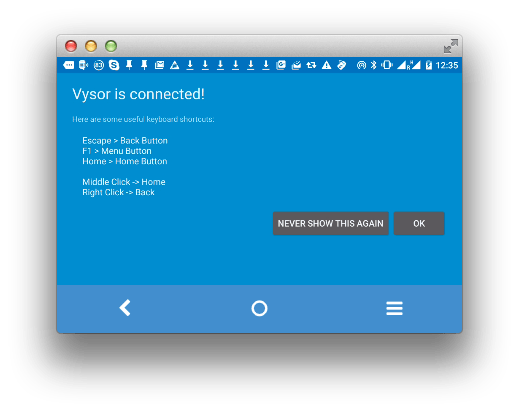
Now hopefully the screen resolution thing will be fixed: [Wayback/Archive] github.com/koush/vysor.io/issues/68
–jeroen
Posted in Android, Android Devices, Chrome, Development, Google, Keyboards and Keyboard Shortcuts, KVM keyboard/video/mouse, Mobile Development, Power User, Vysor | Leave a Comment »
Posted by jpluimers on 2016/02/10
Thanks User Josh Close – Stack Overflow. for answering the below on Stack Overflow: it got my Resharper Alt-Enter key workign again.
Re-apply Visual Studio keyboard scheme:
- (VS2013 latest ReSharper)
- ReSharper > Options > Environment > Keyboard & Menus > ReSharper Platform keyboard scheme: Visual Studio > Apply Scheme > Save.
- This will reset the shortcut keys for ReSharper.
- (older versions)
- ReSharper > Options > Environment > General > Visual Studio Integration > Apply
–jeroen
via: visual studio – Resharper Alt Enter not working – Stack Overflow.
Posted in .NET, C#, Development, Keyboards and Keyboard Shortcuts, Power User, Software Development, Visual Studio 2013, Visual Studio and tools | Leave a Comment »
Posted by jpluimers on 2016/02/04
Back in the late 80s and early 90s of last century, engineers Richard E. Berry, Cliff J. Reeves set a standard that still influences the user interfaces and user experience of today: the IBM Common User Access.
I mentioned CUA a few times before, but since an old client of mine managed to throw away their paper originals in a “we don’t need that old stuff any more as we are now all digital” frenzy, I wanted to locate some PDFs. And I promised to write more about CUA.
If anyone has printed versions of the non-PDF documents below, please donate them to aek at bitsavers.org or scanning at archive.org as they are really hard to get.
A few search queries I used:
The PDFs I think are most interesting:
Read the rest of this entry »
Posted in BitSavers.org, Development, Hardware, History, IBM SAA CUA, Keyboards and Keyboard Shortcuts, KVM keyboard/video/mouse, Power User, Software Development, UI Design, Usability, User Experience (ux) | 3 Comments »
Posted by jpluimers on 2016/02/01
This is cool, as it allows to run VPN over HTTPS or even over ICMP or DNS. Impressive: 1. Ultimate Powerful VPN Connectivity – SoftEther VPN Project.
Equally impressive is the range of operating systems covered:
- Windows (98 until Server 20012 with x86 and x64 implementations).
- Linux Kernels 2.4, 2.6 and 3.x on Intel x86, x64, ARM, MIPS and PowerPC platforms.
- FreeBSD 5.x, 6.x, 7.x, 8.x and 9.x are supported on Intel x86 and x64 platforms.
- Solaris 8, 9, 10 and 11 on Intel x86, Intel x64, SPARC (both 32 bit and 64 bit) platforms.
- Mac OS X 10.4, 10.5, 10.6, 10.7 and 10.8 on Intel x86, Intel x64, PowerPC (32 bit) and PowerPC G5 (64 bit) platforms.
–jeroen
Posted in Network-and-equipment, Power User, VPN | Leave a Comment »


 The Wiert Corner - irregular stream of stuff