The Wiert Corner – irregular stream of stuff

Jeroen W. Pluimers on .NET, C#, Delphi, databases, and personal interests

  • My badges

  • Twitter Updates

  • My Flickr Stream

  • Pages

  • All categories

  • Enter your email address to subscribe to this blog and receive notifications of new posts by email.

    Join 1,860 other subscribers

Archive for the ‘Hardware’ Category

MacBook (or -Pro; -Air): Disable the default “fn key” behaviour and enable the normal Function-keys by default

Posted by jpluimers on 2011/10/03

In their infinite wisdom Apple has chosen to cripple the Apple keyboards on the MacBook (and -Pro and -Air) to default the top-row keys to not behave as function keys.

Apparently they expect people to use those keys more often for changing screen brightness, multi media playing, sound volume, than as function keys.

Maybe it is their 1 Infinite Loop address, but out there in the real world, people appreciate the function keys by default to behave, well like they are meant for: Function Keys and not having to press the fn key to use them.

Actually, some people at Apple were smart enough to make this configurable, but it is well hidden behind the phrase “Use F1-F12 keys to control software features” as the MacRumors Forums 2007 post titled “View Single Post – How To F Lock?” points out.

In the mean time however, the Mac OS X System Preferences to reorganized quite a bit, and “Keyboard & Mouse” are now to separate entries. So the steps are now these:

  1. Press Command-Space to start the Spotlight Window
    (yes, the Command Key still is marked as ⌘ for consistency, but for how long?)
  2. Type “Keyboard” (without double quotes ;-)
  3. Choose the “Keyboard” entry under “System Preferences”
  4. Put a checkmark in front of the “Use all F1, F2, etc. jeys as standard function keys”
    When this option is selected, press the Fn key to us ethe special features printed on each key”
    (note that on a MacBook Air, the key is not “Fn”, but “fn”: so far for consistency again)
  5. Done.

There even seem to be some answers on the Apple discussion forums seem to hint on this, but – at the time of writing – they all conveniently show up as “We’ll be back soon” for some time now, thereby redefining the term “shortly” in the same pass:

We will be back soon.

Being in this mode, it would be soooooo nice if actually they marked the option key with the same character as they refer to it from the menus: ⌥.
They used to on older versions of the option key (even on old MacBook Pro machines). Now that would be consistent user experience…

Now people have to find the right Apple documentation on keyboard shortcuts to find out what the symbols mean.

But – though often famed for consistency –  I don’t think it is one of Apple strengths.

–jeroen

via: MacRumors Forums – View Single Post – How To F Lock?.

Posted in Apple, Keyboards and Keyboard Shortcuts, Mac, MacBook, MacBook-Air, MacBook-Pro, Power User | 2 Comments »

Windows “Device Manager” – expand all nodes

Posted by jpluimers on 2011/09/23


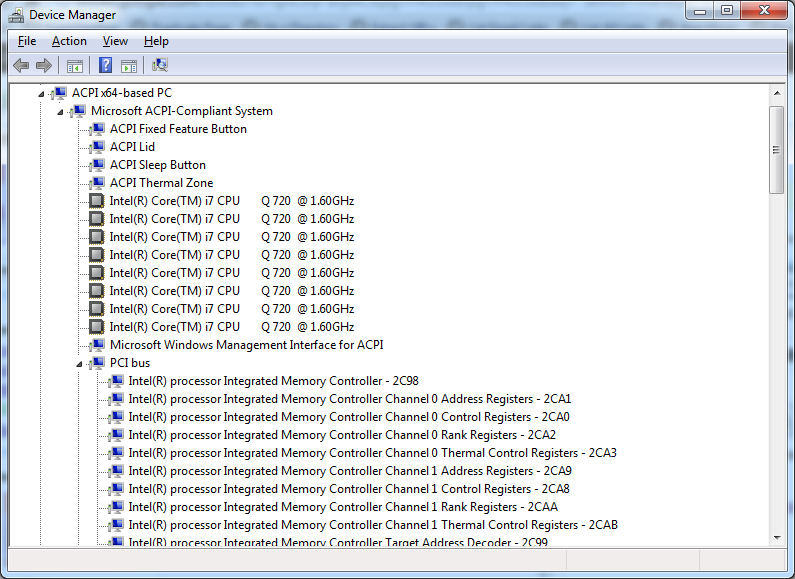
Expanded Windows Device Manager


With the increasing number of devices, it really helps to expand all nodes in the Device Manager’s tree view.

You cannot do this with the mouse, as none of the menu options contain an “Expand All” option.

But since the treeview, is the built-in Windows treeview (used in many places, like Windows explorer), you can use these shortcuts to expand/collapse nodes:

  • Numeric Keypad *: Expands everything under the current selection
  • Numeric Keypad +: Expands the current selection
  • Numeric Keypad -: Collapses the current selection.
  • RIGHT ARROW: Expands the current selection if it is not expanded, otherwise goes to the first child
  • LEFT ARROW: Collapses the current selection if it is expanded, otherwise goes to the parent

This not only works in Microsoft Windows 7: Visual … – Google Books, I think it has been introduced as far back as Windows 95.

–jeroen

Posted in Keyboards and Keyboard Shortcuts, Power User, Windows, Windows 10, Windows 7, Windows 8, Windows 8.1, Windows 9, Windows Server 2003, Windows Server 2003 R2, Windows Server 2008, Windows Server 2008 R2, Windows Server 2012, Windows Server 2012 R2, Windows Vista, Windows XP | 1 Comment »

xs4all ONLY issues with ADSL sync and Fritz!Box 7340

Posted by jpluimers on 2011/08/26

Recently, I had big problems with my Fritz!Box 7340 losing ADSL sync on my xs4all ONLY connection.

The odd thing is: the problems started after it worked well for quite a while.

I had multiple dozens of these reconnects per day, sometimes as few as once every fre hours, but often as many as half a dozen per hour:

11.07.11 05:14:08 IPv6 Internet connection established successfully. Prefix: 12ab:34cd:56ef::/48
11.07.11 05:14:08 IPv6 Internet connection established successfully. IP address: 12ab:34cd:56ef::fe01dc23:ba45:9867
11.07.11 05:14:07 Internet connection established successfully. IP address: 172.31.120.210, DNS server: 194.109.6.66 and
194.109.9.99, Gateway: 194.109.5.205
11.07.11 05:14:01 DSL is available (DSL synchronization exists with 10007/1029 kbit/s).
11.07.11 05:13:47 DSL synchronization starting (training).
11.07.11 05:13:32 Internet connection cleared.
11.07.11 05:13:32 IPv6 Internet connection was cleared; prefix no longer valid.
11.07.11 05:13:32 Internet connection cleared.
11.07.11 05:13:31 DSL not responding (no DSL synchronization).

The xs4all helpdesk didn’t respond on my emails, and Google searches didn’t reveal much.

This is what I tried:

  1. I tried getting the FRITZ.Box_Fon_WLAN_7340.en-de-es-it-fr.99.05.04-19769.image firmware, mentioned in this thread, but could not download it any more.
  2. I also tried to set the DSL settings to “maximum stability” without any improvement, resetting to factory settings, etc.
  3. The router is already very close to the ISRA point (where DSL enters the house), and I tried both with/without splitter with no improvement whatsoever.
  4. Read the steps in this sat4all thread, but found nothing unusual in my hardware and software config.

I didn’t expect any improvement as nothing on my side has changed, and before xs4all ONLY, I ran DSL for more than 10 years with different modems and no problems whatsoever.

Finally, I downgraded to Firmware-Version 99.04.88 from Firmware-Version 99.04.90.

When downgrading, keep this in mind:

  • Fritz! does not keep old firmware versions on-line; you must regularly get the Fritz!Box 7340 part of their ftp site and keep an archive yourself
  • It will reset your router to factory state and not remember any settings
  • It cannot restore your settings if you saved them with a higher firmware version, not even when you save them with a password as the web-interface seems to suggest

Luckily, one of the things that xs4all did well, is keep an archive of firmware versions for the Fritz!Box 7340, including a Firmware-Version 99.04.88.

Perform these steps when downgrading: Read the rest of this entry »

Posted in Fritz!, Fritz!Box, Network-and-equipment, Power User | 1 Comment »

I love my keyboard; why did they hide “Underline keyboard shortcuts and access keys” in Windows 7 so far away?

Posted by jpluimers on 2011/03/18

This is how you view the underline character for Alt and other keyboard shortcuts in Windows 7 (the link shows you how to do this with the mouse, but we are keyboard lovers, are’t we?):

  1. Press the WINDOWS-U combination to open the “Ease of Access Center”
  2. Under Explore all settings, select “Make the keyboard easier to use” by pressing TAB a couple of times, then press ENTER to select it.
  3. Press ALT-N to select and check “Underline keyboard shortcuts and access keys” under “Make it easier to use keyboard shortcuts”
  4. Press ALT-O to fire the OK button action.
  5. Press ALT-F4 to close the “Ease of Access Center”

Done!

So far for accessibility (:

–jeroen

via: Underline keyboard shortcuts and access keys.

Posted in Keyboards and Keyboard Shortcuts, Power User, Windows, Windows 7 | 3 Comments »

Older Fritz!Box Firmwares for 7340 (and 7170/7270/7570)

Posted by jpluimers on 2011/03/17

The Dutch internet provider xs4all keeps an archive of some of the older Fritz!Box firmwares.

Sometimes newer firmwares have some issues, and the Fritz people are often very fast removing the old ones.

Here are some older firmwares for Fritz!Box 7170, 7270, 7340 and 7570: Index of /~helpdesk/firmwares.

Fritz themselves have their Firmwares here: ftp://ftp.avm.de///fritz.box/fritzbox.fon_wlan_7340

–jeroen

Posted in Fritz!, Fritz!Box, Network-and-equipment, Power User | Leave a Comment »

SwitchResX helped me switch my Mac machine to 1360×768 and 1888×1062

Posted by jpluimers on 2010/12/24

A while ago, I got involved in Mac programming again after more than a decade of absence.
It felt like a warm reunion.

A Mac Mini Server serves as a development machine: it is about the same price as a regular Mac Mini, but packs 2 HDDs which for me is more useful than one HDD and a DVD player.

However, living in the Windows world for a long time long, and having had RSI in the DOS era almost two decades ago, I had a few wishes for using it.

The first was keyboard wise. The second is custom resolutions. Read the rest of this entry »

Posted in Apple, Development, Keyboards and Keyboard Shortcuts, Power User, RSI, Software Development, UltraNav keyboards, xCode/Mac/iPad/iPhone/iOS/cocoa | 10 Comments »

Solution for error “13.05.00” fuser jam on HP 9500/9500hdn

Posted by jpluimers on 2010/11/12

When you get this error on your HP Color LaserJet 9500/9500HDN repeatedly, and the solutions mentioned here don’t help, then check also the inside of the fuser (HP part number C8556A).

Steps to check:

  1. Turn off the printer
  2. Take the fuser out of the printer
  3. Wait for the fuser to cool down
  4. Open the fuser using the green tip (see picture below)
  5. Pry out the paper
  6. Close the fuser
  7. Insert the fuser in the printer
  8. Turn on the printer
  9. Perform a test print on the printer

This took me quite a while to figure out, as the paper gets stuck on the opposite side of the fuser, not at the side where you can open the inside of the fuser.

Hope this helps a few people :-)

–jeroen

via: “13.05.00” fuser jam 9500hdn – Google Search.

Note: click on the image to see a bigger version.

HP Color LaserJet 9500/9500hdn fuser (part number C8556A)

HP Color LaserJet 9500/9500hdn fuser (part number C8556A)

Posted in Hardware, Power User | 2 Comments »

ENDIAN Firewall – Connected client can access EFW but no other hosts: enable promiscuous mode on VMware ESXi

Posted by jpluimers on 2010/10/12

While solving a problem with Windows 7 machines not being able to ping the machines on the GREEN LAN of an Endian when connecting through OpenVPN, but XP machines could, I did a few upgrades, then went on to solve the problem.

  • Upgraded from ESX 3.5 to ESXi 4.1 (I needed this anyway because of Pass Through USB support)
  • Upgraded the community edition appliance from Endian 2.2 to Endian 2.4 (which has more configuration options, and better ways for reporting and logging)

Then I went on solving the issue, which I suspected was a kind of routing problem. Read the rest of this entry »

Posted in Endian, ESXi4, ESXi5, ESXi5.1, Firewall, Infrastructure, OpenVPN, Power User, VMware, VMware ESXi | 8 Comments »

VMware ESXi 4.0 / ESXi 4.1: enable SSH login for non-root users (and only them)

Posted by jpluimers on 2010/09/28

VMware ESXi has SSH disabled by default.

In ESX / ESXi 3 and 3.5, it took a while for people to recognize the ‘unsupported’ trick and enable SSH.
In ESXi 4.0, /sbin/services.sh was fixed, so SSH was easier to enable (note: only delete the # in front of the first ssh).
Since ESXi version 4.1, SSH is called “Remote Tech Support (SSH)”, and it very easy to enable from the console.
Thomas Maurer described how easy it is to activate SSH in ESXi 4.1. He provides clear screen shots, whereas the VMware knowledge base article just lists the textual steps.

But contrary to ESX/ESXi 3.5 and lower, and *nix habits, enabling SSH on ESXi 4.x will enable this for the root user.
This has to do with the switch between ESX/ESXi 3.5 and 4.0 from to the dropbear ssh daemon (in the /sbin/dropbearmulti binary).
Dropbear is a very lightweight implementation of the SSH 2 protocol; ideal for ESXi which – as a hypervisor – needs to have a really low footprint.

In addition to the dropbear change, SSH is disabled for non-root users (which has nothing to do with dropbear, see below).

This post is about how to fix not only the SSH (as above) but also how to allow specific users to use SSH. Read the rest of this entry »

Posted in ESXi4, Keyboards and Keyboard Shortcuts, Power User, VMware | 9 Comments »

x64 support in ESXi4.1 requires VT, I know that! but why warn so late?

Posted by jpluimers on 2010/08/16

I know that ESXi 4.1 requires VT (the Intel support for hardware assisted virtualization) to be enabled to run x64 VMs.
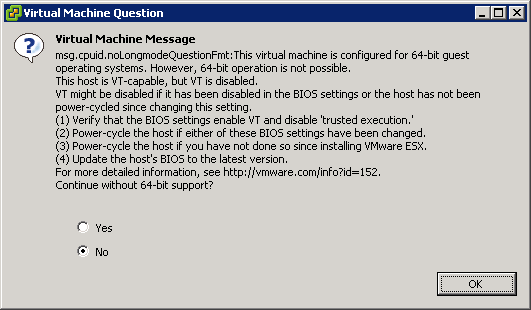
This is the warning that you get when starting an x64 VM, and you don’t have VT enabled:

[Window Title]
Virtual Machine Message
[Main Instruction]
Virtual Machine Message
msg.cpuid.noLongmodeQuestionFmt: This virtual machine is configured for 64-bit guest
operating systems. However, 64-bit operation is not possible.
This host is VT-capable, but VT is disabled.
VT might be disabled if it has been disabled in the BIOS settings or the host has not been
power-cycled since changing this setting.
(1) Verify that the BIOS settings enable VT and disable ‘trusted execution.’
(2) Power-cycle the host if either of these BIOS settings have been changed.
(3) Power-cycle the host if you have not done so since installing VMware ESX.
(4) Update the hosts’s BIOS to the latest version.
For more detailed information, see http://vmware.com/info?id=152
Continue without 64-bit support?
[Yes] [No] [OK]

Read the rest of this entry »

Posted in BIOS, Boot, ESXi4, Hardware, HP XW6600, Power User, Virtualization, VMware, VMware ESXi | 3 Comments »