Archive for the ‘iPad’ Category
Posted by jpluimers on 2016/12/09
So I gave my mom an iPad. But she doesn’t have a credit card. As having one is not usual for Dutch people, especially for elderly Dutch people. Why would you need one if you can pay anything you require online with your Bank Card?
Well: from an iPad, you cannot sign in to iTunes without first adding a credit card. There is no other way. No bank account (which is very common in Europe). No iTunes voucher. No nothing. This is what you have to do:
If you’ve already created your Apple ID, you’ll need to add a payment method when you first use it to sign in to the iTunes Store, App Store, or iBooks Store. But you can optionally remove the payment method after you sign in to the store. You won’t be asked for a payment method again until you make your first purchase.
I haven’t even checked iTunes for on her PC, as iTunes is so utterly user unfriendly (for instance you cannot drag-drop music to your iPad from a folder. You need iTunes and I’d need to explain here about all sorts of clouds other than where rain comes from) that I won’t even try to teach her how to use it.
What I finally did is add my own credit card (apparently they don’t do name or address checks), then remove it.
–jeroen
Source: Create an iTunes Store, App Store, or iBooks Store account without a credit card or other payment method – Apple Support
Posted in Apple, iOS, iPad, iTunes, Mac OS X / OS X / MacOS, Power User | Leave a Comment »
Posted by jpluimers on 2014/06/24
While Watching the CodeRage Mobile conference last week, I noticed Bruno Fierens showing his iPad on a PC.
I also thought about the other way around: show your PC or Mac on your iPad or using your iPad as a second (third?) monitor to your regular machine.
So here are some links to tools I want to look into further:
- Reflector – AirPlay mirror your iPhone or iPad to any Mac or PC, wirelessly..
- AirParrot – AirPlay your Mac or PC’s screen to Apple TV.
- MaxiVista: iPad as a monitor.
- MaxiVista: Laptop as a Second Monitor.
- MaxiVista: Mac as a Second Monitor.
- using iPad as second screen: DisplayPad for iPhone for iPhone, iPod touch, and iPad on the iTunes App Store.
- iDisplay: Turn your iPhone, iPad, iPad Mini or Android into external monitor for your Mac or Windows PC.
- (ScreenSlider is defunct now)
- Air Display: iPhone, iPad, Android, Mac or Windows PC as an external monitor. (there is a free ad supported version)
- extending your desktop workspace using displays of network connected computers or portable devices: ZoneOS ZoneScreen.
- Use your other computer (Mac or PC) as an additional display for your Mac: ScreenRecycler.
- mirrors your iPhone/iPad screen on your desktop: Plutinosoft | iDemo.
- Wireless Monitor Apps: iPad/iPhone Apps AppGuide.
- Splashtop XDisplay – Support.
- Mini Display for iPhone 3GS, iPhone 4, iPhone 4S, iPhone 5, iPod touch (3rd generation), iPod touch (4th generation), iPod touch (5th generation) and iPad on the iTunes App Store.
I’ve not done comparisons yet. These sites have compared some of the products though:
–jeroen
Posted in Apple, Hardware, iOS, iPad, iPhone, iPod touch, Mac, Mac OS X / OS X / MacOS, Mac OS X 10.7 Lion, MacBook, MacBook Retina, MacBook-Air, MacBook-Pro, OS X 10.8 Mountain Lion, Power User, Windows, Windows 7, Windows 8, Windows Vista, Windows XP | Leave a Comment »
Posted by jpluimers on 2014/05/02
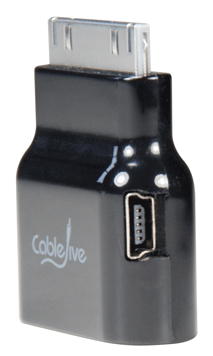
Interesting device I want to try out (probably from Amazon.com: CableJive dockStubz+).
It is a 30-pin Pass-Through adapter for iPod/iPhone/iPad (lets call them iDevice).
Reasons to get one (or more depending on the number of devices/chargers you use regularly):
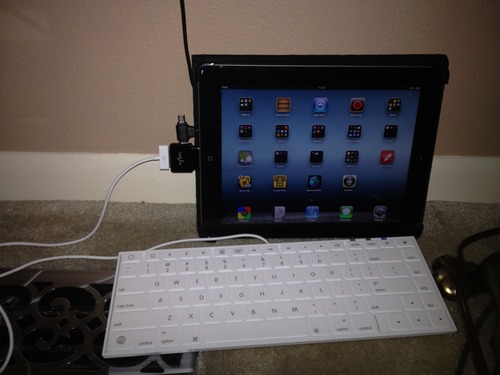
- Use the connector to connect a compatible device, while still charging through the side micro-USB power port on the adapter.
- Charge modern iDevice with old chargers and old iDevice with modern chargers.
- Put your iDevice in a dock even when you have a bumper or case around it.
A few pictures showing their use are below.
Basically, there are two verions of charging circuitry: USB based and FireWire based.
I will make sure to get the + version, as it combines these two:
dockStubz+ model includes charge conversion circuitry for those older docks and accessories that don’t charge while they are connected. Safely connect your mobile device to any dock and get the charging you need.
–jeroen
via: dockStubz Charge Converter and 30-pin Pass-Through Adapter.


 (een larger)
Posted in Apple, iOS, iPad, iPhone, iPod, iPod touch, Power User | Leave a Comment »
Posted by jpluimers on 2014/03/14
Interesting: HotspotShield VPN to surf from a USA IP address.
There is a free version with ads, and a payed version without ads.
Probably more services like this exist, but this has been working for me.
Yup there are:
–jeroen
via: Download Free VPN for iPhone, Mac and Windows to Access Blocked Sites & Surf Anonymously.
Posted in Apple, iOS, iPad, iPhone, Mac, Mac OS X / OS X / MacOS, Mac OS X 10.4 Tiger, Mac OS X 10.5 Leopard, Mac OS X 10.6 Snow Leopard, Mac OS X 10.7 Lion, OS X 10.8 Mountain Lion, Power User, Windows, Windows 7, Windows 8, Windows Vista, Windows XP | Leave a Comment »
Posted by jpluimers on 2014/02/24
Last week, Apple fixed the so called #gotofail bug for iOS devices. Other devices (Macs with OS X 10.9 Mavericks, maybe earlier versions and I also suspect Apple TV to be vulnerable) will follow soon.
I thought that Old iOS devices would be in the dark as the updates are for iOS 6.x and 7.x only. So any device that can only run on iOS 5 or lower might not be supported.
So I thought these devices would be unsupported, but found out an iPad 1st generation would pass the gotofail.com test.
So if you have any of these, please let me know if they fail or pass:
- iPhone 3 or earlier,
- iPod Touch 3rd generation or earlier,
- iPad 1st generation: passes.
Please watch any security announcements carefully with using Apple equipment, as the bug can highly facilitate a man-in-the-middle attack.
Some other site with background information (it hit the news wildly): Read the rest of this entry »
Posted in Apple, Development, iOS, iPad, iPhone, iPod, iPod touch, Mac, Mac OS X / OS X / MacOS, MacBook, MacBook Retina, MacBook-Air, MacBook-Pro, OS X 10.9 Mavericks, Power User, Software Development | 1 Comment »
Posted by jpluimers on 2013/12/26
Where last year it would still work on iOS 5 and 6, this year Apple has upped the requirements to iOS 7 leaving many users in the dark: iOS 7 only works on very recent iOS devices.
Too bad:
Incompatible with my 4th Gen IPOD Touch
by Valorian Nova
I spent quite awhile trying to figure out why this won\’t install on my Ipod and when I finally look it up it\’s because my IPOD is capped at IOS 6.1.5 and this needs IOS 7. Really puts a damper on this app for me.
via 12 Days of Gifts on the App Store on iTunes.
Posted in iOS, iPad, iPhone, iPod touch, Power User | Leave a Comment »
Posted by jpluimers on 2013/02/19
I wrote before on How to solve stuck iPad keeping asking for Exchange password: reset your iPad (or iPod/iPhone if it happens with those).
Actually, you should first verify if your Outlook Web Access still works with the same password, and if it does, then try to restart your iPad/iPod/iPhone, and if that fails, reset it:
Restarting your device
Press and hold the Sleep/Wake button for a few seconds until the red “slide to power off” slider appears, and then slide the slider.
Press and hold the Sleep/Wake button until the Apple logo appears.
Note: Reset your device only if you are unable to restart it.
Resetting your device
Press and hold the Sleep/Wake button and the Home button together for at least ten seconds, until the Apple logo appears.
–jeroen
via iPhone, iPad, iPod touch: Turning off and on (restarting) and resetting.
Posted in Apple, iOS, iPad, iPhone, iPod touch, Power User | Leave a Comment »
Posted by jpluimers on 2012/10/05
Chrome, Opera, etc are all rated as 17+ for “mature content” ans such by Apple.
So they think nobody with Safari will see any mature content?
What a laugh!
–jeroen
via: Is Apple Restricting Google Chrome For iOS Out Of Spite? | WebProNews.
Posted in iOS, iPad, iPhone, iPod touch, Opinions, Power User | Leave a Comment »
Posted by jpluimers on 2012/09/29
If I read Inappropriate Use of Adobe Code Signing Certificate my conclusion is that anything signed by the Adobe Code Signing Certificate since 2012-07-10 potentially can be malware.
As a precaution, I will manually revoke the certificate on all my systems (that’ll take a while!). If anyone knows how to automate that process, please post a comment showing how to.
Hitching on a trusted certificate of a big software company comes close to the ultimate hack: trojaning signed malware in the distribution of an OS vendor.
–jeroen
via: Inappropriate Use of Adobe Code Signing Certificate « Adobe Secure Software Engineering Team (ASSET) Blog.
Posted in *nix, Adobe, Android Devices, Apple, HTC, HTC Sensation, iOS, iPad, iPhone, iPod, iPod touch, Linux, Mac, Mac OS X / OS X / MacOS, Mac OS X 10.4 Tiger, Mac OS X 10.5 Leopard, Mac OS X 10.6 Snow Leopard, Mac OS X 10.7 Lion, Opinions, OS X 10.8 Mountain Lion, Power User, Windows, Windows 7, Windows 8, Windows Server 2000, Windows Server 2003, Windows Server 2003 R2, Windows Server 2008, Windows Server 2008 R2, Windows Vista, Windows XP | Tagged: adobe software, conclusion, engineering team, precaution, secure software, software, software company, software engineering, technology, ultimate hack | Leave a Comment »
Posted by jpluimers on 2012/09/24
Posted in Geeky, iOS, iPad, iPhone, iPod touch, LifeHacker, Opinions, Power User | Tagged: Apple, google, iOS6, Maps, technology | 1 Comment »




 The Wiert Corner - irregular stream of stuff