The Wiert Corner – irregular stream of stuff

Jeroen W. Pluimers on .NET, C#, Delphi, databases, and personal interests

  • My badges

  • Twitter Updates

  • My Flickr Stream

  • Pages

  • All categories

  • Enter your email address to subscribe to this blog and receive notifications of new posts by email.

    Join 1,860 other subscribers

Archive for the ‘Uptimerobot’ Category

Pricing | Better Uptime

Posted by jpluimers on 2024/12/06

Reminder to show how well my experimentation with [Wayback/Archive] Better Uptime went and how they compare to [Wayback/Archive] UptimeRobot.

For now I am at this plan in [Wayback/Archive] Pricing | Better Uptime:

Free:

  • e-mail alerts
  • 3-minute checks
  • 10 monitors

This suffices to keep an eye on the modest IT infrastructure at both our home and the one from my mentally retarded brother.

Note that other prices on that pages are per month. Despite the default selection being “annual plan” the very light grey and thin “/mo” on a black ground indicates they are still per month, but you get 20% discount with the annual plans).

Read the rest of this entry »

Posted in *nix, Amazon SES, Amazon.com/.de/.fr/.uk/..., BetterUptime, Cloud, Infrastructure, Monitoring, Power User, Uptimerobot | Leave a Comment »

The Delphi documentation site docwiki.embarcadero.com has been down/up oscillating for 4 days is now down for almost a day.

Posted by jpluimers on 2022/03/08

The [Wayback/Archive] Embarcadero/IDERA Documentation Wiki has been mostly down since March 3rd, 2022 (not the main page, but almost all other pages are).

I modified [Wayback/Archive] Docwiki https – EmbarcaderoMonitoring to show the actual status of a deeper page as the (mostly static) top page is up, so monitoring that is useless as the deeper pages are down.

The deeper pages are dynamic and require a functioning MySQL database connection. That connection is mostly down (the error message is not clear, so this could be a network or a database server problem, or maybe even a loadbalancer gradually entering bit heaven).

Since it had been down for like 6 days in February*, I’d expect Idera to keep an eye on it and prepare for more downtime. Apparently that’s either not a 24×7 thing for them or  they missed the “pre” in preparation as it is dead-silent on .

It also runs on an unsupported version of Mediawiki 1.31** which by itself does not explain the outage, but does indicate that their idea of handling their internal lifetime management is different than what they advocate to clients in their software subscription model, see [Wayback/Archive] Delphi – Embarcadero store, [Wayback/Archive] Update Subscription – Embarcadero and [Wayback/Archive] Special Offers on RAD Studio, Delphi & C++Builder – Embarcadero:

Read the rest of this entry »

Posted in *nix, Bookmarklet, Delphi, Development, JavaScript/ECMAScript, Lightweight markup language, MediaWiki, Monitoring, Power User, Scripting, SocialMedia, Software Development, Twitter, Uptimerobot, Web Browsers | Leave a Comment »

Binding #Uptimerobot monitoring to your own subdomain: embarcaderomonitoring.wiert.me

Posted by jpluimers on 2021/01/01

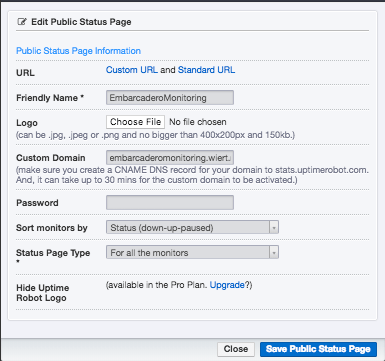
Below a few screenshots on how to bind your own subdomain to a set of uptimerobot monitors.

This case is about [Archive.isembarcaderomonitoring.wiert.me, which I setup because of the not so well way that Embarcadero maintained their web facing infrastructure in the past.

The steps for that are really simple, assuming you already have an uptimerobot account and some monitor set-up. If you don’t: check out the first video (thanks onewebstreet!) linked below the fold, as it is a step-by-step introduction.

Steps for your own subdomain

If you like video more than a list of steps, check out the second video (thanks Kyle!) below the fold.

  1. Ensure you have a DNS CNAME record that points your subdomain (in my case embarcaderomonitoring.wiert.me) to stats.uptimerobot.com:

    Note that [Archive.is] stats.uptimerobot.com by itself will not display any dashboard, as it requires a CNAME to be involved that is registered in the Uptime robot Custom Domain list.

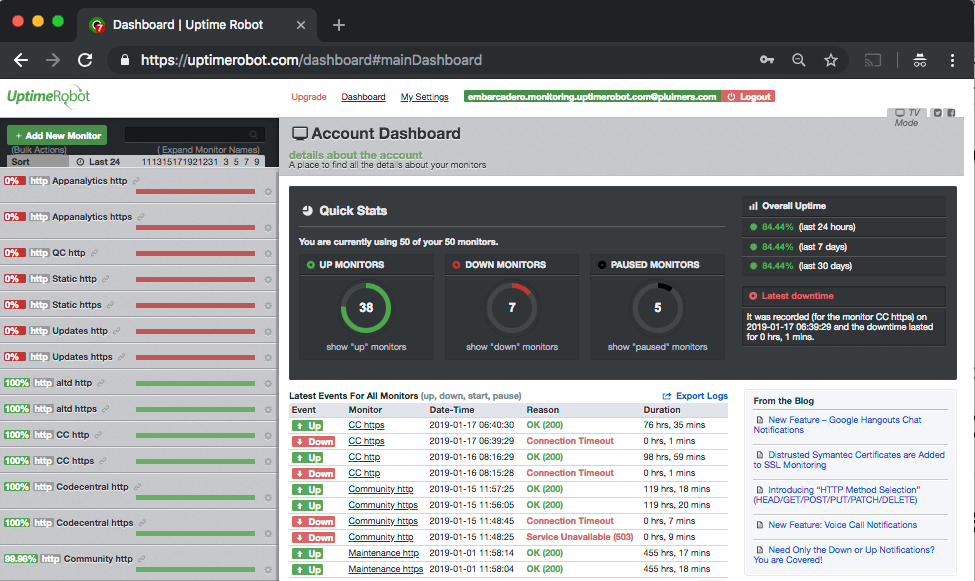
  2. Login to Uptime robot, which brings you to uptimerobot.com/dashboard#mainDashboard
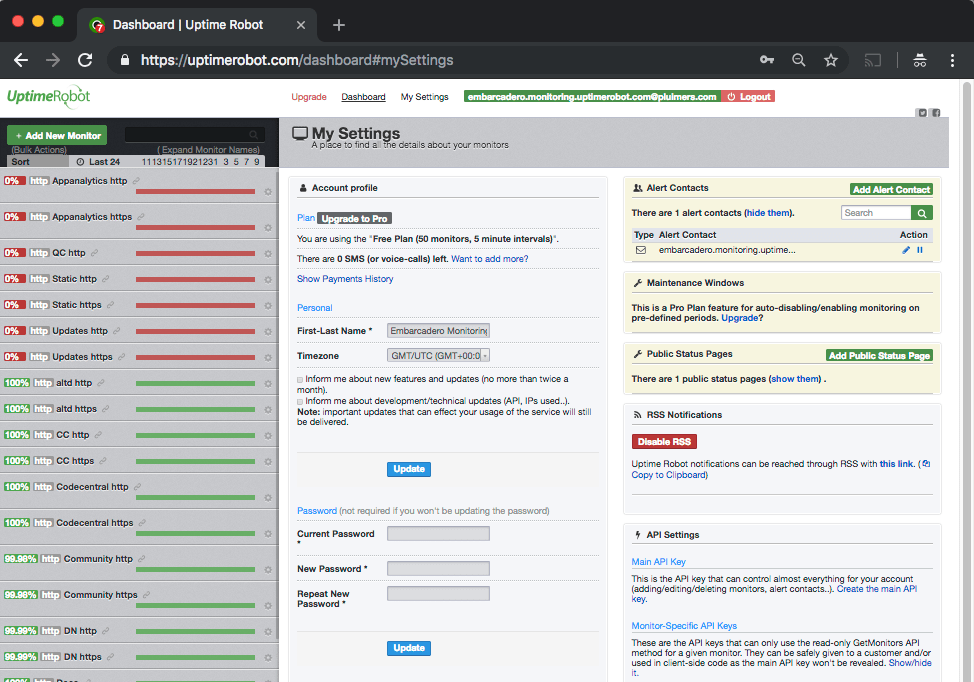
  3. Click on settings, which brings you to uptimerobot.com/dashboard#mySettings
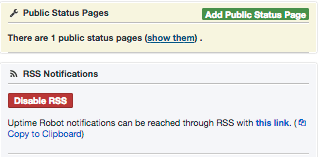
  4. Observe the “Disable RSS” (or “Enable RSS” if you have not yet enabled it) and the “this link” (which in my case points to this RSS feed [WayBack])
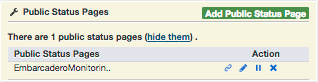
  5. Clicking on “show them” will get you something like this:
  6. Clicking on the pencil icon then will get you where you can set the “Custom Domain”, which notes

    Custom Domain

    (make sure you create a CNAME DNS record for your domain to stats.uptimerobot.com. And, it can take up to 30 mins for the custom domain to be activated.)

  7. Wait a while and check your CNAME for a valid Uptime robot status dashboard.

–jeroen

Read the rest of this entry »

Posted in *nix, LifeHacker, Monitoring, Power User, Uptimerobot | Leave a Comment »

Uptimerobot: TCP uptime only verifies the three-way TCP handshake

Posted by jpluimers on 2020/12/28

I like uptimerobot a lot (wrote about it earlier, and will write about it soon again), but there are two important things to keep in mind on how it does connection uptime verification:

  1. HTTP checks: [WayBack] Introducing “HTTP Method Selection” (HEAD/GET/POST/PUT/PATCH/DELETE) | Uptime Robot – Blog
    • HTTP requests by default are HEAD for plain HTTP monitors or GET for HTTP keyword monitors, but in the advanced settings, you have options to choose other methods as well: HEAD/GET/POST/PUT/PATCH/DELETE are supported, which means the only unsupported methods (see Hypertext Transfer Protocol: Request Methods – Wikipedia) are TRACE/OPTIONS/CONNECT.
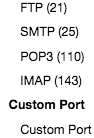
  2. TCP checks: [WayBack] New Feature – Monitoring Ports | Uptime Robot – Blog

If you want to see a few specific TCP protocol tests in action, then check these:

I did not find a good site to test IMAP servers in a simple way like the above sites. If anyone has one: please share it in a comment below.

I did find a post with public FTP servers (they are becoming rare): [WayBack] Is there a Public FTP server to test upload and download? – Stack Overflow

jeroen

Posted in *nix, Monitoring, Power User, Uptimerobot | Leave a Comment »

Great tool: the Toptal Colorblind Web Page Filter

Posted by jpluimers on 2020/08/06

Colorblind Web Page Filter

Colorblind Web Page Filter

A great tool I found out about a while ago [Archive.is] Toptal Color Blind Filter.

It shows the original web page and the rendering for various types of color blindness:

  • protan -> Protanopia: red/green color blindness; anomalous red cones
  • deutan -> Deutanopia: red/green color blindness; anomalous green cones
  • tritan -> Tritanopia: blue/yellow color blindness; anomalous blue cones
  • grey -> Greyscale/achromatopsia: quick check for all forms of colorblindness

Because of a comment at [WayBack] Forums… https://embarcaderomonitoring.wiert.me/ – JWP – Google+, I used Toptal to notify Uptime robot that their status pages are hard for color blind people: [WayBackJeroen Pluimers on Twitter: “Some color blind people indicated to me that @uptimerobot status pages are hard for them to read. Examples are for @EmbarcaderoTech as they have subdomains being offline often: …”, so lets look at how people with various types of color blindness see embarcaderomonitoring.wiert.me :

Read the rest of this entry »

Posted in *nix, Color (science), Color (software development), Development, Monitoring, Power User, science, Software Development, Uptimerobot, Usability, User Experience (ux), Web Development | Leave a Comment »

Duh moment: when 69.162.119.78 is querying your DNS infrastructure and it appears to be uptimerobot

Posted by jpluimers on 2020/07/28

From the hindsight department [WayBack] Nice when someone in Dallas using 69.162.119.78 is querying your DNS infrastructure for many permutations of domains… https://gist.github.com/jpluimer… – Jeroen Wiert Pluimers – Google+.

Wolfgang Rupprecht gave me some hints on the cause, as the IP address 69.162.119.78 Google Search used to be of a gaming server: [WayBack] TwotailsTikat’s Profile – Member List – Minecraft Forum

After a good night sleep,

# nslookup 69.162.119.78
78.119.162.69.in-addr.arpa name = mail.uptimerobot.com

In retrospect: perfectly normal behaviour for monitoring machine “snip”.

Log by https://github.com/gamelinux/passivedns

–jeroen

Read the rest of this entry »

Posted in *nix, DNS, Internet, Monitoring, Power User, Uptimerobot | Leave a Comment »

Do I really need to write a WordPress API wrapper to check the status of “missed schedule” posts?

Posted by jpluimers on 2020/01/29

After years with “missed schedule” posts on (paid!) wordpress.com based sites, WordPress has documented that the scheduler officially does not support more than 100 posts:

[WayBackWarning: Please do not schedule more than 100 posts. Any posts scheduled beyond that amount will not be published.

In practice this is not fully true, so lets explain that a little.

Background

Imagine the list of scheduled posts as a list of posts to be posted anywhere from the near future (lets call that tail) until far in the future (for now head).

As long as you schedule posts in head to tail order, then there is no problem. You can schedule 100s of posts (usually I’ve between 700 and 1200 posts scheduled that way).

The problems appear when:

Read the rest of this entry »

Posted in *nix, Development, Missed Schedule, Monitoring, Power User, SocialMedia, Software Development, Uptimerobot, Web Development, WordPress, WordPress | Leave a Comment »

Uptime Robot on Twitter: “Sorry all that the API and status pages fluctuated since the last 18 hours. The issue is completely fixed and it is all back to normal now.”

Posted by jpluimers on 2018/12/04

[WayBackUptime Robot on Twitter: “Sorry all that the API and status pages fluctuated since the last 18 hours. The issue is completely fixed and it is all back to normal now.”

[WayBackJeroen Pluimerson Twitter: “Some are still broken, especially the ones with IDs 778601760 778601763 778601765 778601777 778601814 779973649 779677530 779677532 All of them reachable through various ISPs, but UpTimeRobot marks them down since about 11 hours”

See:

Failing:

Edit 20181205

Found out what happened: the IP got blocked on some spam lists. This is odd:

Even though the SMTP server behind it has relay blocked apart from the 2 domains it is primary MX for, somebody found a trick around it, I think by sending mail to the primary domains that

  1. are not caught yet by the installed backlist filters
  2. later bounce when forwarded to their forward address because their blacklist filters are by now more up-to-date,
  3. then the bounce email being flagged as SPAM.

MXTOOLBOX

The trick caused the IP to appear on 3 blacklists according to MXTOOLBOX:

Blacklist Reason TTL ResponseTime
 LISTED CBL 80.100.143.119 was listed  Detail 806 0 Ignore
 LISTED Hostkarma Black 80.100.143.119 was listed  Detail 805 0 Ignore
 LISTED Spamhaus ZEN 80.100.143.119 was listed  Detail 300 281 Ignore

Checking these revealed all to be around CBL:

CBL:

This IP address was detected and listed 6 times in the past 28 days, and 0 times in the past 24 hours. The most recent detection was at Tue Dec 4 02:25:00 2018 UTC +/- 5 minutes

Hostkarma Black:

Your reverse DNS is correct! – snip.xs4all.nl
The IP address for the reverse lookup name matches the original IP – RDNS Information

This is a list from our log files showing the activity from IP address 80.100.143.119. Our system stores information for 4 days.


/ip-log/karma.log.06:black 80.100.143.119 auth-bad ID=79648-15207 X=mxbackup H=snip.xs4all.nl [80.100.143.119]:40353 HELO=[[127.0.0.1]] SN=[M.ASMMSS.06446644586518723606@terrain.gov.harvard.edu] AUTH=[antonio] T=[irena.getheridge2018@outlook.fr] S=[Re: RcPT[(ALERT) | 0644664458]]

Spamhaus ZEN:

80.100.143.119 is not listed in the SBL

80.100.143.119 is not listed in the PBL

80.100.143.119 is listed in the XBL, because it appears in:

dnsbl.spfbl.net

Further research also found an entry in dnsbl.spfbl.net:

Check result of IP 80.100.143.119

This is the rDNS found:

This IP was flagged due to misconfiguration of the e-mail service or the suspicion that there is no MTA at it.


For the delist key can be sent, select the e-mail address responsible for this IP:

  • add a PayPal user’s email for 6.00 BRL.
  • add a PayPal user’s email for 1.50 USD.
  • <abuse@xs4all.nl> qualified.
  • <postmaster@snip.xs4all.nl> qualified.
  • <postmaster@xs4all.nl> qualified.

The rDNS must be registered under your own domain. We do not accept rDNS with third-party domains.

A chicken-and-egg situation here: since snip.xs4all.nl is blocked because of the blacklist entry, I cannot request a validation email for the blacklist entry.

But then there was MultiRBL showing that most DNS black lists are aggregators of others.

jeroen

Read the rest of this entry »

Posted in *nix, DNS, Internet, Monitoring, Power User, Uptimerobot | Leave a Comment »

UptimeRobot is written in PHP and runs on IIS

Posted by jpluimers on 2018/11/28

In [WayBackJeroen Pluimers‏ @jpluimers: Every now and then editing @uptimerobot entries failed. Just “HTTP Error 503.4 – Service Unavailable The FastCGI pool queue is full” 1/2 I found out that UptimeRobot:

There is also a maintenance page at uptimerobot.com/maintenance.php#tvMode [Archive.is] and uptimerobot.com/maintenance.php?c-e [Archive.is]. If you get to those, then retry in ~10 minutes as sometimes it takes that long for an update to be processed.

Sometimes setting up multiple Android devices for the same uptimerobot account can be a bit of a hassle: [WayBack] Uptime Robot on Twitter: “Once logged in to the account from another Andriod device, that device will be added as an alert contact too.… “.

All in all it is still a nice tool (:

–jeroen

Read the rest of this entry »

Posted in *nix, Development, IIS, Monitoring, PHP, Power User, Scripting, Software Development, Uptimerobot, Web Development | Leave a Comment »

https://altd.embarcadero.com/ TLS certificate does not match domain name

Posted by jpluimers on 2018/09/07

One of the domains not yet monitored at embarcaderomonitoring.wiert.me, was the altd download server for ISOs and installers on http and https level. Ultimately you want https, as most of these are about installers, so you do not want any man-in-the-middle to fiddle with them.

TLS on altd fails

Upitmerobot is not yet smart enough to check validity of TLS certificates on https connections.

Chrome, Firefox, Safari, Internet Explorer, wget, curl and ssllabs however are.

altd hides as much from itself as possible

Uptimerobot did not like monitoring the plain http://altd.embarcadero.com/ and https://altd.embarcadero.com/ URLs, because the altd is not browsable, so it tries to hide most of its structure from access. This means they both return an odd response:

Those responses are actually 404 errors (note the - minus sign after curl --trace-ascii: it sends the trace to stdout):

$ wget http://altd.embarcadero.com/
--2018-09-05 10:44:23-- http://altd.embarcadero.com/
Resolving altd.embarcadero.com (altd.embarcadero.com)... 88.221.144.40, 88.221.144.10
Connecting to altd.embarcadero.com (altd.embarcadero.com)|88.221.144.40|:80... connected.
HTTP request sent, awaiting response... 404 Not Found
2018-09-05 10:44:23 ERROR 404: Not Found.

$ curl --verbose http://altd.embarcadero.com/
*   Trying 88.221.144.40...
* TCP_NODELAY set
* Connected to altd.embarcadero.com (88.221.144.40) port 80 (#0)
> GET / HTTP/1.1
> Host: altd.embarcadero.com
> User-Agent: curl/7.54.0
> Accept: */*
> 
< HTTP/1.1 404 Not Found
< Server: Apache
< Content-Type: text/html; charset=iso-8859-1
< Content-Length: 16
< Date: Wed, 05 Sep 2018 08:45:57 GMT
< Connection: keep-alive
< 
* Connection #0 to host altd.embarcadero.com left intact
File not found."

$ curl --trace-ascii - http://altd.embarcadero.com/
== Info:   Trying 88.221.144.40...
== Info: TCP_NODELAY set
== Info: Connected to altd.embarcadero.com (88.221.144.40) port 80 (#0)
=> Send header, 84 bytes (0x54)
0000: GET / HTTP/1.1
0010: Host: altd.embarcadero.com
002c: User-Agent: curl/7.54.0
0045: Accept: */*
0052: 
<= Recv header, 24 bytes (0x18)
0000: HTTP/1.1 404 Not Found
<= Recv header, 16 bytes (0x10)
0000: Server: Apache
<= Recv header, 45 bytes (0x2d)
0000: Content-Type: text/html; charset=iso-8859-1
<= Recv header, 20 bytes (0x14)
0000: Content-Length: 16
<= Recv header, 37 bytes (0x25)
0000: Date: Wed, 05 Sep 2018 08:47:19 GMT
<= Recv header, 24 bytes (0x18)
0000: Connection: keep-alive
<= Recv header, 2 bytes (0x2)
0000: 
<= Recv data, 16 bytes (0x10)
0000: File not found."
File not found."== Info: Connection #0 to host altd.embarcadero.com left intact

This is also the reason that WayBack does not want to archive that link, but it can be archived at [Archive.ishttps://altd.embarcadero.com/.

Luckily, a Google search for site:altd.embarcadero.com revealed there is a non-installer file short enough (~72 kibibytes) for Uptime robot to check, so it now verifies it can access these:

–jeroen

Read the rest of this entry »

Posted in *nix, *nix-tools, cURL, Encryption, HTTPS/TLS security, Monitoring, Power User, Security, Uptimerobot, wget | Leave a Comment »