


Inspired by [WayBack] linux command line: du — how to make it show only total for each directories – Stack Overflow
du -h -s -c *
This displays the human readable (-h) total (-s) with a grand total (-c) of all subdirectories (*).
–jeroen
Posted by jpluimers on 2018/01/15
Inspired by [WayBack] linux command line: du — how to make it show only total for each directories – Stack Overflow
du -h -s -c *
This displays the human readable (-h) total (-s) with a grand total (-c) of all subdirectories (*).
–jeroen

Posted in *nix, *nix-tools, Power User | Leave a Comment »
Posted by jpluimers on 2018/01/09
The default [WayBack] Zabbix Disk space usage graph (named Disk space usage {#FSNAME}) for Windows looks like this:

Total disk space on C:
What I want is a graph over time. Based on that, I can start working on different triggers than the default “less than 20% free space available“, for instance:
So I want graphs similar to the CPU load (in the graph itself called Processor load) graph which looks like this:

CPU load (a.k.a. Processor load) is actually graphed “over time”
It is part of the Graph prototypes for the Template OS Windows discovery list Mounted filesystem discovery:

For now I’ve added this graph prototype as Line chart with 95th percentile:

If that work, I can start working on the triggers:

–jeroen

Posted in *nix, Monitoring, Power User, Zabbix | 2 Comments »
Posted by jpluimers on 2018/01/01
It is a lot (~300 megabyte compressed download!), but worth it.
Here are the links:
sha256sum UberPdfSdk-1000-0000.tar.gz 215aed6e5b99bd4a923a2916708163df7bffc47e36508d51dac34cd9a4a74337sha256sum UberPdfSdk-1000-0000.zip 608a90fd6b8f352b4d1f9f59d0d1853a957179e7272ce9a58db78bb52ef6b6e3And the quote from [WayBack] LAUNCHED https://uberpdf.org/ … – Joe C. Hecht – Google+
LAUNCHED https://uberpdf.org/
…
337 MB of source and utils in 2,308 Files, 910 Folders before you build (not counting 3rd party source UberBuild downloads).
It’s a start, with much to come.It will get easier now that UberBuild is clean.
I will be updating the docs and website in the next few days.
Special thanks …
I already see room for improvement (such as a setup screen for extra compilers such as Delphi and Free Pascal to keep folks out of shell scripts and from hunting for help in the documentation).
…
–jeroen
Posted in *nix, C, C++, Delphi, Development, Linux, Power User, Software Development, Windows | 3 Comments »
Posted by jpluimers on 2018/01/01
For my research list (thanks Mariusz Fik @Fisiu):
Actually: this was more of a reminder checking out if someone else by now has made OpenSuSE Tumbleweed builds for ODROID (:
–jeroen
via:
Posted in *nix, Linux, openSuSE, Power User, SuSE Linux | Leave a Comment »
Posted by jpluimers on 2017/12/25
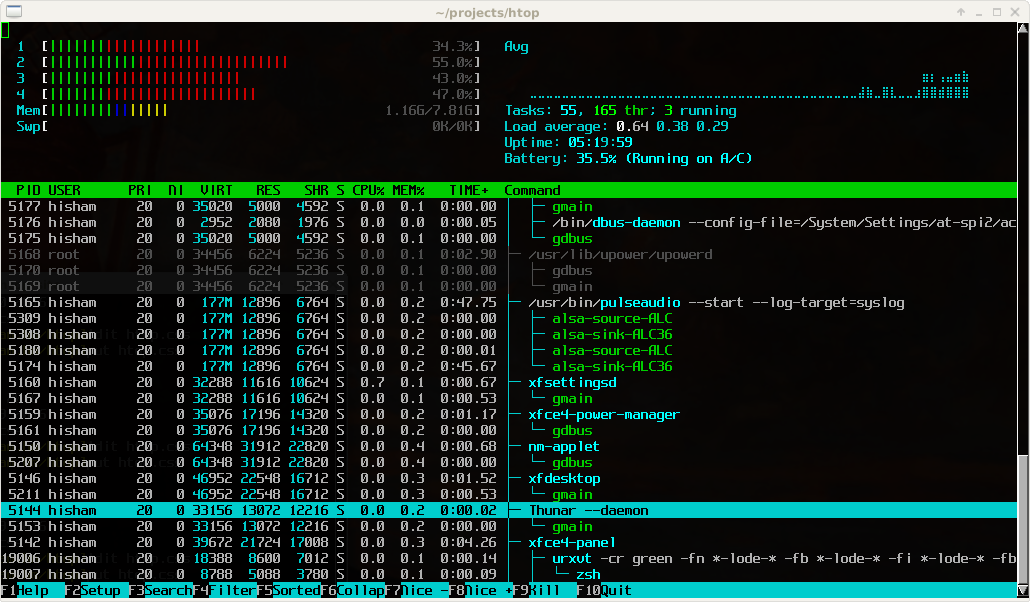
Great tool: [WayBack] htop – an interactive process viewer for Unix because it’s both interactive and supports a wide range of OSes: Linux, FreeBSD, OpenBSD and Mac OS X.
Thanks to Warren Postma who suggested it in his comment at [WayBack] 18 Useful Commands to Get Hardware Information on Linux – Linuxslaves.
Note that on OS X you get this warning after brew install htop :
htop requires root privileges to correctly display all running processes,

so you will need to run `sudo htop`.

You should be certain that you trust any software you grant root privileges.
On Linux you don’t get this message as there you have the /proc file system providing enough information as explained at [WayBack] osx – Why does htop on Mac OS X require root privileges to see data for all processes, but on Linux it runs without root – Super User.
A workaround (involving the setuid bit) is at [WayBack] Running htop on Mac OS X needs root. Why?! | Blog | JoeNyland.me or by running visudo ensuring you don’t need a password for it at [WayBack] osx – htop isn’t returning CPU or memory usage!? – Super User
–jeroen

Posted in *nix, *nix-tools, Apple, BSD, Linux, Mac OS X / OS X / MacOS, macOS 10.12 Sierra, OS X 10.11 El Capitan, OS X 10.9 Mavericks, Power User | Leave a Comment »
Posted by jpluimers on 2017/12/19
[WayBack] 301 & 302 Redirect Generator Tool is a simple and cool tool:
Generate code to permanently or temporarily redirect your old URL to a new URL using htaccess, PHP, HTML, JavaScript, ASP or ASP.Net
Although using .htaccess files requires Apache to allow AllowOverride All which you might not want to, so here are a few other options and links you might want to check out:
–jeroen
Posted in *nix, Apache2, Development, HTML, HTML5, Power User, Software Development, Web Development | Leave a Comment »
Posted by jpluimers on 2017/12/14
Yes, there are still static web-sites. A long time ago, they were uploaded over FTP. Now many use more secure protocols.
So here are some links and notes to allow this on a Linux based host running OpenSSH.
I got to the above via these two links:
An alternative might be web-dave, but that would probably mean some hassle to separate uploading the site from accessing the site.
[Archive.is] How To Set Up WebDAV With Apache2 On OpenSUSE 12.2
–jeroen
Posted in *nix, Communications Development, Development, Internet protocol suite, Linux, openSuSE, Power User, SSH, SuSE Linux, TCP | Leave a Comment »
Posted by jpluimers on 2017/12/08
for postfix and sendmail: [WayBack] Fixing Invalid HELO’s – major.io
Posted in *nix, *nix-tools, postfix, Power User, sendmail | Leave a Comment »
Posted by jpluimers on 2017/12/08
Cool: [WayBack] Pi-hole v3.2 Introduces Long-term Statistics, An Audit Log, Colours, and More! – Pi-hole®: A black hole for Internet advertisements.
Via: Ronald van Bolhuis
–jeroen

Posted in *nix, Linux, Power User | Leave a Comment »
Posted by jpluimers on 2017/12/05
The [WayBack] Interactive map of Linux kernel is way better than the static versions below that I got via
[WayBack] Interactive map of the Linux kernel subsystems. A little bit beyond what is required to use Linux. But great for those who want a deeper understanding of the kernel. – Joe C. Hecht – Google+
–jeroen

Posted in *nix, Development, Linux, Power User, Software Development | Leave a Comment »
 The Wiert Corner - irregular stream of stuff