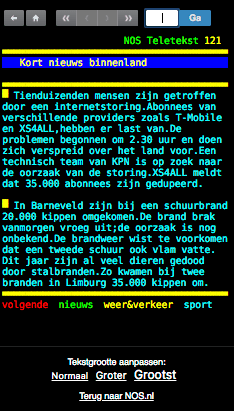
 This time I was not affected, but many people were by the [WayBack] 121 – NOS Teletekst: xs4all and T-mobile outage:
NOS Teletekst 121
Kort nieuws binnenland
Tienduizenden mensen zijn getroffen
door een internetstoring.Abonnees van
verschillende providers zoals T-Mobile
en XS4ALL,hebben er last van.De
problemen begonnen om 2.30 uur en doen
zich verspreid over het land voor.Een
technisch team van KPN is op zoek naar
de oorzaak van de storing.XS4ALL meldt
dat 35.000 abonnees zijn gedupeerd.
In Barneveld zijn bij een schuurbrand
20.000 kippen omgekomen.De brand brak
vanmorgen vroeg uit;de oorzaak is nog
onbekend.De brandweer wist te voorkomen
 dat een tweede schuur ook vlam vatte.
Dit jaar zijn al veel dieren gedood
door stalbranden.Zo kwamen bij twee
branden in Limburg 35.000 kippen om.
volgende nieuws weer&verkeer sport
dat een tweede schuur ook vlam vatte.
Dit jaar zijn al veel dieren gedood
door stalbranden.Zo kwamen bij twee
branden in Limburg 35.000 kippen om.
volgende nieuws weer&verkeer sport
Trying to grab the above page as PNG, made me find the old teletekst web-interface is directory browseable, but dysfunctional: [WayBack] Directory Listing For /webtekst.html/
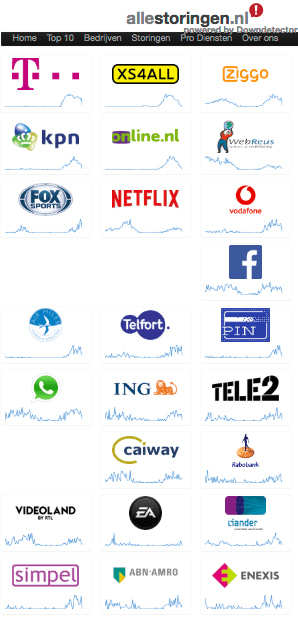
Lots of people were affected as you can see at
[Archive.is] Storingsoverzicht | Allestoringen Realtime overzicht van storingen. Problemen? Wij helpen je verder.
They are powered by Downdetector which has a world-wide monitoring service [Archive.is] Status overview | Downdetector, and seems situated in Haarlem. Cool thing: they have similar sites for many other countries:
allestörungen.at | allestörungen.ch | allestörungen.de | allestoringen.be | allestoringen.nl | aussieoutages.com | canadianoutages.com | downdetector.ae | downdetector.cl |downdetector.co.nz | downdetector.co.za | downdetector.com | downdetector.com.ar | downdetector.com.br | downdetector.dk | downdetector.es | downdetector.fi | downdetector.fr |downdetector.hk | downdetector.ie | downdetector.in | downdetector.it | downdetector.jp | downdetector.mx | downdetector.no | downdetector.pl | downdetector.pt | downdetector.ru |downdetector.se | downdetector.sg | downdetector.co.uk | downdetector.web.tr |
Usually uptime robot warns me on time, and this time my connections were OK:
Read the rest of this entry »






 The Wiert Corner - irregular stream of stuff