


Some links that helped me getting this working:
Archive for the ‘Security’ Category
Setting up a GitHub project so it is served over https as a github.io and a custom subdomain
Posted by jpluimers on 2022/04/27

Posted in Cloud, Cloudflare, Communications Development, Development, Encryption, GitHub, HTML, HTTP, HTTPS/TLS security, Infrastructure, Internet protocol suite, Let's Encrypt (letsencrypt/certbot), Power User, Security, Software Development, Source Code Management, TCP, TLS, Web Development | Leave a Comment »
Cryptosense Discovery
Posted by jpluimers on 2022/03/15
This is cool: [Wayback] Cryptosense Discovery:
Free tool that discovers security configuration errors in SSH and TLS servers and explains how to fix them. Supports STARTTLS and can also scan HTTPS, POP3, IMAP and SMTP servers.
It gives you a list of servers a target domain uses (for purposes like web, email, etc) that can have external encryption enabled, then allows you to test these.
The list by default has only servers within that target domain enabled, but you can optionally include other servers (for instance if a domain uses a third party for their SMTP handling).
Basically it is the web-counterpart of a tool like testssl.sh (which I have written about before).
Found while checking out how to test the MX security of a domain using [Wayback] testssl.sh as I forgot the syntax, which in retrospect is dead easy as per [Wayback] tls – How to use testssl.sh on an SMTP server? – Information Security Stack Exchange (thanks [Wayback] Z.T.!):
…
testssl.sh --mx <domain name>works fine.
testssl.sh -t smtp <ip>:25and
testssl.sh -t smtp <ip>:587also work fine.
Note that not specifying the port assumes port 443, despite specifying protocol
smtp. That doesn’t work.…
Also, you might try discovery.cryptosense.com which does the same thing only better
That website is made by the cool people at [Wayback] Cryptosense.
Both are a lot easier than the alternatives described in [Wayback] Blog · How to test SMTP servers using the command-line · Halon MTA: using nslookup and dig for determining the affected hosts, using nc or telnet for testing basic connectivity, using [Wayback/Archive.is] openssl s_client to test TLS, and [Wayback/Archive.is] smtpping for measuring throughput.
In addition to the above tools mentioned in the blog, I’ve also used
sendEmail(note case sensitivity),ehlo-size, andswaks.
This is what I tested:
- [Wayback] Cryptosense Discovery: clientondersteuningplus.nl
We found these machines for
clientondersteuningplus.nl. Select those you would like to scan:clientondersteuningplus.nl185.37.70.68localhost.clientondersteuningplus.nl127.0.0.1pop.clientondersteuningplus.nl5.157.84.75These machines are also used by
clientondersteuningplus.nl. They seem to be managed by a third party:…
–jeroen
Share this:

Posted in *nix, *nix-tools, Awk, bash, bash, Communications Development, Development, DNS, Encryption, grep, HTTPS/TLS security, Internet, Internet protocol suite, Power User, Scripting, Security, SMTP, Software Development, SSH, ssh/sshd, TCP, testssl.sh, TLS | Leave a Comment »
Snowflake – help vulnerable people (like censored or in war zones) access the internet
Posted by jpluimers on 2022/02/28
Via [Archive] Daniël Verlaan on Twitter: “Het is lief dat mensen iets willen doen, maar dit is even “effectief” als heel vaak op je F5-knop drukken. Als je zonder technische kennis mee wil helpen, draai een Tor Snowflake zodat Oekraïners en Russen toegang blijven houden tot een vrij internet: …” / Twitter:
[Wayback/Archive] Snowflake
Snowflake is a system to defeat internet censorship. People who are censored can use Snowflake to access the internet. Their connection goes through Snowflake proxies, which are run by volunteers. For more detailed information about how Snowflake works see our [Wayback/Wayback] documentation wiki.
Run a Proxy
If your internet access is not censored, you should consider installing the Snowflake extension to help users in censored networks. There is no need to worry about which websites people are accessing through your proxy. Their visible browsing IP address will match their Tor exit node, not yours.
If you would like to run a command-line version of the Snowflake proxy on your desktop or server, see our [Wayback/Archive] community documentation for running a standalone Snowflake proxy.
Use Snowflake
If your internet access is censored, you should download [Wayback/Archive] Tor Browser.
 Install in Firefox
 Install in Chrome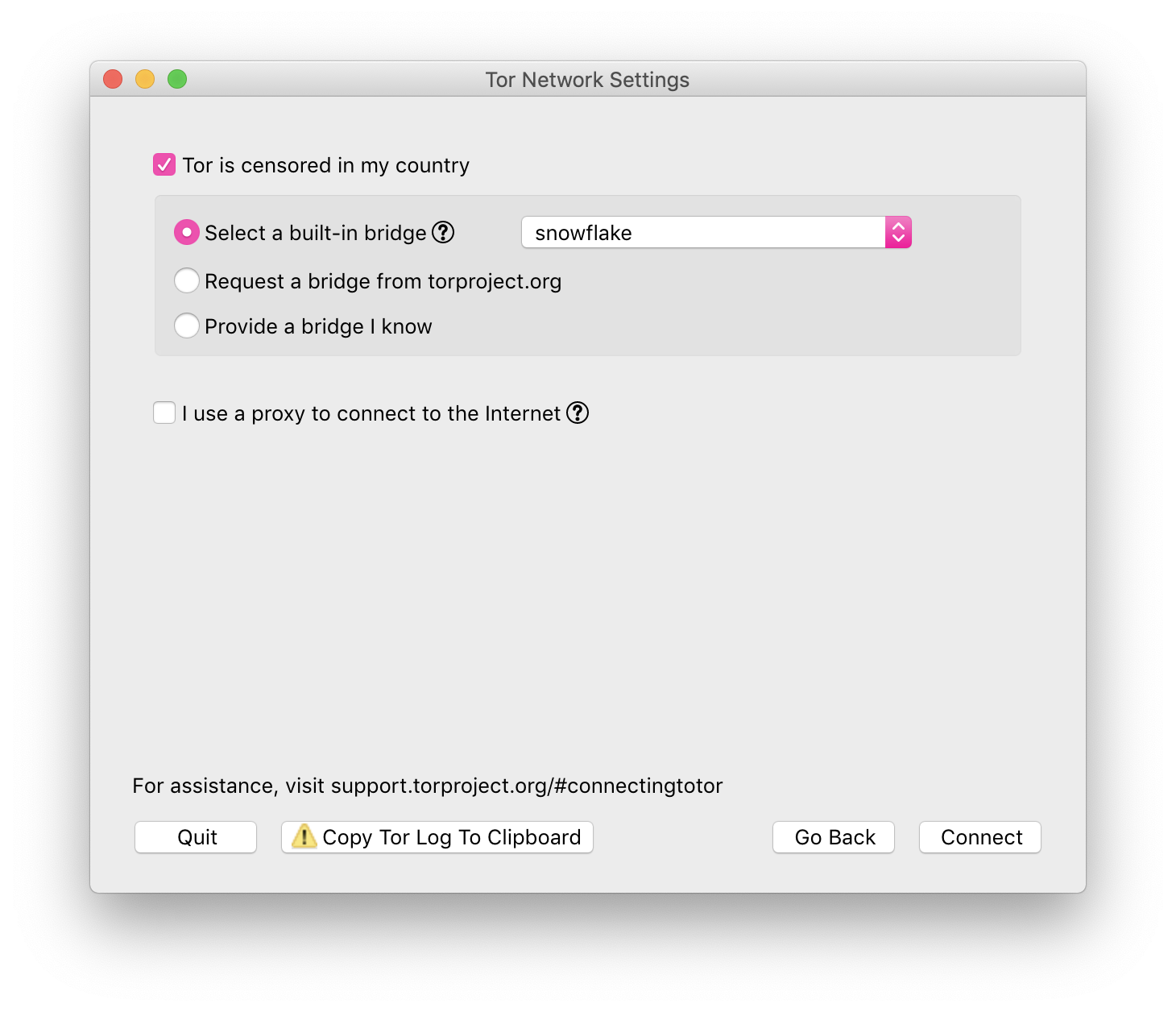
–jeroen
Share this:

Posted in Awareness, Power User, Privacy, Security | Leave a Comment »
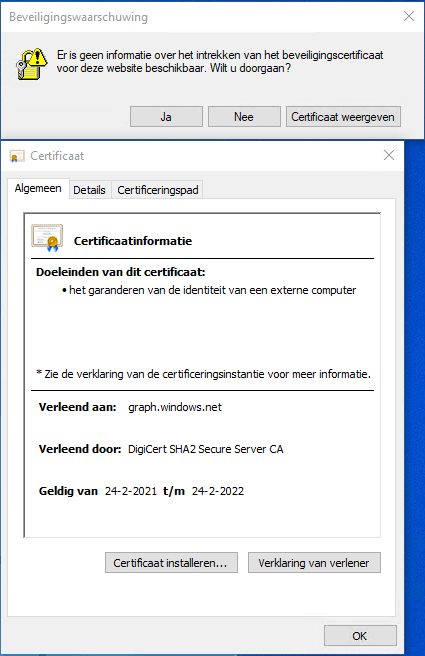
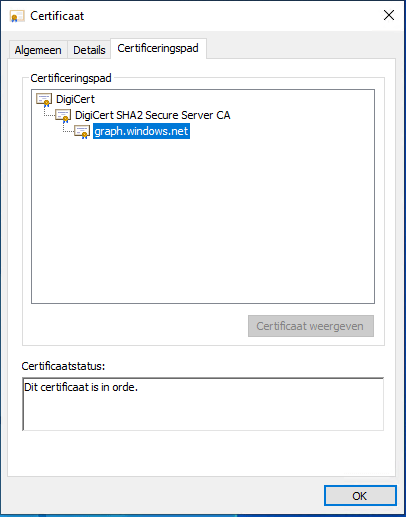
Not sure why: graph.windows.net is missing a security certificate retraction on some Windows machines?
Posted by jpluimers on 2022/02/28
Got this on two Dutch Windows machines, not sure why yet:
Missing information on security certificate retraction
Certificate path is OK
–jeroen
Share this:

Posted in Communications Development, Development, Encryption, Internet protocol suite, Power User, Security, TCP, TLS | Leave a Comment »
Bash functions to encode and decode the ‘Basic’ HTTP Authentication Scheme
Posted by jpluimers on 2022/02/24
IoT devices still often use the ‘Basic’ HTTP Authentication Scheme for authorisation, see [Wayback] RFC7617: The ‘Basic’ HTTP Authentication Scheme (RFC ) and [Wayback] RFC2617: HTTP Authentication: Basic and Digest Access Authentication (RFC ).
Often this authentication is used even over http instead of over https, for instance the Egardia/Woonveilig alarm devices I wrote about yesterday at Egardia/Woonveilig: some notes about logging on a local gateway to see more detailed information on the security system. This is contrary to guidance in:
- RFC7617:
   This scheme is not considered to be a secure method of user
   authentication unless used in conjunction with some external secure
   system such as TLS (Transport Layer Security, [RFC5246]), as the
   user-id and password are passed over the network as cleartext.
- RFC2617:
   "HTTP/1.0", includes the specification for a Basic Access
   Authentication scheme. This scheme is not considered to be a secure
   method of user authentication (unless used in conjunction with some
   external secure system such as SSL [5]), as the user name and
   password are passed over the network as cleartext.
Fiddling with those alarm devices, I wrote these two little bash functions (with a few notes) that work both on MacOS and in Linux:
# `base64 --decode` is platform neutral (as MacOS uses `-D` and Linux uses `-d`)
# `$1` is the encoded username:password
function decode_http_Basic_Authorization(){
  echo $1 | base64 --decode
  echo
}

# `base64` without parameters encodes
# `echo -n` does not output a new-line
# `$1` is the username; `$2` is the password
function encode_http_Basic_Authorization(){
  echo $1:$2 | base64
}
The first decodes the <credentials> from a Authorization: Basic <credentials> header into a username:password clean text followed by a newline.
The second one encodes a pair of username and password parameters into such a <credentials> string.
They are based on these initial posts that were not cross platform or explanatory:
- [Wayback] Decode HTTP Basic Access Authentication – Stack Pointer
- [Wayback] Create Authorization Basic Header | MJ’s Web Log
–jeroen
Share this:
Posted in *nix, *nix-tools, Apple, Authentication, bash, bash, Communications Development, Development, HTTP, Internet protocol suite, Linux, Mac OS X / OS X / MacOS, Power User, Scripting, Security, Software Development, TCP, Web Development | Leave a Comment »
Google Open Source Insights (hopefully by now more than just npm/golang/maven)
Posted by jpluimers on 2022/02/02
Interesting project at [Wayback] Open Source Insights
Open Source Insights is an experimental project by Google.
Hopefully by now it is supporting more than just npm/golang/maven and by the time it sunsets, other projects take over.
The introduction was some 9 months ago: [Wayback] Introducing the Open Source Insights Project | Google Open Source Blog
Via:
- [Archive.is] corbosman on Twitter: “At least in the JS/PHP world it’s already pretty common to add all kinds of dependency security checkers to your CI/CD pipeline. And there’s Github Code Scanning. But it’s interesting to visually see the often immense dependency chains.… “
- [Archive.is] annabelle on Twitter: “Finding OSS dependencies is messy, particularly when you start trying to figure out how you inherent a particular vulnerability. Today Google launched deps.dev, a way to visualize and find how you inherent dependencies, and what’s in them: … “
–jeroen
Share this:
Posted in Development, Go (golang), JavaScript/ECMAScript, Node.js, Power User, Scripting, Security, Software Development | Leave a Comment »
Hornbach has some very “special” limitations to “special characters” in passwords. I wonder why.
Posted by jpluimers on 2022/02/01
[Wayback] Jeroen Wiert Pluimers on Twitter: “”Too special” password character password woos at @HORNBACH_NL : [ Het wachtwoord moet minstens acht tekens lang zijn, en minstens een getal en een letter (a-zA-Z) bevatten. De volgende speciale tekens zijn toegestaan: !”#$%&'()*+,.:;?@_|} ] 1/”
I wonder what kind of parser they use, as these printable special ASCII characters are forbidden:
- \-/[\]^`{~
- space (0x20)
- tab (0x9)
- line feed (0xa)
- carriage return (0xb
- vertical tab (0xb)
- form feed (0xc)
Seems no JSON or SQL to me: there I would expect other limitations.
What would break if you use them in other fields or pass them in an HTML POST-request?
I mean: these passwords should be salted and hashed immediately when the HTML-POST request is received, so certainly they would not be stored somewhere or passed many layers into code, right?
Oh, in order to activate an account there, you need to accept some 40+ A4 sized pages of legal stuff. Brave Dutch judge that will put these all in favour of Hornbach.
- [Wayback] Herroepingsrecht bij HORNBACH (no PDF)
- [Wayback] Modelformulier voor herroeping PDF (1 page)
- [Wayback] Privacyverklaring HORNBACH Bouwmarkt (Nederland) B.V. [Wayback] PDF (23 pages)
- [Wayback] Reglement cameratoezicht (only as PDF): 3 pages
–jeroen
Share this:
Posted in Development, LifeHacker, Power User, Security, Software Development, Web Development | Leave a Comment »
Some links on using and updating Let’s Encrypt certificates for internal servers
Posted by jpluimers on 2022/02/01
Sometimes it is easier to have current and public CA signed TLS certificates for internal servers than to setup and maintain an internal CA and register it on all affected browsers (including mobile phones).
One of my reasons to investigate this is that Chrome refuses to save credentials on servers that have no verifiable TLS certificate, see my post Some links on Chrome not prompting to save passwords (when Firefox and Safari do) about a week ago.
Below are some links for my link archive that hopefully will allow me to do this with Let’s Encrypt (msot via [Wayback/Archive] letsencrypt for internal servers – Google Search):
Share this:
Posted in Cloud, Cloudflare, Development, Encryption, ESXi6, ESXi6.5, ESXi6.7, ESXi7, Fritz!, Fritz!Box, Fritz!WLAN, Infrastructure, Internet, Let's Encrypt (letsencrypt/certbot), Power User, Security, Software Development, Virtualization, VMware, VMware ESXi, Web Development | Leave a Comment »
Some links on Chrome not prompting to save passwords (when Firefox and Safari do)
Posted by jpluimers on 2022/01/20
For quite some time now, Chrome (think years) refuses to prompt for saving passwords whereas Firefox and Safari do prompt and save them, even for site types that it used to save passwords for in the past.
It has been annoying enough for too long now that I tried to do better than the Google searches I used back when I saw this happen first.
Below are some links based on new searches (starting with [Wayback] adding a password in chrome settings – Google Search); hopefully I can try them after I made a list of sites that Chrome does not show the password save prompt for.
Solutions I tried that failed (but maybe useful for others):
- [Wayback] windows 7 – Chrome not asking to remember passwords – Super User: restart your browser
- First answer of [Wayback] How can I manually add a password to Chrome password manager? – Super User : check if “Autofill” a.k.a. “Offer to save passwords” is enabled and the site is not on the “Never Saved” list of sites.
- Second answer of [Wayback] How can I manually add a password to Chrome password manager? – Super User Check if there is a password
inputfield being marked withtype="password", and if not add it.
Solutions still to try:
Share this:
Posted in Chrome, Chrome, Communications Development, Development, Encryption, ESXi6, ESXi6.5, ESXi6.7, Firefox, Fritz!, Fritz!Box, Fritz!WLAN, Google, https, HTTPS/TLS security, Internet, Internet protocol suite, Let's Encrypt (letsencrypt/certbot), Power User, routers, Safari, Security, TCP, TLS, Virtualization, VMware, VMware ESXi, Web Browsers, Web Development | Leave a Comment »
Security questions are evil because of social media “games” phishing for them
Posted by jpluimers on 2022/01/11
Via [Archive.is] Jilles Groenendijk on Twitter: “what @AppSecBloke said… “, from:
- [Archive.is] Jeroen Wiert Pluimers on Twitter: “@AltTextCrew please OCR CC @MintheG @BiancaPrins… “
- [Archive.is] V_To_The_K on Twitter: “ESPECIALLY ones that say the Month and Day/Year you were born means you are “X” person/character/animal… “
- [Archive.is] Mike Thompson on Twitter: “Thanks to @robmay70 for this, but it remains an ever present issue, especially on the likes of Facebook and Instagram.… “
I don’t normally do this but here goes:
First job STOP Current job SENDING Dream Job YOUR Favorite food POTENTIAL Favorite dog PASSWORDS Favorite footwear OR Favorite Chocolate bar MEMORABLE Favorite Ice Cream DATA Your Vehicle color TO Favorite Holiday PEOPLE Night owl or earlybird WHO Favorite day of the week COLLECT Tattoos THIS Favourite colour INFORMATION Do you like vegetables FOR Do you wear glasses SOCIAL Favourite season ENGINEERING
Share this:

Posted in Facebook, Instagram, LifeHacker, Pen Testing, Power User, Security, SocialMedia | Leave a Comment »
 The Wiert Corner - irregular stream of stuff