The Wiert Corner – irregular stream of stuff

Jeroen W. Pluimers on .NET, C#, Delphi, databases, and personal interests

  • My badges

  • Twitter Updates

  • My Flickr Stream

  • Pages

  • All categories

  • Enter your email address to subscribe to this blog and receive notifications of new posts by email.

    Join 1,854 other subscribers

Archive for the ‘Security’ Category

Ik ben wat verward over de @WoonVeilig site. https://t.co/ui8agTkgM9 heeft het bijvoorbeeld over GATE-03 en GATE-02, maar https://t.co/QswkrlsuZY over ALARM-03 en SMARTHOME-01. Ook heeft SMARTHOME-01 meer accessoires dan ALARM-03. Werken die extra (zoals CO-25) niet op ALARM-03?”

Posted by jpluimers on 2020/11/02

[WayBack] “Ik ben wat verward over de @WoonVeilig site. www.woonveilig.nl/juiste-producten- heeft het bijvoorbeeld over GATE-03 en GATE-02, maar www.woonveilig.nl/klantenservice/handleidingen over ALARM-03 en SMARTHOME-01. Ook heeft SMARTHOME-01 meer accessoires dan ALARM-03. Werken die extra (zoals CO-25) niet op ALARM-03?”

Wat linkjes:

Tweakers.net:

Concurrentie: SmartAlarm; ook met beperking IP-only.

Meer domotica dan concurrentie: HomeWizard.

Over het hoe en waarom:

–jeroen

Read the rest of this entry »

Posted in LifeHacker, Power User, Security | Leave a Comment »

Facebook ist in Bezug auf Kundenzufriedenheit und Vertrauen in Umfragen zieml…

Posted by jpluimers on 2020/10/16

Nice thread as it talks a bit about how keep your own stuff secure with companies doing MitM, or have VPN infrastrcuture.

[WayBack] Facebook ist in Bezug auf Kundenzufriedenheit und Vertrauen in Umfragen zieml…

Most larger TLS based web-sites now have HSTS so detect MitM.

Having a proxy locally helps checking the certificates.

Corporate laptops usually has device management. If they use MitM, their root certificates are usually put back automatically. But not all software uses the same root certificate store (:

In the past, I have used [WayBack] cntlm, or VPN (routing only corporate traffic over VPN).

There are corporate VPN variants, which take over the complete routing table or even run arbitrary scripts as root on your box on connect in order to do “endpoint validation”. And then there is OpenVPN, which routes the traffic that the company shall see to the company and lets you use normal connectivity for the rest.

You want openvpn, in all cases.

Another trick I have used is to VPN/SSH out of a corporate box and route some of the traffic over it.

Finally, for some larger corporate VPN software, there is an open source replacement that has better configuration options: OpenConnect supports AnyConnect, Juniper and GlobalProtect.

Related: picture on the right via [WayBack] Torsten Kleinz – Google+

–jeroen

Posted in Cntlm, Encryption, HTTPS/TLS security, Power User, Security, Windows, Windows-Http-Proxy | Leave a Comment »

Supermicro Bios Update – YouTube

Posted by jpluimers on 2020/09/14

I needed to get myself an OOB license for the BIOS update over the IPMI console or SUM (Supermicro Update Manager). An IPMI update can be done without an OOB license from the IPMI console, but the BIOS requires a license.

Links that initially helped me with that to get a feel for what I needed:

I thought that likely I need to purchase a key for it:

Obtain the license code from your IPMI BMC MAC address

But then I found out the below links on reverse engineering.

From those links, I checked both the Perl and Linux OpenSSL versions. Only the Perl version works on MacOS.

Then I fiddled with the bash version: unlike the OpenSSL version above, this one printed output. It wrongly printed the last groups of hex digits instead of the first groups of hex digits that the Perl script prints.

Here is the corrected bash script printing the first groups of hex digits (on my systems, I have an alias supermicro_hash_IPMI_BMC_MAC_address_to_get_OOB_license_for_BIOS_update for it):

#!/bin/bash
function hash_mac {
  mac="$1"
  key="8544e3b47eca58f9583043f8"
  sub="\x"
  #convert mac to hex
  hexmac="\x${mac//:/$sub}"
  #create hash
  code=$(printf "$hexmac" | openssl dgst -sha1 -mac HMAC -macopt hexkey:"$key")
  #DEBUG
  echo "$mac"
  echo "$hexmac"
  echo "$code"

  echo "${code:0:4}-${code:4:4}-${code:8:4}-${code:12:4}-${code:16:4}-${code:20:4}"
}

Steps

Reverse engineering links

  • [WayBack] The better way to update Supermicro BIOS is via IPMI – VirtualLifestyle.nl

    Another way to update the BIOS via the Supermicro IPMI for free is simply calculating the license key yourself as described here: https://peterkleissner.com/2018/05/27/reverse-engineering-supermicro-ipmi/ [WayBack].

    • [WayBack] Reverse Engineering Supermicro IPMI – peterkleissner.com

      Algorithm:

      MAC-SHA1-96(INPUT: MAC address of BMC, SECRET KEY: 85 44 E3 B4 7E CA 58 F9 58 30 43 F8)

      Update 1/14/2019: The Twitter user @astraleureka posted this code perl code which is generating the license key:

      #!/usr/bin/perl
      use strict;
      use Digest::HMAC_SHA1 'hmac_sha1';
      my $key  = "\x85\x44\xe3\xb4\x7e\xca\x58\xf9\x58\x30\x43\xf8";
      my $mac  = shift || die 'args: mac-addr (i.e. 00:25:90:cd:26:da)';
      my $data = join '', map { chr hex $_ } split ':', $mac;
      my $raw  = hmac_sha1($data, $key);
      printf "%02lX%02lX-%02lX%02lX-%02lX%02lX-%02lX%02lX-%02lX%02lX-%02lX%02lX\n", (map { ord $_ } split '', $raw);

      Update 3/27/2019: There is also Linux shell version that uses openssl:

      echo -n 'bmc-mac' | xxd -r -p | openssl dgst -sha1 -mac HMAC -macopt hexkey:8544E3B47ECA58F9583043F8 | awk '{print $2}' | cut -c 1-24
    • [WayBack] Modular conversion, encoding and encryption online — Cryptii

      Web app offering modular conversion, encoding and encryption online. Translations are done in the browser without any server interaction. This is an Open Source project, code licensed MIT.

      Steps:

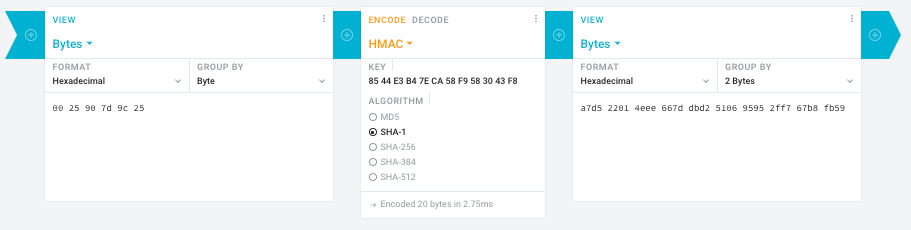
      1. In the left pane, select the “View” drop-down to be “Bytes”, then paste the HEX bytes of your IPMI MAC address there (like 00 25 90 7d 9c 25)
      2. In the middle pane, select the drop-down to become “HMAC” followed by the radio-group to be “SHA1“, then paste these bytes into the “Key” field: 85 44 E3 B4 7E CA 58 F9 58 30 43 F8
      3. In the right pane, select the drop-down to become “Bytes”, then the “Group by” to become “2 bytes”, which will you give the output (where the bold part is the license key: 6 groups of 2 bytes): a7d5 2201 4eee 667d dbd2 5106 9595 2ff7 67b8 fb59

      Result:

    • Michael Stapelberg’s private website, containing articles about computers and programming, mostly focused on Linux.[WayBack] Securing SuperMicro’s IPMI with OpenVPN
    • [WayBack] GitHub – ReFirmLabs/binwalk: Firmware Analysis Tool
  • [WayBack] The better way to update Supermicro BIOS is via IPMI – VirtualLifestyle.nl

    Ahh…..a few corrections :-P

    #!/bin/bash
    function hash_mac {
      mac="$1"
      key="8544e3b47eca58f9583043f8"
      sub="\x"
      #convert mac to hex
      hexmac="\x${mac//:/$sub}"
      #create hash
      code=$(printf "$hexmac" | openssl dgst -sha1 -mac HMAC -macopt hexkey:"$key")
      #DEBUG
      echo "$mac"
      echo "$hexmac"
      echo "$code"
      echo "${code:9:4} ${code:13:4} ${code:17:4} ${code:21:4} ${code:25:4} ${code:29:4}"
    }
    #hex output with input
    hash_mac "$1"
    
    #Look out for the quotes, they might get changed by different encoding
  • [WayBack] The better way to update Supermicro BIOS is via IPMI – VirtualLifestyle.nl

    Thanks Peter. For anyone interested, here’s a bash script that takes the MAC as the only argument and outputs the activation key:

    #!/bin/bash
    function hash_mac {
      mac="$1"
      key="8544e3b47eca58f9583043f8"
      sub="\x"
      #convert mac to hex
      hexmac="\x${mac//:/$sub}"
      #create hash
      code=$(printf "$hexmac" | openssl dgst -sha1 -mac HMAC -macopt hexkey:"$key")
      ## DEBUG
      echo "$mac"
      echo "$hexmac"
      echo "$code"
      echo "${code:9:4} ${code:13:4} ${code:17:4} ${code:21:4} ${code:25:4} ${code:29:4}"
    }
    ## hex output with input
    hash_mac "$1"


–jeroen

Read the rest of this entry »

Posted in Development, Encoding, Hardware, Hashing, HMAC, Mainboards, OpenSSL, Power User, Security, SHA, SHA-1, Software Development, SuperMicro, X10SRH-CF | Leave a Comment »

SSL certificates – not optional | Open Query Pty Ltd

Posted by jpluimers on 2020/09/04

Some tips on using the certbot for Let’s Encrypt and the support for wildcard certificates through DNS updates: [WayBack] SSL certificates – not optional | Open Query Pty Ltd

–jeroen

Posted in Encryption, HTTPS/TLS security, Let's Encrypt (letsencrypt/certbot), Power User, Security | Leave a Comment »

Some banking apps are not so privacy friendly

Posted by jpluimers on 2020/09/01

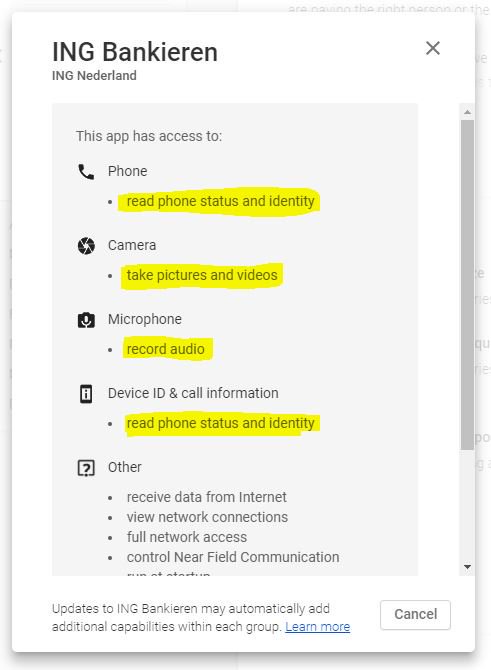
Some baking apps want a lot of permissions, including privacy sensitive ones.

Maybe they should split themselves in a small, non-intrusive app that allows payment confirmation, and fatter (hopefully less intrusive than now) app for account management.

For now, I try to avoid these apps as they are single points of failures.

ING had a great TAN code system on paper. It hardly had any side-channel attack vectors, and by putting some copies in geographically distinct locations, you had good and safe back-ups too.

It looks like the successor is a single point of failure: only one scanner device per account holder is possible.

Let’s see what the future will bring.

Related:


–jeroen

Posted in LifeHacker, Power User, Security | Leave a Comment »

DIY electronic RFID Door Lock with Battery Backup – CodeProject

Posted by jpluimers on 2020/08/26

On my list: check if Mifare Desfire cards are still secure enough for something like a [WayBackDIY electronic RFID Door Lock with Battery Backup – CodeProject.

Via: [WayBack] Lots of interesting info on RFID use. https://www.codeproject.com/Articles/1096861/DIY-electronic-RFID-Door-Lock-with-Battery-Backup – Lars Fosdal – Google+

–jeroen

Posted in Development, Hardware Development, LifeHacker, Power User, Security | Leave a Comment »

Password hashing on client side is insecure · Issue #44 · meteor/meteor-feature-requests · GitHub and some bcrypt notes

Posted by jpluimers on 2020/08/26

Some interesting bits from [WayBack] Password hashing on client side is insecure · Issue #44 · meteor/meteor-feature-requests · GitHub by tysonclugg:

Stop with the client side hashing – it’s security theatrics. Submit plain text passwords over TLS. The focus should be on having TLS enabled by default, and making sure the server has a sufficient amount of cryptographic work-factor during authentication to render brute-force attacks ineffective (eg: use server-side bcrypt).

Honestly, javascript password shenanigans in the browser is as dumb as backing up HOTP/TOTP secrets from your 2FA app in case you lose your phone. Hint: that changes “something you have” into “something you know”, authenticating with two things you know is single factor authentication. And yet, a group of “smart people” created an app that allows just that. Don’t be another one of those “smart people”.

If you’re still unsure about ditching client-side password hashing, have a read on what others have said:

  1. https://www.nccgroup.trust/us/about-us/newsroom-and-events/blog/2011/august/javascript-cryptography-considered-harmful/
  2. http://thisinterestsme.com/client-side-hashing-secure/
  3. https://security.stackexchange.com/questions/53594/why-is-client-side-hashing-of-a-password-so-uncommon
  4. https://cybergibbons.com/security-2/stop-doing-client-side-password-hashing/
  5. https://www.reddit.com/r/crypto/comments/375lor/is_client_side_hashing_of_passwords_viable_to/
    5.1. One of the comments specifically mentions SRP, but goes on to say:

You’ll probably be interested in the Secure Remote Password protocol (SRP). It uses a variant of the Diffie-Hellman key negotiation protocol to simultaneously authenticate the client with the server, the server with the client, and establish a session key for sending secrets between the client and server. It’s not very useful with web applications, because you still have to trust the encrypted channel to deliver the right version of the JavaScript to manage the communication. It could be useful for other client/server applications, where the client application can be verified and isn’t retransmitted every session.

If you’re still not convinced after reading all of the above, I’d suggest you contact a notable cryptographer for further advice. Prof. David A. Wagner might be a good choice.

Meanwhile, client side password hashing hinders upgrades to the password hashing scheme, and nothing has been done.

Hindering, not preventing. Of course you can send many hashed variants of the password from the client to the server to account for whichever legacy hash exists in the DB, but in my that weakens the system by allowing many hashes to be submitted simultaneously (or in short order) with no work factor. The result is that brute forcing an account becomes much easier.

and in [WayBack] Password hashing on client side is insecure · Issue #4363 · meteor/meteor · GitHub:

On compatibility (the reason I visited the Meteor password hashing code in the first place), upgrading to new hashing algorithms (which MUST be done from time to time) is much easier if the plaintext password is passed to the server, and transparent to the client as no new API is required to handle the case of upgrading from an old hash to a new hash. The generally accepted means of storing hashes is “$” such as “pbkdf2_sha256$15000$ZLpQISRxzhY0$fxrQcKxhkG//nHg10NrkulhvWkAqWbWeQg4QeD7c59E=
This is a PBKDF2 hash for the password “pass” which includes the number of rounds, the salt and the resultant hash ready to be verified and upgraded if required, for example by increasing the number of rounds from 150000 to 250000, or ready to be swapped to a different algorithm altogether (eg: pbkdf2_sha512).

NIST in 2017 on key derivation functions:

In June 2017, NIST issued a new revision of their digital authentication guidelines, NIST SP 800-63B-3,[12]:5.1.1.1 stating that: “Verifiers SHALL store memorized secrets [i.e. passwords] in a form that is resistant to offline attacks. Memorized secrets SHALL be salted and hashed using a suitable one-way key derivation function. Key derivation functions take a password, a salt, and a cost factor as inputs then generate a password hash. Their purpose is to make each password guessing trial by an attacker who has obtained a password hash file expensive and therefore the cost of a guessing attack high or prohibitive.” and that “The salt SHALL be at least 32 bits in length and be chosen arbitrarily so as to minimize salt value collisions among stored hashes.”

It looks like Argon2 is better than bcrypt and PBKDF2_SHA512. The 2017 hashing speed table:

sha1: 68.000.000.000 hash/s
sha256: 23.000.000.000 hash/s
sha512: 8.600.000.000 hash/s
sha3: 6.500.000.000 hash/s
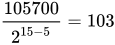
bcrypt(5): 105.700 hash/s(for work factor 15 it’s {\displaystyle {\frac {105700}{2^{15-5}}}=103} hash/sec)
sha256crypt: 3.100.000 hash/s
And with stretching:
pbkdf2-sha1(1000 r): 26.000.000 hash/s
pbkdf2-sha256: 9.400.000 hash/s
pbkdf2-sha512: 3.400.000 hash/s

Also, one commenter mentioned that using future telling skills we expect that hash values improve 55% annually, which is exciting and scary at once. —grin 13:51, 10 October 2017 (UTC)

The cost is confirmed at [WayBack] bcrypt cost 10/12/14 brute force time? – Information Security Stack Exchange, so in 2020 it should be somewhere around the 12-14 range.

Moore’s law does not fully apply any more for single core performance, but there are other potential optimisations, and it is unclear how future hash attacks will improve, so it is better to use a mini-bench mark to calculate a good cost, see:

Delphi implementations:

Via:

Further reading:

–jeroen

Posted in Development, Hashing, Power User, Security, Software Development | Leave a Comment »

Roderick Gadellaa auf Twitter: “@ingnl Ik begrijp dat jullie gaan stoppen met TAN codes. Juich ik toe, 2FA met sms is behoorlijk lek. Maar nu moet ik jullie app gaan gebruiken. Ik werp 1 blik op de permissions die jullie app wil en denk: Neen.…”

Posted by jpluimers on 2020/08/12

[WayBackRoderick Gadellaa auf Twitter: “@ingnl Ik begrijp dat jullie gaan stoppen met TAN codes. Juich ik toe, 2FA met sms is behoorlijk lek. Maar nu moet ik jullie app gaan gebruiken. Ik werp 1 blik op de permissions die jullie app wil en denk: Neen.…”

Reminder to self: check what permissions are needed now.

–jeroen

Read the rest of this entry »

Posted in Development, Power User, Security, Software Development | Leave a Comment »

On my research list: finding out how to prevent FortiClient to route all traffic over VPN

Posted by jpluimers on 2020/08/10

Links that will likely help me:

–jeroen

Read the rest of this entry »

Posted in FortiGate/FortiClient, Hardware, Internet, Network-and-equipment, Power User, routers, Security, VPN | Leave a Comment »

Android passwords: store as transient as possible using arrays in stead of strings

Posted by jpluimers on 2020/08/06

Sometimes you cannot avoid handling passwords in your application. When you do,

  • keep them around as short as possible
  • store them in data types that are not garbage collected
  • wipe the storage as soon as you are done

In practice, this usually comes down to storing them as arrays (character or byte arrays), not strings.

This holds for many other platforms outside Java as well: strings are usually managed in one way or the other, so they cannot be wiped

References:

For actual storage of passwords, you always have the risk of retrieval: when a “bad guy” gets physical access to a device, it is basically hosed.

A KeyStore can only do so much against it: if your APK can be downloaded, it can be reverse-engineered revealing the exact steps how the store is accessed, reproducing the steps needed to hack into the underlying protected data/functionality.

The keystore can be forgetful…

You’ve just moved in to a new house and have been given the master key for the front door. You only have one of these so you know you need to keep it safe. Your really paranoid so you hire an armed guard, whose sole job is to protect this key, in fact, this is all he has been trained to do and has a catchy slogan of “need to protect a key, its what I was born to do!”. You install an extra lock on your front door as you feel the bodyguard isn’t enough, this is a rough area anyway and who’s going to make sure no-ones about to break in and steal all your crap. You return to your key guard only to be informed he has thrown the key away. You shout and scream at him but he just blankly says “I don’t have it anymore, I didn’t think it was important”. You can’t contain your anger “What the hell, your a jerk! You had one thing to do and you failed, this causes me a lot of problems, why didn’t you tell me you might do this?! What do I do now?!”

[WayBack] Android Security: The Forgetful Keystore – SystemDotRun – Dorian Cussen’s Super Blog

–jeroen

Posted in Android, Development, Java, Java Platform, Mobile Development, Power User, Security, Software Development | Leave a Comment »