Archive for the ‘Virtualization’ Category
Posted by jpluimers on 2023/12/28
This is a sort of follow-up on ESXi: listing virtual machines with their IP addresses where we ended with this:
I modified the above script to become this:
#!/bin/sh
vmids=`vim-cmd vmsvc/getallvms | sed -n -E -e "s/^([[:digit:]]+)s+((S.+S)?)s+([S+])s+(.+.vmx)s+(S+)s+(vmx-[[:digit:]]+)s*?((S.+)?)$/1/p"`
for vmid in ${vmids} ; do
    # powerState values:
    #   Powered off
    #   Powered on
    #   Suspended
    powerState=`vim-cmd vmsvc/power.getstate ${vmid} | sed '1d'`
    name=`vim-cmd vmsvc/get.config ${vmid} | sed -n -E -e '/(vim.vm.ConfigInfo) {/,/files = (vim.vm.FileInfo) {/ s/^ +name = "(.*)",.*?/1/p'`
    vmPathName=`vim-cmd vmsvc/get.config ${vmid} | sed -n -E -e '/files = (vim.vm.FileInfo) {/,/tools = (vim.vm.ToolsConfigInfo) {/ s/^ +vmPathName = "(.*)",.*?/1/p'`
    # For now, I choose to use only the IPv4 main address from ipAddress, which is in between (vim.vm.GuestInfo) { and net = (vim.vm.GuestInfo.NicInfo) [.
    ipAddress=`vim-cmd vmsvc/get.guest ${vmid} | sed -n -E -e '/(vim.vm.GuestInfo) {/,/net = (vim.vm.GuestInfo.NicInfo) [/ s/^ +ipAddress = "(.*)",.*?/1/p'`
    printf "VM with id %3s has power state %-11s and IPv4=%-15s (name = ${name}; vmPathName = ${vmPathName}).n" "${vmid}" "${powerState}" "${ipAddress}"
done
Now the script grew even larger in to vim-cmd-list-all-VMs-with-IPv4-MAC-uuid.sh:
Read the rest of this entry »
Posted in *nix, *nix-tools, ash/dash, ash/dash development, Development, ESXi6, ESXi6.5, ESXi6.7, Power User, Scripting, Software Development, Virtualization, VMware, VMware ESXi | Leave a Comment »
Posted by jpluimers on 2023/11/10
A while ago, Jilles found out why not to use VirtualBox: [Wayback/Archive] Jilles🏳️🌈 on Twitter: “@jpluimers Ik wil op basis van wat de Arch community schreeuwt; “Virtualbox is stom, als je geen hyper-v gebruikt vraag je om problemen”, HYPER-V maar gaan proberen.” / Twitter
The biggest problem is that VirtualBox seems to be developed ant tested for the happy path, not the failing path.
Which means that when you use it for less common scenarios, it will often fail in mysterious ways.
Back in Running ArchiveTeam Warrior version 3.2 on ESXi, I already mentioned this:
Totally agreeing with Kristian Kohntopp, I do not understand why people use VirtualBox at all: I just run in too much issues like [Archive.is] Kristian Köhntopp on Twitter: “Hint: Wenn die Installation einer Linux-Distro in Virtualbox mit wechselnden, unbekannten Fehlern scheitert, hilft es, stattdessen einmal VMware Workstation oder kvm zu probieren. In meinem Fall hat es dann *jedes* *einzelne* *Mal* mit *demselben* Iso geklappt.”.
Read the rest of this entry »
Posted in *nix, *nix-tools, ArchiveTeamWarrior, Hyper-V, InternetArchive, Linux, Power User, VirtualBox, Virtualization, VMware, WayBack machine, Windows, Windows 10, Windows 11 | 1 Comment »
Posted by jpluimers on 2023/04/26
A less clickbaity title than most articles today as the below only applies to the VMware hypervisors running on MacOS and Windows.
The last Pwn2Own Zero Day Initiative revealed two major issues that allow a virtual machine to either execute code or read hypervisor memory on the VMware Workstation/Player/Fusion host:
- [Wayback/Archive] NVD – CVE-2023-20869
VMware Workstation (17.x) and VMware Fusion (13.x) contain a stack-based buffer-overflow vulnerability that exists in the functionality for sharing host Bluetooth devices with the virtual machine.
- [Wayback/Archive] NVD – CVE-2023-20870
VMware Workstation and Fusion contain an out-of-bounds read vulnerability that exists in the functionality for sharing host Bluetooth devices with the virtual machine.
Both issues have been fixed now, so be sure to deploy the fixes or, if you can’t, apply the workarounds.
Read the rest of this entry »
Posted in Fusion, Power User, Security, Virtualization, VMware, VMware Player, VMware Workstation | Leave a Comment »
Posted by jpluimers on 2023/02/04
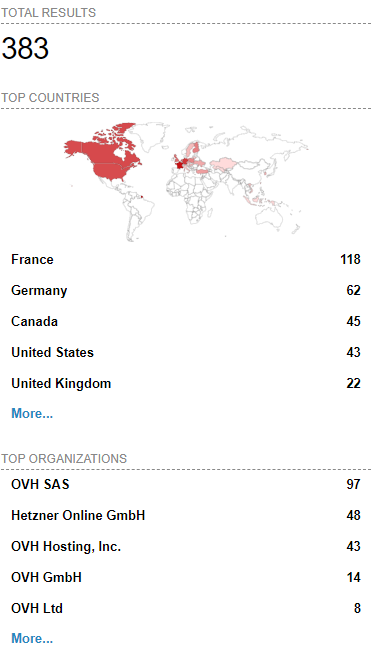 [Wayback/Archive] Massive ESXiArgs ransomware attack targets VMware ESXi servers worldwide
Admins, hosting providers, and the French Computer Emergency Response Team (CERT-FR) warn that attackers actively target VMware ESXi servers unpatched against a two-year-old remote code execution vulnerability to deploy ransomware.
Tracked as
CVE-2021-21974, the security flaw is caused by a heap overflow issue in the OpenSLP service that can be exploited by unauthenticated threat actors in low-complexity attacks.
“As current investigations, these attack campaigns appear to be exploiting the vulnerability CVE-2021-21974, for which a patch has been available since 23 February 2021,” CERT-FR said.
“The systems currently targeted would be ESXi hypervisors in version 6.x and prior to 6.7.”
To block incoming attacks, admins have to disable the vulnerable Service Location Protocol (SLP) service on ESXi hypervisors that haven’t yet been updated.
CERT-FR strongly recommends applying the patch as soon as possible but adds that systems left unpatched should also be scanned to look for signs of compromise.
CVE-2021-21974 affects the following systems:
- ESXi versions 7.x prior to ESXi70U1c-17325551
- ESXi versions 6.7.x prior to ESXi670-202102401-SG
- ESXi versions 6.5.x prior to ESXi650-202102101-SG
[Wayback/Archive] Esxi Ransomware Help and Support Topic (ESXiArgs / .args extension) – Page 2 – Ransomware Help & Tech Support (there are now 4 pages, most victims OVH, likely many more pages to follow)
[Wayback/Archive] How to Disable/Enable the SLP Service on VMware ESXi (76372)
[Wayback/Archive] html:”We hacked your company successfully” title:”How to Restore Your Files” – Shodan Search which resulted in the above image (I tweeted it at [Wayback/Archive] Jeroen Wiert Pluimers @wiert@mastodon.social on Twitter: “@vmiss33”)
Commands used in [Wayback/Archive] Jeroen Wiert Pluimers @wiert@mastodon.social on Twitter: “@vmiss33 I did forget to disable SLP on a patched system, but doing that is easy as per kb.vmware.com/s/article/76372“:
/etc/init.d/slpd status
/etc/init.d/slpd stop
esxcli system slp stats get
esxcli network firewall ruleset set -r CIMSLP -e 0
chkconfig slpd off
chkconfig --list | grep slpd
More links to follow, but I’m away from keyboard for most of the day.
–jeroen
Read the rest of this entry »
Posted in ESXi6, ESXi6.5, ESXi6.7, Power User, Ransomware, Security, Virtualization, VMware, VMware ESXi | Leave a Comment »
Posted by jpluimers on 2022/12/30
For my memory to create a 40 GiB (gibibytes, i.e. sizes in powers of 2 bytes):
# vmkfstools --createvirtualdisk 40G --diskformat eagerzeroedthick ./X9SRI-3F-W10P-EN-MEDIA-DATA.vmdk
Creating disk './X9SRI-3F-W10P-EN-MEDIA-DATA.vmdk' and zeroing it out...
Create: 100% done.
People tend to abbreviate it into what for me reads gibberish:
# vmkfstools -c 40G -d eagerzeroedthick ./X9SRI-3F-W10P-EN-MEDIA-DATA.vmdk
Creating disk './X9SRI-3F-W10P-EN-MEDIA-DATA.vmdk' and zeroing it out...
Create: 100% done.
It will create a descriptor file and flat data file, of which the last is exactly 40 gibibytes size (as 42949672960 / (1024 * 1024 * 1024) == 40):
# ls -l X9SRI-3F-W10P-EN-MEDIA-DATA*.vmdk
-rw-------    1 root     root     42949672960 Nov 16 16:54 X9SRI-3F-W10P-EN-MEDIA-DATA-flat.vmdk
-rw-------    1 root     root           471 Nov 16 16:54 X9SRI-3F-W10P-EN-MEDIA-DATA.vmdk
–jeroen
Posted in ESXi6, ESXi6.5, ESXi6.7, Power User, Virtualization, VMware, VMware ESXi | Leave a Comment »
Posted by jpluimers on 2022/07/01
Few articles exist on running x86 VMs on Apple M1 architecture.
This is the best I found, and clearly states that QEMU based UTM is the way to go, but notably lacks 3D support: [Wayback/Archive.is] Apple Silicon M1: How to run x86 and ARM Virtual Machines on it? | by Dmitry Yarygin | Mar, 2021 | Medium
Without VMs, but running Windows x86_64 code is already possible using Windows 10 for ARM via Parallels: [Wayback] Windows 10 on M1 Macs: What you can do (virtualization, sorta) and can’t (Boot Camp) | Macworld.
VMware Fusion is not going to support x86_64 virtualisation anytime soon as per [Wayback/Archive.is] Fusion on Apple Silicon: Progress Update – VMware Fusion Blog – VMware Blogs
…
What about x86 emulation?
We get asked regularly about running x86 VMs on M1 Macs. It makes total sense… If Apple can emulate x86 with Rosetta 2, surely VMware can do something too, right?
Well, the short answer is that there isn’t exactly much business value relative to the engineering effort that is required, at least for the time being. For now, we’re laser focused on making Arm Linux VMs on Apple silicon a delight to use.
So, to be a bit blunt, running x86 operating systems on Apple silicon is not something we are planning to deliver with this project. Installing Windows or Linux from an x86 ISO, for example, will not work.
…
More on UTM, which is open source:
- Downloads:
- Github:
- [Wayback/Archive.is] utmapp/UTM: Virtual machines for iOS
- [Wayback/Archive.is] UTM/README.md at master · utmapp/UTM
UTM is a full featured system emulator and virtual machine host for iOS and macOS. It is based off of QEMU. In short, it allows you to run Windows, Linux, and more on your Mac, iPhone, and iPad. More information at https://getutm.app/ and https://mac.getutm.app/
…
Features
- Full system emulation (MMU, devices, etc) using QEMU
- 30+ processors supported including x86_64, ARM64, and RISC-V
- VGA graphics mode using SPICE and QXL
- Text terminal mode
- USB devices
- JIT based acceleration using QEMU TCG
- Frontend designed from scratch for macOS 11 and iOS 11+ using the latest and greatest APIs
- Create, manage, run VMs directly from your device
…
- [Wayback/Archive.is] Home · utmapp/UTM Wiki
Now hopefully someone posts a Wiki of running x86_64 Windows on Apple M1 (:
This is a small start that it can be done [Wayback/Archive.is] Has anyone tried running Delphi on Windows ARM? – Delphi IDE and APIs – Delphi-PRAXiS [en]
It works well. I’ve managed to build and run my VCL and FMX projects on Android, iOS, Windows and Mac without any problems.
Note that both Windows ARM and the way it runs Delphi are still in preview so tread carefully!
Can you confirm it cannot only build projects but also debug them?
I can debug Windows and Android no problem. I’m having issues debugging iOS as it’s stopping in the IDE but showing the CPU rather than code views. I believe this might be a badly built component I need to re-install rather than an issue with the environment but can’t confirm either way at the moment.
…
An update on the debugging issues on iOS – it’s all working now. My VM just needed a restart and I can debug without problems now.
--jeroen
Posted in Apple, M1 Mac, Mac, Mac OS X / OS X / MacOS, Power User, Qemu, UTM, Virtualization, Windows, Windows 10 | Leave a Comment »
Posted by jpluimers on 2022/05/27
Posted in Chrome, Configuration Management, Development, DevOps, Firefox, History, IaC - Infrastructure as Code, Infocom and Z-machine, Infrastructure, KVM Kernel-based Virtual Machine, LSI/3ware, Open Source, PDP-11, Power User, PowerShell, Puppet, Python, Qemu, Rust, Safari, Scripting, Software Development, UCSD Pascal, Vagrant, Veewee, Virtualization, Web Browsers, Xen | Leave a Comment »
Posted by jpluimers on 2022/05/02
A while ago I wrote about Stop 0x0000007B after converting an existing XP machine to a Virtual Machine (ESXi, Hyper-V, or other).
After this, the machine still had boot issues (a grey or black screen after boot, unless booted via Grub from a rescue CD).
The solution in retrospect was simple, but I only figured out after the fact what the solution had done.
Of course this gave me a facepalm moment, as back in the days, this was exactly the warning I gave everyone when installing Windows XP on ESXi anyway: use a SCSI buslogic based virtual disk, not an IDE or SATA virtual disk.
The reason is that Windows XP does not like the IDE/SATA disk that VMware provides. Windows Vista and up are less of a problem.
This is indeed what my practical solution did:
- VMware Converter 4.x creates a VM with an IDE/SATA disk (as it cannot talk to the more recent ESXi versions at all because of API changes)
- VMware Converter 6.x creates a VM with a buslogic SCSI base disk (and it can create it directly on your ESXi rig, though it will use a directory in the root of your data store, even if you prefer it somewhere deeper in the directory tree)
References:
–jeroen
Posted in Power User, VMware, Hardware, Windows XP, Windows, VMware ESXi, Virtualization, ESXi6, SAS/SATA, ESXi6.5, ESXi6.7, VMware Converter, SCSI | Leave a Comment »
Posted by jpluimers on 2022/04/29
Sometimes machines die without one having had the chance of doing a proper bootable file-system backup instead of a file-by-file-backup.
You can still P2V these machines (convert them from physical to virtual), but it is a lot more pain as you have to try to grab any installation keys for them and create a compatible virtual machine configuration by hand like I did in P2V of an existing XP machine to Hyper-V to have an emergency fallback when retiring old XP physical machines.
The below linked answer (with steps) uses Symantec Backup Exec System Recovery (now back in the hands of Veritas again as Backup Exec) to make part of this process towards VMware ESXi less tedious: [Wayback] virtualization – Convert a hard-drive into a VMWare machine – Server Fault (thanks [Wayback] Mark Booth and [Wayback] Dave M)
Doing this might require you to find old Windows XP media. Those are in the Internet Archive (often slower, but has the file hashes too) and The Eye (much faster from where I live in Europe); Internet Archive examples are for English, though other languages are present as well:
Got the Internet Archive tip from [Wayback/Archive.is] Where can I download an official Windows XP ISO? I have a license key if that helps? : windows, found the correct filename there, then downloaded the [Wayback] The Eye.
–jeroen
Posted in Hyper-V, Power User, Virtualization, VMware, VMware ESXi, Windows | Leave a Comment »
Posted by jpluimers on 2022/04/21
For my link archive: [Wayback] VMware ESXi: How to Kill an Unresponsive (Stuck) Virtual Machine | Windows OS Hub
Commands covered:
esxcli vm process listesxcli vm process kill --type=[soft,hard,force] --world-id=WorldNumberesxtoppskill
–jeroen
Posted in ESXi5, ESXi5.1, ESXi5.5, ESXi6, ESXi6.5, ESXi6.7, ESXi7, Power User, Virtualization, VMware, VMware ESXi | Leave a Comment »


 The Wiert Corner - irregular stream of stuff