Archive for the ‘VirtualBox’ Category
Posted by jpluimers on 2023/11/10
A while ago, Jilles found out why not to use VirtualBox: [Wayback/Archive] Jilles🏳️🌈 on Twitter: “@jpluimers Ik wil op basis van wat de Arch community schreeuwt; “Virtualbox is stom, als je geen hyper-v gebruikt vraag je om problemen”, HYPER-V maar gaan proberen.” / Twitter
The biggest problem is that VirtualBox seems to be developed ant tested for the happy path, not the failing path.
Which means that when you use it for less common scenarios, it will often fail in mysterious ways.
Back in Running ArchiveTeam Warrior version 3.2 on ESXi, I already mentioned this:
Totally agreeing with Kristian Kohntopp, I do not understand why people use VirtualBox at all: I just run in too much issues like [Archive.is] Kristian Köhntopp on Twitter: “Hint: Wenn die Installation einer Linux-Distro in Virtualbox mit wechselnden, unbekannten Fehlern scheitert, hilft es, stattdessen einmal VMware Workstation oder kvm zu probieren. In meinem Fall hat es dann *jedes* *einzelne* *Mal* mit *demselben* Iso geklappt.”.
Read the rest of this entry »
Posted in *nix, *nix-tools, ArchiveTeamWarrior, Hyper-V, InternetArchive, Linux, Power User, VirtualBox, Virtualization, VMware, WayBack machine, Windows, Windows 10, Windows 11 | 1 Comment »
Posted by jpluimers on 2021/05/05
A while ago I wrote about Helping the WayBack ArchiveTeam team: running their Warrior virtual appliance on ESXi.
Since it was scheduled before my cancer treatment started and got posted when still recovering from it, I missed that version 3.2 of the [Wayback] ArchiveTeam Warrior appliance appeared in the [Wayback] Releases · ArchiveTeam/Ubuntu-Warrior at [Wayback] Release v3.2 · ArchiveTeam/Ubuntu-Warrior. You can download it form these places:
These two sites have not yet been updated, so they contain the older versions:
The source code now has been moved three times:
Read the rest of this entry »
Posted in *nix, *nix-tools, ArchiveTeamWarrior, Cloud, Containers, diff, Docker, ESXi5, ESXi5.1, ESXi5.5, ESXi6, ESXi6.5, ESXi6.7, ESXi7, Infrastructure, Internet, InternetArchive, Kubernetes (k8n), KVM Kernel-based Virtual Machine, patch, Power User, VirtualBox, Virtualization, VMware, VMware ESXi, VMware Workstation, WayBack machine | Leave a Comment »
Posted by jpluimers on 2020/04/17
Every now and then I need to run existing VMware based disk under a different virtualisation environment.
In my case, the target was VirtualBox, and the source used a e1000 virtual network adapter.
You find the required settings to migrate to VirtualBox by running this inside the directory of your VMware virtual machine:
grep ethernet *vmx
It gives output like this:
ethernet0.present = "TRUE"

ethernet0.virtualDev = "e1000"

ethernet0.networkName = "VM Network on LAN"

ethernet0.addressType = "generated"

ethernet0.generatedAddress = "00:0c:29:cc:cc:cc"

ethernet0.pciSlotNumber = "32"

ethernet0.generatedAddressOffset = "0"
This is in fact an “Intel 82545EM Gigabit Ethernet NIC” adapter, which VirtualBox calls “Intel PRO/1000 MT Server (82545EM)”.
Another compatible pair is the VMware vlance or “AMD 79C970 PCnet32- LANCE NIC” which VirtualBox calls “AMD PCNet PCI II (Am79C970A)”
First note:
Often the virtual operating system still recognises it as a different adapter. Sometimes you can prevent this by also copying the MAC address (as VirtualBox by default uses a MAC address like 080027CCCCCC.
If it is still wrong, then read [WayBack] PredictableNetworkInterfaceNames: the various ways of assigning network interface names in virtualisation environments tend to mismatch. To fix this, I had to rename /etc/sysconfig/ifcfg-ens32 to the nee interface name I found via if -a.
Second note:
VMware supports two special virtual networks that are accessible from the host: vmnet1 (host-only) and vmnet8(NAT) : both are accessible from the host as VMware installs special network adapters:
vmnet1 is the host-only network where the host can talk to the VMs and vice versa, but the hosts cannot talk to the outside worldvmnet8 is the NAT network where the host can talk to the VMs and vice versa, but the hosts can talk to the outside world
Some background info at:
Read the rest of this entry »
Posted in Power User, VirtualBox, Virtualization, VMware | Leave a Comment »
Posted by jpluimers on 2020/04/03
With virtual disks, at least these three levels are involved:
- partition or volume (often called drive) size
- virtual disk size
- virtual disk backing store size
When talking about shrinking disks, they usually explain about below steps, assuming there is a 1:1:1 mapping of the above and backing store of the disk is dynamically growing:
- defragment the files on a partition/volume
- zero-fill the non-used space
- shrink the virtual disk assuming it is a dynamically growing one
For various reasons, virtualisation environments can have pre-allocated virtual disks ensuring the space on the backing store is firmly reserved.
One such occasion can be in VMware (often required for instance with vSphere/ESXi/ESX based infrastructure, but can also be used in Workstation/Fusion/Player) or Virtual Box in fixed disk mode (default there is dynamic).
Here are some links that should me help shrink in those situations:
More on conversion:
–jeroen
PS: a useful tip by Joe C. Hecht on shrinking:
Oh… On shrinking VM Disks, I make a new growable disk, then use a utility to “smart copy” the partions to the new disk (then replace the disk files in the VM). The “smart copy” just copies the file system – IE what is used (I use an old copy of Paragon Hard Drive Manager). It works out a lot better than writing “zeros”. I then make a compressed image of the whole VM using rar5 compression with a 1GB dictionary size. I then have batch files that can unrar the VM’s on a moments notice (from a collection of over 300).
Posted in Fusion, Power User, VirtualBox, Virtualization, VMware, VMware ESXi, VMware Workstation | Leave a Comment »
Posted by jpluimers on 2020/01/20
Rephrased from [WayBack] Jeroen Wiert Pluimers – Google+:
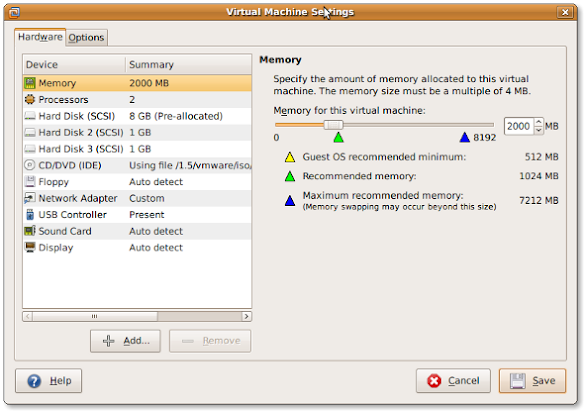
If you install a virtual machine, ensure the disk controller and disks are SCSI based.
This has many advantages, including:
- speed (usually the SCSI drivers can be paravirtualised)
- hot addition of new disks
It holds for virtually any virtualization platform including all non-ancient (less than ~10 year old) versions of:
- VMware (Workstation, Viewer, but I expect this also to work on vSphere, ESXI, Fusion)
- Hyper-V
- KVM (and therefore Proxmox)
- VirtualBox
Based on my notes in the above link and the links below:
Note this isn’t just for Linux guests/hosts: Most guests (including Windows) can do a SCSI bus re-scan and detect new SCSI devices.
The trick here is that the guest must already have a virtual SCSI controller (adding that will require a reboot of the guest).
Then adding a new SCSI disk on that controller from any host (Windows, Mac, ESXi, vSphere) should work fine.
–jeroen
Posted in ESXi4, ESXi5, ESXi5.1, ESXi5.5, ESXi6, ESXi6.5, Fusion, Hyper-V, KVM Kernel-based Virtual Machine, Power User, Proxmox, View, VirtualBox, Virtualization, VMware, VMware ESXi, VMware Workstation | Leave a Comment »
Posted by jpluimers on 2018/10/30
Cool repository, but contact your cloud provider before trying…: [WayBack] airbus-seclab/crashos.
via:
–jeroen
Posted in Fusion, Hyper-V, KVM Kernel-based Virtual Machine, Power User, Proxmox, View, VirtualBox, Virtualization, VMware, VMware ESXi, VMware Workstation | Leave a Comment »
Posted by jpluimers on 2018/10/08
Posted in *nix, *nix-tools, Fusion, Hyper-V, KVM Kernel-based Virtual Machine, Power User, Proxmox, View, VirtualBox, Virtualization, VMware, VMware ESXi, VMware Workstation | Leave a Comment »
Posted by jpluimers on 2016/09/20
In the 2009 past, sdelete used the -c parameter to zero wipe clean a hard drive and -z would clean it with a random pattern.
That has changed. Somewhere along the lines, -c and -z has swapped meaning which I didn’t notice.
This resulted in many of my virtual machines image backups were a lot larger than they needed to be.
The reason is that now:
-c does a clean free space with a random DoD conformant pattern (which does not compress well)-z writes zeros in the free space
Incidently, -c is a lot slower than -z as well.
TL;DR: use this command
sdelete -z C:
Where C: is the drive to zero clean the free space.
–jeroen
Posted in Batch-Files, Development, Fusion, Hyper-V, Power User, Proxmox, Scripting, sdelete, Software Development, SysInternals, View, VirtualBox, Virtualization, VMware, VMware ESXi, VMware Workstation, Windows | Leave a Comment »
Posted by jpluimers on 2016/04/04
This week I needed the trick below, so I was glad that a long time ago, Danny Thorpe Shared publicly on G+:
[Wayback/Archive] VirtualBox: Clone VM without Re-activation of Windows
Follow these steps to clone a VirtualBox VM in a manner so that the Windows 7 Activation in the guest doesn’t have to be re-activated in the clone.
–jeroen
via: Danny Thorpe – Google+: VirtualBox: Clone VM without Re-activation of Windows 7.
Posted in Power User, VirtualBox, Virtualization, Windows, Windows 7 | Leave a Comment »
Posted by jpluimers on 2016/04/01
IRC so: »i> Isotopp: Ich habe jetzt nen Mac als Arbeitsplatzrechner… Was will man als UNIX Hacker zuerst an Tools installieren?«
Source: IRC so: »i> Isotopp: Ich habe jetzt nen Mac als Arbeitsplatzrechner… Was will… by Kristian Köhntopp.
Since G+ is very bad at searching, I created this summary of the tools; read the full G+ post (Google Translate is quite OK), including comments on why.
Edit: 20160402 – I’m posting regular updates based on the comments for that G+ post. I’ve changed or added German iTunes store links to US-English ones.
Read the rest of this entry »
Posted in Apple, Audacity, Audio, Fusion, Hardware, Keybase, Keyboards and Keyboard Shortcuts, KVM keyboard/video/mouse, Mac, Mac OS X / OS X / MacOS, MacBook, MacBook Retina, MacBook-Pro, Media, OS X 10.10 Yosemite, OS X 10.11 El Capitan, Power User, Security, VirtualBox, Virtualization, VMware | Leave a Comment »


 The Wiert Corner - irregular stream of stuff