The Wiert Corner – irregular stream of stuff

Jeroen W. Pluimers on .NET, C#, Delphi, databases, and personal interests

  • My badges

  • Twitter Updates

  • My Flickr Stream

  • Pages

  • All categories

  • Enter your email address to subscribe to this blog and receive notifications of new posts by email.

    Join 1,860 other subscribers

Archive for the ‘Everything by VoidTools’ Category

finding duplicates – voidtools forum

Posted by jpluimers on 2025/10/07

That feeling you have been living under a stone since 2014: [Wayback/Archive] finding duplicates – voidtools forum

1.4 Beta has both dupe: & sizedupe: functions.
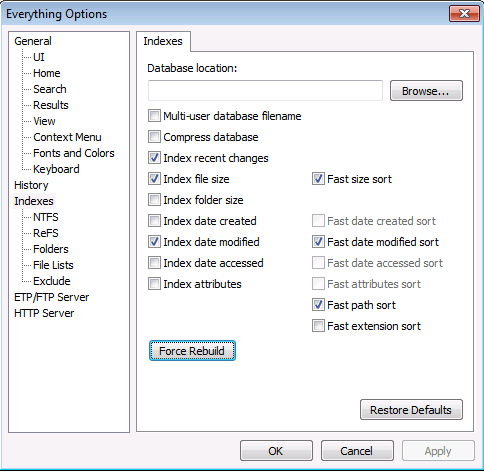
(In the Index, you need to index the file size & also enable Fast size sort.)

You can combine them, something like:

> dupe: sizedupe: c: file:

Or even add a size to it:

> dupe: sizedupe: c: file: size:>2MB

Note that that finds file name AND (I believe its an AND) file size duplications – anywhere, not necessarily limited to C:, & also that name AND size are the only qualifications for “duplication”, as in files meeting that criteria may not be (byte-by-byte) “duplicates”.

A partial excuse is that these never made it to the changelog at [Wayback/Archive] www.voidtools.com/Changes.txt or [Wayback/Archive] www.voidtools.com/BetaChanges.txt.

It is in the documentation since May 2017 at [Wayback/Archive] Searching – voidtools though:

Read the rest of this entry »

Posted in Batch-Files, Development, Everything by VoidTools, Power User, Scripting, Software Development, Windows | Leave a Comment »

Everything force rescan all volumes – via voidtools forum

Posted by jpluimers on 2021/02/08

Sometimes the Everything search tool gets out of sync with the actual contents on disk, so this tip from [WayBack] Everything 1.3.1.636b does not “refresh” – voidtools forum will rescan all volumes and update the database:

To rebuild the Everything database:

  • In Everything, from the Tools menu, click Options.
  • Click the Indexes tab.
  • Click Force Rebuild.

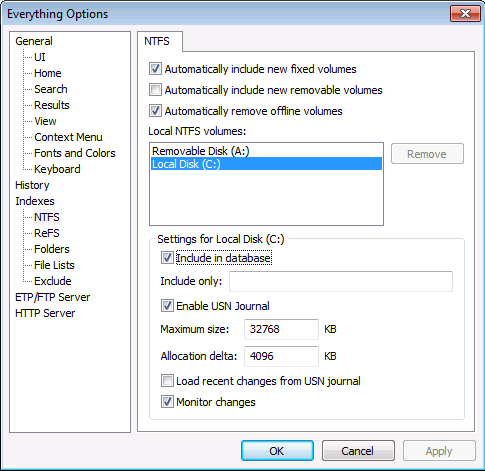
If that fails, you can always remove/add the volumes:

–jeroen

Posted in Everything by VoidTools, Power User, Windows | Leave a Comment »

A choco install list

Posted by jpluimers on 2021/02/03

Sometimes I forget the choco install mnemonics for various tools, so here is a small list below.

Of course you have to start with an administrative command prompt, and have a basic Chocolatey Installation in place.

If you want to clean cruft:

choco install --yes choco-cleaner

Basic install:

choco install --yes 7zip
choco install --yes everything
choco install --yes notepadplusplus
choco install --yes beyondcompare
choco install --yes git.install --params "/GitAndUnixToolsOnPath /NoGitLfs /SChannel /NoAutoCrlf /WindowsTerminal"
choco install --yes hg
choco install --yes sourcetree
choco install --yes sysinternals

For VMs (pic one):

choco install --yes vmware-tools
choco install --yes virtio-drivers

For browsing (not sure yet about Chrome as that one has a non-admin installer as well):

choco install --yes firefox

For file transfer (though be aware that some versions of Filezilla contained adware):

choco install --yes filezilla
choco install --yes winscp

For coding:

choco install --yes vscode
choco install --yes atom

For SQL server:

choco install --yes sql-server-management-studio

For web development / power user:

choco install --yes fiddler

For SOAP and REST:

choco install --yes soapui

If you don’t like manually downloading SequoiaView at gist.github.com/jpluimers/b0df9c2dba49010454ca6df406bc5f3d (e8efd031d667de8a1808d6ea73548d77949e7864.zip):

choco install --yes windirstat

For drawing, image manipulation (paint.net last, as it needs a UI action):

choco install --yes gimp
choco install --yes imagemagick
choco install --yes paint.net

For ISO image mounting in pre Windows 10:

choco install --yes wincdemu

For hard disk management:

choco install --yes hdtune
choco install --yes seatools
choco install --yes speedfan

For Fujitsu ScanSnap scanners (not sure yet this includes PDF support):

choco install --yes scansnapmanager

–jeroen

Posted in 7zip, atom editor, Beyond Compare, Chocolatey, Compression, Database Development, Development, DVCS - Distributed Version Control, Everything by VoidTools, Fiddler, Firefox, Fujitsu ScanSnap, git, Hardware, Mercurial/Hg, Power User, Scanners, SOAP/WebServices, Software Development, Source Code Management, SQL Server, SSMS SQL Server Management Studio, SysInternals, Text Editors, Versioning, Virtualization, VMware, VMware ESXi, vscode Visual Studio Code, Web Browsers, Web Development, Windows | Leave a Comment »

“cushion treemap” delphi – Google Search

Posted by jpluimers on 2020/05/06

For my link archive below a few links from “cushion treemap” delphi – Google Search.

The reason: I like Sequoiaview a lot, but it has a few issues (of which I wrote in SequoiaView Homepage) and lacks a few things too.

WinDirStat is nice, but could be a lot cleaner. Both lack one feature I’d love to have: light-weight automatic updating on NTFS volumes.

Everything does the latter, but does not do graphical output as it is focused on being a blindingly fast indexing and searching tool (I like it a lot so there is even a category on my blog for it: Everything by VoidTools).

It would be cool if both could be hooked together, which would require a cushion treemap in Delphi and an API to access the Everything database.

So here are links that might help with the first:

–jeroen


Posted in Delphi, Development, Everything by VoidTools, Power User, Software Development, Windows | Leave a Comment »

Call Everything with search pattern as parameter? – voidtools forum

Posted by jpluimers on 2019/03/25

[WayBack] Call Everything with search pattern as parameter? – voidtools forum:

C:\Program Files\Everything\Everything.exe -search """aaa bbb"""

The extra quotes are needed to get through 2 layers of de-quoting.

Related: [WayBack] How to apply quotes from the command line – voidtools forum

–jeroen

Posted in Everything by VoidTools, Power User, Windows | Leave a Comment »

Ctrl-T — www.voidtools.com • View topic – Everything window is ‘Always On Top’

Posted by jpluimers on 2017/03/17

If you use everything search from VoidTools, then don’t be surprised that pressing Ctrl-T makes it “Always On Top”:

Ctrl-T sets

Ctrl-T sets “Always On Top”

Of course this is not defined in “Tools” -> “Options”.

I forgot in which version this was introduced, as in the past I never stumbled over it on keyboards that have Ctrl and Alt reversed.

–jeroen

via: www.voidtools.com • View topic – Everything window is ‘Always On Top’


Posted in Everything by VoidTools, Keyboards and Keyboard Shortcuts, Power User, Windows | Leave a Comment »

Reducing the size of your Windows.edb (Search) and DataStore.edb (Update) databases

Posted by jpluimers on 2017/01/30

Windows Search: Windows.edb

If you use Windows Search (I don’t: I use Everything by VoidTools), your Windows.edb can grow ridiculously large. It is a single file, though it appears to be in two places because there is a symbolic link from C:\Users\All Users to C:\ProgramData :

C:\ProgramData\Microsoft\Search\Data\Applications\Windows\Windows.edb
C:\Users\All Users\Microsoft\Search\Data\Applications\Windows\Windows.edb

This is how to reduce its size:

How to offline defrag the index

  1. Change the Windows Search service so that it does not automatically start. To do this, run the following command in cmd.exe:
    sc config wsearch start= disabled
  2. Run the following command to stop the Windows Search service:
    net stop wsearch
  3. Run the following command to perform offline compaction of the Windows.edb file:
    esentutl.exe /d %AllUsersProfile%\Microsoft\Search\Data\Applications\Windows\Windows.edb
  4. Run the following command to change the Windows Search service to delayed start:
    sc config wsearch start= delayed-auto
  5. Run the following command to start the service:
    net start wsearch

Notes:

  1. I did not perform the last 2 steps as I’ve kept Windows Search disabled.
  2. If you want to reduce the size of the C:\ProgramData\Microsoft\Search\Data\Applications\Windows\Projects\SystemIndex\Indexer\CiFiles\ directory:
    1. Before step 1, choose what kind of Windows Search indexing options you want
    2. Between step 3 and 4, delete the directory

Windows Update: DataStore.edb

Windows Update uses the same database structure and is a single file:

C:\Windows\SoftwareDistribution\DataStore\DataStore.edb

This is how I reduced its size:

net stop wuauserv
net stop bits
esentutl.exe /d C:\Windows\SoftwareDistribution\DataStore\DataStore.edb
net start bits
net start wuauserv

Talking about Windows Update: you might also want to Clean Up the WinSxS Folder

–jeroen

Read the rest of this entry »

Posted in Everything by VoidTools, Power User, Windows, Windows 10, Windows 7, Windows 8, Windows 8.1, Windows 9, Windows Server 2008, Windows Server 2008 R2, Windows Server 2012, Windows Server 2012 R2, Windows Vista | Leave a Comment »

Windows 10 1511 update broke the Hyper-V networking – Fix network connection issues

Posted by jpluimers on 2016/04/11

After updating a Windows 8.1 machine that had Hyper-V running, none of the VMs could access any networking: Windows 10 build 1511 completely broke the vSwitch infrastructure.

This is what I had to do:

  1. Reinstall network devices using netcfg –d command (Source: Fix network connection issues – Windows Help)
  2. Reboot host
  3. Create a new vSwitch in Hyper-V (as the old one was gone)
  4. Remove the network adapters of the VMs (they were in a limbo state)
  5. Add new network adapters to the VMs connecting them to the correct vSwitch.

This was the umpteenth time Hyper-V let me down, so in the future I’m back to VMware or Virtual Box.

Windows 10 also broke Everything Search Engine and UBCD4Win. I could not get UBCD4Win to work again, but a reinstall of Everything made it to work again.

And Windows 10 moved a lot of things away from the Control Panel, which means that things that basically worked for more than a decade are now gone. For instance, Windows updates now must be run with a shortcut like this:

%LocalAppData%\Packages\windows.immersivecontrolpanel_cw5n1h2txyewy\LocalState\Indexed\Settings\nl-NL\AAA_SystemSettings_MusUpdate_UpdateActionButton.settingcontent-ms

Note that’s for a DUTCH system. For a US-English system of course the shortcut is different:

%LocalAppData%\Packages\windows.immersivecontrolpanel_cw5n1h2txyewy\LocalState\Indexed\Settings\en-US\AAA_SystemSettings_MusUpdate_UpdateActionButton.settingcontent-ms

This feels like “1998 wants its VBA translated languages back”.

Of course I could get around this by building a table translatingto a text language code from the numeric language code* from the below command, but that’s not the point: Windows 10 makes life harder.

reg query “hklm\system\controlset001\control\nls\language” /v Installlanguage
returns codes like 0407, 0409, 040D, 0413, etc.

–jeroen

*: Heck if Microsoft cannot even update their 2002 Table of Language Culture Names, Codes, and ISO Values Method [C++] and has trouble keeping the various .NET version pages updated**, how could I?

**: these are the only .NET versions the table is documented

Posted in Everything by VoidTools, Hyper-V, Power User, Virtualization, Windows | 1 Comment »

How to automate Adobe Acrobat XI Standard to re-compress a lot of PDFs? – via: Super User

Posted by jpluimers on 2015/09/21

A while ago I asked compression – How to automate Adobe Acrobat XI Standard to re-compress a lot of PDFs? – Super User.

Back then it saved about 80% of the total file size. Very substantial.

Recently I needed to convert another (smaller, but still substantial) bunch of PDF documents and saw I forgot to post the solution here:
Read the rest of this entry »

Posted in Adobe, Adobe Acrobat, Everything by VoidTools, Power User, Windows, Windows 7, Windows 8, Windows 8.1 | Leave a Comment »

Finding your Windows files quickly: Everything Search engine

Posted by jpluimers on 2015/01/30

More than 4 years ago, I wrote about the Windows filename search replacement: Everything. Since then, Everything has even gotten better: though the “stable” 1.2 version dates back to 2009, a new series of 1.3.x betas has appeared since early 2013 that are just as stable, are faster and have far more features.

Some new features I like a lot:

  • Support for Recent Changes, for instance searching for rc:today gives you files that have changed today.
  • The extended search syntax now includes the ability to search for attributes (even compressed, offline or encrypted) and timestamps (even relative ones like dm:last10minutes) for datecreated (dc), datemodified (dm) or recentchanges (rc).
  • Allow for boolean operators ! (NOT), & (AND) and space (OR) and grouping them with < and >.
  • These search prefixes: Read the rest of this entry »

Posted in Everything by VoidTools, Power User, Windows, Windows 7, Windows 8, Windows Server 2003 R2, Windows Server 2008, Windows Server 2008 R2, Windows Vista | Leave a Comment »