


Need to check this out some day: cs.exe compiled from [Wayback] sparse.zip which you can download from [Wayback/Archive] NTFS Sparse Files For Programmers



Posted by jpluimers on 2024/09/25
Need to check this out some day: cs.exe compiled from [Wayback] sparse.zip which you can download from [Wayback/Archive] NTFS Sparse Files For Programmers

Posted in C, C++, Development, NTFS, Power User, RoboCopy, Software Development, Visual Studio C++, Windows, Windows 10, Windows 11 | Leave a Comment »
Posted by jpluimers on 2021/10/07
TL;DR: Empty files are indeed of size zero, but there is some disk space involved for their meta-data (like name, permission, timestamps)
Some links (via [WayBack] create zero sized file – Google Search):
Filesystems store a lot of information about a file such as file name, file size, creation time, access time, modified time, created user, user and group permissions, fragments, pointer to clusters that store the file, hard/soft links, attributes… Those are called file metadata. Why do you count those metadata into file size when users do not (need to) care about them and don’t know about them? They only really care about the file content
Moreover each filesystem stores different types of metadata which take different amounts of space on disk. For example POSIX permissions are very different from NTFS permission, and there are also
inodenumbers in POSIX which do not exist on Windows. Even POSIX filesystems vary a lot, like ext3 with 32-bit block address, ext4 with 48-bit, Btrfs with 64-bit and ZFS with 128-bit address. So how will you count those metadata into file size?Take another example with a 100-byte file whose metadata consumes 56 bytes on the current filesystem. We copy the file to another filesystem and now it takes 128 bytes of metadata. However the file contents are exactly the same, the number of bytes in the files are also the same. So displaying file size as 156 bytes on a system but 228 bytes on another is very confusing and counter-intuitive.
touchwill create an inode, andls -iorstatwill show info about the inode:$ touch test $ ls -i test 28971114 test $ stat test File: ‘test’ Size: 0 Blocks: 0 IO Block: 4096 regular empty file Device: fc01h/64513d Inode: 28971114 Links: 1 Access: (0664/-rw-rw-r--) Uid: ( 1000/1000) Gid: ( 1000/1000) Access: 2017-03-28 17:38:07.221131925 +0200 Modify: 2017-03-28 17:38:07.221131925 +0200 Change: 2017-03-28 17:38:07.221131925 +0200 Birth: -Notice that
testuses 0 blocks. To store the data displayed, the inode uses some bytes. Those bytes are stored in the inode table. Look at the ext2 page for an example of an inode structure [WayBack].
Oh and a nice NTFS thing (thanks [WayBack] Paweł Bulwan):
and in case of NTFS, the size of file reported by Windows and most tools is actually the size of the main stream of the file, which we perceive as the content of the file. The file stored on NTFS partition can additionaly have some data stored in alternative data streams, and still have the reported size of 0. It’s a nice filesystem feature to know if you want to have the full picture :)
Related: my really old post command line – create empty text file from a batch file (via: Stack Overflow)
–jeroen
Posted in *nix, btrfs, Development, File-Systems, NTFS, Power User, Software Development, Windows | Leave a Comment »
Posted by jpluimers on 2021/09/22
[WayBack] Thread by @0xdade: Today I learned that you can put zero width spaces in file names on Linux. Have fun. I’m playing with this because punycode/IDN is fascinati…
Today I learned that you can put zero width spaces in file names on Linux. Have fun.I’m playing with this because punycode/IDN is fascinating, and I wanted to know what happened when I started shoving unicode in the path portion of the url, which isn’t part of how browsers try to protect URLs, as far as I can tell
I think it’s more entertaining to have a file that is named *only* a zero width space, but I think using them throughout a filename is better to break tab completion and not stand out too much. A filename that is just blank looks strange in ls output.Thank goodness adduser is looking out for our best interests.Oooh this one is pretty subtle.Just about pissed myself with this one.Not related to the terminal fun, but related to zero width characters:
You can:
– Break url previews https://0xda.de
– @0xdade without tagging
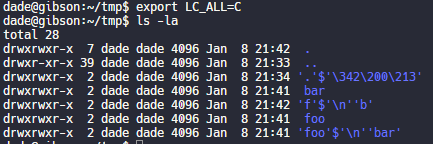
– Make a word like systemd not searchable twitter.com/search?q=from%…Okay but back to command line crap. I really like this one. Create a directory named .[ZWS]One thing that is cool about using zero width spaces is that “ls” has a flag, “-b”, that is meant to escape non-graphic characters. Inserting a newline, for instance, would be escaped to \n. But the zero width space is technically a graphic character, so nothing happens.
Fun.
Have no fear, though. It’s not unbeatable. It’s only fun if the language and LC settings are set to support utf-8. If you set LC_ALL=C or whatever that isn’t utf-8, then it looks like this.Putting a link to this tweet here so that I don’t lose it again in the future.
dade@0xdadeMy god, it is beautiful. I mean except all the whitespace I can’t get rid of before the command lmao.
And these tweets:
xsel for linux). zws () { echo -n '\u200D' | pbcopy }… “000. If you cat it, there were \b chars to hide the flag. Super tedious.… “Variation Selectors (U+FE00..U+FE0F) are zero-width invisible modifiers with the ID_Continue property, so can be used inside variable names in languages like Python or C#. And since they’re modifiers, the cursor doesn’t stop when it passes them.… “\a in C) is printed by the program, it will cause the terminal to ring its bell.… “[WayBack] Acme::Bleach – For really clean programs – metacpan.org
https://0xda.de – @0xdade without tagging – Make a word like systemd not searchable “
[WayBack] Thread by @Plazmaz: @0xdade Was doing some real fucking around with urls recently: gist.github.com/Plazmaz/565a5c… (was gonna flesh it out more but didn’t find…:
Was doing some real fucking around with urls recently:(was gonna flesh it out more but didn’t find the time)
This one is my fave:
‘⁄’ (\u2044)
or
‘∕’ (\u2215)
Allow for this:
google.com⁄search⁄query⁄.example.com
google.com⁄search⁄query⁄@example.com[WayBack] url-screwiness.md · GitHub:
This is a list of methods for messing with urls. These are often useful for bypassing filters, SSRF, or creating convincing links that are difficult to differentiate from legitimate urls.
And a bit of documentation links:
–jeroen

Posted in *nix, .NET, C#, Development, NTFS, Power User, Python, Scripting, Software Development, Windows | Leave a Comment »
Posted by jpluimers on 2021/09/21
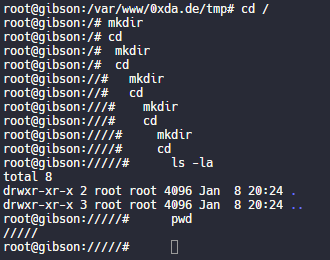
Lots of interesting tidbits on unix and NTFS file systems.
If you want to blow up your tooling, try creating a recursive hardlink…, which is likely one of the reasons that nx file systems do not support them.
Covered and related topics:
Posted in *nix, Development, File-Systems, History, NTFS, Power User, Software Development, Windows, Windows Development | Leave a Comment »
Posted by jpluimers on 2020/07/03
A while ago, I had to mass encrypt a lot of directories and files on Windows for some directories in an existing directory structure.
This helped me to find out which ones were already done (it lists all encrypted files on all drives; the /n ensures the files or encryption keys are not altered):
cipher.exe /u /n /h
This encrypted recursively in one directory B:\Directory:
cipher /D /S:B:\Directory /A
It also has options to wipe data (/W), export keys into transferrable files (/X) and many more.
If you like the Windows Explorer more then to encrypt/decrypt (it is a tedious process): [WayBack] How do I encrypt/decrypt a file? | IT Pro.
Via:
–jeroen
Posted in Encryption, NTFS, Power User, Security, Windows | Leave a Comment »
Posted by jpluimers on 2020/01/31
When copying over a 400 gigabyte file over the network to an NTFS compressed folder on a drive with having 600 gigabytes free space, the volume became full after copying ~350 gigabytes.
What I learned is that compressing huge files for later read-only access is fine, but you need about twice the disk space while the copy operation is in progress.
For non-compressed files you can go without this extra reservation.
Background information:
Note there are also issues with NTFS compression and de-duplication. I’m not sure about sparse files. Be careful when you try to compress the system drive where your Windows OS lives on:
–jeroen
Posted in NTFS, Power User, Windows | Leave a Comment »
Posted by jpluimers on 2018/04/20
A while ago I had an Intel Matrix RAID-1 pair of drives that got broken. One of them turned “red” and – since both drives were only a few serial numbers apart – the other was giving issues the moment I tried fiddling with it.
These actions failed:
What had succeeded was a regular Windows backup (a non-image one).
This is what I finally did to get it working again:
–jeroen
References:
Posted in NTFS, Power User, Windows, Windows 10 | Leave a Comment »
Posted by jpluimers on 2017/05/26
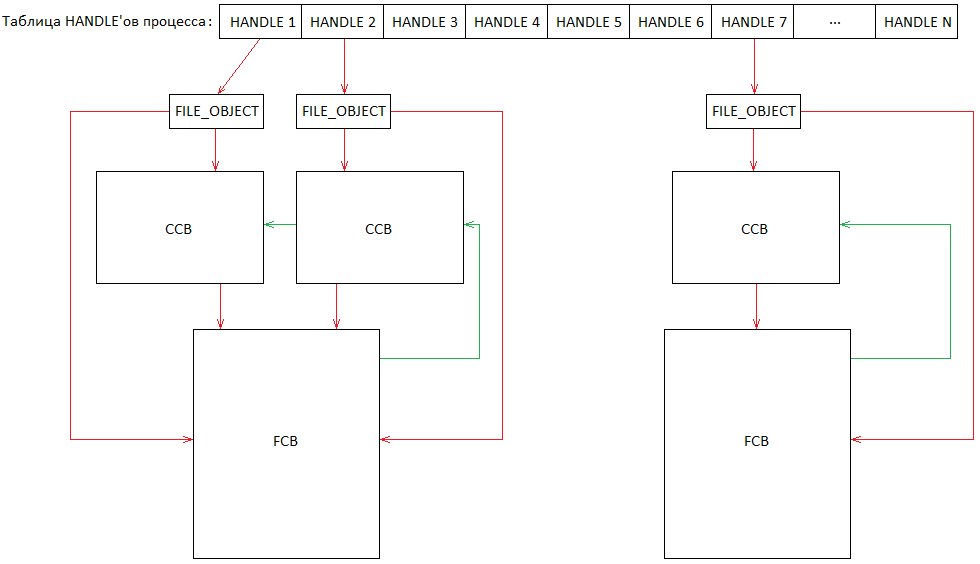 Source:
History repeating itself: [Archive.is] 31607 – C:\nul\nul crashes/BSOD then, now it’s this:
Via:
All versions prior to Windows 10 and Windows Server 2016 seem vulnerable.
So add $MFT to this list:
The following device names have been known to render a system unstable: CON,
NUL, AUX, PRN, CLOCK$, COMx, LPT1, and CONFIG$.
In short, Steven Sheldon created a rust package named nul which broke the complete package manager on Windows:
nul is not a valid name in windows 10, so cargo fails to update the registry, and then aborts whatever it was doing (building, searching, ect.).I think this project should be re-published to crates.io under a new name, something like null-strings perhaps?https://github.com/rust-lang/crates.io-indexBTW: one of my gripes on learning new languages is that they come with a whole new idiom of their ecosystem: rust, cargo, crates, all sound like being a truck mechanic to me.
–jeroen

Posted in Development, Microsoft Surface on Windows 7, NTFS, Power User, Security, Software Development, The Old New Thing, Windows, Windows 10, Windows 7, Windows 8, Windows 8.1, Windows 9, Windows 95, Windows 98, Windows Defender, Windows Development, Windows ME, Windows NT, Windows Server 2000, Windows Server 2003, Windows Server 2003 R2, Windows Server 2008, Windows Server 2008 R2, Windows Server 2012, Windows Server 2012 R2, Windows Server 2016, Windows Vista, Windows XP | Leave a Comment »


 The Wiert Corner - irregular stream of stuff