The Wiert Corner – irregular stream of stuff

Jeroen W. Pluimers on .NET, C#, Delphi, databases, and personal interests

  • My badges

  • Twitter Updates

  • My Flickr Stream

  • Pages

  • All categories

  • Enter your email address to subscribe to this blog and receive notifications of new posts by email.

    Join 1,839 other subscribers

Archive for the ‘Windows’ Category

Alexander Klöpping. Juist nu. on Twitter: “Is er een voice recorder app waarbij je met een druk op de knop tijdcodes kunt markeren omdat vlak voordat moment iets belangrijks gezegd werd? Zodat je achteraf makkelijk de belangrijke momenten kunt terugzoeken?” / Twitter

Posted by jpluimers on 2022/01/07

[Archive.is1/Archive.is2] Alexander Klöpping. Juist nu. on Twitter: “Is er een voice recorder app waarbij je met een druk op de knop tijdcodes kunt markeren omdat vlak voordat moment iets belangrijks gezegd werd? Zodat je achteraf makkelijk de belangrijke momenten kunt terugzoeken?” / Twitter

https://twitter.com/AlexanderNL/status/1277519084117164032

Selectie voor Android / Windows / MacOS:

Read the rest of this entry »

Posted in Android Devices, Audacity, Audio, Media, Power User, Windows | Leave a Comment »

The Evolution of Windows Search | Windows Search Platform

Posted by jpluimers on 2022/01/03

Great post [WayBack] The Evolution of Windows Search | Windows Search Platform, covering some 3 decades of search:

  • 1991 (Cairo with WinFS)
  • 1996 (Windows NT 4.0)
  • 2000 (Windows 2000)
  • 2001 (Windows XP)
  • 2007 (Windows Vista)
  • 2009 (Windows 7)
  • 2012 (Windows 8.x)
  • 2015 (Windows 10)

It is part 1 of a series of 4 posts by [WayBack] Brendan Flynn, Author at Windows Search Platform:

  1. The Evolution of Windows Search  👈  You Are here
  2. Windows Search Configuration and Settings
  3. What’s in my index?
  4. How to make the most of search on Windows

When grabbing them, only the first two parts were available. Part two was about [WayBack] Configuration and Settings | Windows Search Platform with an in depth coverage of both the old style Control Panel applet as the new Windows 10 Settings page.

Via: [Archive.is] Immo Landwerth on Twitter: “If you like Raymond Chen’s The Old New Thing, then you might love this new developer focused blog too. It starts with an interesting history of Windows Search, by @brflynn_ms. Enjoy & subscribe!”

–jeroen

Posted in Power User, Windows 7, Windows Vista, Windows XP, Windows 8, Windows, Windows Server 2000, Windows 8.1, Windows NT, Windows 10 | Leave a Comment »

Run the latest RDP session in full-screen

Posted by jpluimers on 2021/12/28

MSTSC.exe helptext

MSTSC.exe helptext

I created this small batch file:

:: start last RDP session (or new one with command-line parameters) full-screen
:: see https://interworks.com/blog/ijahanshahi/2012/01/02/mstsc-commands-and-creating-custom-remote-desktop-shortcut/
mstsc /f %*

It is based on [Wayback] MSTSC Commands and Creating a Custom Remote Desktop Shortcut | InterWorks, which has the helptext for MSTSC.exe (which stands for MicroSoft Terminal Services).

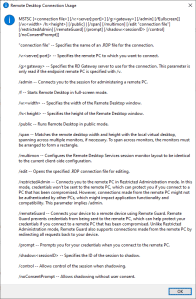
Later I found out a way easier method to get that helptext is to run MSTSC.exe /?, which shows a nice dialog:

[Window Title]
Remote Desktop Connection Usage

[Content]
MSTSC [] [/v:<server[:port]>] [/g:] [/admin] [/f[ullscreen]] [/w: /h:] [/public] | [/span] [/multimon] [/edit "connection file"] [/restrictedAdmin] [/remoteGuard] [/prompt] [/shadow: [/control] [/noConsentPrompt]]

"connection file" -- Specifies the name of an .RDP file for the connection.

/v:<server[:port]> -- Specifies the remote PC to which you want to connect.

/g: -- Specifies the RD Gateway server to use for the connection. This parameter is only read if the endpoint remote PC is specified with /v.

/admin -- Connects you to the session for administering a remote PC.

/f -- Starts Remote Desktop in full-screen mode.

/w: -- Specifies the width of the Remote Desktop window.

/h: -- Specifies the height of the Remote Desktop window.

/public -- Runs Remote Desktop in public mode.

/span -- Matches the remote desktop width and height with the local virtual desktop, spanning across multiple monitors, if necessary. To span across monitors, the monitors must be arranged to form a rectangle.

/multimon -- Configures the Remote Desktop Services session monitor layout to be identical to the current client-side configuration.

/edit -- Opens the specified .RDP connection file for editing.

/restrictedAdmin -- Connects you to the remote PC in Restricted Administration mode. In this mode, credentials won't be sent to the remote PC, which can protect you if you connect to a PC that has been compromised. However, connections made from the remote PC might not be authenticated by other PCs, which might impact application functionality and compatibility. This parameter implies /admin.

/remoteGuard -- Connects your device to a remote device using Remote Guard. Remote Guard prevents credentials from being sent to the remote PC, which can help protect your credentials if you connect to a remote PC that has been compromised. Unlike Restricted Administration mode, Remote Guard also supports connections made from the remote PC by redirecting all requests back to your device.

/prompt -- Prompts you for your credentials when you connect to the remote PC.

/shadow: -- Specifies the ID of the session to shadow.

/control -- Allows control of the session when shadowing.

/noConsentPrompt -- Allows shadowing without user consent.

[OK]

–jeroen

Posted in Batch-Files, Development, Power User, Remote Desktop Protocol/MSTSC/Terminal Services, Scripting, Software Development, Windows | Leave a Comment »

Windows: get CPU information on the console

Posted by jpluimers on 2021/12/28

It still seems that WMIC is the quickest way to get CPU information on the console:

T510-PSO C:\bin\rdp> wmic cpu get name,CurrentClockSpeed,MaxClockSpeed
CurrentClockSpeed  MaxClockSpeed  Name
2667               2667           Intel(R) Core(TM) i5 CPU       M 560  @ 2.67GHz

T510-PSO C:\bin\rdp> wmic path win32_Processor get Name,NumberOfCores,NumberOfLogicalProcessors
Name                                             NumberOfCores  NumberOfLogicalProcessors
Intel(R) Core(TM) i5 CPU       M 560  @ 2.67GHz  2              4

Actually, wmic cpu is shorthand for wmic path win32_Processor, so this works fine:

T510-PSO C:\bin\rdp> wmic cpu get name,CurrentClockSpeed,MaxClockSpeed,NumberOfCores,NumberOfLogicalProcessors
CurrentClockSpeed  MaxClockSpeed  Name                                             NumberOfCores  NumberOfLogicalProcessors
2667               2667           Intel(R) Core(TM) i5 CPU       M 560  @ 2.67GHz  2              4

The reason is that cpu is an alias:

T510-PSO C:\bin\rdp> wmic alias cpu list brief
FriendlyName  PWhere              Target
CPU           Where DeviceID='#'  Select * from WIN32_PROCESSOR

Via:

–jeroen

Posted in Batch-Files, Console (command prompt window), Development, Power User, Scripting, Software Development, T510, ThinkPad, Windows | Leave a Comment »

Chocolatey Software | NirLauncher

Posted by jpluimers on 2021/12/27

The cool thing about the Chocolatey NirLauncher install, is that it not just installs the launcher in the path, but all the NirSoft tools.

I wanted it in the path initially because I needed InsideClipboard to do some investigation (I wrote a similar tool ages ago, but could not readily find the source or executable, but InsideClipboard is better anyway).

This is cool, as I now can start any of the NirSoft tools from the cmd prompt, including [WayBack] NirLauncher itself, [WayBack] InsideClipboard and [WayBack] NirCmd (so I can now set the sound volume to 25% by running nircmd setsysvolume 16000)

To install:

choco install --yes NirLauncher

An older WayBack link notes a few important issues about anti-virus tools:

Read the rest of this entry »

Posted in Chocolatey, NirSoft, Power User, Windows, Windows 10 | Leave a Comment »

Some links on resetting Windows 10 to a different installation language, but keeping the license

Posted by jpluimers on 2021/12/24

I had a few non English Windows 10 systems that I wanted to keep the license for, but otherwise have a clean Windows 10 English install on.

Some links; hopefully I can later make more notes.

Read the rest of this entry »

Posted in Power User, Windows, Windows 10 | Leave a Comment »

bolkedebruin/rdpgw: Remote Desktop Gateway in Go for deploying on Linux/BSD/Kubernetes

Posted by jpluimers on 2021/12/23

On my list of things to try: an open source golang implementation of the Remote Desktop Gateway protocol: [Wayback/Archive.is] bolkedebruin/rdpgw: Remote Desktop Gateway in Go for deploying on Linux/BSD/Kubernetes.

[Wayback] [MS-TSGU]: Terminal Services Gateway Server Protocol | Microsoft Docs:

Specifies the Terminal Services Gateway Server Protocol, which is a mechanism to transport data-link layer (L2) frames on a Hypertext Transfer

Via: [Wayback] linux – Create RDP gateway in Raspberry Pi or Ubuntu – Super User

–jeroen

Posted in *nix, Development, Go (golang), Power User, Remote Desktop Protocol/MSTSC/Terminal Services, Software Development, Windows | Leave a Comment »

Easiest way to move the C:\MSOCache directory to another drive is to create symbolic link to the new location

Posted by jpluimers on 2021/12/15

I always forget that, when moving a folder, instead of finding all references to that folder and fixing them, you can create an NTFS symlink from the old location to the new one.

[Wayback] how to move MSOCACHE folder from C-drive to D-drive ?? – Microsoft Community (thanks [Wayback] tgunda numbering and casing updates mine):

There are too much entries in the registry to correct them manually one by one.

An easier and quicker solution is to copy the full MSOCache folder to a new place and to make a soft link to it:
  1. Create a new folder, e.g. F:\MSOCache
  2. Copy everything from C:\MSOCache to the new one.
  3. Rename the old folder  C:\xMSOCache  (Don’t delete it, just in case).
  4. Open a command prompt window in administrator mode.
  5. Write:  mklink /d c:\MSOCache f:\MSOCache
Now there is an MSOCache link at C, pointing to the new place.
If everything is OK, you can delete  C:\xMSOCache

This can be very handy when moving around large software development installations, circumventing a full uninstall/install sequence loosing lots of configuration settings.

–jeroen

Posted in Development, LifeHacker, Office, Power User, Software Development, Windows, Windows Development | Leave a Comment »

How to build a CD ISO image file from the windows command line? – Stack Overflow

Posted by jpluimers on 2021/12/07

As I might need this in the future, some highlights from [Wayback] How to build a CD ISO image file from the windows command line? – Stack Overflow:

–jeroen


Posted in Development, Power User, Software Development, Windows, Windows Development | Leave a Comment »

wget proxy: set the http_proxy environment variable

Posted by jpluimers on 2021/11/05

[WayBack] WGET 1.11.4 for Windows (win32) as well as many other tools use the [WayBack] http_proxy envonment variable to specify the http proxy settings.

To set it to a locally running Cntlm proxy, use this syntax:

set http_proxy=http://localhost:3128

–jeroen

Posted in Cntlm, Power User, Windows, Windows-Http-Proxy | Leave a Comment »