


On my list of things to play with is ScreenToGif via [WayBack] Creating animated GIFs from screenshots – twm’s blog
–jeroen
Posted by jpluimers on 2020/09/25
On my list of things to play with is ScreenToGif via [WayBack] Creating animated GIFs from screenshots – twm’s blog
–jeroen

Posted in Power User, Windows | Leave a Comment »
Posted by jpluimers on 2020/09/21
Reminder from [WayBack] WinHlp32 for Windows 8.1 – twm’s blog to find a similar download for Windows 10.
–jeroen
Posted in Power User, Windows, Windows 10 | Leave a Comment »
Posted by jpluimers on 2020/09/16
To prevent a screen-saver from kicking in [WayBack] jiggling the mouse – twm’s blog:
My solution then is this procedure:
procedure JiggleMouse;
var
  Inpt: TInput;
begin
  Inpt.Itype := INPUT_MOUSE;
  Inpt.mi.dx := 0;
  Inpt.mi.dy := 0;
  Inpt.mi.mouseData := 0;
  Inpt.mi.dwFlags := MOUSEEVENTF_MOVE;
  Inpt.mi.time := 0;
  Inpt.mi.dwExtraInfo := 0;
  SendInput(1, Inpt, SizeOf(Inpt));
end;
Call it in regular intervals and the screen saver will not start.
This is now (or soon will be) in the u_dzOsUtils unit which is part of my dzlib utility library.
–jeroen
Posted in Delphi, Development, Power User, Software Development, Windows | 1 Comment »
Posted by jpluimers on 2020/09/04
I had to shrink down a Windows disk of an ESXi based Virtual Machine from 240 Gibibyte to about 140 gigabyte.
In this case, it was Windows 7 on ESXi 6.5, but the actual versions do not really matter.
The only way to decrease ESXi .vmdk files is by fiddling with disk sector counts in the text based .vmdk files (not the binaries .vmdk files!) of a diskname.vmdk / diskname-flat.vmdk text/binary pair. This is described for instance in these two articles:
# Extent description

RW 52428800 VMFS "foo-flat.vmdk"
The value between
RWandVMFSis the size of disk in sectors.After changing the value, you can use
vmkfstoolsto clone this disk.
Notes:
- This article presumes you already shrunk your NTFS partition (for instance as described in Consolidating NTFS free space).
- If you only have a binary .vmdk file, then you can use
vmkfstoolsto create a text/binary pair for you, for instance by using these commands:
vmkfstools --clonevirtualdisk Windows7.vmdk Windows7.thick.vmdk
vmkfstools --clonevirtualdisk Windows7.vmdk Windows7.thin.vmdk --diskformat thin- You cannot workaround 2. as the
--geometryfunctionality ofvmkfstoolsonly displays existing geometry, see
ESXi has .vmdk files that count disk sizes in sectors, but the tooling that ship with Windows to not show partition sizes in sectors, especially not the partition ending sector.
All permutations of tooling like DISKPART, PowerShell, WMIC and terms partition, ending sector, cylinder, head, etc failed me to return built-in tools.
Luckily, “powershell” “partition” “ending sector” found the documentation for [WayBack] Test Disk | File System | Data Management titled “TestDisk Documentation, Release 7.1, Christophe GRENIER” which lead to:
[WayBack] TestDisk Download – CGSecurity
Download TestDisk & PhotoRec. TestDisk is a free and open source data recovery software tool designed to recover lost partition and unerase deleted files. PhotoRec is a file carver data recovery software tool.
It is available for many platforms, including Windows x86 (fully featured) and x64 (limited features):
There was also the much more convoluted PowerForensics which is also more difficult to install:
- [WayBack] Invoke-IR | PowerShell Digital Forensics and Incident Response: On the Forensic Trail – Master Boot Record (MBR)
- [WayBack] GitHub – Invoke-IR/PowerForensics: PowerForensics provides an all in one platform for live disk forensic analysis
- [WayBack] Invoke-IR | PowerShell Digital Forensics and Incident Response: Installing PowerForensics
As a check (because the calculations by hand are too cumbersome to trust on a first trey), I also downloaded the ISO image of gparted:
Let’s get started for real!

Posted in Power User, Virtualization, VMware, VMware ESXi, Windows, Windows 7 | Leave a Comment »
Posted by jpluimers on 2020/08/14
In the end, this list worked on a Fritz!Box, but I still do not know which other subdomains and protocols they silently let pass:
windowsupdate.microsoft.com

*.windowsupdate.microsoft.com

*.update.microsoft.com

*.windowsupdate.com

download.windowsupdate.com

download.microsoft.com

*.download.windowsupdate.com

test.stats.update.microsoft.com

ntservicepack.microsoft.com

update.microsoft.com

*.update.microsoft.com

*.download.microsoft.com

windowsupdate.com

wustat.windows.com

login.live.com

mp.microsoft.com

*.mp.microsoft.com

www.update.microsoft.com

support.microsoft.com

www.msftconnecttest.com
Some source materials:
–jeroen
Posted in Fritz!, Fritz!Box, Internet, Power User, Windows, Windows 10, Windows 7 | Leave a Comment »
Posted by jpluimers on 2020/07/31
For my link archive: networking – Whitelist Windows Update Servers – Super User
Because there are brain dead routers that do not allow for wildcards, or whitelisting only a certain protocol for a URL, call windowsupdate.microsoft.com a URL, but then also accept http://www.windowsupdate.microsoft.com.
–jeroen
Posted in Firewall, Infrastructure, Power User, Windows | Leave a Comment »
Posted by jpluimers on 2020/07/29
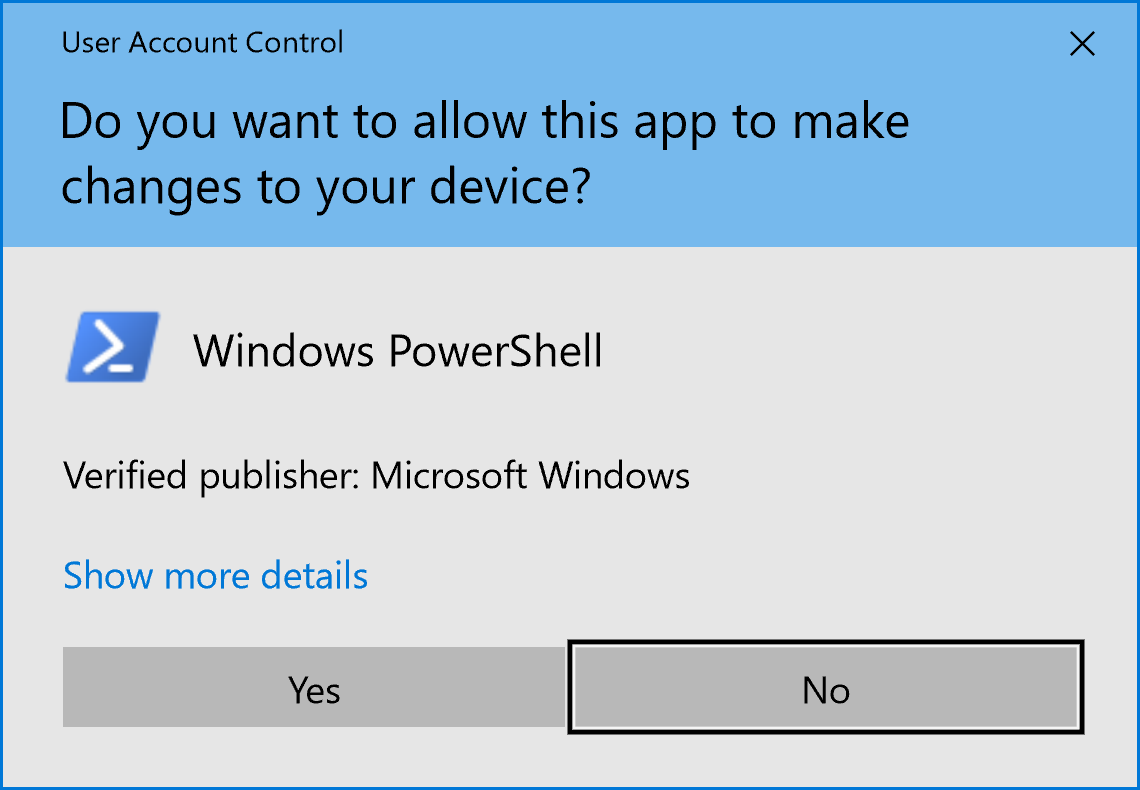
Just in case I need to explain this to someone, as it has been a long time ago I did this: [WayBack] windows – Is there a single UAC binary? – Super User.
Via: [WayBack] Jeroen Wiert Pluimers: Is there a UAC binary? – Google+
Most important reference: [WayBack] How User Account Control Works | Microsoft Docs
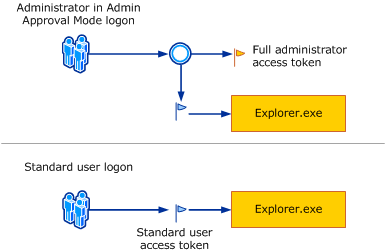
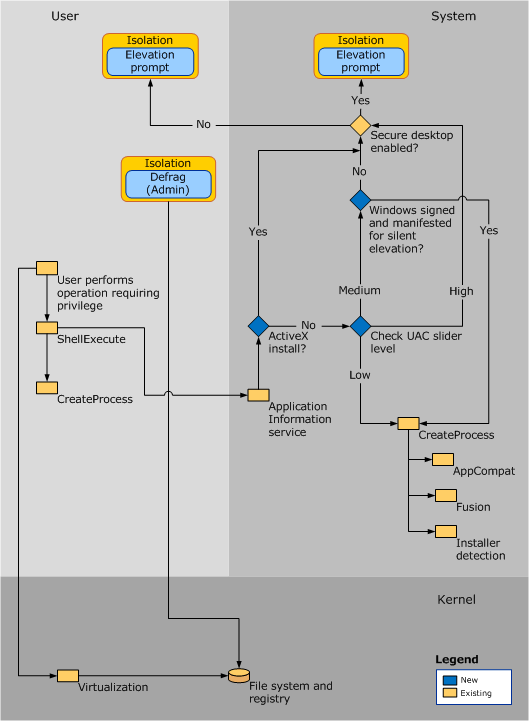
consent.exe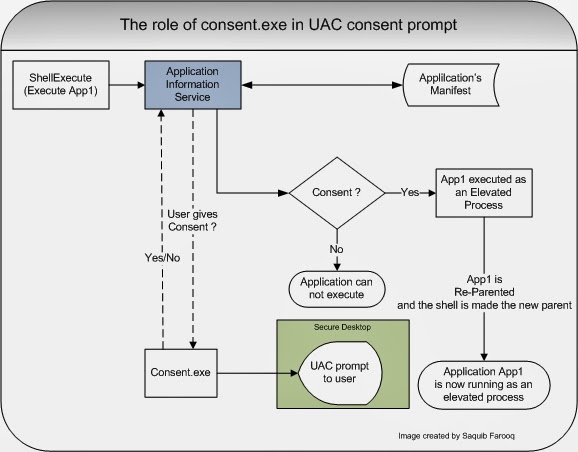
–jeroen

Posted in Development, Power User, Security, Software Development, Windows, Windows Development | Leave a Comment »
Posted by jpluimers on 2020/07/27
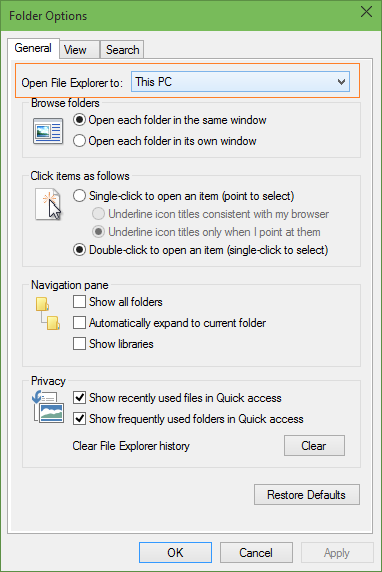 When I first bumped into this around 2017, I found via [WayBack] How to Make File Explorer Open This PC By Default In Windows 10 that it was just a new “Folder Options” choice that by default pointed to “Quick Access” (Dutch “Snelle Toegang”) instead of prior Windows versions opening at “This PC” (Dutch “Deze PC”).
Only recently, I found out that Scott Hanselman already tweeted about this in August 2015:
[WayBack] Scott Hanselman on Twitter: “Windows 10 Tip: You can control where Windows Explorer opens (This PC vs Quick Access). Click View | Options http://t.co/mNi6K6tVIP”
–jeroen

Posted in Power User, Windows, Windows 10 | Leave a Comment »
Posted by jpluimers on 2020/07/17
Wow: I never noticed this before, but thinking back it has happened to me at least a few times years ago: [WayBack] Windows 7 Hosts File Ignored.
The trick is to create a new hosts file as Administrator.
I thought it had to do with proper line endings: Notebad messes those up every now and then. But I was wrong: even with Notepad++ this happens, see [WayBack] I just had to trouble shoot a Windows XP (!) issue where the entries in the hosts file were being ignored. The change that actually worked was: 1. Crea… – Thomas Mueller (dummzeuch) – Google+
–jeroen
Posted in Power User, Windows | Leave a Comment »
Posted by jpluimers on 2020/07/14
A while back, while using “git svn”, on a Windows system, I got [Archive.is] “error: invalid object 100644” “git svn” – Google Search after statements like this:
# git svn rebase
error: refs/remotes/git-svn does not point to a valid object!
error: invalid object 100644 ac7df132f5bd7d639fc525f1f0204a546658d0c5 for 'Source/ToDoList/GX_ToDo.pas'
fatal: git-write-tree: error building trees
write-tree: command returned error: 128
# git svn fetch
error: refs/remotes/git-svn does not point to a valid object!
error: invalid object 100644 ac7df132f5bd7d639fc525f1f0204a546658d0c5 for 'Source/ToDoList/GX_ToDo.pas'
fatal: git-write-tree: error building trees
write-tree: command returned error: 128
In my case, regular git operations (like branching, committing, pushing, etc) worked fine, but git svn would fail.
One problem was that [Archive.is] “error: refs/remotes/git-svn does not point to a valid object” – Google Search only returned one un-meaningful result: [WayBack] gist:87613 · GitHub.
Luckily, I had a backup (though it was from a while ago as that VM had not been in use for quite some time) which is the first part in [WayBack] Git FAQ – Git SCM Wiki: How to fix a broken repo?.
Since I was still interested finding out how to resurrect, just in case this happens at a time the backups do not go back far enough, I tried the steps below.
The very first fixing step is to ensure you can quickly restore things, or even better: operate on a copy of the broken pieces. On Windows, robocopy /mir is my friend for this, in Linux rsync -avloz (although on some systems, -z crashes).
Find out what problems you have, and in which order to fix them. Otherwise you will break more stuff and take longer to fix it.
In this case, two things failed: one on the git side, and one on the git svn side. Since git svn depends on git, the best approach is to fix the git problem first, then the git svn thing.
Posted in CertUtil, Development, DVCS - Distributed Version Control, git, Hashing, md5, Power User, Security, SHA, SHA-1, SHA-256, SHA-512, Software Development, Source Code Management, Subversion/SVN, Windows | Leave a Comment »

 The Wiert Corner - irregular stream of stuff