Archive for the ‘Windows’ Category
Posted by jpluimers on 2014/04/17
 Windows 8.1 Update has the search icon and power off button at the top right side on the home screen.After the interesting piece at Microsoft Abandons Windows 8.1: Take Immediate Action Or Be Cut Off Like Windows XP I decided to make sure it is installed on all my Windows 8.x systems. That wasn’t so easy as “apply this update”.
There are various reasons the update can fail (at least one is even lying, see below) and there is no obviously automated way to check it has been applied.
First of all, two checks to see if Windows 8.1 Update is installed. From my question Batch file: how to check if Windows 8.1 update is installed – Super User I learned this simple statement:
reg query "HKLM\SOFTWARE\Microsoft\Windows NT\CurrentVersion" /v BuildLabEx
If it returns a value of 17031 or higher, then Windows 8.1 Update is installed. The second and third scripts at How to differentiate Windows 8.1 Update 1 from Windows 8.1? are elaborating on that version number.
But for the average user it is even easier: on the home screen, check if the search icon (magnification glass) is visible. See the image on the right.
Potential error messages
Quite a few users get error messages when installing the update. Some of them are these: Read the rest of this entry »
Posted in Power User, Windows, Windows 8.1 | Tagged: Update Installation, Windows XP | Leave a Comment »
Posted by jpluimers on 2014/04/16
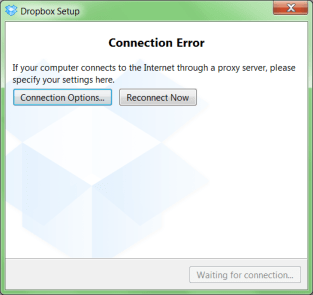
A while ago, I was working with a not so cooperative corporate firewall. All web browsers would work fine, but most other applications would not go through the proxy in a nice way.
For instance, DropBox would show the dreadfull “Connection Error” dialog shown on the right.
That dialog basically means “Dropbox has no clue what happens, try fiddling with your proxy or account settings, then press Reconnect Now” to retry.
Many other applications had issues (for instance Visual Studio connecting to Team Foundation System was very unreliable and the workarounds clumsy).
CNTLM: not the solution
I got inspired by the [WayBack] I code and code: Tutorial: How to use Dropbox behind a corporate proxy server using CNTLM, even though I was pretty sure the corporate firewall was not NTLM based.
And indeed, CNTLM -v -M http://google.com -c CNTLM.INI would give errors like this:
cntlm: Proxy returning invalid challenge!

headers_send: fd 4 warning -999 (connection closed)

Connection closed
HTTP Fiddler: looks promising
So I fired up my old buddy [WayBack] Fiddler 2 HTTP debugging proxy.
Further on, you will learn that Fiddler2 is much more, but right now it is enough to know that it basically sits as a local proxy between your applications and the outside world. Read the rest of this entry »
Posted in .NET, .NET 2.0, .NET 3.0, .NET 3.5, .NET 4.0, .NET 4.5, base64, Cntlm, Development, DropBox, Encoding, Fiddler, JavaScript/ECMAScript, NTLM, Power User, Scripting, SocialMedia, Software Development, Web Development, Windows, Windows 7, Windows 8, Windows Server 2000, Windows Server 2003, Windows Server 2003 R2, Windows Server 2008, Windows Server 2008 R2, Windows Vista, Windows XP, Windows-Http-Proxy | Leave a Comment »
Posted by jpluimers on 2014/04/11
This Explorer extension is brilliant: Path Copy Copy – Home.
It works in Windows XP and up (including 7, 8 .x, 20xx Server, etc).
The Open Source is done in Visual Studio with C++.
–jeroen
Read the rest of this entry »
Posted in C++, Development, Power User, Software Development, Visual Studio 2010, Visual Studio and tools, Windows, Windows 7, Windows 8, Windows 8.1, Windows Server 2003, Windows Server 2003 R2, Windows Server 2008, Windows Server 2008 R2, Windows Vista, Windows XP | Leave a Comment »
Posted by jpluimers on 2014/04/10
Not only for Windows 7 SP1, as it works on newer Windows versions too:
The article lists many steps, but these are the ones you don’t want to miss:
- Start the Disk Cleanup wizard by running ‘CleanMgr‘ as Administrator
- Make sure you press the “Cleanup system files” button:
this will restart CleanMgr as administrator and include obsolete Windows Update files in the scan.
Both scanning and cleaning can take quite a while, and you often have to reboot afterwards.
You automate parts of the non-administrator process, but the automation task does not support the “Cleanup system files” option. Normally I’d rather see what it wants to cleanup, so I have not used this automation way yet..
–jeroen
via: Disk Cleanup Wizard addon lets users delete outdated Windows updates on Windows 7 SP1.
Posted in Power User, Windows, Windows 7, Windows 8, Windows 8.1, Windows Server 2008, Windows Server 2008 R2 | Leave a Comment »
Posted by jpluimers on 2014/04/08
Based on Updating Windows Defender signatures (only) » twm’s blog (thanks Thomas!), I found it would not work on all my Windows systems.
So I wrote a small batch file that works on my Windows 8.x, 7 and XP systems: Read the rest of this entry »
Posted in Power User, Windows, Windows 7, Windows 8, Windows 8.1, Windows XP | Leave a Comment »
Posted by jpluimers on 2014/04/02
Wow, I totally missed the introduction of SETX.
From TechNet:
SETX:
Creates or modifies environment variables in the user or system environment, without requiring programming or scripting. The Setx command also retrieves the values of registry keys and writes them to text files.
Even better, is that it allows you take values from these sources so it is easy to get those into environment variables:
- Command-line parameter
- Registry key
- Text file (with some filtering/search options)
From a bit of searching around, I think it got introduced in a Windows Resource Kit, and got included by default starting Windows Vista.
Excellent addition to my toolset (:
–jeroen
via Setx.
Posted in Batch-Files, Development, Power User, Scripting, Software Development, Windows, Windows 7, Windows 8, Windows 8.1, Windows Server 2008, Windows Server 2008 R2, Windows Vista | Leave a Comment »
Posted by jpluimers on 2014/03/30
Read this very nice post on Nex7’s Blog: ECC vs non-ECC RAM: The Great Debate.
There is no debate. Use ECC dude.
Use ECC especially for server side things (storage, virtualization, databases, etc) where you employ some kind of redundancy/correction in the storage (ZFS, RAID, etc) side of things.
And think about using ECC for the rest of your stuff, especially when things stay in memory for a longer period of time (in-memory processing of data can speed up things a lot, but also increase the risk).
Summary:
There is no debate here. None.
[…]
if you think non-ECC RAM can compete with ECC RAM, you are mistaken. If you think there’s a risk/reward analysis here, you’re correct. The risk is not gigantic, and there’s a real cost to alleviating that risk. You have to decide if that cost is worth alleviating that risk.
[…]
If you believe there’s a risk/reward plan where you can take the reward and apply to to mitigate the risk, you are back to being mistaken. The only benefit of non-ECC RAM (and thus the only reward in its choice over ECC RAM) is it will make the solution cheaper. There is not, however, any way (that I’ve heard of, yet) you can use the cost savings to mitigate the risk using non-ECC RAM will introduce.
[…]
If you choose to use non-ECC RAM, you open yourself up to a new vector for data corruption/loss/downtime/errors/etc,
one that could (rarely) even cause you to lose your entire filesystem, and one ZFS does not (cannot) resolve for you. Indeed, one it likely can’t even see at all. If you choose to employ non-ECC RAM, or are forced to do so because of circumstance or environmental constraint, that’s potentially understandable (and even acceptable) – but do not then attempt to validate or explain away that choice with pseudoscience or downplaying the risk you’ve added. You are using an inferior solution with an extra vector for data corruption/loss that ECC RAM solutions simply do not have. It is that simple.
[…]
Hint 3: There’s a reason we’re so gung-ho about using ECC RAM for ZFS, and it’s not just because we’re paranoid about data loss (which goes hand in hand with being a ZFS zealot, really). It is because you likely don’t realize how at risk you are. Due to the nature of how ZFS handles writes, your incoming (write) data is at risk of RAM-related bit errors for likely significantly longer than traditional storage solutions or alternative filesystems. 5, 10, 30, 60 or more seconds in a state where it is at risk.
Read the rest of this entry »
Posted in *nix, ECC memory, Endian, ESXi4, ESXi5, ESXi5.1, ESXi5.5, Hardware, Hyper-V, Linux, Memory, Power User, SuSE Linux, VMware, VMware ESXi, Windows, Windows 7, Windows 8, Windows 8.1, Windows Server 2008, Windows Server 2008 R2 | Tagged: ECC RAM, ZFS | Leave a Comment »
Posted by jpluimers on 2014/03/29
Until recently, I had all my VMware vSphere Client installations inside a Windows XP VM because Windows XP: relatively light weight, but (as of writing almost) End-of-Life.
I am upgrading that install now, and actually making two installs:
- on Windows Server 2003 R2 (the main VM management VM)
- on Windows 8.1 (my main Windows work laptop)
Of course I needed the installers for vSphere Client 4.1, 5.0, 5.1 and 5.5. The easiest os to get them through the direct download links at VMware: Vsphere Client Direct Download Links | tech :: stuff Read the rest of this entry »
Posted in ESXi4, ESXi5, ESXi5.1, ESXi5.5, Power User, VMware, VMware ESXi, Windows, Windows 8.1, Windows Server 2003 R2, Windows XP | Tagged: VMware, Windows Server 2003 R2, Windows XP, Windows XP SP2 | Leave a Comment »
Posted by jpluimers on 2014/03/29
The upside of findstr is that it is included with Windows since a long time (at least since Windows XP, later: indeed since Windows ME) and supports a form of regex.
But often it drives you crazy.
When it does, read What are the undocumented features and limitations of the Windows FINDSTR command? – Stack Overflow.
–jeroen
Posted in Power User, Windows, Windows 7, Windows 8, Windows 8.1, Windows ME, Windows Server 2000, Windows Server 2003, Windows Server 2003 R2, Windows Server 2008, Windows Server 2008 R2, Windows Vista, Windows XP | Leave a Comment »
Posted by jpluimers on 2014/03/29
Brilliant piece of open source:
SmallestDotNet – SmallestDotNet.com is a single page site that does one thing. It tells you the smallest, easiest download you’d need to get the .NET Framework on your system.
Even on Mac OS X it is helpful and recommends Mono and on iOS it recommends looking at MonoTouch.
Thanks Scott Hanselman for making this available!
–jeroen
via:
Posted in .NET, .NET 1.x, .NET 2.0, .NET 3.0, .NET 3.5, .NET 4.0, .NET 4.5, Apple, Development, Mac, Mac OS X / OS X / MacOS, Mac OS X 10.4 Tiger, Mac OS X 10.5 Leopard, Mac OS X 10.6 Snow Leopard, Mac OS X 10.7 Lion, MacBook, MacBook Retina, MacBook-Air, MacBook-Pro, OS X 10.8 Mountain Lion, OS X 10.9 Mavericks, Power User, Software Development, Windows, Windows 7, Windows 8, Windows 8.1, Windows Server 2003, Windows Server 2003 R2, Windows Server 2008, Windows Server 2008 R2, Windows Vista, Windows XP | Tagged: .NET Framework, scott hanselman | Leave a Comment »


 The Wiert Corner - irregular stream of stuff