Archive for the ‘Windows Vista’ Category
Posted by jpluimers on 2014/05/13
This article is a very brief example of how to use dsquery/dsget/find to get computer information from in the active direrctory of a domain.
The main aim for myself is to condense the information here, and have some links for background information.
If you have the right credentials then the below batch file works very well.
It uses these tools:
- dsquery to query the active directory on your domain controller for the existence and Distinguished Name (or ID/path) of various objects (in this example dsquery computer to check if a computer exists in a domain)
- dsget which can get you various detail information about an object (for instance dsget computer used in this example))
- find to raise the correct errorlevel (and indicate if we indeed found a CN – or Common Name – from a distinguished name)
The ds* tools do not raise any errorlevel, so that’s what find is used for.
Further reading: Read the rest of this entry »
Posted in Batch-Files, Development, Power User, Scripting, Software Development, Windows, Windows 7, Windows 8, Windows Server 2000, Windows Server 2003, Windows Server 2003 R2, Windows Server 2008, Windows Server 2008 R2, Windows Vista, Windows XP | Leave a Comment »
Posted by jpluimers on 2014/05/09
This happened to a client as well: the stock Windows Vista PCL5 driver for an IP-connected HP LaserJet 4050TN would not allow you to select a paper tray. Not for default settings, nor for printing preferences.
The solution: download the HP PCL6 driver for Windows Vista from HP LaserJet 4050 Printer series – Download drivers and software .
Question:
LJ 4050n – Can’t select Tray 1 in driver
I have a 4050n connected to a small LAN, with 3 XP-Pro SP2 machines. These all print directly using standard TCP/IP ports. They were installed using the PCL5e driver downloaded from HP ( 4.27.4050.410 12 Dec 2003 ) This all basically works.
The only problem is I cannot select tray 1. The ‘paper source’ drop-down is greyed out at ‘auto select’. Printer always prints from tray 2 ( A4 Plain. )
Answer:
Try the PCL6 for a 4000TN, the printer still works if a 4050 has a 4000 driver loaded, had similar problems just used the 4000 driver.
–jeroen
via: HP Communities – LJ 4050n – Can’t select Tray 1 in driver – Enterprise Business Community.
Posted in HP Printer Drivers, Power User, Printer drivers, Windows, Windows Vista | Leave a Comment »
Posted by jpluimers on 2014/05/05
Thanks John Savill from Windows IT Pro:
To include comments in a registry file, place a semicolon (;) at the beginning of the line, as shown below:
; This will delete the key below because of the - sign

\[-HKEY_LOCAL_MACHINE\SOFTWARE\SavillTech\key\]
–jeroen
via: How do I place comments in a .reg file? | Windows Server content from Windows IT Pro.
Posted in Microsoft Surface on Windows 7, Power User, Windows, Windows 7, Windows 8, Windows Server 2000, Windows Server 2003, Windows Server 2003 R2, Windows Server 2008, Windows Server 2008 R2, Windows Vista, Windows XP | Leave a Comment »
Posted by jpluimers on 2014/04/28
I want to script an install where a service needs to be run as a user. I want to be able to specify the user.
Creating the user is easy through the [Wayback/Archive] NET USER /ADD command.
Specifying the user for the service can also be done: the [Wayback/Archive] SC CONFIG command [Wayback/Archive] allows this (thanks [Wayback/Archive] wmz and [Wayback/Archive] ofiris).
Now the missing link: granting the user the [Wayback/Archive] “Log on as a service” privilege as a [Wayback/Archive] logon right (SeServiceLogonRight). Is there a command for this? Or a simple script for PowerShell?
(I know only Local Service can do this out of the box, and [Wayback/Archive] no other accounts by default are, but I want to have control over the account and what other privileges that account has).
Here is the solution, including a few comments.
The easiest way to do this from a command line is definitely using NTRights.exe from the Windows Server 2003 Resource Toolkit.
ntrights +r SeServiceLogonRight -u jeroen -m \%COMPUTERNAME%
I changed the command-line a bit:
ntrights +r SeServiceLogonRight -u %USERNAME% -m \%COMPUTERNAME%
Note that
whoami /all
doesn’t show any change (not even after a reboot, it does not matter if you run it with or without UAC token).
secpol.msc
does show the change however, and does not require UAC (follow the tree to “Security Settings -> Local Policies -> User Rights Management -> Log on as a service” to see the users having the permission).
–jeroen
via: [Wayback/Archive] Easiest way to grant “Log on as a service” to a Windows user from the command-line? – Super User.
PS: Later I found out it is way easier to query the right:
accesschk.exe /accepteula -q -a SeServiceLogonRight
It will list the users having that right, for instance:
        IIS APPPOOLClassic .NET AppPool
        NT SERVICEALL SERVICES
        VCS-CIContinuaCI
There are similar rights one might want to query:
SeBatchLogonRight
SeDenyBatchLogonRight
SeInteractiveLogonRight
SeDenyInteractiveLogonRight
SeServiceLogonRight
SeDenyServiceLogonRight
SeNetworkLogonRight
SeDenyNetworkLogonRight
Thanks [Wayback/Archive] twasbrillig for explaining that at as answer to [Wayback/Archive] powershell – How to view user privileges using windows cmd? – Stack Overflow
Posted in Batch-Files, CommandLine, Development, Power User, PowerShell, Scripting, Software Development, Windows, Windows 7, Windows 8, Windows 8.1, Windows Server 2008, Windows Server 2008 R2, Windows Vista | Leave a Comment »
Posted by jpluimers on 2014/04/20
I’m glad that junction did work to create a directory junction to link a directory from one NTFS file system to another with this small batch file (that falls back from mklink to junction):
  @echo off
:start
  if !%1!==!! goto :help
  goto :main
:help
  echo %0 TargetFolder
  echo   Creates directory symbolic link using MKLINK or JUNCTION so that TargetFolder points to %~dp0
  goto :eof
:main
  :: http://www.howtogeek.com/howto/windows-vista/using-symlinks-in-windows-vista/
  call :do mklink /D %1 %~dp0
  call :do junction %1 %~dp0
  goto :eof
:do
  echo %*
  %*
  goto :eof
Some more reading on juncions, hard links, symbolic links, etc:
Read the rest of this entry »
Posted in Power User, Windows, Windows 7, Windows 8, Windows 8.1, Windows Server 2000, Windows Server 2003, Windows Server 2003 R2, Windows Server 2008, Windows Server 2008 R2, Windows Vista, Windows XP | Tagged: Junction Points, NTFS file system, symbolic links | Leave a Comment »
Posted by jpluimers on 2014/04/16
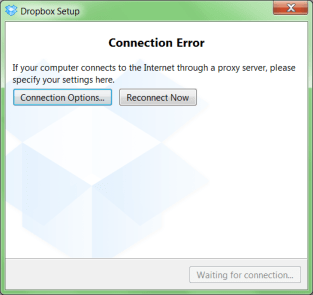
A while ago, I was working with a not so cooperative corporate firewall. All web browsers would work fine, but most other applications would not go through the proxy in a nice way.
For instance, DropBox would show the dreadfull “Connection Error” dialog shown on the right.
That dialog basically means “Dropbox has no clue what happens, try fiddling with your proxy or account settings, then press Reconnect Now” to retry.
Many other applications had issues (for instance Visual Studio connecting to Team Foundation System was very unreliable and the workarounds clumsy).
CNTLM: not the solution
I got inspired by the [WayBack] I code and code: Tutorial: How to use Dropbox behind a corporate proxy server using CNTLM, even though I was pretty sure the corporate firewall was not NTLM based.
And indeed, CNTLM -v -M http://google.com -c CNTLM.INI would give errors like this:
cntlm: Proxy returning invalid challenge!

headers_send: fd 4 warning -999 (connection closed)

Connection closed
HTTP Fiddler: looks promising
So I fired up my old buddy [WayBack] Fiddler 2 HTTP debugging proxy.
Further on, you will learn that Fiddler2 is much more, but right now it is enough to know that it basically sits as a local proxy between your applications and the outside world. Read the rest of this entry »
Posted in .NET, .NET 2.0, .NET 3.0, .NET 3.5, .NET 4.0, .NET 4.5, base64, Cntlm, Development, DropBox, Encoding, Fiddler, JavaScript/ECMAScript, NTLM, Power User, Scripting, SocialMedia, Software Development, Web Development, Windows, Windows 7, Windows 8, Windows Server 2000, Windows Server 2003, Windows Server 2003 R2, Windows Server 2008, Windows Server 2008 R2, Windows Vista, Windows XP, Windows-Http-Proxy | Leave a Comment »
Posted by jpluimers on 2014/04/11
This Explorer extension is brilliant: Path Copy Copy – Home.
It works in Windows XP and up (including 7, 8 .x, 20xx Server, etc).
The Open Source is done in Visual Studio with C++.
–jeroen
Read the rest of this entry »
Posted in C++, Development, Power User, Software Development, Visual Studio 2010, Visual Studio and tools, Windows, Windows 7, Windows 8, Windows 8.1, Windows Server 2003, Windows Server 2003 R2, Windows Server 2008, Windows Server 2008 R2, Windows Vista, Windows XP | Leave a Comment »
Posted by jpluimers on 2014/04/02
Wow, I totally missed the introduction of SETX.
From TechNet:
SETX:
Creates or modifies environment variables in the user or system environment, without requiring programming or scripting. The Setx command also retrieves the values of registry keys and writes them to text files.
Even better, is that it allows you take values from these sources so it is easy to get those into environment variables:
- Command-line parameter
- Registry key
- Text file (with some filtering/search options)
From a bit of searching around, I think it got introduced in a Windows Resource Kit, and got included by default starting Windows Vista.
Excellent addition to my toolset (:
–jeroen
via Setx.
Posted in Batch-Files, Development, Power User, Scripting, Software Development, Windows, Windows 7, Windows 8, Windows 8.1, Windows Server 2008, Windows Server 2008 R2, Windows Vista | Leave a Comment »
Posted by jpluimers on 2014/03/29
The upside of findstr is that it is included with Windows since a long time (at least since Windows XP, later: indeed since Windows ME) and supports a form of regex.
But often it drives you crazy.
When it does, read What are the undocumented features and limitations of the Windows FINDSTR command? – Stack Overflow.
–jeroen
Posted in Power User, Windows, Windows 7, Windows 8, Windows 8.1, Windows ME, Windows Server 2000, Windows Server 2003, Windows Server 2003 R2, Windows Server 2008, Windows Server 2008 R2, Windows Vista, Windows XP | Leave a Comment »
Posted by jpluimers on 2014/03/29
Brilliant piece of open source:
SmallestDotNet – SmallestDotNet.com is a single page site that does one thing. It tells you the smallest, easiest download you’d need to get the .NET Framework on your system.
Even on Mac OS X it is helpful and recommends Mono and on iOS it recommends looking at MonoTouch.
Thanks Scott Hanselman for making this available!
–jeroen
via:
Posted in .NET, .NET 1.x, .NET 2.0, .NET 3.0, .NET 3.5, .NET 4.0, .NET 4.5, Apple, Development, Mac, Mac OS X / OS X / MacOS, Mac OS X 10.4 Tiger, Mac OS X 10.5 Leopard, Mac OS X 10.6 Snow Leopard, Mac OS X 10.7 Lion, MacBook, MacBook Retina, MacBook-Air, MacBook-Pro, OS X 10.8 Mountain Lion, OS X 10.9 Mavericks, Power User, Software Development, Windows, Windows 7, Windows 8, Windows 8.1, Windows Server 2003, Windows Server 2003 R2, Windows Server 2008, Windows Server 2008 R2, Windows Vista, Windows XP | Tagged: .NET Framework, scott hanselman | Leave a Comment »


 The Wiert Corner - irregular stream of stuff