Posted by jpluimers on 2022/10/26
With APIs, you always hope that Get and Set methods mirror each other. More often than not, they don’t.
Take for instance these two:
They are far from symmetric: [Wayback/Archive] Get-NetFirewallRule shows far less than [Wayback/Archive] Set-NetFirewallRule allows you to set (first and foremost the various port related properties). It can be worked around though.
There are a few posts discussing this, of which I think these two are the most important:
Both above posts via [Wayback/Archive] “Get-NetFirewallRule” “LocalPort” – Google Search.
This is what I was after:
PowerShell "Get-NetFirewallRule -Name 'RemoteDesktop-UserMode-In-TCP' | Select-Object Name,DisplayName,Enabled,Direction,@{Name='Protocol';Expression={($PSItem | Get-NetFirewallPortFilter).Protocol}},Action,@{Name='LocalPort';Expression={($PSItem | Get-NetFirewallPortFilter).LocalPort}}"
Or actually:
Read the rest of this entry »
Posted in CommandLine, Development, Power User, PowerShell, PowerShell, Remote Desktop Protocol/MSTSC/Terminal Services, Scripting, Software Development, Windows | Leave a Comment »
Posted by jpluimers on 2022/10/25
With the rise of *nix tools and infrastructure on Windows (including, but certainly not limited to Visual Studio Code and Windows Subsystem for Linux), I need to get acquainted to the new ways these interface to the Windows Console.
Since Windows Console is from the (now obsolete) UCS-2 days, so it is not even fully Unicode aware, and has trouble with UTF-8, UTF-16.
So here are some links for my reading list:
–jeroen
Read the rest of this entry »
Posted in *nix, *nix-tools, CommandLine, ConPTY, Console (command prompt window), Development, Linux, Power User, Software Development, Windows, Windows 10, Windows 11, Windows Development, Windows Terminal, WSL Windows Subsystem for Linux | Leave a Comment »
Posted by jpluimers on 2022/10/21
From [Wayback/Archive.is] [APP][2.1+] ExDialer – Dialer & Contacts | Page 134 | XDA Forums:
…
I installed exDialer 1.98 and set all asked permissions. The contacts were not visible but after rebooting the device they show up. Now the problem still was with call history. I Install plugin for missing calls from exDialer’s settings. Then I went into device settings and under all applications found exDialer, go to permission settings to check if everything is enabled and then under call history permission tap on “Show all apps with this permission”. Then I disable this permission for the default call dialer (also if you have some other installed) and boom…call history’s back. I suppose this method can be used also on Android 10 or 9 if you have the same problem.
Note: Leave contacts premission for default dialer active.
…
All you got to do, after going through all steps I describe before is, go to phone Settings, then manage applications. There you will find default apps, open it and under Phone App change default to exDialer. I instantly get back call history, without reboot or any other action.
…
I must also say that “True Phone” is a great replacement I could not find any thing that I miss from exDailer.
It have both call recording and swipe to call/text. (you need to dig deep in the settings).
And True Phone is active active app with last update from Mar 13 2021
…
For me the only step to get the history visible was to make the find the settings for default “Phone App change default to exDialer”.
–jeroen
Posted in Android Devices, OnePlus Six, Power User | Leave a Comment »
Posted by jpluimers on 2022/10/20
Last week I found out that I had some Windows ATOM issues before, but this beats them easily was still a draft in stead if in the blog queue.
I got reminded to it by someone asking on Telegram about
“Do I need to use GarbageCollectAtoms in Delphi? I used it in delphi 7, but I dont know what is benefit. 😐”.
The short answer is: yes, if your Delphi application does terminate in a way that the Controls unit cannot cleanly unload (and cannot free the Windows atoms) or leaks Windows atoms in a different way. I have been in that situation and that’s why I wrote the above blog post that got published in 2016.
The longer answer is likely no, both the Windows atom and registered Windows message table share a heap and that registered VCL Windows message leaking bug got fixed some 10 years ago in Delphi XE2, see:
Read the rest of this entry »
Posted in Conference Topics, Conferences, Delphi, Development, Event, Power User, Software Development, Windows, Windows 10, Windows 7, Windows 8, Windows 8.1, Windows NT, Windows Server 2000, Windows Server 2003, Windows Server 2003 R2, Windows Server 2008, Windows Server 2008 R2, Windows Server 2012, Windows Server 2012 R2, Windows Server 2016, Windows Vista, Windows XP | Leave a Comment »
Posted by jpluimers on 2022/10/19
Posted in Development, FortiGate/FortiClient, Hardware, Network-and-equipment, Power User, Security, Software Development, VPN, Windows, Windows 10, Windows 7, Windows 8, Windows 8.1, Windows 9, Windows Development, Windows Server 2000, Windows Server 2003, Windows Server 2003 R2, Windows Server 2008, Windows Server 2008 R2, Windows Server 2012, Windows Server 2012 R2, Windows Server 2016, Windows Vista, Windows XP | Leave a Comment »
Posted by jpluimers on 2022/10/18
For my link archive (all my Chromecast devices are wired via LAN to low-latency fiber backed ISPs):
For v1 Chromecast devices, it seems Google does not care any more and will always stream at 1060p50 or 1060p60 without giving the opportunity to tune down the quality from the Android Chromecast app (my app always shows “Quality:Unavailable”, see the picture below the signature).
For v2 and up, there sometimes are firmware issues that take long times to get resolved.
–jeroen
Read the rest of this entry »
Posted in Chromecast, Google, Power User | Leave a Comment »
Posted by jpluimers on 2022/10/17
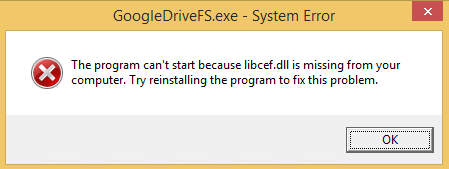
GoogleDriveFS – cannot find libcef.dll
Don’t you love errors after things try to audo-update themselves without testing preerquisites:
---------------------------
GoogleDriveFS.exe - System Error
---------------------------
The program can't start because libcef.dll is missing from your computer. Try reinstalling the program to fix this problem.
---------------------------
OK
---------------------------
The message was from the csrss.exe Client/Server Runtime Subsystem – Wikipedia process:
Read the rest of this entry »
Posted in Google, GoogleDrive, Power User, Windows, Windows 8 | Leave a Comment »


 The Wiert Corner - irregular stream of stuff