


Interessant draadje over iemand die zijn gegevens probeerde af te schermen, maar die in een rechtzaak toch gebruikt mochten worden: [WayBack] Verkoper illegale e-books moet 1421 euro aan Stichting Brein betalen – IT Pro – Nieuws – Tweakers.
–jeroen
Posted by jpluimers on 2021/08/30
Interessant draadje over iemand die zijn gegevens probeerde af te schermen, maar die in een rechtzaak toch gebruikt mochten worden: [WayBack] Verkoper illegale e-books moet 1421 euro aan Stichting Brein betalen – IT Pro – Nieuws – Tweakers.
–jeroen

Posted in LifeHacker, Power User | Leave a Comment »
Posted by jpluimers on 2021/08/27
Sometimes, the Windows device manager shows any of the below errots for an USB 3.x device that is physically connected to the ESXi host and passes through a VM (via a virtual USB controller and virtual USB device).
This solution usually works: use a USB 2.0 cable instead of a USB 3.x cable.
If it doesn’t work, then the solutions are the same as when this happens in a pure physical solution:
In my case, I needed a USB connection, because it is the only way to reset a Fujitsu ScanSnap scanner to correct WiFi settings after it gets confused (which happens a few times per year).
The difference for devices with a known driver:
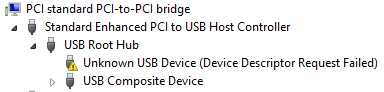
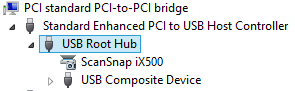
The difference for devices with an unknown driver:
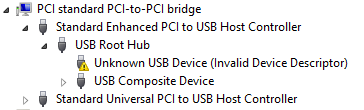
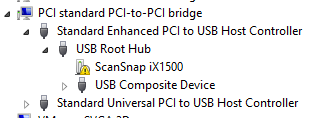
This happened with me on both a ScanSnap iX500 and iX1500, and this did not help (as I was on a more recent Windows version): [WayBack] When setting up your scanner 502: My computer does not recognize ScanSnap iX500 with a USB 3.0 port. – Fujitsu Global.
More on USB passthrough:
A tutorial explaining how to add USB devices connected to a ESXi host to a virtual machine residing on the host itself. A feature called USB passthrough.
You can add one or more USB passthrough devices from an ESXi host to a virtual machine if the physical devices are connected to the host on which the virtual machine runs.
More on USB virtualisation:
–jeroen

Posted in ESXi5.5, ESXi6, ESXi6.5, Fujitsu ScanSnap, Hardware, ix500, Power User, Scanners, Virtualization, VMware, VMware ESXi | Leave a Comment »
Posted by jpluimers on 2021/08/27
You know the old helpdesk joke about “turning it off and on”, right?
GE did that on steroids for their C light bulbs.
It is an off, on, off, on, off, on sequence that depends on the firmware version which nobody knows.
Both procedures:
Do not mix up the off and on times, or you have to restart again.
So step 2 becomes this:
The recommend counting using Mississippi seconds (am I the only one having to check the spelling of that 3 times?).
No counting mechanism beats using a watch or clock.
They even made a video about it lasting 3+ minutes.
The video has a great comment thread.
Via: [WayBack] Alexander BITCOIN ADS ZIJN NEP Klöpping on Twitter: “Als ik ooit zomergast ben laat ik dit fragment integraal zien https://t.co/iHuclGuddu”
–jeroen
Posted in Hardware, LifeHacker, Power User | Leave a Comment »
Posted by jpluimers on 2021/08/27
[WayBack] keyboard – How can I type unicode characters without using the mouse? – Ask Different (thanks [WayBack] malte):
- Press
⌃ Control+⌘ Command+␣ spaceto bring up the characters popover.- Then type in the code point and press the down arrow to select the symbol. (Use
U+####as code point)- Then simply press ENTER and you are done.
This also works with the names of the symbols (e.g. arrow).
Additional information
Note the icon in the top right of the character popover. It changes the popover to the full Character Viewer, which cannot be navigated by the keyboard. Click the icon in the top right of the Character Viewer to return to the popover. Many thanks to @Tom Gewecke for this information.
–jeroen
Posted in Apple, Mac OS X / OS X / MacOS, Power User | Leave a Comment »
Posted by jpluimers on 2021/08/26
Sometimes, especially when ESXi thinks a volume is bad, but the ESXi S.M.A.R.T. logging does not indicate so, it boots without mounting some of the VMFS volumes as datastores.
It took me a while to find the right command to list those, but I’m glad I found it:
Posted in ESXi6, ESXi6.5, ESXi6.7, Power User, PowerCLI, Virtualization, VMware, VMware ESXi | Leave a Comment »
Posted by jpluimers on 2021/08/26
Last week I posted firewalld: show interfaces with their zone details and show zones in use as a follow up on On my research list: migrate from OpenSuSE SuSEfirewall2 to firewalld « The Wiert Corner – irregular stream of stuff.
I explained that firewalld is based on zones, and showed some statements on how to retrieve information.
In the mean time, I collected a bunch more firewalld related links, so here they are:
For adding ports numerically, just add one at a time, or a range eg ‘3000-4000’
The CLI command to allow port 5000 TCP would be
sudo firewall-cmd --zone=public --add-port=5000/tcp
--permant option# firewall-cmd --zone=public --add-service=http successTo make changes permanent, use the –permanent option. Example:
# firewall-cmd --permanent --zone=public --add-service=http
success
Changes made in Permanent configuration mode are not implemented immediately. Example:
# firewall-cmd --zone=work --list-services
dhcpv6-client ssh
However, changes made in a Permanent configuration are written to configuration files. Restarting the firewalld service reads the configuration files and implements the changes.
Example:# systemctl restart firewalld# firewall-cmd --zone=work --list-services dhcpv6-client http ssh
- Concepts
- Configuration
- Utilities
- The daemon: firewalld
- Zone
- Service
- IPSet
- Helper
- ICMP Type
- Direct Interface
- HowTo
- Manual Pages
- firewalld(1)
- firewall-cmd(1)
- firewall-offline-cmd(1)
- firewall-config(1)
- firewall-applet(1)
- firewalld.conf(5)
- firewalld.zones(5)
- firewalld.zone(5)
- firewalld.service(5)
- firewalld.ipset(5)
- firewalld.helper(5)
- firewalld.icmptype(5)
- firewalld.richlanguage(5)
- firewalld.direct(5)
- firewalld.lockdown-whitelist(5)
- firewalld.dbus(5)
- External Resources
- Working With The Source
–jeroen
Posted in *nix, *nix-tools, firewalld, Power User | Leave a Comment »
Posted by jpluimers on 2021/08/26
A while ago openSUSE switched to firewalld as a fronte-end for iptables. Tumbleweed was first in 2018, so I wrote a reminder: On my research list: migrate from OpenSuSE SuSEfirewall2 to firewalld « The Wiert Corner – irregular stream of stuff.
The core concept of firewalld is zones, which some people find hard to understand: [Archive.is/WayBack] Firewalld on Leap 15 – why is it so complicated ? : openSUSE.
Another concept is interfaces and how they bind to zones. [Wayback] Masquerading and Firewalls | Security Guide | openSUSE Leap 15.2 shows more of that.
The final concept is services that bind one or more aspects (like ports or addresses) to a service name [Wayback] Documentation – Manual Pages – firewalld.service | firewalld.
Other interesting bits of information:
Below are some examples on what I learned, especially finding details about active interfaces and the zones they are bound to.
All of them are based on:
xargs shell trick (I known you can do some of them without the trick, but I try to use common patterns in my solution so I do not have to remember which boundary case failsecho -n trick to skip the newline outputfirewall-cmd options (which kind of care commands)
--get-active-zones:Print currently active zones altogether with interfaces and sources used in these zones. Active zones are zones, that have a binding to an interface or source. The output format is:
zone1
  interfaces: interface1 interface2 ..
  sources: source1 ..
zone2
  interfaces: interface3 ..
zone3
  sources: source2 ..
If there are no interfaces or sources bound to the zone, the corresponding line will be omitted.
--list-interfaces:List interfaces that are bound to zone
zoneas a space separated list. If zone is omitted, default zone will be used.
--get-zone-of-interface=<zone>:Print the name of the zone the
interfaceis bound to or no zone.
--info-zone=<zone> (which shows far more information than the manual indicates):Print information about the zone
zone. The output format is:zone interfaces: interface1 .. sources: source1 .. services: service1 .. ports: port1 .. protocols: protocol1 .. forward-ports: forward-port1 .. source-ports: source-port1 .. icmp-blocks: icmp-type1 .. rich rules: rich-rule1 ..
Two more notes before the examples:
--list-all-zones, but that shows details of all un-used zones as well.--list-interfaces to list *all* interfaces. I might replace this later with ls /sys/class/net (see [WayBack] linux – List only the device names of all available network interfaces – Super User).Besides lising zones and interfaces, you might be interested in services and ports:
# firewall-cmd --list-services
dhcpv6-client ssh
# firewall-cmd --list-ports
The first only shows the zone names
# firewall-cmd --list-interfaces | xargs -I {} sh -c 'firewall-cmd --get-zone-of-interface={}'
public
The second both zones and interfaces:
# firewall-cmd --get-active-zones
public
  interfaces: ens192
OpenSuSE by default does not bind interfaces to zones; it means any interface uses the default zone. That means the --list-interfaces commands in this blog post fail.
You can check this behaviour by running this command:
# ls /sys/class/net | xargs -I {} sh -c 'echo -n "interface {} has zone " ; firewall-cmd --get-zone-of-interface={} | xargs -I [] sh -c "echo [] ; firewall-cmd --info-zone=[]"'
interface eth0 has zone no zone
interface lo has zone no zone
interface wlan0 has zone no zone
Alternatives:
# firewall-cmd --get-default-zone
public
# firewall-cmd --info-zone=$(firewall-cmd --get-default-zone)
public
  target: default
  icmp-block-inversion: no
  interfaces:
  sources:
  services: dhcpv6-client ssh
  ports:
  protocols:
  masquerade: no
  forward-ports:
  source-ports:
  icmp-blocks:
  rich rules:
You can see that here the public zone is marked default which means it binds to any interface that is not bound to a specific zone.
# firewall-cmd --list-interfaces | xargs -I {} sh -c 'firewall-cmd --get-zone-of-interface={} | xargs -I [] sh -c "firewall-cmd --info-zone=[]"'
public (active)
  target: default
  icmp-block-inversion: no
  interfaces: ens192
  sources:
  services: dhcpv6-client ssh
  ports:
  protocols:
  masquerade: no
  forward-ports:
  source-ports:
  icmp-blocks:
  rich rules:
List interfaces and their zones:
# firewall-cmd --list-interfaces | xargs -I {} sh -c 'echo -n "interface {} has zone " ; firewall-cmd --get-zone-of-interface={}'
interface ens192 has zone public
List interfaces and their zone details:
# firewall-cmd --list-interfaces | xargs -I {} sh -c 'echo -n "interface {} has zone " ; firewall-cmd --get-zone-of-interface={} | xargs -I [] sh -c "echo [] ; firewall-cmd --info-zone=[]"'
interface ens192 has zone public
public (active)
  target: default
  icmp-block-inversion: no
  interfaces: ens192
  sources:
  services: dhcpv6-client ssh
  ports:
  protocols:
  masquerade: no
  forward-ports:
  source-ports:
  icmp-blocks:
  rich rules:
dns service is available, then allow it on publicVerify if a DNS is in the enabled services:
# firewall-cmd --list-services
dhcpv6-client ssh
Here no DNS service is enabled, so I need to figure out if any DNS service is available to be enabled.
This lists all the services that can be enabled in a zone:
# firewall-cmd --get-services
On my system, this returned the following list:
RH-Satellite-6 amanda-client amanda-k5-client amqp amqps apcupsd audit bacula bacula-client bb bgp bitcoin bitcoin-rpc bitcoin-testnet bitcoin-testnet-rpc bittorrent-lsd ceph ceph-mon cfengine cockpit condor-collector ctdb dhcp dhcpv6 dhcpv6-client distcc dns dns-over-tls docker-registry docker-swarm dropbox-lansync elasticsearch etcd-client etcd-server finger freeipa-4 freeipa-ldap freeipa-ldaps freeipa-replication freeipa-trust ftp ganglia-client ganglia-master git grafana gre http https imap imaps ipp ipp-client ipsec irc ircs iscsi-target isns jenkins kadmin kdeconnect kerberos kibana klogin kpasswd kprop kshell ldap ldaps libvirt libvirt-tls lightning-network llmnr managesieve matrix mdns memcache minidlna mongodb mosh mountd mqtt mqtt-tls ms-wbt mssql murmur mysql nfs nfs3 nmea-0183 nrpe ntp nut openvpn ovirt-imageio ovirt-storageconsole ovirt-vmconsole plex pmcd pmproxy pmwebapi pmwebapis pop3 pop3s postgresql privoxy prometheus proxy-dhcp ptp pulseaudio puppetmaster quassel radius rdp redis redis-sentinel rpc-bind rsh rsyncd rtsp salt-master samba samba-client samba-dc sane sip sips slp smtp smtp-submission smtps snmp snmptrap spideroak-lansync spotify-sync squid ssdp ssh steam-streaming svdrp svn syncthing syncthing-gui synergy syslog syslog-tls telnet tentacle tftp tftp-client tile38 tinc tor-socks transmission-client upnp-client vdsm vnc-server wbem-http wbem-https wsman wsmans xdmcp xmpp-bosh xmpp-client xmpp-local xmpp-server zabbix-agent zabbix-server
I was searching to see if dns was available, so I split the string with tr, then searced with grep:
# firewall-cmd --get-services | tr " " "\n" | grep dns

dns

dns-over-tls

mdns
To get details, use the firewall-cmd --info-service=servicename like this:
# firewall-cmd --get-services | tr " " "\n" | grep dns | xargs -I [] sh -c "firewall-cmd --info-service=[]"
dns
  ports: 53/tcp 53/udp
  protocols:
  source-ports:
  modules:
  destination:
  includes:
dns-over-tls
  ports: 853/tcp
  protocols:
  source-ports:
  modules:
  destination:
  includes:
mdns
  ports: 5353/udp
  protocols:
  source-ports:
  modules:
  destination: ipv4:224.0.0.251 ipv6:ff02::fb
  includes:
So for named (bind), I need the dns service to be enabled:
# firewall-cmd --zone=public --add-service=dns --permanent
success
Now a –list-services will not show dns as we changed the --permanent configuration, not the current configuration:
# firewall-cmd --list-services

dhcpv6-client ssh
So you need to --reload the --permanent settings:
# firewall-cmd --list-services --permanent

dhcpv6-client dns ssh

# firewall-cmd --reload

success

# firewall-cmd --list-services

dhcpv6-client dns ssh
–jeroen
Posted in *nix, *nix-tools, bash, bash, Development, iptables, Linux, openSuSE, Power User, Scripting, Software Development, SuSE Linux, Tumbleweed, xargs | Leave a Comment »
Posted by jpluimers on 2021/08/25
(Edit 20221202: added one more link on “REALLOCATED SECTOR CT below threshold”)
Somehow, health data of my NVMe and SATA drives do not show up as health information on the web-ui of my ESXi playground rig.
So far, I noticed that ESXi runs a smartd, but does not ship with a smartctl, nor health data ends up in the web user interface. So you cannot see the state of NVMe and SATA devices easily.
Still these devices deteriorate over time and afterwards die, so below are some links to investigate later.
Goal is to use my own thresholds to set warning and error levels.
Some log entries:
Posted in *nix, *nix-tools, ESXi6, ESXi6.5, Power User, PowerCLI, smartmontools/smartctl/smartd, Virtualization, VMware, VMware ESXi | Leave a Comment »
Posted by jpluimers on 2021/08/25
Oh nice: [Wayback/Archive.is] Samsung can remotely disable their TVs worldwide using TV Block.
This means:
Disconnected, any apps needing internet connection won’t run.
Those apps usually work more reliable on an Apple TV or similar device that plays over HDMI anyway.
In addition, it will also prevent Samsung to show adds on your TV.
So disconnecting it is a win-win-win situation.
Note: you could already block apps and adds, see:
Maybe those blocks also block blocking.
–jeroen
Posted in 4K Monitor, Displays, Hardware, Home Audio/Video, MU6100, Power User, Samsung TV | Leave a Comment »
Posted by jpluimers on 2021/08/25
[WayBack] html – CSS Display an Image Resized and Cropped – Stack Overflow (thanks [WayBack] roborourke!); see full answer link for runnable snippet and HTML (the WordPress editor keeps fucking up preformatted code blocks with html or XML in it).
You could use a combination of both methods eg.
    .crop {
        width: 200px;
        height: 150px;
        overflow: hidden;
    }

    .crop img {
        width: 400px;
        height: 300px;
        margin: -75px 0 0 -100px;
    }
You embed the img in a div with class .crop, or in-line the styles in the img and div tags.
--jeroen
Posted in CSS, Development, HTML, HTML5, SocialMedia, Software Development, Web Development, WordPress, WordPress | Leave a Comment »
 The Wiert Corner - irregular stream of stuff