The Wiert Corner – irregular stream of stuff

Jeroen W. Pluimers on .NET, C#, Delphi, databases, and personal interests

  • My badges

  • Twitter Updates

  • My Flickr Stream

  • Pages

  • All categories

  • Enter your email address to subscribe to this blog and receive notifications of new posts by email.

    Join 1,854 other subscribers

Needle fear / prikangst

Posted by jpluimers on 2021/06/15

An interesting Dutch thread on fear of needles and how to cope with it is at [Archive.is] Jerry Vermanen on Twitter: “Even iets heel anders. Mijn vaccinatieafspraak komt dichterbij. Maar ik ben doodsbang voor naalden. Hoe hebben andere mensen met dezelfde angst dit aangepakt?”

The question came because of COVID-19 vaccinations.

Since I have needle fear and I am autistic, I posted a sub-thread ([Archive.is] Jeroen Wiert Pluimers on Twitter: “Ik heb mijn “maar je ziet er helemaal niet autistisch uit” T-Shirt aangetrokken (dank @biancatoeps !) … “) with how it works best in my case, which I have translated below just in case it can help other people.

Having gotten my second AstraZeneca shot on Sunday 2021-06-14, and had drawn blood for cardiologist check-up on Monday 2021-06-15 I know these work for me:

I put on my “but you don’t look autistic at all” T-Shirt (thanks [Archive.is] @biancatoeps !)

In addition, I report it in advance and briefly discuss how it works best for me.

They are very happy with that, by the way.

because many have that fear, but don’t say it (just assume that 1 in 3 people has a fear of injection, I’ll look for a link about that in a moment).

In addition to [Archive.is] Eveline Meijer on Twitter: “Nog niet gevaccineerd, maar vaak genoeg geprikt en ik ben er ook bang voor. Ik meld dit vaak bij degene die de prik zet en dat ik de naald vooral niet wil zien. Dus andere kant op kijken en proberen rustig te ademen. Dan komt het bij mij meestal wel goed.… “

first what works for me, and what I do:

  1. give a brief explanation of what they are going to do and how
  2. indicate my preferred arm
  3. tell them they should stop talking to me a few seconds before putting the needle in
  4. look away from where they sting, focus on something else so that I focus on breathing
  5. say “yes” if they can start

You’re certainly not alone, and it’s great that you’re talking about it before now. Hopefully these tips will help making it easier for you in the future.

This states that more than 35% has fear plus some tips: [Wayback] Bang voor naalden? Deze app helpt bij prikangst | RTL Nieuws (which mentions the app [Wayback] AINAR – Artificial Intelligence for Needle Anxiety Reduction)

Good luck for when you get vaccinated. I will get the 2nd shot this afternoon and it will be fine (:

Later: Got shot 2 of AstraZeneca. A little light-headed because the anxiety subsides. Waiting for half an hour now as I’m allergic to NSAIDs: just to be on the safe side.

Notes:

Some interesting bits from the Dutch thread at [Wayback] Thread by @JerryVermanen: Even iets heel anders. Mijn vaccinatieafspraak komt dichterbij. Maar ik ben doodsbang voor naalden. Hoe hebben andere mensen met dezelfde angst dit aangepakt?:

  • [Wayback] AINAR – Artificial Intelligence for Needle Anxiety Reduction

    Welcome to AINAR!

    The AINAR game application makes it possible to learn controlling your needle fear. The AINAR app is making use of state of the art technology in Artificial Intelligence and biofeedback.

    THIS SITE DOES NOT CONTAIN IMAGES OF NEEDLES!

  • Tell them, and when getting the shot, look the other way and focus on breathing.
  • Seek distraction: make some small talk, play on your phone.
  • Look forward to the treat you give yourself afterwards: ice cream, LEGO, whatever.
  • Compartmentalise the event slots (before shot, during shot, after shot) and try to put your fears only in the middle slot.
  • Get the single shot Janssen vaccin (only having fear once instead of twice).
  • If the pain triggers your fear, try lidocaine skin cream (consult with your doctor first as it is a anesthetic that causes loss of feeling in the skin and surrounding tissues that prevents pain).
  • Take a support person or support animal with you (first ask if that is allowed).
  • Fear can enhance the pain sense, so if you can lessen the fear, the pain likely lessens too.

Dutch sub-thread: [Wayback] Thread by @jpluimers: @JerryVermanen Ik heb mijn “maar je ziet er helemaal niet autistisch uit” T-Shirt aangetrokken (dank @biancatoeps !)…

–jeroen

Read the rest of this entry »

Posted in LifeHacker, Power User | Leave a Comment »

Delphi Basics : FindCmdLineSwitch command07

Posted by jpluimers on 2021/06/15

Since I keep forgetting about this, and there is the Embarcadero documentation for it has had no examples added in Delphi 2007 or later: [WayBack] Delphi Basics : FindCmdLineSwitch command

Example code : Saerch the program parameters for 3 switches
begin
// Before running this code, use the Run/parameters menu option
// to set the following command line parameters : /def abc /ghi
ShowMessage(CmdLine);     // Show the execution command + parameters

// How many parameters were passed?
ShowMessage(‘There are ‘+IntToStr(ParamCount)+’ parameters’);

// Scan for parm1, parm2 and parm3 parameters
if FindCmdLineSwitch(‘abc’)
then ShowMessage(‘abc found’)
else ShowMessage(‘abc NOT found’);

if FindCmdLineSwitch(‘def’)
then ShowMessage(‘def found’)
else ShowMessage(‘def NOT found’);

if FindCmdLineSwitch(‘ghi’)
then ShowMessage(‘ghi found’)
else ShowMessage(‘ghi NOT found’);
end;
Show full unit code
   “C:\Program files\Borland\Delphi7\Projects\Project1.exe” /def abc /ghi
There are 3 parameters
abc NOT found
def found
ghi found

Related: [WayBack] delphi – How to read value of ParamStr with different deliminators? – Stack Overflow

Unchanged Embarcadero Delphi 2007 documentation:

For comparison, the Delphi 10.2 Rio documentation:

The really odd thing? The really versatile TCommandParser class got ditched after Delphi XE6: On the Delphi TCommandParser class for parsing command-lines and arguments (via: Suggestions for how to define command line parameters – Stack Overflow).

–jeroen

Posted in Delphi, Development, Software Development | Leave a Comment »

Awesome Cookie Manager: popup URI

Posted by jpluimers on 2021/06/14

I blogged about [WayBack] Awesome Cookie Manager before. The Awesome Cookie Manager lets the user manage cookies in Google Chrome. It is great.

It is even greater that the pop-up dialog has a URI:

chrome-extension://hcpidejphgpcgfnpiehkcckkkemgneif/popup.html

Get it at [Archive.is] Awesome Cookie Manager – Chrome Web Store:

Displays a list of all Google Chrome cookies. Allows searching, viewing, editing, saving, restoring, and deleting cookies.

It helped me solve the below cases, where I had too many cookies, to the Web Archive bailed out; Awesome Cookie Manager helped me to clear the right cookies:

Edit 20231230: Awesome Cookie Manager source repository at [Wayback/Archive] Phatsuo/awesome-cookie-manager: Awesome Cookie Manager.

--jeroen

Posted in Chrome, Google, Power User | Leave a Comment »

MacOS: killing Chrome from the terminal

Posted by jpluimers on 2021/06/14

Every now and then, Chrome hangs to badly on MacOS that the whole Mac GUI becomes unresponsive so even the “Force Quit” dialog does not appear.

Sometimes you are lucky enough that you have a (remote) terminal shell open.

Then you can do either of these:

  • Less hard kill:
    • killall 'Google Chrome'
    • killall Google\ Chrome
  • Hard kill:
    • killall -9 'Google Chrome'
    • killall -9 Google\ Chrome

The less hard kill sometimes brings up an unresponsive task and still allows you to save any changed.

Via:

–jeroen

Posted in Apple, Chrome, Google, Mac OS X / OS X / MacOS, Power User | Leave a Comment »

Keyboard Shortcuts, Markdown, and Autocomplete – Atlassian Documentation

Posted by jpluimers on 2021/06/14

Details at [WayBack] Keyboard Shortcuts, Markdown, and Autocomplete – Atlassian Documentation; summary:

To view all Confluence keyboard shortcuts, do any of the following:

  • Choose the help icon  from the universal sidebar, then choose Keyboard Shortcuts.
  • When viewing a page, press shift+?
  • While editing a page, choose the question mark icon from the editor toolbar.

a list of some of the most common shortcuts:

Markdown

Use markdown shortcuts to format text from the comfort of your keyboard.

  1. Either:
    • Type [ and then the first few characters of the page title, user’s name, image name or file name.
    • Type the first few characters of the page title, user’s name, image name, or file name (or select relevant text) and then press ctrl+shift+k.
  2. Click the relevant link from the list of suggestions.

If the item you need is not in the list, either choose Search for ‘xxx’ to continue looking for the page within Confluence, or Insert Web Link to link to an external page.

When a Windows shortcut has Ctrl in it, the MacOS shortcut uses Command.

–jeroen

Posted in Development, Keyboards and Keyboard Shortcuts, Lightweight markup language, MarkDown, Power User, Software Development | Leave a Comment »

Still relevant for current Windows versions: hard drive – defrag /x – consolidate free space not really working – Windows Server 2012 – Server Fault

Posted by jpluimers on 2021/06/11

From my answer at [WayBack] hard drive – defrag /x – consolidate free space not really working – Windows Server 2012 – Server Fault

I’ve tried many tools, starting with defrag C: /X (which tries, but doesn’t give good results) and found out these steps give the best results:

  1. Perform an Ultradefrag full optimisation
  2. Perform a MyDefrag Consolidate free space script on the drive.

Note that MyDefrag (formerly named JkDefrag) is not maintained any more but the 4.3.1 version in the WayBack machine still works very well as the underlying defragmentation APIs in Windows haven’t changed.

References:

The original MyDefrag disappeared two times (temporarily in 2014 because the domain expired, then permanently in 2017 because the domain went off-line).

Luckily, the WayBack machine at archive.org has the latest version saved (not all the links from the archive.org search page have an executable as sometimes it shows the expired domain or a non-existing redirect when the domain got off-line):

Note that chocolatey install --yes mydefrag --version 4.3.11 fails because of the missing download. See [WayBack] Chocolatey Software | MyDefrag 4.3.1.

(The --version parameter trick is from [WayBack] Chocolatey – How to install hidden and unlisted package? – Super User, via [WayBack] “This package is unlisted and hidden from package listings.” – Google Search).

–jeroen

Posted in Power User, Windows, Windows 10, Windows 7, Windows 8, Windows 8.1, Windows Server 2008, Windows Server 2008 R2, Windows Server 2012, Windows Server 2012 R2, Windows Server 2016, Windows Vista, Windows XP | Leave a Comment »

Winword: parts of the document with numbered, but other parts (Table of Contents, Summary) without numbering

Posted by jpluimers on 2021/06/11

Steps to have only the body parts of your Winword document Heading 1 numbered, but parts like Summary and Table of Contents without numbering.

Related:

Steps:

  1. Create a document with
    • some paragraphs of body text, intertwined with:
      • some paragraphs that should become numbered headings,
      • some paragraphs that should become non-numbered headings
      • room for a table of context
  2. Go to the “Styles” popup (keyboard shortcut Ctrl+Shift+Alt+S, or ribbon “Home” -> section “Styles” -> small button on the lower right of the ribbon section
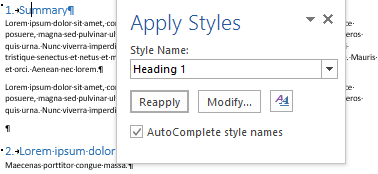
  3. For each paragraph that should become a heading, apply style “Heading 1” (you can also use keyboard shortcut Ctrl+Alt+1 for this)
  4. Modify the various heading levels so they become numbered: see [WayBack] How to create numbered headings or outline numbering in Word 2007 and Word 2010 | ShaunaKelly.com. I prefer the hierarchical numbered multilevel list without the numbers being indented for the body text, but with indented numbers in the Table of Contents, so lets go.
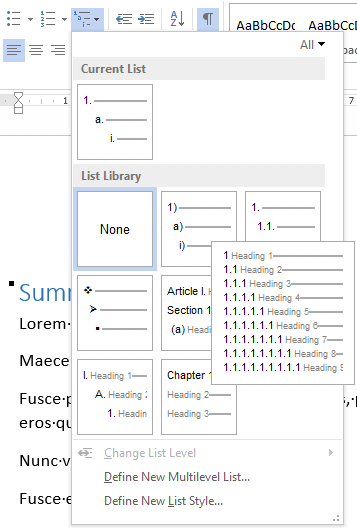
    1. Start with the stock multi-leveled list definition:
      1. Change from “None” to the multi-level one:
      2. Now create a new one based on it:
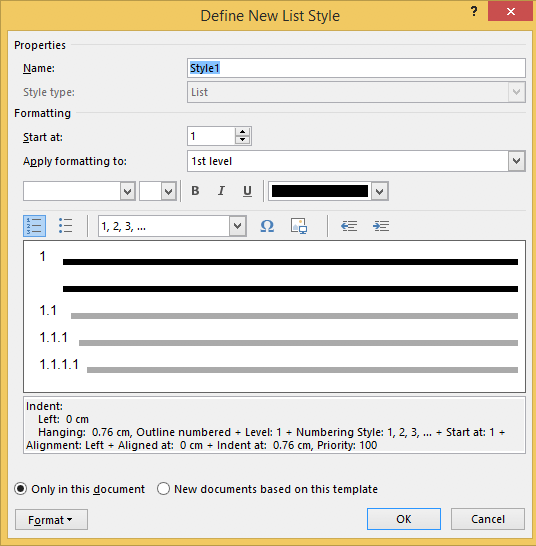
        1. “Define New List Style…”:
        2. Rename from “Style1” to “Heading
    2. This involves creating a new list style called “Headings”, based on the numbered list style you like
      • ).
    3. Since by default, these bind to all levels, your document styles “Heading 1”..”Heading 9″ are covered. If for one or more styles, you do not want numbering, see below how to fix that (I do that for a “Heading 1 – no-numbering” style used for the “Summary” heading, and for the “TOC Heading” style.
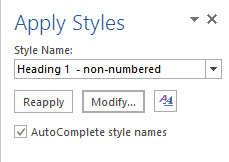
  5. Mark the “Summary” heading as a new style “Heading 1 – non-numbered”:
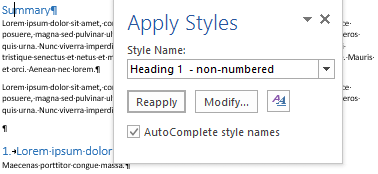
    1. Press Ctrl+Shift+S to get to the “Apply Styles” 
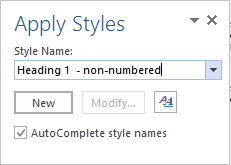
    2. Enter the new name “Heading 1 – non-numbered” and press the “New” button: 
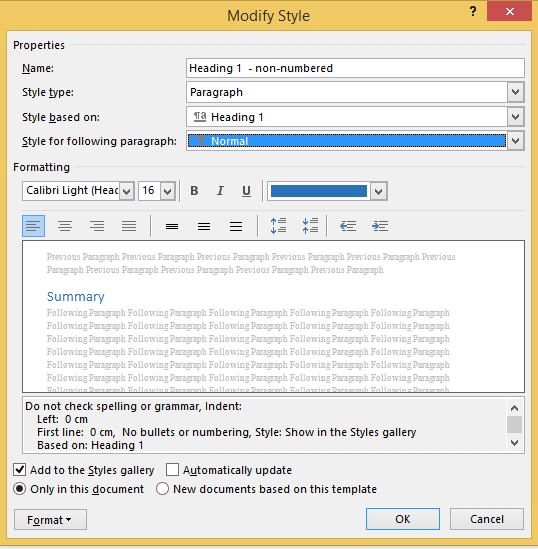
    3. Press the “Modify” button 
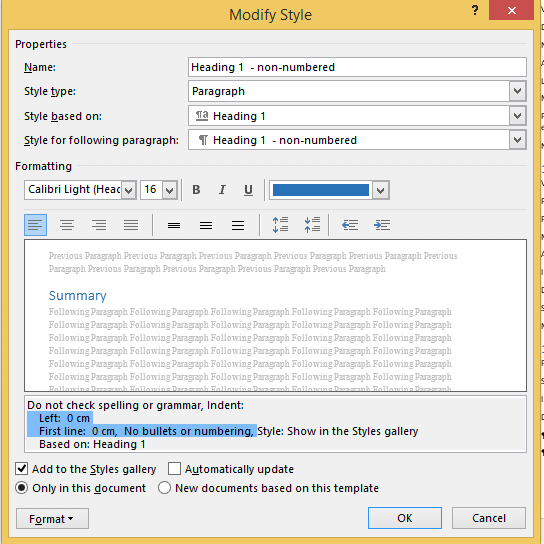
    4. to view the current style
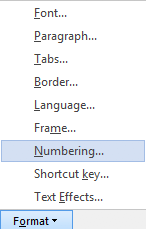
    5. Press “Format” ->     
    6. Change it from “None” to “None” and press “OK”
    7.  Observe the numbering is gone:
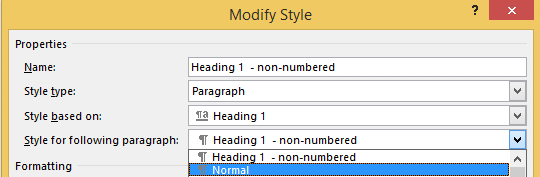
    8. Unlike the “Heading 1” style, the “Style for following paragraphs” is wrong: it needs to be
    9. Now we are done, so press the “OK” button:
    10. Then observe the first numbered “Heading 1” now has got the number “1” instead of the “Summary”:
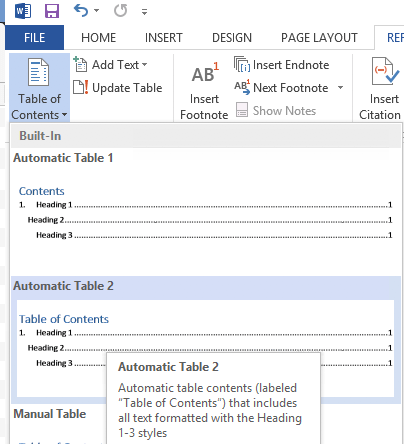
  6. Insert a “Table of Contents”, for instance after the “Summary”
    1. You might think it will start with a heading “Table of Contents”:
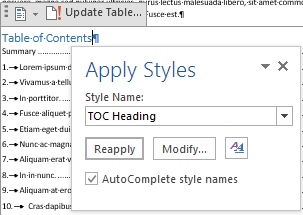
    2. Im some localisations of office, it is prepended with a “1.” and becomes “1. Table of Contents”. If it does, then you have to change style “TOC Heading” and undo the numbering as done with “Heading 1 – non-numbering” by pressing Ctrl+Shift+S when you are in the “Table of Contents” heading:
    3. From there, press the “Modify” button and continue as done with “Heading 1 – non-numbering”:

–jeroen

Posted in Office, Office 2007, Office 2010, Office 2013, Office 2016, Power User, Word | Leave a Comment »

Check if this still happens: some Twitter content in the WayBack machine gets a slash in the URL removed during rendering on Chrome

Posted by jpluimers on 2021/06/11

From my research list; check if this still happens: [WayBack] Saving Twitter content in the WayBack archive: the fully loaded page has a wrong trailing URL (missing the second slash before the authority) · GitHub

  1. Visited https://twitter.com/MarkGraham
  2. Saved it using https://web.archive.org/save/https://twitter.com/MarkGraham
  3. Waited for the save to complete and the page to fully load and got https://web.archive.org/web/20190607081047/https:/twitter.com/MarkGraham
  4. Observed the trailing part is not a valid URL any more https:/twitter.com/MarkGraham: it is missing the second slash before the authority (see https://en.wikipedia.org/wiki/Uniform_Resource_Identifier#Generic_syntax)

This might be a Twitter.com thing:

Notes:

  • I have only tested this with my Chrome configurations on various machines (both regular and anonymous tabs) over at least a year; I need to figure out what happens when using different browsers.
  • It does not always happen.

Via: [WayBack] Jeroen Pluimers on Twitter: “I understand that the sites themselves pay a big role in this. That’s why I have the mangling of URLs that sometimes happens on my research list. I made this quick summary: …”

–jeroen

Read the rest of this entry »

Posted in Internet, InternetArchive, Power User, SocialMedia, Twitter, WayBack machine | Leave a Comment »

string – Change backslash to forward slash in windows batch file – Stack Overflow

Posted by jpluimers on 2021/06/10

One of the situations where setlocal enabledelayedexpansion comes on handy to replace \ with / which some unix based tools like better: [WayBack] string – Change backslash to forward slash in windows batch file – Stack Overflow

echo off

setlocal enabledelayedexpansion

for %%f IN ("C:\tools\workspace\*") DO (
  set old=%%f
  echo !old!
  set new=!old:\=/!
  echo !new!  
  echo.                 
)

Related, as it explains when the source and target replacements are in variables themselves: [WayBack] command line – String replacement in batch file – Stack Overflow, thanks Joey and Tom Warfield!

You can use the following little trick:

set word=table
set str="jump over the chair"
call set str=%%str:chair=%word%%%
echo %str%

The call there causes another layer of variable expansion, making it necessary to quote the original % signs but it all works out in the end.

Upvoting this answer because it works both ways, with the environment variable in either position, or in both the “before” and “after” positions:

set word=table
set str="jump over the chair"
call set str=%%str:chair=%word%%%
echo %str%
set word1=chair
set word2=desk
set str="jump over the chair"
call set str=%%str:%word1%=%word2%%%
echo %str%'

–jeroen

Posted in Batch-Files, Development, Scripting, Software Development | Leave a Comment »

Sulfur Argon Calcium Samarium

Posted by jpluimers on 2021/06/10

Got this from a friend: Sulfur Argon Calcium Samarium (SArCaSm): the Primary Elements of Humor.

Of course there is Iridium Oxygen Nitrogen Yttrium (IrONy) as well.

–jeroen

Read the rest of this entry »

Posted in Fun, LifeHacker, Power User, Quotes | Leave a Comment »