Posted by jpluimers on 2018/05/01
Via [WayBack] Limits on Everything – The Isoblog.:
A posting at Brave New Geek about limits on everything, for example limits on message sizes and numbers of in-flight messages in message queues. Interesting read.
Very interesting read indeed: [WayBack] Take It to the Limit: Considerations for Building Reliable Systems – Brave New Geek
You have to set limits, which begs for a few questions:
- how to find out which limits and at what levels
- how to enforce these limits
Food for thought…
The first can be done with benchmarking, see for instance these from the same blogs above:
Enforcing limits depends in your infrastructure and your communication stacks.
–jeroen
Posted in Cloud, Development, Infrastructure, Opinions, Software Development | Leave a Comment »
Posted by jpluimers on 2018/04/30
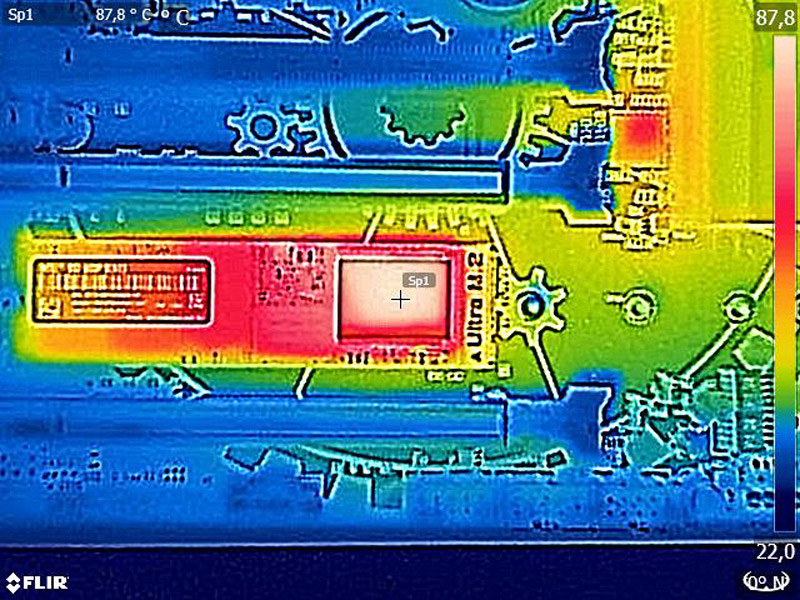
A short while ago, I installed a pair of 1TB Intel 600p NVMe SSD devices.
Performing a straight rsync backup of some 100 gigabyte of data managed to shutdown both of them: the throttling was so much that VMware ESXi lost the volumes on it and showed “Permanently inaccessible device”.
I was quite surprised as the initial reviews did not mention any temperature problems, but apparently there are.
Since then I’ve put a 120mm fan near to it which made the problems go away, but it still every now and then jumped to over 60 degrees Celsius.
 Later I “fixed” it in a better way for cooling getting the idle temperature around 30 degrees Celsius and heavy duty temperatures around 40 degrees Celsius:
I did not have to mount any M.2 heatsinks on them yet; they probably won’t fit under the fan anyway
Related links and products:
Related:
–jeroen
Posted in Hardware, NVMe, Power User, SSD | 1 Comment »
Posted by jpluimers on 2018/04/27
Unlike for instance DropBox, Google Backup & Sync does not allow you do move the Google Drive location in a one-step way. You have to go through below ridiculous steps to move it around yourself.
A comment on G+ indicated I should try Insync. Not free, but way more stable and more features.
[WayBack] Insync: A Mini Desktop File Manager For Your Google Drive
Insync adds Google Drive functionality to your Windows, Linux and mac OS desktop. Sync, backup, edit and share files easily with one or multiple accounts. Team Drives syncing for G Suite accounts now available! Try Insync free, no credit card needed.
[WayBack] Unlike for instance DropBox, Google Backup & Sync does not allow you do move … – Jeroen Wiert Pluimers – G+
I got them via [Archive.is] Change default location of Backup and Sync Folder on disk. – Google Product Forums, rephrased and added screenshots:
Read the rest of this entry »
Posted in Fujitsu ScanSnap, Google, GoogleBackupAndSync, GoogleDrive, Hardware, ix500, Power User, Scanners | Leave a Comment »
Posted by jpluimers on 2018/04/26
On my research list: Home – Outpan as it is a key-value store of EAN (actually GTIN, so including GS1 UPC, EAN which means barcodes like UPC-12, EAN-8, EAN-13 and ITF-14).
- [WayBack] Global Trade Item Number – Wikipedia
- [WayBack] API Documentation – Outpan Developers
Legacy API
Get Product Information
GET https://api.outpan.com/v2/products/[GTIN]?apikey=[YOUR API KEY]
Add Product Name
POST https://api.outpan.com/v2/products/[GTIN]/name?apikey=[YOUR API KEY]
Required POST parameters:
name: The name you would like to add for this product.
Add Product Attribute
POST https://api.outpan.com/v2/products/[GTIN]/attribute?apikey=[YOUR API KEY]
Required POST parameters:
name: Name of the attribute you would like to add for this product.
value: Value for the attribute you would like to add for this product.
- [GTIN] is the barcode number (ISBN, EAN, UPC, …) of the product you’re looking up.
- All API calls must be done via HTTPS. Plain HTTP calls will be rejected.
–jeroen
via [WayBack] [How To] Scan a barcode and add the product name to Wunderlist : tasker
Posted in Barcode, Cloud, Cloud Apps, Cloud Development, Development, EAN, Infrastructure, Internet, Power User, Software Development | Leave a Comment »
Posted by jpluimers on 2018/04/26
A change of FetchOptions.CursorKind from ckAutomatic to ckDynamic does the trick.
did fix this issue:
I stumbled about a problem regarding FireDAC and MSSQL 2016. The table has four fields, one being of type varbinary(max). When I omit this blob field from the SELECT, I can update any field without problems using the edit and post methods of TFDQuery. It is only when I include that blob field in the SELECT, I cannot update the other fields anymore (the blob is not changed). The post runs into a timeout. It seems that the table is somehow locked. That guess is backed by the fact that even a simple UPDATE query executed from Management Studio is also blocked until I reset my application inside the debugger.Interestingly an INSERT runs without problems.
Via: [WayBack] I stumbled about a problem regarding FireDAC and MSSQL 2016…. G+ Uwe Raabe
–jeroen
Posted in Delphi, Development, Software Development | Leave a Comment »





 The Wiert Corner - irregular stream of stuff