The Wiert Corner – irregular stream of stuff

Jeroen W. Pluimers on .NET, C#, Delphi, databases, and personal interests

  • My badges

  • Twitter Updates

  • My Flickr Stream

  • Pages

  • All categories

  • Enter your email address to subscribe to this blog and receive notifications of new posts by email.

    Join 1,862 other subscribers

Archive for April, 2012

Do posts coincide with real world events? (via: How does Raymond decide what to post on any particular day? – The Old New Thing – Site Home – MSDN Blogs)

Posted by jpluimers on 2012/04/09

When starting the blog, there was not very particular pattern on writing posts. I just wrote them up as something happened.

I started about a week before my 40th birthday, and sometimes tended to publish multiple posts a day. Most of them having to do with software development.

The frequency was irregular, mostly because it took a bit of time to get the hang of writing, getting in a writing flow is not always easy, and while in flow, posts could come into bursts.

I decided to become more structured, and looked at how other people were doing it.

A good example is Raymond Chen who writes The Old New Thing. I have an article queue just like him:

generally, it’s just a FIFO queue

His queue horizin of a year is way longer than mine. I try to keep a queue of around 2 months (which gives me some slack when in “crunch mode” – which I try to avoid – or holidays/marching band events) occasionally going to 3 months.

The pattern went from almost exclusively software development related to a scheme like this:

  • Software development on tuesday, wednesday and thursday
  • Power User/Lifehacker on monday and friday
  • Personal stuff at semi-random intervals
  • Only posts in weekends that are related to specific dates

A fun fact: post popularity is not in the order of the scheme (see the 2011 report). Actually I don’t write to get high page views. My main motivation is that this blog is indeed a blog: a web log where I can find back things I have done, or that interest me. I hope it benefits others too, and I do appreciate the views (thanks for reading <g>).

Most posts are posted at 0600 WordPress.com UTC+1 time (which somehow tends to vary depending on daylight savings). Occasional extra posts (usually with recent news) gets posted around noon or around 1800.

An average post takes me about 30 minutes of writing, but some takes several hours or even a day.

So: no, posts usually don’t coincide with real world events :)

–jeroen

via: How does Raymond decide what to post on any particular day? – The Old New Thing – Site Home – MSDN Blogs.

Posted in About, Personal | 1 Comment »

Powershell links (via: Scott Hanselmans 2011 Ultimate Developer and Power Users Tool List for Windows)

Posted by jpluimers on 2012/04/06

If you like .NET and scripting, then PowerShell and the PowerShell Community Extensions is what you should try:

PowerShell – The full power of .NET, WMI and COM all from a command line. PowerShell has a steep learning curve, much like the tango, but oh, my, when you really start dancing…woof. I also use PowerShell Prompt Here. Its built into Windows 7, by the way.

  • I also recommend after installing PowerShell that you immediately go get PowerTab to enable amazing “ANSI-art” style command-line tab completion.
  • Next, go get the PowerShell Community Extensions to add dozens of useful commands to PowerShell.
  • Want a more advanced GUI for PowerShell? Get the free PowerGUI.

Thanks Scott for summarizing :)

–jeroen

via: Scott Hanselmans 2011 Ultimate Developer and Power Users Tool List for Windows – Scott Hanselman.

Posted in .NET, Development, Power User, PowerShell, Scripting, Software Development | 1 Comment »

Finally Google allows searching for “C#” via: Search quality highlights: 50 changes for March – Inside Search

Posted by jpluimers on 2012/04/05

Finally, Google allows searching for C# and returns meaningful results (previously they returned the same results as searching for C).

They improved a bunch of other special characters as well.
–jeroen

via:

Search quality highlights: 50 changes for March – Inside Search.

Posted in .NET, C#, Development, Google, GoogleSearch, Power User, Software Development | Leave a Comment »

Some words on Unicode in Windows (Delphi, .NET, APIs, etc)

Posted by jpluimers on 2012/04/05

O'Reilly book "Unicode Explained: Internationalize Documents, Programs, and Web Sites"

O'Reilly book "Unicode Explained: Internationalize Documents, Programs, and Web Sites"

Withe the growing integration between systems, and the mismatch between those that support Unicode and that do not, I find that a lot of organisations lack basic Unicode knowledge.

So lets put down a few things, that helps as a primer and gets some confusion out of the way.

Please read the article on Unicode by Joel on Software, and the book Unicode Explained. The book is from 1996, and still very valid.

Unicode

Unicode started in the late 80s of last century as a 16-bit character model.

Somehow lots of people still thing Unicode is a 16-bit double-byte character set. It is not. It uses a variable width encoding for storage.

All encodings except the 32-bit ones are variable width. The UTF-16 encoding is a variable width encoding where each code point (not character!, see below why) takes one or more 16-bit words.

This is because – as of Unicode version 2.0 in 1996 – a surrogate character mechanism was introduced to be able to have more than 64k code points.

The architecture of Unicode is completely different than traditional single-byte character sets or double-byte character sets.

In Unicode, there is a distinction between code points (the mapping of the character to an actual IDs), storage/encoding (in Windows now uses UTF-16LE which includes the past used UCS-2) and leaves visual representation (glyphs/renderings) to fonts.

Unicode has over a million code points, logically divided into 17 planes, of which the Basic Multi-lingual Plane has code points that can be encoded into one 16-bit word.

There is no font that can display all Unicode code points. By original aim, the first 256 Unicode code points are identical to the ISO 8859-1 character set (which is Windows-29591, not Windows-1252!) for which most fonts can display most characters.

I entity Unicode (Windows version)

By now, you probably grasp that Unicode is not an easy thing to get right. And that can be hard, hence people love and hate Unicode at the same time. Maybe I should get the T-Shirt :).

One thing that complexes things, is that Unicode allows for both composite characters and ready made composites. This is one form where different sequences can be equivalent, so there can be Unicode equivalence for which you need some knowledge on Unicode Normalization (be sure to read this StackOverflow question and this article by Michael Kaplan on Unicode Normalization).

There are many Unicode encodings, of which UTF-8 and UTF-16 are the most widely used (and are variable length). UTF-32 is fixed length. All 16-bit and 32-bit encodings can have big-endian and little-endian storage and can use a Byte Order Mark (BOM) to indicate their endinaness. Not all software uses BOMs, and there are BOMs for UTF-8 and other encodings as well (for UTF-8 it is not recommended to include a BOM).

When only parts your development environment supports Unicode strings, you need to be aware of which do and which don’t. For any interface boundary between those, you need to be aware of potential data loss, and need to decide how to cope with that.

For instance, does your database use Unicode or not for character storage? (For Microsoft SQL Server: do you use CHAR/VARCHAR or NCHAR/NVARCHARyou should aim for NVARCHAR, yes you really should, do not use text, ntext and image). What do you do while transferring Unicode and non-Unicode text to it? Ask the same questions for Web Services, configuration files, binary storage, message queueing and various other interfaces to the outside world.

The Windows API is almost exclusively Unicode (see this StackOverflow question for more details)

Delphi and Unicode

Let’s focus a bit on Delphi now, as that the migration towards Unicode at clients raised a few questions over the last couple of months.

One of the key questions is why there are no conversion tools that help you migrate your existing source code to fully embrace Unicode.

The short answer is: because you can’t automate the detection of intent in your codebase.

The longer answer starts with that there are tools that detect parts of your Delphi source that potentially has problems: the compiler hints, warnings and errors that brings your attention to spots that are fishy, are likely to fail, or are plain wrong.

Delphi uses the standard Windows storage format for Unicode text: UTF-16LE.

Next to that, Delphi supports conversion to and from UTF-8 en UTF-32 (in their various forms endianness).

External storage of text is best done as UTF-8 because it doesn’t have endianness, and because of easier exchange of text in ISO-8859-1.

Marco Cantu wrote a very nice whitepaper about Delphi and Unicode, and I did a Delphi Unicode talk at CodeRage 4 and posted a lot of Delphi Unicode links at StackOverflow.

A few extra notes on Delphi and Unicode:

With Delphi string types, stick to the UnicodeString (default string as of Delphi 2009) and AnsiString (default string until Delphi 2007) as their memory management is done by Delphi. WideString management is done by COM, so only use that when you really need to. Also avoid ShortString.

For any interfaces to the external world, you need to decide which ones to keep to generic string, Char, PChar and which ones to fix to AnsiChar/PAnsiChar/AnsiString(+ accompanying codepage) or fix at UnicodeChar/PUnicodeChar/UnicodeString.

Of course remnants from the past will catch up with you: if you have Technical Debt on the past where characters were bytes, and you abused Char/PChar/array-of-char/etc you need to fix that, and use the Byte/PByte/TByteArray/PByteArray. It can be costly to pay the accrued debt on that.

–jeroen

PS:

Posted in .NET, C#, Delphi, Development, EBCDIC, Encoding, ISO-8859, Software Development, Technical Debt, Unicode, UTF-8 | 2 Comments »

Debt in IT and Software Development (via: Coding Horror: Paying Down Your Technical Debt)

Posted by jpluimers on 2012/04/04

Debt and flood insurance

Thanks to Randy Glasbergen for the debt image

I love this quote from Jeff Attwood on technical debt in 2009:

periodically pay down your technical debt

and the Computer Weekely article about half a year ago:

Short-term speed may come at the price of long-term delays and cost.

Lately, I find that I need to explain Debt in relation to IT and Software Development more and more often.

We now all know what happens with the financial system when we let debt get out of control.

The same holds for your IT and Software Development.

Debts get introduced by not “playing by the rules”. The quotes are there because you can not always play nicely, and the rules are not always clear or known.

Lets give a few examples of rules that – from experience at clients – are more often than not neglected. The examples are based on Windows, but could just as easily be Mac OS X, Unix, OS/400 or anything else.

  • Make sure you use a recent Windows version
    I often see companies lagging more than one version behind (i.e. still use Windows XP or SQL Server 2000). That’s too far.
  • Don’t run your users with too many privileges (and certainly not as Administrators)
    Especially running as Administrator will get you in trouble with User Account Control (UAC) in Windows Vista and up.
  • Using directories like C:\TEMP is a no-no.
    This should be a no-brainer, but truckloads of in-company software still thinks it can write everywhere.
    I know C:\TEMP used to be the Temporary Folder some 20 years ago.
    But that was then, and this is now: Use the %TEMP% environment variable or GetTempPath function (even better: the GetTempFileName function or the .NET Path.GetTempFileName function).
    More in general for known folders, use CSIDL or KNOWNFOLDERID whenever possible. Your favourite development tool usually has a library functions for that, for instance the .NET System.Environment.GetFolderPath function.

These few were examples ranged from technically very broad to specific. There are more, but these will give you a rough idea how wide the field of debt can be. Even debt outside the realm of Technical Debt can turn out to be really expensive.

Every time you  postpone or skip a Windows version, you collect some debt in the hope (often wrongfully called expectation) that you earn more on the money/resource you just didn’t invest and putting that money/resource to use otherwise. The same holds for any other kind of debt.

The main problem with debt is not the total of the debt, it is the interest rate that makes the accrued debt grows faster than most people and organizations realize.

This is actually one of the main causes of the current world wide financial crisis, the same holds for many IT debts.

And for all kinds of debts, you often don’t know how high the interest rate will be, so the accrued value can be way beyond what you expect.

I’ve regularly seen projects collecting so much debt, that migration costs raised to thousands of hours because of it, resulting into management taking another very bad decision: rewriting the stuff from scratch. Don’t do that: Joel on Software excellently describes what happens when you do that.

What to do about it?

You might say “don’t collect debt”, but you can’t always avoid debt.

So you need to build periods where you pay off accrued debt. And you need to do that regularly, in order to avoid the interest pitfall.

This does not limit itself to software development (though that’s what I normally focus at). It covers a wide range of IT topics.

Sometimes, you can even pay your debt in advance. For instance, I was among the first to switch from Windows XP to the x64 of Windows Vista. I knew it would cause pain, but it immediately payed back by being able to use much more memory, and run more Virtual Machines at the same time. That made me more flexible and productive.

–jeroen

via: Coding Horror: Paying Down Your Technical Debt.

Posted in *nix, .NET, Delphi, Development, Opinions, Power User, Software Development, Technical Debt, Windows, Windows 7, Windows 8, Windows Vista, Windows XP | 9 Comments »

Getting the public static readonly strings and public const strings (and their values) from a class

Posted by jpluimers on 2012/04/03

Quite a few projects have one or more classes with with a bunch of public const string or public static readonly string values. Use const when things are really constant (like registry configuration keys), use static readonly when – upon change – I do not want to recompile dependent assemblies. Many people recommend static readonly over const.

Having members in stead of string literals scattered all over the place allows you to do compile timing checking, which I’m a big fan of as in the age of things getting more and more dynamic, you need to have as many sanity checks as possible.

One of the checks is to verify these const members and their values. Sometimes you need the list of members, sometimes the list of values, and sometimes each member value should be the same as the member name.

The listing below shows the code I came up with.

It works with code like this, and those can have more code and other fields (non string, non public) in them as well:

namespace bo.Literals
{
    public class FooBarPublicStringConstants
    {
         public const string Foo = "Foo";
         public const string Bar = "Bar";
    }
    public class FooBarPublicStaticReadOnlyStringFields
    {
         public static readonly string Foo = "Foo";
         public static readonly string Bar = "Bar";
    }
}

I started out with this code, but that is limited to classes only having public const fields. Not flexible enough. Read the rest of this entry »

Posted in .NET, C#, C# 2.0, C# 3.0, C# 4.0, Development, Software Development | Leave a Comment »

Page with my WordPress posting Categories

Posted by jpluimers on 2012/04/02

I’m in the midst of writing a small app that generates trees and clouds of the WordPress categories.

The main reason is that I want to better organize the categories, so I need an overview. The multi-page WordPress Categories editor isn’t of much use as it is very hard to get an overview.

Using the [Category] WordPress tag isn’t of much help as I can’t get things like this to work (I remember seeing something like this on the forums, can’t find it any more though):
[Category]
[Category number='5' method='title' order='asc' id='11,45' orderby='comment_count']

Preliminary output is at the Posting Categories page in the top menu that I will update every once in a while.

I will post the app later, as I intend to create a category cloud in addition to the tree.

–jeroen

Posted in Development, SocialMedia, Software Development, Web Development, WordPress, WordPress | Leave a Comment »

3rd Generation iPads most important aspect: 264ppi screen resolution (via: Entering A High-Resolution, Post-PC World… | The Future of Reading

Posted by jpluimers on 2012/04/02

Ever since I bought PCs, monitors, laptops and other devices with displays, I went for the highest resolution I could afford (though I didn’t try the QXGA 2048×1536 in my Thinkpad T60 or T61p)

I bought a 13-inch MacBook Air, not a MacBook Pro not because of SSD (it is nice, no doubt), but because the screen resolution.

Small digression:

Last year, I had a huge disappointment where almost all laptop manufacturers were not only ditching 1920×1200 in favour of 1920×1080 (that’s 10% less vertical display estate right where apps waste that with higher toolbars, ribbons, task bars, etc!), but also ditched the 1920 pixel wide 15.something inch form factors in favour of 17 inch screens. Switching from 15 to 17 inch adds another 2 pounds to your laptop. Not nice!

Now the 3rd generation iPad beats all of my other displays. Not only in resolution (it does), but especially in ppi: at 264 ppi it reads like paper.

It took a long time, but this will introduce a new era of high ppi displays on mobile, and hopefully not so mobile devices so we have retina displays (measured at viewing dinstance) everywhere (and might also introduce the post-PC era, though the issue of software development on all those smart devices needs to be solved first; more on that in a later post).

So over the last 20 years, we went from lean back paper through lean forward reading displays into lean back reading iPad and ePaper at comfortable (264 / 200+) ppi.

Now that’s progress:

The 3rd Generation iPad has a display resolution of 264ppi. And still retains a ten-hour battery life (9 hours with wireless on). Make no mistake. That much resolution is stunning. To see it on a mainstream device like the iPad – rather than a $13,000 exotic monitor – is truly amazing, and something I’ve been waiting more than a decade to see.

It will set a bar for future resolution that every other manufacturer of devices and PCs will have to jump.

Having that much resolution in a handheld device will be the final step in changing reading forever. I’m not the only one who believes this. Andrew Rashbass, chief executive of The Economist Group, recently gave a fascinating presentation he called LeanBack 2.0. He postulates that in the days of print, we leaned back and read. The Web and computers made us lean forward to read. Devices like the iPad have restored our ability to lean back, relax, and read. LeanBack 2.0!

–jeroen

via: 3rd Generation iPad: Entering A High-Resolution, Post-PC World… | The Future of Reading.

Posted in Opinions, Power User | Leave a Comment »

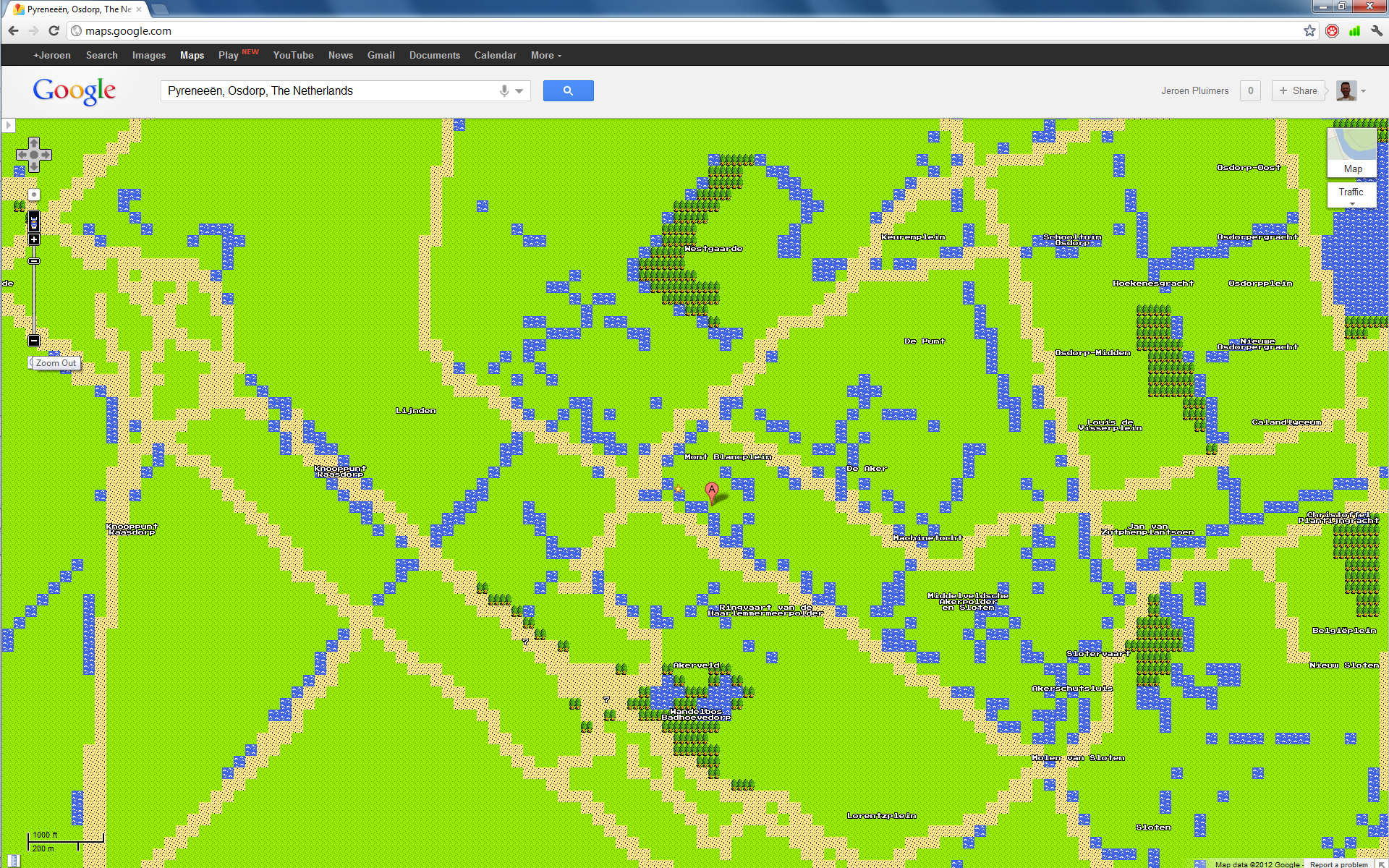
Many people missed the 8-bit street view at Google Maps Quest on April 1st #1april #april1st

Posted by jpluimers on 2012/04/01

Many people mentioned the April 1st prank by Google: 8-bit maps, and a NES Google Maps cartridge (quote at 0:55: blow on the cartridge to fix bugs ROFL!)

Today Google Maps has a quest mode, rendering the maps in Nintendo NES “quality”.

Few people really used it, and missed the glorious 8-bit streetview, and the really nice landmarks that you see when you zoom in to a scale of 500 meter or better.

You can even link to the 8-bit maps and to the 8-bit street view!.

Click on the images for larger versions (:

--jeroen


Posted in About, Apri1st, Fun, Google, GoogleMaps, Personal, Power User, Prank | Tagged: , , , , , | Leave a Comment »

The “San Seriffe” of PHP: “PEP 313 — Adding Roman Numeral Literals to Python”

Posted by jpluimers on 2012/04/01

At 9 years of age, PEP 313 still is a classic april fools joke. One of the hilarious parts:

This PEP is rejected. While the majority of Python users deemed this to be a nice-to-have feature, the community was unable to reach a consensus on whether nine should be represented as IX, the modern form, or VIIII, the classic form. Likewise, no agreement was reached on whether MXM or MCMXC would be considered a well-formed representation of 1990. A vocal minority of users has also requested support for lower-cased numerals for use in (i) powerpoint slides, (ii) academic work, and (iii) Perl documentation.

–jeroen (who also loves the San Seriffe joke of 1997)

via: PEP 313 — Adding Roman Numeral Literals to Python.

Posted in Development, Opinions, PHP, Scripting, Software Development | 1 Comment »