The Wiert Corner – irregular stream of stuff

Jeroen W. Pluimers on .NET, C#, Delphi, databases, and personal interests

  • My badges

  • Twitter Updates

  • My Flickr Stream

  • Pages

  • All categories

  • Enter your email address to subscribe to this blog and receive notifications of new posts by email.

    Join 1,862 other subscribers

Archive for September, 2012

New Skype things learned: more chat commands and roles than “/me”

Posted by jpluimers on 2012/09/10

I only knew the Skype /me command.

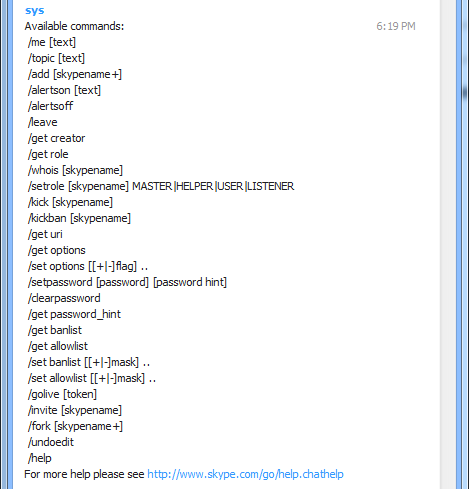
That is: until somehow the sys suddenly inserted this help into the Skype session I was in:

[6:19:53 PM] sys: Available commands:
/me [text]
/topic [text]
/add [skypename+]
/alertson [text]
/alertsoff
/leave
/get creator
/get role
/whois [skypename]
/setrole [skypename] MASTER|HELPER|USER|LISTENER
/kick [skypename]
/kickban [skypename]
/get uri
/get options
/set options [[+|-]flag] ..
/setpassword [password] [password hint]
/clearpassword
/get password_hint
/get banlist
/get allowlist
/set banlist [[+|-]mask] ..
/set allowlist [[+|-]mask] ..
/golive [token]
/invite [skypename]
/fork [skypename+]
/undoedit
/help
For more help please see http://www.skype.com/go/help.chathelp

The link then directed me to https://support.skype.com/en/faq/FA10042/What-are-chat-commands-and-roles

http://www.skype.com/go/help.chathelp

–jeroen

via: Help for Skype: What are chat commands and roles?.

Posted in Power User, Skype | Leave a Comment »

Enabling DisableLastAcces using fsutil

Posted by jpluimers on 2012/09/07

Note: modifying DisableLastAccess using fsutil is only supported on Windows Server 2008 R2 and higher, and on Windows 7 and higher.
The comment says that older versions of Windows (Windows Server 2000 through Windows Server 2008, and Windows XP through Windows Vista) need the registry way to do this.

This is not true, as the fsutil way works for Windows Server 2003.

Both ways require a reboot and require Administrator access.

It works like this (on Windows Server 2003 x86 as an Administrator user):

C:\Documents and Settings\jeroenp>fsutil behavior query disablelastaccess
disablelastaccess is not currently set

C:\Documents and Settings\jeroenp>fsutil behavior set disablelastaccess 1

C:\Documents and Settings\jeroenp>fsutil behavior query disablelastaccess
disablelastaccess = 1

C:\Documents and Settings\jeroenp>

Note that fsutil does not need –help, -? or -h on the command-line to display help; just omit stuff and you get help: Read the rest of this entry »

Posted in Power User, Windows, Windows 7, Windows 8, Windows Server 2000, Windows Server 2003, Windows Server 2003 R2, Windows Server 2008, Windows Server 2008 R2, Windows Vista, Windows XP | Leave a Comment »

madshi.net: Delphi XE3 releases of madExcept (4.0.5) and madCodeHook (3.1.2)

Posted by jpluimers on 2012/09/06

Great: a few more additions for my Delphi XE3 toolbox:

2012-09-05 

madExcept 4.0.5 release comes with the following changes:

  • added support for XE3
  • a couple of bugfixes and minor improvements

madCodeHook 3.1.2 comes with the following changes:

  • added support for XE3
  • added support for Metro (AppContainer integrity) apps
  • fixed: crash in CreateProcessEx (32bit)
  • fixed: uninjection crash in w2k3 error reporting service

–jeroen

via: madshi.net – home.

Posted in Delphi, Delphi XE3, Development, Software Development | 1 Comment »

Why I really dislike localized error messages…

Posted by jpluimers on 2012/09/06

The problem with localized error messages often is that it is virtually impossible to find information about them.

For instance the below error got reported by a client for me to fix (click on the picture to get a larger version) has a few big problems:

Read the rest of this entry »

Posted in Excel, Office, Power User, Windows | Tagged: , , , , , , , , , , , , , | 2 Comments »

.NET Framework Libraries: downloadable source code under the Shared Source Initiative

Posted by jpluimers on 2012/09/06

So I won’t forget: .NET Framework Libraries.

It contains the download links, setup instructions (for debugging, troubleshooting and source/symbols downloading) and licensing information.

–jeroen

Posted in .NET, .NET 2.0, .NET 3.0, .NET 3.5, .NET 4.0, .NET 4.5, ASP.NET, Development, Software Development | Leave a Comment »

Creating a blank Visual Studio solution without a directory, and sln Format Version numbers

Posted by jpluimers on 2012/09/06

A while ago, I blew quite a few Visual Studio Solution and Project builds because I was experimenting in a suite of solutions with the Configuration Manager adding other Solution Configurations than Release and Debug, and mixing x86/AnyCPU platforms to facilitate Debug & Continue.

Lesson learned: don’t do that!

Keep it simple:

  1. Keep your Solution Configurations at Release and Debug,
  2. Perform conditional defines in your automated build server,
  3. Limit the mixing your platforms to a minimum.

We noted the anomalies a little late in the process (in retrospect, when taking over the solution suite, we should have started with setting up and Build Automation right at the beginning, then fix all the solutions that came from Visual Source Shredder, but alas: you are never too old to learn from your mistakes).

The anomalies were spurious (and hard to reproduce) build failures at developer workstations, wrong builds of assemblies ending up on the final build directories and more. And best of all: Visual Studio not failing, warning or hinting upon most issues.

Fixing projects and solutions from wrong Solution Configurations

The history in the version control system was not helpful enough to assist in fixing it, so the fix was this:

  1. Manually edit the .csproj files, and remove the PropertyGroup elements other than “Debug|AnyCPU” and “Release”AnyCPU”.
    This is easy to do inside Visual Studio and with automatic checkout from TFS of the project files:

    1. In the Solution Explorer, select all the projects
    2. Right click on a project
    3. Choose “Unload Project”
      (because you selected all the projects, it is the second menu item from the bottom, and way easier to find when you do this per project)
    4. For each project
      1. Right click the project
      2. Choose “Edit ….”
      3. Remove the PropertyGroup elemts you don’t need
      4. Save and close the file
      5. Right click the project
      6. Choose “Reload Project”
  2. Fix the solution files

The last step is a lot more complex, because of a couple of reasons:

My workaround was as follows:

  1. Start with an empty solution in the same directory as the original solution
  2. Add all the Solution Folders, Solution Items, and projects to it that  were in the original solution
    (having two copies of Visual Studio next to each other on a dual monitor setup is of great help)
  3. Compare the .sln files to each other
  4. Check out the original .sln file
  5. Merge any changes into the original .sln file
  6. Build it
  7. Check in
  8. Run a build on the CruiseControl.net automated build server
  9. Fix build errors
  10. Delete the temporary local .sln file

Creating an empty solution in a directory

Finally, I get to the title of this blog entry: Visual Studio will always generate a directory when creating a Blank Solution, and does not support creating an Empty Solution in a directory.

There are many posts describing how to workaround this, but the actual downloads are usually gone because of link rot (Jakob Nielsen’s alert from 1998 still is totally right about it). Thanks to they webarchive.org WayBackMachine though for keeping some of them alive.

So I went with Peter Provost’s solution, and amended it from Visual Studio 2005 to all Visual Studio versions that support .NET that I have used or still use: 2002, 2003, 2005, 2008, 2010 and 2012 a.k.a. VS11.

All files are in Change set 89386 on BeSharp.CodePlex.com.

His solution uses the ShellNew command for .sln file extensions that is stored in the registry:

  1. Create an empty solution file for the Visual Studio version you are using
  2. Copy that as a template file to %Windir%\ShellNew
    (you need to be administrator for that)
  3. Import a small .reg file binding that template file to the ShellNew command for .sln files

ShellNew is versatile, so you can also embed the fresh solution file into the .reg file, see this ShellNew article for a few nice examples.

Note that generating a new ShellNew verb for .sln is something other than loading a .sln (loading a .sln is done through VisualStudioLauncher).

Back to the .sln file: this one is different for any version of Visual Studio. Historically, the basic format is the same though (and I think this – in combination with VisualStudioLauncher – is the main reason it is not XML).

An empty solution file looks like this (note the empty line at the beginning), as described in Hack the Project and Solution Files:


Microsoft Visual Studio Solution File, Format Version 12.00
# Visual Studio 11
Global
	GlobalSection(SolutionProperties) = preSolution
		HideSolutionNode = FALSE
	EndGlobalSection
EndGlobal

The accompanying .reg file like this:

Windows Registry Editor Version 5.00

[HKEY_CLASSES_ROOT\.sln\ShellNew]
"FileName"="Visual Studio Solution - VS11.sln"

When you look at the Format Version inside the .sln version, you see that it (12) is one bigger than the internal Visual Studio Version (11).

That is because Microsoft stepped up the internal version from Visual Studio .NET (2002) and Visual Studio 2003 from 7.0 to 7.1, but the solution file format version from 7.00 to 8.00 as the table below shows.

Note that the .NET 1.x versions of Visual Studio (2002 for .NET 1.0, 2003 for .NET 1.1) don’t have the GlobalSection/HideSolutionNode/EndGlobalSection part and the # Visual Studio xx line.

With a little bit of querying, I got at this table:

Visual Studio version Internal version Solution file format version
Visual Studio .NET (2002) 7.0 Microsoft Visual Studio Solution File, Format Version 7.00
Visual Studio 2003 7.1 Microsoft Visual Studio Solution File, Format Version 8.00
Visual Studio 2005 8.0 Microsoft Visual Studio Solution File, Format Version 9.00
Visual Studio 2008 9.0 Microsoft Visual Studio Solution File, Format Version 10.00
Visual Studio 2010 10.0 Microsoft Visual Studio Solution File, Format Version 11.00
Visual Studio 2012 (a.k.a. VS11) 11.0 Microsoft Visual Studio Solution File, Format Version 12.00

All files to get you going are in Change set 89386 on BeSharp.CodePlex.com.

It was a bit hard to get all those version numbers, so here are the sources I used:

–jeroen

Posted in .NET, C#, C# 1.0, C# 2.0, C# 3.0, C# 4.0, C# 5.0, Development, Internet, link rot, Power User, Software Development, Visual Studio 11, Visual Studio 2002, Visual Studio 2003, Visual Studio 2005, Visual Studio 2008, Visual Studio 2010, Visual Studio and tools, WWW - the World Wide Web of information | Leave a Comment »

No more Android phone for me…

Posted by jpluimers on 2012/09/05

After all my address-contacts trouble I was hoping my phone would behave for at least a while.

Not so, like in the past it often:

  • pops up a black screen while using the phone book requiring a power button reboot
  • looses Bluetooth in the middle of a call, requiring a hard reboot (remote battery, insert battery, start over)
  • looses GSM/UMTS connection in the middle of a call, basically terminating the call
  • looses internet data connection, requiring a hard reboot
  • looses GPS connection, not sure about a work around
  • turns off the vibrate, but doesn’t turn on the ring tone (so I miss lots of phone calls)
  • turns of Bluetooth and/or WiFi after a reboot
  • finds out even the basic apps like mail, phone or calendar hang and need to be “reported”, but I never get follow-ups on that
  • refuses to sync important data because “it will retry later”
  • cannot find contacts in the database, but after manually re-adding them, you suddenly have two
  • the mail app keeping restarting while fetching mails

What kept me using it was the usefulness of many apps.

But now I won’t any more: the last 4 days, the gMail app managed to use almost 1 gigabyte of data (my monthly plan) for no reason at all.

That was the limit.

Bye bye Android.

Now I just need to decide:

  • iPhone 5
  • Windows Phone 8

Given the update track-record of Apple, this is a no brainer.

–jeroen

Posted in Android Devices, Opinions, Power User | Tagged: , , , , , , , , , | 4 Comments »

Nice article on Anonymising Data respecting Dutch privacy laws for OTAP/DTAP (via: Artikel in Compact | Insite Advies)

Posted by jpluimers on 2012/09/05

A very interesting (Dutch) article as PDF written by the Insite Advies people on “testing information systems and the usage of anonymized personal data”:

Artikel in Compact

Insite Advies heeft samen met ITCG (www.itcg.nl) een artikel geschreven met als titel ‘Testen van informatiesystemen en het gebruik van (geanonimiseerde) persoonsgegevens’.

Het artikel verscheen deze week in Compact (www.compact.nl).

Het artikel gaat in op de risico’s van het testen van de juiste werking van informatiesystemen met behulp van bestaande persoonsgegevens en legt uit hoe organisaties ten behoeve van testdoeleinden bestaande persoonsgegevens eenvoudig kunnen anonimiseren.

Download het artikel.

–jeroen

via: Artikel in Compact | Insite.

Posted in Database Development, Development, Software Development, Testing | Leave a Comment »

FastMM4 download available for Delphi XE3

Posted by jpluimers on 2012/09/05

At the day of the Delphi XE3 release Piere le Riche released the download version of FastMM4 (now version 4.991) that is compatible with Delphi XE3.

change log:

Version 4.991 (3 September 2012)

  • Added the LogMemoryManagerStateToFile call. This call logs a summary of
    the memory manager state to file: The total allocated memory, overhead,
    efficiency, and a breakdown of allocated memory by class and string type.
    This call may be useful to catch objects that do not necessarily leak, but
    do linger longer than they should.
  • OS X support added by Sebastian Zierer
  • Compatible with Delphi XE3

Note:

The download is ready, but the FastMM source repository on SourceForge is not yet updated.

–jeroen

via: FastMM | Free Development software downloads at SourceForge.net.

Posted in Delphi, Delphi XE3, Development, FastMM, Software Development | 1 Comment »

Help Test RAD Studio XE3 Support in GExperts 1.37 Beta 1 | GExperts

Posted by jpluimers on 2012/09/04

Didn’t see this one on DelphiFeeds yet:

Help Test RAD Studio XE3 Support in GExperts 1.37 Beta 1 | GExperts.

Now please Thomas, can you create an experimental build too?

–jeroen

Posted in Delphi, Delphi XE3, Development, Software Development | 2 Comments »