Archive for June, 2016
Posted by jpluimers on 2016/06/20
Boy, don’t you dislike how hard it is to find direct download links…
Well, thanks to kenorb and jjlin (slightly edited):
Check: IE6, IE7, IE8, IE9, IE10, IE11 Offline Installers Download Links – kenorb Mar 20 ’15 at 13:39 – http://www.itechtics.com/download-internet-explorer-all-versions/ – note this does not provide hashes.
jjlin:
Try these Microsoft offline installer links:
These may refuse to work if you already have IE 11 installed, though. If it is refused, try this: http://stackoverflow.com/questions/20043971/how-to-downgrade-from-internet-explorer-11-to-internet-explorer-10
And in case these links ever stop working and you must obtain a copy from a non-Microsoft source, here are the SHA-512 hashes for posterity:
- 32-bit: d89ba3f9978be428ac05b182481198ab0f7b0c0651e4716e63cd0cf907d739cbc30f44ec9c444da683869473a548cd99e5c396467b2898f7c382b6345b3e70d2
- 64-bit: f1752bb6517fe15071e5f7a4fee4b8680da1bdad1df7054ab22bab78fe0f46aee177787f60ea2cfc86a2db2b08429e2cba3cfdd20ba6a2ab69e091c7784dfdae
Source: internet explorer 10 – Does Microsoft still have a link to download IE10 for Windows 7? – Super User
–jeroen
Posted in .NET, Development, Internet Explorer, Power User, Software Development, Visual Studio 2015, Visual Studio and tools, Web Browsers, Windows, Windows 7 | Leave a Comment »
Posted by jpluimers on 2016/06/20
HP Printers, PCL6 and drivers are always a fight to get right.
In this case the Microsoft stock Windows 8.1 x64 drivers always result in my HP LaserJet 9500 HDN printing a page like this from the same tray the last print job ran:
PCL XL error

        Warning: IllegalMediaSource
I’ve seen similar results with other Windows, printer and driver combinations (not limited to Microsoft drivers, but always PCL related), but never knew the solution.
Reading the answer, I totally recognise it: always some form of PCL6 driver was involved, and switching to PostScript solved it.
Note that there are three varieties of the HP Universal Print Driver for Windows:
So now I know to always install the first and the last (:
–jeroen
via: windows xp – PCL XL error Warning: IllegalMediaSource – Server Fault.
Posted in HP Printer Drivers, Power User, Printer drivers, Windows, Windows 7, Windows 8, Windows 8.1, Windows Vista, Windows XP | Leave a Comment »
Posted by jpluimers on 2016/06/17
The article I quote from is about Windows Server 2003 and Windows XP, but still holds for modern Windows Server and Client versions:
After you enable roaming profiles for a couple of users, the first thing that you will probably notice is that logins and log offs become extremely slow for those users. […]
The solution to obscenely long logons and log offs is to use folder redirection. Folder redirection allows you to save portions of the user’s profile in a different location on the network. […]
You can’t redirect every folder in a user’s profile.[…] The folders that you can redirect are:
- Application Data,
- Desktop,
- My Documents, and
- Start Menu.
[…] I recommend creating a share point on the server to which you can redirect these folders. […]
To redirect a folder, open the Group Policy Editor and navigate to User Settings | Windows Settings | Folder Redirection. The group policy requires you to redirect each of the four folders separately, but the procedure for doing so is the same for each folder:
- Set the folder’s Setting option to “Basic – Redirect Everyone’s Folder To The Same Location”.
- Next, select the Create A Folder For Each User Under The Root Path option from the Target Folder Location drop down list.
- Finally, enter your root path in the place provided.
–jeroen
via: Profile and Folder Redirection In Windows Server 2003 :: Windows 2003 :: Articles & Tutorials :: WindowsNetworking.com.
Posted in Power User, Windows, Windows 7, Windows 8, Windows 8.1, Windows 9, Windows Server 2003, Windows Server 2003 R2, Windows Server 2008, Windows Server 2008 R2, Windows Server 2012, Windows Server 2012 R2, Windows Vista, Windows XP | Leave a Comment »
Posted by jpluimers on 2016/06/16

HTTP Error 404.0 – Not Found
Had this on a fresh Bonobo Git Server on a relatively fresh Windows 7 installation:
HTTP Error 404.0 – Not Found
At first I thought it was missing ASP because of the “StaticFile” in the error information, so I enabled it:

ASP is not enabled by default

Enable ASP
That didn’t help, so I searched for “MapRequestHandler” “HTTP Error 404.0 – Not Found” and found:
- HTTP Error 404.0 – Not Found (MapRequestHandler / StaticFile) when deploying WCF Web API on IIS 7.x | Alexander Zeitler
- aspnet_regiis.exe -i is still a solution : Fixing HTTP Error 404.0 – Not Found (MapRequestHandler / StaticFile) when deploying an application in IIS 7.x | Michael Hidalgo
Though ASP.NET was clearly enabled according to the Windows features, this was apparently for an old ASP.NET version so I manually re-registered ASP.NET (but now for Version 4: I had 4.6.1 installed):
C:\Windows\System32>%windir%\Microsoft.NET\Framework\v4.0.30319\aspnet_regiis.exe -ir
Microsoft (R) ASP.NET RegIIS version 4.0.30319.0
Administration utility to install and uninstall ASP.NET on the local machine.
Copyright (C) Microsoft Corporation. All rights reserved.
Start installing ASP.NET (4.0.30319.0) without changing existing web applications to use this version of ASP.Net.
.....
Finished installing ASP.NET (4.0.30319.0) without changing existing web applications to use this version of ASP.Net.
Windows 7 is .NET 2.0 all over the place…
Then it still didn’t work, but the second tip above also mentioned the application pool. And since Bonobo insists installing in wwwwroot, it’s using the default application which on Windows 7 – surprise! – is ASP.NET 2.0:

Default Windows 7 application pool for wwwroot uses ASP.NET 2.0

ASP.NET 4.0 needs to be the default.
Changing that to ASP.NET 4.0 made it all work.
Read the prerequisites
Too bad that ASP.NET registration part is only prominently visible in the readme.md on github, but not in the installation instructions of the web-site with a tiny link (overwhelmed by the screenshots) to prerequisites.
Same for the default credentials:
- username admin
- password admin
–jeroen
Posted in .NET, ASP.NET, Development, DVCS - Distributed Version Control, git, Software Development, Source Code Management | Leave a Comment »
Posted by jpluimers on 2016/06/16
Since quite a few commands that you regularly see mentioned on the web have been removed from OpenSuSE net-tools, I’ve created a few bash aliases in /etc/bash.bashrc.local below.
Note the original commands are not good have been deprecated for years on various distros and therefore removed:
# stuff removed from net-tools
# see https://features.opensuse.org/317197 and https://build.opensuse.org/package/view_file/network:utilities/net-tools/net-tools.changes
## Because of changes on Thu Apr 10 12:33:41 UTC 2014
alias "arp=echo 'use \"ip neigh\" or \"ip -r neight\"' && ip neigh"
alias "ifconfig=echo 'use \"ip a\"' && ip a"
alias "netstat= echo 'use \"ss\" or \"ss -r\"' && ss"
alias "route=echo 'use \"ip r\"' && ip r"
## Because of changes on Sun Mar 29 00:41:21 UTC 2015
alias "ipmaddr=echo 'use \"ip maddr\"' && ip maddr"
alias "iptunnel=echo 'use \"ip tunnel\"' && ip tunnel"
Some bits of the net-tools change-log:
-------------------------------------------------------------------
Sun Mar 29 00:41:21 UTC 2015 - jengelh@inai.de
- ipmaddr and iptunnel are obsolete too, move them to subpackage.
(Superseded by `ip maddr` and `ip tunnel`)
- remove redundant %clean section
-------------------------------------------------------------------
Thu Apr 10 12:33:41 UTC 2014 - mmarek@suse.cz
- Move arp, ifconfig, netstat and route to a -deprecated subpackage
(fate#317196, fate#317197)
- Drop the rarp tool, which has been broken since kernel 2.3
Note that the -lntu parameter seems to be the same for both ss and netstat: [WayBack] Get a list of Open Ports in Linux – Super User
–jeroen
via File net-tools.changes of Package net-tools – openSUSE Build Service.
Posted in *nix, *nix-tools, bash, bash, Development, Linux, openSuSE, Power User, Scripting, Software Development, SuSE Linux | Leave a Comment »
Posted by jpluimers on 2016/06/15
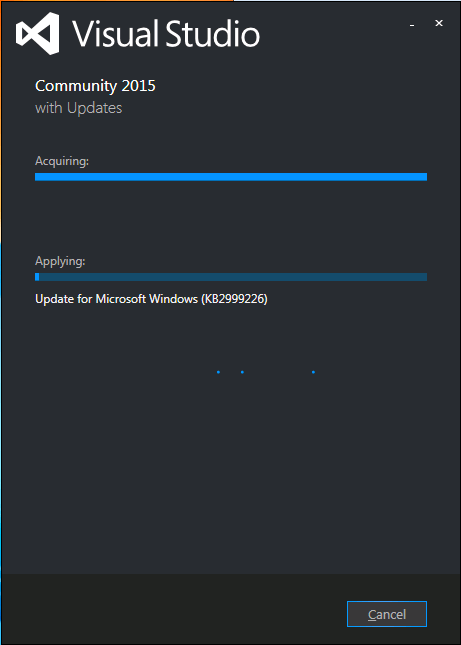
Visual Studio 2015 install stuck on “acquiring” KB2999226
I had exactly the same when installing Visual Studio 2015 on a Windows 7 x64 system: stuck on “Acquiring” the “Update for Microsoft Windows (KB2999226)”.
So as mentioned in the StackOverflow answers for the below question, I manually downloaded “Update for Windows 7 for x64-based Systems (KB2999226)” which you can get directly at https://download.microsoft.com/download/1/1/5/11565A9A-EA09-4F0A-A57E-520D5D138140/Windows6.1-KB2999226-x64.msu.
Be sure to quit both the Visual Studio 2015 installation as well as any (“automagically interfering” background Windows Updates), as otherwise you get this error:
If you still get that error, then
- try to stop/start the
wuauserv service: usually it gets rid of the error.
- When it still occurs, try a clean boot, then re-apply the KB.
Applying the KB can take a long while, even on fast hardware.
–jeroen
Source: Stuck while installing Visual Studio 2015 (Update for Microsoft Windows (KB2999226)) – Stack Overflow
Posted in .NET, Development, Software Development, Visual Studio 2015, Visual Studio and tools | Leave a Comment »
Posted by jpluimers on 2016/06/15
This is what the Delphi [WayBack] System.Classes.TThread.NameThreadForDebugging (introduced in Delphi 2010) is based on:
//
// Usage: SetThreadName (-1, "MainThread");
//
#include <windows.h>
const DWORD MS_VC_EXCEPTION=0x406D1388;

#pragma pack(push,8)
typedef struct tagTHREADNAME_INFO
{
   DWORD dwType; // Must be 0x1000.
   LPCSTR szName; // Pointer to name (in user addr space).
   DWORD dwThreadID; // Thread ID (-1=caller thread).
   DWORD dwFlags; // Reserved for future use, must be zero.
} THREADNAME_INFO;
#pragma pack(pop)

void SetThreadName( DWORD dwThreadID, char* threadName)
{
   THREADNAME_INFO info;
   info.dwType = 0x1000;
   info.szName = threadName;
   info.dwThreadID = dwThreadID;
   info.dwFlags = 0;

   __try
   {
      RaiseException( MS_VC_EXCEPTION, 0, sizeof(info)/sizeof(ULONG_PTR), (ULONG_PTR*)&info );
   }
   __except(EXCEPTION_EXECUTE_HANDLER)
   {
   }
}
Related:
For Delphi 2009 and 2007: It is implemented in the SetThreadName method of the IdGlobal unit.
–jeroen
Posted in C++, Delphi, Development, Software Development | Leave a Comment »
Posted by jpluimers on 2016/06/14
Quoting John Hart‘s brilliant answer:
Using --resolve leverages all of the normal logic that applies, but simply pretends the DNS lookup returned the data in your command-line option. It works just like /etc/hosts should.
Note --resolve takes a port number, so for HTTPS you would use
Https: curl --resolve 'yada.com:443:127.0.0.1' https://yada.com/something
Http: curl --resolve 'yada.com:80:127.0.0.1' http://yada.com/something
It requires curl 7.21.3 or higher (from the end of 2010). Which by now everybody should have.
–jeroen
more via: Set cURL to use local virtual hosts – Stack Overflow.
Posted in *nix, bash, cURL, Development, Power User, Scripting, Software Development | Leave a Comment »


 The Wiert Corner - irregular stream of stuff