


It’s a while ago I saw this first, but recently I bumped into it again and found out I never posted a link, so here it goes:
A game to help you master the pen tool
Source: The Bézier Game
–jeroen
Posted by jpluimers on 2017/06/27
It’s a while ago I saw this first, but recently I bumped into it again and found out I never posted a link, so here it goes:
A game to help you master the pen tool
Source: The Bézier Game
–jeroen

Posted in Development, EPS/PostScript, Font, Power User, Software Development | Leave a Comment »
Posted by jpluimers on 2017/06/26
–jeroen
Posted in Assembly Language, CP/M, Development, History, Software Development, Z80 | Leave a Comment »
Posted by jpluimers on 2017/06/26
Interesting: middelink/mikrotik-fwban: Use your Mikrotik firewall to do fail2ban like blocking of unwanted IPs. Written in Go.
It might beat these (that just count SSH connections, not failed connection attempts):
Another alternative is to parse one of the logs:
Of course you should have this installed by default as part of your hardening process:
–jeroen
Posted in Development, Internet, MikroTik, Power User, RouterOS, routers, Scripting, Software Development | Leave a Comment »
Posted by jpluimers on 2017/06/26
[WayBack] [WARNING] Intel Skylake/Kaby Lake processors: broken hyper-threading via [WayBack] Affects all oses. Updated can be applied by updating your UEFI/BIOS microcode update for CPU. Make sure you apply those fixes. – nixCraft – Google+:
This warning advisory is relevant for users of systems with the Intel
processors code-named "Skylake" and "Kaby Lake".  These are: the 6th and
7th generation Intel Core processors (desktop, embedded, mobile and
HEDT), their related server processors (such as Xeon v5 and Xeon v6), as
well as select Intel Pentium processor models.
My own actions for now are below.
Find out which machines use CPUs on these lists:
Use these Linux commands to find out the model and hyperthreading support:
grep -E 'model|stepping' /proc/cpuinfo | sort -u
grep -qE '^flags.*[[:space:]]ht[[:space:]]' /proc/cpuinfo && \
echo "Hyper‐threading is supported"
Use this Windows command to find out the model:
wmic cpu get caption
Use this command on Mac OS X:
sysctl -n machdep.cpu.brand_string
If it’s on the list and supports hyperthreading, then disable hyperthreading.
–jeroen
Posted in Power User | Leave a Comment »
Posted by jpluimers on 2017/06/26
Source: The Most Common VPN Error Codes Explained
- VPN Error 800 “Unable to establish connection”
- VPN Error 619 “A connection to the remote computer could not be established”
- VPN Error 51 “Unable to communicate with the VPN subsystem”
- VPN Error 412 “The remote peer is no longer responding”
- VPN Error 721 “The remote computer did not respond”
- VPN Error 720 “No PPP control protocols configured”
- VPN Error 691 “Access denied because username and/or password is invalid on the domain”
- VPN Errors 812, 732 and 734 “The connection was prevented because of a policy configured on your RAS/VPN server”
- VPN Error 806 “A connection between your computer and the VPN server has been established but the VPN connection cannot be completed.”
–jeroen
via: Could be useful. – Joe C. Hecht – Google+
Posted in Power User, Windows, Windows 10, Windows 7, Windows 8, Windows 8.1, Windows Server 2008, Windows Server 2008 R2, Windows Server 2012, Windows Server 2012 R2, Windows Vista, Windows XP | Leave a Comment »
Posted by jpluimers on 2017/06/23
This was too funny to let go unnoticed: [WayBack] How to turn on the light at home, Philips Version – Kristian Köhntopp – Google+.
It was shown during [Archive.is] Google Cloud Next 2017 in Amsterdam and immediately reminded me of The Big Bang Theory – How to turn on a lamp below.
A few notable entries from the comments:

–jeroen

Posted in Cloud, Fun, Infrastructure, IoT Internet of Things, Network-and-equipment, Power User | Leave a Comment »
Posted by jpluimers on 2017/06/23
For my blog archive as I already shared it on G+
[WayBack] With so many vulnerabilities out there, here is how to find out of if a fixed is applied to vulnerabilities on Debian/Ubuntu Linux using CVE. – Jeroen Wiert Pluimers – Google+
[WayBack] Debian/Ubuntu Linux: Find If Installed APT Package Includes a Fix/Patch Via CVE Number – nixCraft
Explains how to view the changelog of an installed package on a Debian or Ubuntu Linux server to find out if a fix/patch applied via CVE number.
Hans Wolters:
And find all packages that belong to one cve :-)
zgrep -i cve /usr/share/doc/*/changelog.Debian.gz|grep 1000364
–jeroen
Posted in OpenVPN, Power User, Security | Leave a Comment »
Posted by jpluimers on 2017/06/23
WHAT IS A BOGON, AND WHY SHOULD I FILTER IT?
A bogon prefix is a route that should never appear in the Internet routing table. A packet routed over the public Internet (not including over VPNs or other tunnels) should never have a source address in a bogon range. These are commonly found as the source addresses of DDoS attacks.
Source: The Bogon Reference – Team Cymru
The regular Bogon list is pretty static (last change in 2012), so I’ve listed the text version below. But the full Bogon list (including unused IPv4 space) is dynamic.
0.0.0.0/8
10.0.0.0/8
100.64.0.0/10
127.0.0.0/8
169.254.0.0/16
172.16.0.0/12
192.0.0.0/24
192.0.2.0/24
192.168.0.0/16
198.18.0.0/15
198.51.100.0/24
203.0.113.0/24
224.0.0.0/4
240.0.0.0/4
–jeroen
Posted in Internet, Power User, routers, Security | Leave a Comment »
Posted by jpluimers on 2017/06/22

The operation could not be completed.

Include In Project
I’ve got a bunch of PowerShell projects in a solution. In some of them, I can include new files, in others I get the below error.
The diff of a good/bad project is below as well.
Two questions:
---------------------------

Microsoft Visual Studio

---------------------------

The operation could not be completed

---------------------------

OK

---------------------------
Good file: WindowsLogsCbsInquiry.pssproj
Bad file: WindowsTempInquiry.pssproj
–jeroen

Posted in CommandLine, Development, PowerShell, Software Development, Visual Studio 2015, Visual Studio and tools | Leave a Comment »
Posted by jpluimers on 2017/06/22
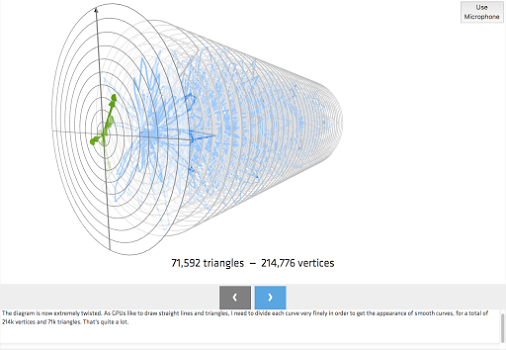
Another of +Steven Wittens step-by-step visual mathematical explorations: Fourier Analysis Look and Listen For this one headphones and a microphone are required, including a good machine…
–jeroen
–more–

Posted in Algorithms, Development, Software Development | Leave a Comment »

 The Wiert Corner - irregular stream of stuff