The Wiert Corner – irregular stream of stuff

Jeroen W. Pluimers on .NET, C#, Delphi, databases, and personal interests

  • My badges

  • Twitter Updates

  • My Flickr Stream

  • Pages

  • All categories

  • Enter your email address to subscribe to this blog and receive notifications of new posts by email.

    Join 1,854 other subscribers

Archive for 2020

Windows 7 Hosts File Ignored: recreate it and you’re back in business

Posted by jpluimers on 2020/07/17

Wow: I never noticed this before, but thinking back it has happened to me at least a few times years ago: [WayBack] Windows 7 Hosts File Ignored.

The trick is to create a new hosts file as Administrator.

I thought it had to do with proper line endings: Notebad messes those up every now and then. But I was wrong: even with Notepad++ this happens, see [WayBack] I just had to trouble shoot a Windows XP (!) issue where the entries in the hosts file were being ignored. The change that actually worked was: 1. Crea… – Thomas Mueller (dummzeuch) – Google+

–jeroen

Posted in Power User, Windows | Leave a Comment »

openSUSE forums tips

Posted by jpluimers on 2020/07/17

A few tips from posting to the openSUSE forums, learned from banging my head to the wall too often.

  • They are at https://forums.opensuse.org/forum.php
  • The forum software can be very slow at times taking ~tens of seconds for loading a post:
    • loading multiple posts or pages of posts you are interested in multiple tabs speeds up your reading a lot
  • Answers on the post often are along the form “has been answered before” without pointing to the actual link, even if the post is marked with a read icon, for instance in [WayBack] No option to “keep me logged in on this device” with Novell/openSUSE login?
  • Your email is not your username, so do not use it during logon: [WayBack] Lousy log in
  • The search function in the forum is horrible.
  • The forum software is proprietary (vBulletin – Wikipedia) and has a
  • When writing/replying to posts:
    1. Edit your answer off-line, because
      • you will automatically be logged off even if the forum indicates you are still logged on (there is no count down of the activity timer), see
      • when you re-logon, your carefully edited text has been lost from the cache
    2. Never use formatting, either auto-introduced, or introduced while pasting, avoid BB-code
      1. Reasoning
      2. Though the forum supports BB code, NNTP news readers do not, and the added formatting gives quite a mess
      3. Use the text (“Source mode”) version of the editor, by first clicking the left most button: “Source”

        • After this, the third and fourth button get greyed out:
      4. Remove formatting button is the second from the left (in both text and WYSIWIG mode): “Remove format”
      5. If you are in WYSIWIG mode, then always paste using the third button from the left that strips formatting: “Paste as plain text”
      6. NEVER EVER paste with formatting with the fourth button from the left: “Paste from Word”

–jeroen

Posted in *nix, Linux, openSuSE, Power User, SuSE Linux, Tumbleweed | Leave a Comment »

LOW-TECH MAGAZINE

Posted by jpluimers on 2020/07/16

Below is a cool site that I do not just list because I like the site, but also that they have a solar powered server running a low-tech version of it.

[WayBack] LOW-TECH MAGAZINE

Doubts on progress and technology

It actually started as a Dutch site, is ran by a Belgian now living in Barcelona. This means many articles are available in various languages, not just English and Dutch, but many also in French, German, Spanish, and Italian. Some articles are only available in English or Dutch.

Via: [WayBack] The last c’t Magazin +c’t magazin mentioned lowtechmagazine.com and I have already spent hours reading various articles there … – Thomas Mueller (dummzeuch) – Google+

Here are some more links.

Dutch

English

Read the rest of this entry »

Posted in Development, Hardware Development, LifeHacker, Power User, Solar Power | Leave a Comment »

Li-Ion BMS – Lithium-Ion Battery Management Systems and large battery packs

Posted by jpluimers on 2020/07/16

Just in case I want to really go off-grid: [WayBack] Li-Ion BMS – Lithium-Ion Battery Management Systems and large battery packs

It has a configuration selector module pointing to companies (even one in The Netherlands) that can help me out.

Via [WayBack] DIY Electric Car Forums – View Single Post – using 18650 cells to make 25kwh battery

Hopefully they are based on 18650 batteries:


–jeroen

Posted in 18650, Batteries, Hardware, Li-Ion, LifeHacker, Power User | Leave a Comment »

Remote power control your IoT hardware and remote updating boot SD cards

Posted by jpluimers on 2020/07/16

Thomas Rini (of U-Boot and Yocto fame) mentioned these solutions for remote power control of IoT devices and remote updating SD cards in this slide State of the U-Boot – Thomas Rini, Konsulko Group:

Two power solutions I like myself are:

The combination of these allows for really flexible production and testing environments.

Slides at [WayBackELC2017 – State of the U-Boot.pdf

–jeroen

Read the rest of this entry »

Posted in Arduino, Development, ESP8266, ESP8266X, Hardware Development, Hardware Interfacing, IoT Internet of Things, Network-and-equipment, Odroid, Power User, Raspberry Pi | Leave a Comment »

logging facility in Synopse seems to be an interesting alternative to JclDebug. Need to check out how they differ in looking up the method name for tracing.

Posted by jpluimers on 2020/07/15

On my todo list, as Synops is updated more often than JCL: [WayBack] The logging facility in Synopse seems to be an interesting alternative to JclDebug: According to this StackOverflow answer, one of its features is looki… – Thomas Mueller (dummzeuch) – Google+

–jeroen

Posted in Delphi, Development, Software Development | Leave a Comment »

GitHub – gamelinux/passivedns: A network sniffer that logs all DNS server replies for use in a passive DNS setup

Posted by jpluimers on 2020/07/15

Cool tool: [WayBackGitHub – gamelinux/passivedns: A network sniffer that logs all DNS server replies for use in a passive DNS setup via [WayBack] How to log all my DNS queries? – Unix & Linux Stack Exchange (thanks mxmlnkn!).

It listens on port 53 for DNS requests then logs them to a file on regular intervals aggregating similar requests.

Usage is simple:

Read the rest of this entry »

Posted in *nix, *nix-tools, Development, DevOps, Infrastructure, Linux, openSuSE, Power User, SuSE Linux, Tumbleweed | Leave a Comment »

SAFECode updates its guide on best secure software development practices – SD Times

Posted by jpluimers on 2020/07/15

Interesting to see is how much is not about actual coding, but of tooling, testing, processes, operations and mindset.

[WayBackSAFECode updates its guide on best secure software development practices – SD Times

PDF: [WayBack] SAFECode releases Fundamental Practices for Secure Software Development: Essential Elements of a Secure Development Life Cycle Program (Third Edition).

Table of Contents:

Page;Topic
 4; Executive Summary
 5; Introduction
 5;  Audience
 6; SAFECode Guidance and Software Assurance Programs
 7; Application Security Control Definition
 7;  Actively Manage Application Security Controls
 9; Design
 9;  Secure Design Principles
10;  Threat Modeling 
11;  Develop an Encryption Strategy
12;  Standardize Identity and Access Management
14;  Establish Log Requirements and Audit Practices  
15; Secure Coding Practices
15;  Establish Coding Standards and Conventions
15;  Use Safe Functions Only
17;  Use Code Analysis Tools To Find Security Issues Early
17;  Handle Data Safely 
20;  Handle Errors 
21; Manage Security Risk Inherent in the Use of Third-party Components
22; Testing and Validation
22;  Automated Testing
24;  Manual Testing
27; Manage Security Findings 
27;  Define Severity
28;  Risk Acceptance Process. 
29; Vulnerability Response and Disclosure
29;  Define Internal and External Policies
29;  Define Roles and Responsibilities
30;  Ensure that Vulnerability Reporters Know Whom to Contact 
30;  Manage Vulnerability Reporters
30;  Monitor and Manage Third-party Component Vulnerabilities 
31;  Fix the Vulnerability
31;  Vulnerability Disclosure
32;  Secure Development Lifecycle Feedback  
33; Planning the Implementation and Deployment of Secure Development Practices
33;  Culture of the Organization 
33;  Expertise and Skill Level of the organization 
34;  Product Development Model and Lifecycle
34;  Scope of Initial Deployment
35;  Stakeholder Management and Communications
35;  Compliance Measurement 
36;  SDL Process Health
36;  Value Proposition.
37; Moving Industry Forward
37;  Acknowledgements
38;  About SAFECode

–jeroen

Posted in Development, Security, Software Development | Leave a Comment »

“error: invalid object 100644” “git svn”

Posted by jpluimers on 2020/07/14

A while back, while using “git svn”, on a Windows system, I got [Archive.is“error: invalid object 100644” “git svn” – Google Search after statements like this:

# git svn rebase
error: refs/remotes/git-svn does not point to a valid object!
error: invalid object 100644 ac7df132f5bd7d639fc525f1f0204a546658d0c5 for 'Source/ToDoList/GX_ToDo.pas'
fatal: git-write-tree: error building trees
write-tree: command returned error: 128

# git svn fetch
error: refs/remotes/git-svn does not point to a valid object!
error: invalid object 100644 ac7df132f5bd7d639fc525f1f0204a546658d0c5 for 'Source/ToDoList/GX_ToDo.pas'
fatal: git-write-tree: error building trees
write-tree: command returned error: 128

In my case, regular git operations (like branching, committing, pushing, etc) worked fine, but git svn would fail.

One problem was that [Archive.is“error: refs/remotes/git-svn does not point to a valid object” – Google Search only returned one un-meaningful result: [WayBack] gist:87613 · GitHub.

Luckily, I had a backup (though it was from a while ago as that VM had not been in use for quite some time) which is the first part in [WayBack] Git FAQ – Git SCM Wiki: How to fix a broken repo?.

Since I was still interested finding out how to resurrect, just in case this happens at a time the backups do not go back far enough, I tried the steps below.

The very first fixing step is to ensure you can quickly restore things, or even better: operate on a copy of the broken pieces. On Windows, robocopy /mir is my friend for this, in Linux rsync -avloz (although on some systems, -z crashes).

TL;DR from the fixing steps

Find out what problems you have, and in which order to fix them. Otherwise you will break more stuff and take longer to fix it.

In this case, two things failed: one on the git side, and one on the git svn side. Since git svn depends on git, the best approach is to fix the git problem first, then the git svn thing.

Fixing this manually try 1

Read the rest of this entry »

Posted in CertUtil, Development, DVCS - Distributed Version Control, git, Hashing, md5, Power User, Security, SHA, SHA-1, SHA-256, SHA-512, Software Development, Source Code Management, Subversion/SVN, Windows | Leave a Comment »

Building a rudimentary battery backup for your USB powered devices (IoT, Raspberry, etc)

Posted by jpluimers on 2020/07/14

Malcolm Lewis [WayBack] came with these interesting pastes for a rudimentary battery backup servicing USB powered devices:

Since both expired, here is some more elaboration with Amazon.com links:

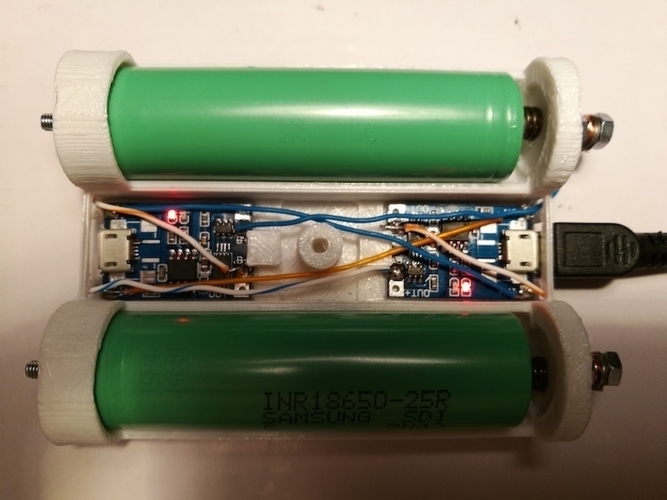
From the picture linked above (full one at the bottom of the post): a switch is missing from the parts list (:

Note that this is only the hardware parts, and no measurements of the voltage from the Raspberry Pi. So it is a battery backup, not a UPS.

For a UPS kind of functionality, you need more hardware (measure voltage to assess when to safely shut down, reset circuitry for when power comes up), and software (so the devices can shutdown).

Connections

After IRC chatting with Lewis (see his [WayBack] profile), this is how they should be connected:

  1. USB charger:
    1. OUT connector type A of USB charger cable
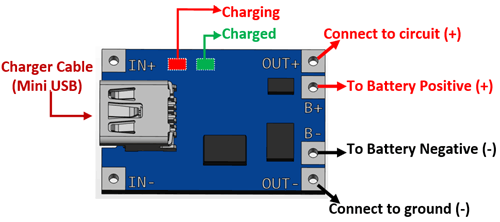
  2. Connections to the TP4056 battery charger (a nice video on this is at Charging a Lithium 18650 Cell using the TP4056)
    1. IN mini/micro USB from connector type B of USB charger cable
    2. BAT pins B+ and B- to the + and – of the 18650 battery holder
    3. OUT pins +/- to your LM2577 IN pins+/-
  3. 18650 battery holder
    1. IN pins +/- to the TP4056 BAT pins +/-
    2. One or two 18650 batteries
    3. Note
    4. Most of the wired “parallel” 18650 dual battery holders on non-USA Amazon sites are in fact serial (you see that in the comments, or by watching the wiring carefully), so better buy an unwired one!
  4. Connections to the adjustable LM2577 step-up converter having a max current of 3A
    (get one *with* voltage meter, as voltage meteres themselves are about half the price of the LM2577!)

    1. IN pins from the TP4056 OUT pins
    2. Adjust to slightly above 5V before connecting anything else!
    3. OUT pins +/- to the red/black pins of a connector A stripped micro USB cable
  5. USB powered device (like Raspberry Pi)
    1. Micro USB connector: connector B of the USB cable coming out of LM2577

If you want to measure both voltage and current, then a combined piece like Voltmeter Amperemeter Dual Digital Volt Amp Meter Messgerät 100V 10A is very convenient. Most of these do not come with schematics, so here is one:

Specs

Parts from Amazon.de

Media

There is a 6A module; though I’m not sure it is based on LM2577

Bad battery box example

–jeroen

Read the rest of this entry »

Posted in 18650, Batteries, Development, Hardware Development, Li-Ion, Power User | Leave a Comment »