The Wiert Corner – irregular stream of stuff

Jeroen W. Pluimers on .NET, C#, Delphi, databases, and personal interests

  • My badges

  • Twitter Updates

  • My Flickr Stream

  • Pages

  • All categories

  • Enter your email address to subscribe to this blog and receive notifications of new posts by email.

    Join 1,861 other subscribers

Archive for the ‘HTTP’ Category

Looking for maintainer(s) for fritzcap (Python project that captures calls from a Fritz!Box)

Posted by jpluimers on 2023/07/12

Given my health uncertainty, I am looking for maintainers for the fritzcap project (it captures calls from a Fritz!Box modem/router and is written in Python).

History

The fritzcap project was originally started in2007 by [Wayback/Archive] spongebob | IP Phone Forum, first as a binary fritzcap.exe Windows executable (see his first post at [Wayback/Archive] FritzBox: Tool für Etherreal Trace und Audiodaten-Extraktion | IP Phone Forum). In 2010 it became an open source Python project at [Wayback/Archive] Google Code Archive – Long-term storage for Google Code Project Hosting.

Read the rest of this entry »

Posted in About, Audio, Cloud, Communications Development, Containers, Development, Docker, ffmpeg, Fritz!, Fritz!Box, fritzcap, Hardware, HTTP, Infrastructure, Internet protocol suite, Media, Network-and-equipment, Personal, Power User, Python, Scripting, Software Development, TCP | Leave a Comment »

Some resources on CORS proxies

Posted by jpluimers on 2023/04/19

Having my background before the web-development era, and having lived mostly in back-ends or client-server front-ends, I sometimes need to really dig into things in order to understand them better.

CORS is such a thing, so below are some links to get started. My main interest is CORS proxies as they will force me do go deep and really get what is going on below the surface.

Defunct CORS proxy sites:

Used searches:

–jeroen

Posted in Communications Development, Development, HTTP, Internet protocol suite, REST, Software Development, TCP, Web Development | Leave a Comment »

Setting up a GitHub project so it is served over https as a github.io and a custom subdomain

Posted by jpluimers on 2022/04/27

Some links that helped me getting this working:

Read the rest of this entry »

Posted in Cloud, Cloudflare, Communications Development, Development, Encryption, GitHub, HTML, HTTP, HTTPS/TLS security, Infrastructure, Internet protocol suite, Let's Encrypt (letsencrypt/certbot), Power User, Security, Software Development, Source Code Management, TCP, TLS, Web Development | Leave a Comment »

Bash functions to encode and decode the ‘Basic’ HTTP Authentication Scheme

Posted by jpluimers on 2022/02/24

IoT devices still often use the ‘Basic’ HTTP Authentication Scheme for authorisation, see [Wayback] RFC7617: The ‘Basic’ HTTP Authentication Scheme (RFC ) and [Wayback] RFC2617: HTTP Authentication: Basic and Digest Access Authentication (RFC ).

Often this authentication is used even over http instead of over https, for instance the Egardia/Woonveilig alarm devices I wrote about yesterday at  Egardia/Woonveilig: some notes about logging on a local gateway to see more detailed information on the security system. This is contrary to guidance in:

  • RFC7617:
       This scheme is not considered to be a secure method of user
       authentication unless used in conjunction with some external secure
       system such as TLS (Transport Layer Security, [RFC5246]), as the
       user-id and password are passed over the network as cleartext.
  • RFC2617:
       "HTTP/1.0", includes the specification for a Basic Access
       Authentication scheme. This scheme is not considered to be a secure
       method of user authentication (unless used in conjunction with some
       external secure system such as SSL [5]), as the user name and
       password are passed over the network as cleartext.

Fiddling with those alarm devices, I wrote these two little bash functions (with a few notes) that work both on MacOS and in Linux:

# `base64 --decode` is platform neutral (as MacOS uses `-D` and Linux uses `-d`)
# `$1` is the encoded username:password
function decode_http_Basic_Authorization(){
  echo $1 | base64 --decode
  echo
}

# `base64` without parameters encodes
# `echo -n` does not output a new-line
# `$1` is the username; `$2` is the password
function encode_http_Basic_Authorization(){
  echo $1:$2 | base64
}

The first decodes the <credentials> from a Authorization: Basic <credentials> header into a username:password clean text followed by a newline.

The second one encodes a pair of username and password parameters into such a <credentials> string.

They are based on these initial posts that were not cross platform or explanatory:

  1. [Wayback] Decode HTTP Basic Access Authentication – Stack Pointer
  2. [Wayback] Create Authorization Basic Header | MJ’s Web Log

–jeroen

Posted in *nix, *nix-tools, Apple, Authentication, bash, bash, Communications Development, Development, HTTP, Internet protocol suite, Linux, Mac OS X / OS X / MacOS, Power User, Scripting, Security, Software Development, TCP, Web Development | Leave a Comment »

GitHub – TimeToogo/tunshell: Remote shell into ephemeral environments 🐚 🦀

Posted by jpluimers on 2021/11/25

Cool: [Wayback/Archive.is] GitHub – TimeToogo/tunshell: Remote shell into ephemeral environments 🐚 🦀

Via: [Archive.is] Jan Schaumann on Twitter: “This looks neat: on-demand remote shell into ephemeral environments, e.g. CI/CD pipeline container. Both sides fetch a client, use rendezvous server to negotiate session info, then establish connection or fall back to proxy through rendezvous. “

Read the rest of this entry »

Posted in Communications Development, Development, DevOps, HTTP, Infrastructure, Internet protocol suite, Power User, Software Development, TCP, WebSockets | Leave a Comment »

Random User Generator | Home

Posted by jpluimers on 2021/11/23

Cool tool for when you ever need random users to test a system [Wayback] Random User Generator | Home:

Random user generator is a FREE API for generating placeholder user information. Get profile photos, names, and more. It’s like Lorem Ipsum, for people.

This was used when extracting Parler data to substantiate evidence around the 20210106 USA Capitol riots.

You can even use a simple HTTP GET like [Wayback] randomuser.me/api and get a JSON result like this.

{"results":[{"gender":"female","name":{"title":"Miss","first":"Malou","last":"Mortensen"},"location":{"street":{"number":2669,"name":"Lyngbyvej"},"city":"Sundby","state":"Syddanmark","country":"Denmark","postcode":48047,"coordinates":{"latitude":"-35.1307","longitude":"113.7480"},"timezone":{"offset":"+1:00","description":"Brussels, Copenhagen, Madrid, Paris"}},"email":"malou.mortensen@example.com","login":{"uuid":"981747de-66fe-40b0-87ea-adfe403fe1be","username":"purpleostrich871","password":"sweets","salt":"x86aQbIB","md5":"55497ac53530b428f98b9d36267ceeef","sha1":"358b94ffabe7d827c34da15791e5d6717c594428","sha256":"6e357e887877e29b7e6d53073f648174382c53c24f83479e25fed9c82075ed32"},"dob":{"date":"1995-06-05T04:50:35.145Z","age":26},"registered":{"date":"2018-07-21T00:59:50.523Z","age":3},"phone":"02990797","cell":"94800012","id":{"name":"CPR","value":"050695-9954"},"picture":{"large":"https://randomuser.me/api/portraits/women/27.jpg","medium":"https://randomuser.me/api/portraits/med/women/27.jpg","thumbnail":"https://randomuser.me/api/portraits/thumb/women/27.jpg"},"nat":"DK"}],"info":{"seed":"8971869bb62b73d7","results":1,"page":1,"version":"1.3"}}

Via:

–jeroen

Read the rest of this entry »

Posted in Communications Development, Development, HTTP, Internet protocol suite, JavaScript/ECMAScript, JSON, Python, REST, Scripting, Software Development, TCP | Leave a Comment »

The browser wars that started on iOS (forcing Safari) and Android (forcing Chrome) now are continued on Windows 11 (forcing Edge)

Posted by jpluimers on 2021/10/05

Via:


Posted in Awareness, Development, HTTP, Internet protocol suite, Software Development, TCP, TLS, URI, Web Development | Leave a Comment »

Solved: ‘Answering Yes to “You have an older version of PackageManagement known to cause issues with the PowerShell extension. Would you like to update PackageManagement (You will need to restart the PowerShell extension after)?” hung my Visual Studio Code.…’

Posted by jpluimers on 2021/10/04

From a while back: [Archive.is] Jeroen Wiert Pluimers on Twitter: ‘Answering Yes to “You have an older version of PackageManagement known to cause issues with the PowerShell extension. Would you like to update PackageManagement (You will need to restart the PowerShell extension after)?” hung my Visual Studio Code.… ‘

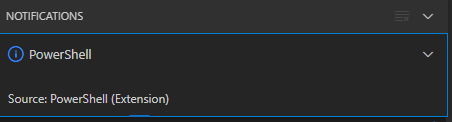
After clicking “Yes”, the the only thing visible was this notification that had an ever running “progress bar”:

Notifications - Powershell - Source: Powershell (Extension)

Notifications – Powershell – Source: Powershell (Extension)

The first part of the solution was relatively simple: restart Visual Studio code, then the original notification showed, and after clicking “Yes”, the “Panel” (you can toggle it with Ctrl+J) showed the “Terminal” output (yes, I was working on [Wayback/Archive.is] PowerShell script for sending Wake-on-LAN magic packets to given machine hardware MAC address, more about that later):

Read the rest of this entry »

Posted in .NET, Communications Development, Development, Encryption, HTTP, HTTPS/TLS security, Internet protocol suite, Power User, Security, Software Development, TCP, Visual Studio and tools, vscode Visual Studio Code, Windows, Windows 10 | Leave a Comment »

One of the Let’s Encrypt’s Root Certificates expired today (and their corresponding intermediate yesterday); how is your infrastructure doing?

Posted by jpluimers on 2021/09/30

Last weekend I published 5 days before the Let’s Encrypt’s Root Certificate is expiring!

It basically was a post trying to amplify the [Wayback/Archive.isLet’s Encrypt’s Root Certificate is expiring! message by [WaybackScott Helme .

Yesterday and today, he is maintaining a Twitter thread on things that have broken.

Quite a few things have, including some versions of curl, on which a lot of infrastructure relies (the certificate for it got fixed later on 20120930), see:

Two important starting points in his thread:

  1. [Archive.is] Scott Helme on Twitter: “🚨🚨🚨 5 minutes until the Let’s Encrypt R3 intermediate expires 🚨🚨🚨 29 September 2021 19:21:40 UTC”
  2. [Archive.is] Scott Helme on Twitter: “🚨🚨🚨 30 minute warning 🚨🚨🚨 IdentTrust DST Root CA X3 Expires: Sep 30 14:01:15 2021 UTC… “

If you want to check from one of your own clients, try [Archive.is] Scott Helme on Twitter: “I’ve created a test site to help identify issues with clients. If you can connect to https://t.co/bXHsnlRk8D then your client can handle being served the expired R3 Intermediate in the server chain!… “

[Wayback/Archive.is] https://expired-r3-test.scotthelme.co.uk/

Note that neither SSLabs, nor Cencys, nor CertCheckkerApp do show the expired certificate, only the new one:

Yes, I know the pluimers.com web server is rated B from a TLS perspective. Will be working on it, but I’m still recovering from rectum cancer treatments, and have an almost 1.5 year backlog to get through.

–jeroen

Posted in Communications Development, Development, Encryption, HTTP, https, HTTPS/TLS security, Internet protocol suite, Let's Encrypt (letsencrypt/certbot), Power User, Security, Software Development, TCP, TLS, Uncategorized, Web Development | Leave a Comment »

GitHub – proxykit/ProxyKit: A toolkit to create code-first HTTP reverse proxies on ASP.NET Core

Posted by jpluimers on 2021/09/28

Interesting: [Archive.is] GitHub – proxykit/ProxyKit: A toolkit to create code-first HTTP reverse proxies on ASP.NET Core:

Having built proxies many times before, I felt it is time to make a package. Forked from ASP.NET labs, it has been heavily modified with a different API, to facilitate a wider variety of proxying scenarios (i.e. routing based on a JWT claim) and interception of the proxy requests / responses for customization of headers and (optionally) request / response bodies. It also uses HttpClientFactory internally that will mitigate against DNS caching issues making it suitable for microservice / container environments.

Related:

–jeroen

Posted in .NET, .NET Core, .NET Standard, ASP.NET, C#, Communications Development, Development, HTTP, Internet protocol suite, Software Development, TCP | Leave a Comment »