The Wiert Corner – irregular stream of stuff

Jeroen W. Pluimers on .NET, C#, Delphi, databases, and personal interests

  • My badges

  • Twitter Updates

  • My Flickr Stream

  • Pages

  • All categories

  • Enter your email address to subscribe to this blog and receive notifications of new posts by email.

    Join 1,839 other subscribers

Archive for the ‘Development’ Category

{$DUPLICATEENABLE ON} against name collisions in Delphi…

Posted by jpluimers on 2017/11/01

Need to research {$DUPLICATEENABLE ON} further one day, but surely looks useful but is not really documented, not even at the Delphi 2009 documentation where it was introduced: [WayBackSysUtils.pfIgnoreDupUnits Constant.

–jeroen

Via: [WayBackMonkeyMixer has just been updated!- I’ve fixed a unit naming collision with Castlia- I’ve added an XE7 project group (which includes both the BPL and… – Simon Stuart – Google+

PS:

A cryptic G+ comment [WayBack] by Uwe Schuster:

DUPLICATEENABLE is old, but since it is something for IDE packages to avoid intersections with user/3rd party packages there is no need for a documentation. I do use it in an IDE package that did use the JCL/JVCL units as well and does another unit with a common name. IIRC I did mention it related to MonkeyMixer.

I think he argues that documentation is both not needed, but the usage of the directive sometimes is. Which somehow feels like a contradiction to me.

PS2: via Stefan Glienke, an error message that is related to this:

---------------------------
Error
---------------------------
Cannot load package 'Package2.'  It contains unit 'Whatever', which is also contained in package 'Package1'.
---------------------------
OK
---------------------------

Posted in Delphi, Delphi 2009, Delphi 2010, Development, Software Development | Leave a Comment »

Agiles Coaching by Judith Andresen [Leanpub PDF/iPad/Kindle]

Posted by jpluimers on 2017/11/01

Any good English books similar to the German [WayBackAgiles Coaching by Judith Andresen [Leanpub PDF/iPad/Kindle]?

Although my German reading is quite OK, it’s not OK enough to fully use this book.

–jeroen

via:

Posted in Agile, Development, Software Development | Leave a Comment »

Especially important for Delphi users on Windows 10 Creators Update: IDE Fix Pack 6.1 released | Andy’s Blog and Tools

Posted by jpluimers on 2017/10/31

The new [Archive.isIDE Fix Pack 6.1 released | Andy’s Blog and Tools is huge, especially for Windows 10 targets:

Windows 10 Creators Update 1703 caused issues with all Delphi programs, libraries and packages because it changed how Windows loads imported DLLs in such a way that it causes performance issues and can crash the debugger.

Delphi 10.2 Tokyo Update 2 fixed this by not producing multiple dll import sections for one DLL anymore.

IDE Fix Pack 6.1 implements that “feature” for all previous Delphi versions (2009-10.1 Berlin) and extends it to not only eliminate duplicate dll imports but also duplicate delay dll imports.

There are also (optional) updates that you can enable with new compiler switches:

  • Eliminating fwait instructions (but be careful, as they can confuse the debugger)
  • Optimising calls to virtual methods through interfaces
  • Optimising certain function prolog code

There are some smaller changes too.

I’m going to try this soon.

–jeroen

Posted in Delphi, Development, Software Development | 2 Comments »

Firebird – generate time/date/timestamp values

Posted by jpluimers on 2017/10/31

I needed the script in [WayBackFirebird – generate time/date/timestamp values to reproduce a problem in Database Workbench <= 5.3.2 with exporting TIME and TIMESTAMP values to Excel xlsx format: the time portion got lost so

The bug is fixed so will appear in the next beta and release versions: [WayBack] 0001506: Timestamp export to Excel XLSX only shows date, Time fails, CSV shows both date and time – Bug & Feature Tracker @ Upscene.com

–jeroen

Read the rest of this entry »

Posted in Database Development, Development, Firebird, Software Development, SQL | Leave a Comment »

Until someone writes proper string visualisers for the Delphi debugger…

Posted by jpluimers on 2017/10/31

A few tricks to write long strings to files when the Delphi debugger cuts them off (just because they like using 4k buffers internally);

  • TStringStream.Create(lRequestMessage).SaveToFile('c:\temp\temp.txt')
  • TIniFile.Create('c:\a.txt').WriteString('a','a',BigStringVar)
  • TFileStream.Create('c:\a.txt', fmCreate or fmShareDenyNone).WriteBuffer(Pointer(TEncoding.UTF8.GetBytes(BigStringVar))^,Length(TEncoding.UTF8.GetBytes(BigStringVar)))

They all work form the debug inspector, but they do leak memory. See comments below.

Via:

–jeroen

Read the rest of this entry »

Posted in About, Conference Topics, Conferences, Delphi, Development, Encoding, Event, Software Development | 6 Comments »

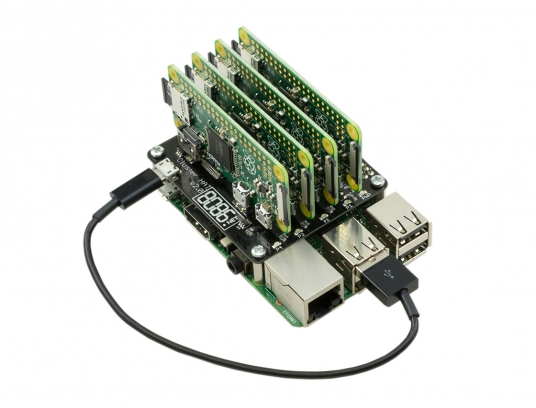
ModMyPi | Cluster HAT Kit Inc. 4 x Raspberry Pi Zero

Posted by jpluimers on 2017/10/30

Interesting stuff; I wonder if there is a case for it as well:

The Cluster HAT interfaces a (Controller) Raspberry Pi A+/B+/2/3 with 4 Raspberry Pi Zeros Configured to use USB Gadget mode, it is an ideal tool for teaching, testing or simulating small scale clusters.

This Kit Includes 1 x Cluster HAT V2, 4 x Raspberry Pi Zero’s, 4 x 16GB Micro SD Cards.

Please Note. A Raspberry Pi B+/2/3, with SD Card & Power Supply are also required for set up. These items are NOT Included in the Kit but can be purchased separately.

Source: [WayBackModMyPi | Cluster HAT Kit Inc. 4 x Raspberry Pi Zero

Via Matthijs ter Woord.

–jeroen

Posted in Development, Hardware Development, Hardware Interfacing, Raspberry Pi | 2 Comments »

Need to give this some thought: multi-LAN on Mikrotik

Posted by jpluimers on 2017/10/27

Maybe for my LoT (LAN of Things): having multiple (even many) local LANs some each with their section of LoT equipment nicely separated and partially being able to talk to some of the other LANs or part of the outside world.

Some links that might help me getting this set up:

Read the rest of this entry »

Posted in Development, Hardware, MikroTik, Network-and-equipment, Power User, RouterOS, routers, Scripting, Software Development, WinBox | Leave a Comment »

The Format function introduced in Delphi 1 was based on the FormatStr function in Turbo Vision available in Turbo Pascal 6 or higher

Posted by jpluimers on 2017/10/26

I did find my Borland Pascal 7.0.1 ISO which showed that https://github.com/romiras/turbo-pascal-archive/blob/master/Files/Dos%20Navigator/FORMAT.ASM is identical to ./BP/RTL/TV/FORMAT.ASM which is used from ./BP/RTL/TV/DRIVERS.PAS to provide this:

{ String formatting routines }

{$L FORMAT.OBJ}

procedure FormatStr(var Result: String; const Format: String; var Params);external {FORMAT};

There are various examples like in ./BP/EXAMPLES/DOS/TVDEMO/ASCIITAB.PAS at line 143:

FormatStr(TempStr, ' Char: %c Decimal: %0# Hex: %0#x ', ASCIIChar);

So it was in the Drivers unit, but also easy to incorporate in your own unit by linking the .OBJ file and providing the external declaration in any unit.

The Drivers unit is very independent of the rest of Turbo Vision: it uses the Objects unit (which most projects use as the System unit at ~500 lines of code provided very little functionality by itself).

For the diskette based install, the .TPU files were on the standard disks and the sources for both RTL and Turbo Vision on separate disks, but anyone would install them as they provided a lot of insight. The CD-ROM has them all on the same medium (both as installers and unpacked in the BP directory).

I just checked Turbo Pascal 6.0 (that I did have a VM for) which has them in the same way.

Source: [WayBackWe’re discussing with the collegues: anybody knows when Format function was introduced in Delphi? – Klaus Edelmann – Google+

–jeroen

Posted in Borland Pascal, Delphi, Development, History, Pascal, Software Development, Turbo Pascal | Leave a Comment »

roelandjansen/pcmos386v501: PC-MOS/386 v5.01 final release including cdrom driver sources.

Posted by jpluimers on 2017/10/25

History: Borland C++ source code for the PC-MOS/386 5.01 version at roelandjansen/pcmos386v501: PC-MOS/386 v5.01 final release including cdrom driver sources.

Related:

–jeroen

Via: [WayBack/Archive.is] PC-MOS/386 is na dertig jaar opensourcesoftware – Computer – .Geeks – Tweakers

Posted in Borland C++, C, C++, Development, History, Software Development | Leave a Comment »

cURL – POST an XML file as a stream

Posted by jpluimers on 2017/10/25

I hope I’m not alone on this but I find the cURL documentation hard to follow and short on examples.

My goal was to mimic some HTTP XML posting traffic a server gets from IoT devices. Google Chrome Postman (or Postman REST Client) reproduction is very easy and will send.

TL;DR

  1. ensure you have an empty --header "Content-Type:" header: this ensures that cURL doesn’t add one and does not mess on how the content is being transferred.
  2. use the --data or --data-binary command with an @ to post a file as body.
  3. if you want --write-out then be sure you have a recent cURL version.

This is how the IoT or Postman will send.

  • Post headers like these:

Host:127.0.0.1:8080
Content-Length: 245
Connection:Keep-Alive

  • Content like this:


<?xml version="1.0"?>
<Root Attribute="value">
<Branch>
<Leaf>content</Leaf>
</Branch>
<Branch Attribute="value">
<Bough Attribute="value">
<Twig Attribute="value">
<Leaf Attribute="value"/>
</Twig>
</Bough>
</Branch>
</Root>

The data is being streamed to the HTTP server even with the very limited set of headers.

I’ve been unable to come up with exact cURL statement that exactly matches the headers and way the content is being transferred.

This is what I tried (in all examples, %1 is the IPv4 address of the HTTP 1.1 server):

  • POST with the all the headers and the --data command:

curl --request POST --header "Host: %1:8080" --header "Content-Length: 245" --header "Connection: Keep-Alive" --data @httpPostSample.xml http://%1:8080/target

This will hang the connection: somehow cURL will never notify the upload is done and the HTTP server keeps waiting. When you put --verbose or --trace-ascii - on the command-line you will see something like this before hanging: * upload completely sent off: 245 out of 245 bytes.

Note the trick to emit the ASCII trace to stdout using --trace-ascii with the minus sign: thanks to [WayBack] Daniel Stenberg for answering [WayBackHow can I see the request headers made by curl when sending a request to the server? – Stack Overflow.

You can do the same with --trace which dumps all characters (not only ASCII) including their HEX representation

  • POST with the all but the Content-Length headers and the --data command:

curl --request POST --header "Host: %1:8080" --header "Connection: Keep-Alive" --data @httpPostSample.xml http://%1:8080/target

This will automatically add a Content-Length: 245 header and complete the transfer. But it will also add a Content-Type: application/x-www-form-urlencoded header causing the content not being posted as a body.

  • POST with a --form file= command:

curl --request POST --header "Host: %1:8080" --header "Connection: Keep-Alive" --form file=@httpPostSample.xml http://%1:8080/target

This will automatically ad a Content-Length: xxx header (way longer than 245) because it converts the request into a Content-Type: multipart/form-data; boundary=------------------------e1c0d47bac806954 one (the hex at the end differs) which is totally unlike what Postman does.

It is also unlike to what the HTTP server accepts.

curl --request POST --header "Host: %1:8080" --header "Connection: Keep-Alive" --data-binary @httpPostSample.xml http://%1:8080/target

curl –request POST –header “Host: %1:8080” –header “Connection: Keep-Alive” –data-binary @httpPostSample.xml http://%1:8080/target

It turns out that --data-ascii is exactly the same as --data and that --data-binary just skips some new-line conversion when compared to --data or --data-ascii. Contrary to the --data-raw documentation that suggest it is equivalent to --data-binary it seems --data-raw behaves exactly like --data and --data-ascii. Odd.

So these are all stuck with the Content-Type: application/x-www-form-urlencoded and I thought I was running out of options.

Then I found [WayBacksoundmonster had posted an answer at [WayBackhttp – What is the cURL command-line syntax to do a POST request? – Super User mentioning to add a Content-Type header.

So I changed the request to include the --header "Content-Type: text/xml; charset=UTF-8"  header:

  • curl --request POST --header "Content-Type: text/xml; charset=UTF-8" --header "Host: %1:8080" --header "Connection: Keep-Alive" --data @httpPostSample.xml http://%1:8080/target

This works. But: the Content-Type header is not present in the original request.

Finally it occurred to me: What if cURL would not insert a Content-Type header if I add an empty Content-Type header?.

That works!

  • curl --request POST --header "Content-Type:" --header "Host: %1:8080" --header "Connection: Keep-Alive" --data @httpPostSample.xml http://%1:8080/target

It posts exactly the same content as the IoT devices and Postman do.

Phew!


I tried to combine this with the --write-out (a.k.a. -w) option, but for older versions of cURL (I could reproduce with 7.34) that forces cURL back in to Content-Type: application/x-www-form-urlencoded mode so watch your cURL version!

Later I will put more research in chuncked transfer. Links that might help me:

–jeroen

Some of the references:

Posted in *nix, bash, cURL, Development, Encoding, Power User, Scripting, Software Development | Leave a Comment »