


Hoe moeilijk kan het toch zijn om je encoding goed te doen.
Deze keer uit een brief van xs4all:

Mojibake encoding probleem
Als je een trema in een brief zet, dan controleer je toch even dat die ook goed op de brief wordt afgedrukt?
Posted by jpluimers on 2015/02/24
Hoe moeilijk kan het toch zijn om je encoding goed te doen.
Deze keer uit een brief van xs4all:
Mojibake encoding probleem
Als je een trema in een brief zet, dan controleer je toch even dat die ook goed op de brief wordt afgedrukt?

Posted in Development, Encoding, ISO-8859, Mojibake, Software Development, Unicode, UTF-8, UTF8 | Leave a Comment »
Posted by jpluimers on 2015/02/24
Interesting: Amazedsaint’s Tech Journal: Hack Raspberry Pi – How To Build Apps In C#, WinForms and ASP.NET Using Mono In Pi.
–jeroen

Posted in .NET, Development, Hardware Development, Raspberry Pi, Software Development | Leave a Comment »
Posted by jpluimers on 2015/02/23
Ditching Windows XP meant finding drivers for some older devices.
One of them is a [Archive.is] Canon PIXMA mini260 Photo Inkjet Printer which prints marvellous photos in a borderless way (so no post processing needed).
Installing drivers on Windows 8.1 x64 turned out to be really easy despite the fact that the Canon site does not offer them: just install the “Windows Vista (64-bit)” drivers from this Canon link: [Wayback] PIXMA mini260 – Canon Europe.
This works as the printer driver model hasn’t changed much since Vista and the Vista drivers do not contain limits on future version numbers (see [Wayback] Getting older Windows drivers to work in Windows 8 for another example).
Now I need to find a way to get my [Archive.is] Olympus Camedia P-400 Digital Color Photo Printer. That is a lot harder: the most recent Windows P-400 Printer > Software Downloads are for Windows XP.
If anyone knows a workaround for this, I might connect this to an XP VM in a walled garden:
Under Windows XP, often the P-400 driver installer didn’t even want to install the USB part of the drivers.
How can I work around this?
Might it be that only the parallel
LPTENUMis included in the [Wayback] Windows XP P400N.inf file, unlike the [Wayback] Windows 2000 driver P400N.INF file that contains both [Wayback] LPTENUM and [Wayback] USBPRINT and the [Wayback] P-440 INF file only has USBPRINT?Other vendors seem to include both in their .INF files like this [Wayback] Dell 3130cn INF file.
–jeroen
via:
Posted in Power User, Vista, Windows, Windows 7, Windows 8, Windows 8.1, Windows 9, Windows Vista, Windows XP | Leave a Comment »
Posted by jpluimers on 2015/02/21
This is the way a wiki should work:
Thanks Simon Stuart for asking, and many others (especially Johan) for providing the info.
Note the version that is missing (;
–jeroen
Posted in Delphi, Delphi 1, Delphi 2, Delphi 2005, Delphi 2006, Delphi 2007, Delphi 2009, Delphi 2010, Delphi 3, Delphi 4, Delphi 5, Delphi 6, Delphi 7, Delphi XE, Delphi XE2, Delphi XE3, Delphi XE4, Delphi XE5, Delphi XE6, Delphi XE7, Development, Software Development | Leave a Comment »
Posted by jpluimers on 2015/02/21
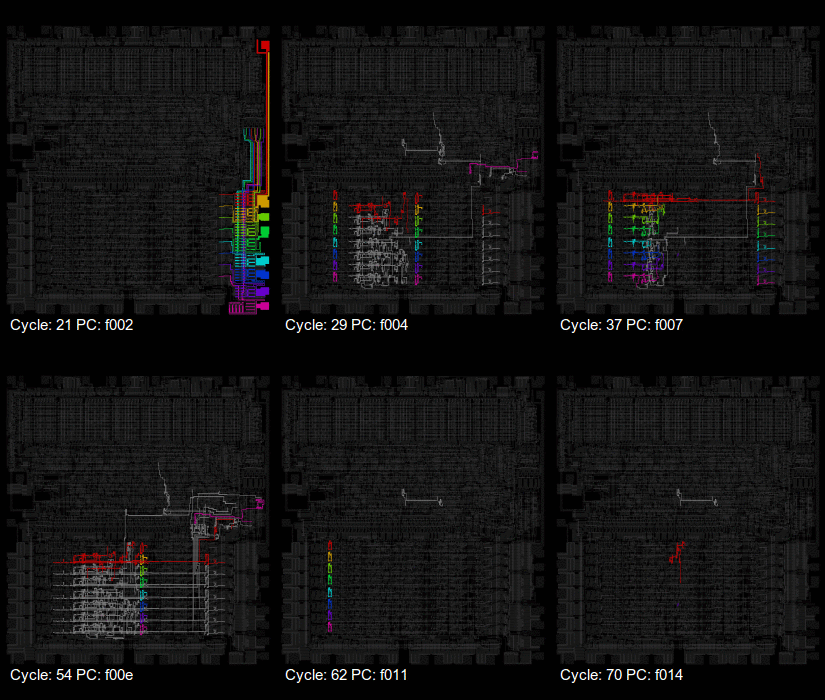
visual6502 pictures via: mos6502 – Google+.
I’ve edited their post below to embed all the links.
–jeroen
Original post with embedded links and edited for readablity:
This week, a new visualisation of the 6502, upcycled from an old favourite. Xray6502 uses the data from the visual6502 project to animate the flow of data values around the chip in rainbow colours. Wladimir has put the code up on github[1], and shared some animations on the 6502 forums too – see our featured link.
You may know that visual6502 is a transistor-level simulation of the NMOS 6502 for your browser. We still see it referenced from time to time[2][3], to explore the circuit and to illustrate exact cycle by cycle behaviour of the chip, and also used to teach the workings of microprocessors in universities[4…7]. It first saw daylight when Greg James presented his findings at SIGGRAPH back in 2010[8], but Greg had been tracing the circuit for much of the previous year. Barry and Brian Silverman had been constructing the circuit simulator and the presentation as a web site. Later that year visual6502.org went live, and went through a series of performance improvements, enhancements and a few bug fixes. It now hosts several simulations, a wiki of notes about the 6502, and several other die photos.
Because visual6502 is open source, it’s been used before for related projects: Michael Steil has published perfect6502[9] which is a C port of the simulation. Elsewhere we find visual2A03[10] which expands the simulation to the CPU chip in the NES. (But note, to save on duplicated effort, this is a real 6502 simulated, not the one with decimal mode ripped out[11] which is actually in the chip.)
Now Wladimir joins in, with this data-tracing visualisation – what can we expect next? Have you played with your visual6502 today?
- [1] https://github.com/laanwj/xray6502
- [2] http://forum.6502.org/viewtopic.php?t=3152
- [3] http://forum.6502.org/viewtopic.php?p=36006#p36006
- [4] http://www.cs.otago.ac.nz/cosc243/ (see lectures 6,7,8)
- [5] https://web.archive.org/web/20130513022146/http://www.cs.uiuc.edu/homes/luddy/PROCESSORS/Nintendo.pdf
- [6] http://iccd.et.tudelft.nl/2009/proceedings/10Shimizu.pdf
- [7] http://eecs.ucf.edu/seniordesign/sp2011su2011/g03/Senior%20Design%202%20Final%20Documentation.pdf
- [8] http://www.visual6502.org/docs/6502_in_action_14_web.pdf
- [9] https://github.com/mist64/perfect6502
- [10] https://www.qmtpro.com/~nes/chipimages/visual2a03/
- [11] http://visual6502.org/wiki/index.php?title=6502DecimalMode#Decimal_mode_and_the_NES.27_RP2A03G
via mos6502 – Google+.

Posted in 6502 Assembly, Assembly Language, Development, Power User | Leave a Comment »
Posted by jpluimers on 2015/02/19
Smart, it works in any modern html5 capable browser:
| data:text/html, <html contenteditable> |
Be sure to look at the blog post and comments at Jose Jesus Perez Aguinaga : One line browser notepad as they explain why this works, and how to extend it in a couple of really smart way.
–jeroen
via: Jose Jesus Perez Aguinaga : One line browser notepad.
Posted in Chrome, Development, Firefox, HTML, HTML5, Internet Explorer, Opera, Power User, Safari, Software Development, Web Browsers, Web Development | 1 Comment »
Posted by jpluimers on 2015/02/18
Mac OS X has md5, but no md5sum.
I agree with Mac OS X: Replicating md5sum Output Format that the second way of emulating md5 is better than the first one.
So here it is:
| #!/bin/bash | |
| /sbin/md5 -r "$@" |
–jeroen
via: Mac OS X: Replicating md5sum Output Format – Raam Dev
Posted in Apple, bash, Development, Hashing, Mac, Mac OS X / OS X / MacOS, Mac OS X 10.4 Tiger, Mac OS X 10.5 Leopard, Mac OS X 10.6 Snow Leopard, Mac OS X 10.7 Lion, MacBook, MacBook Retina, MacBook-Air, MacBook-Pro, md5, OS X 10.8 Mountain Lion, Power User, Scripting, Security, Software Development | Leave a Comment »
Posted by jpluimers on 2015/02/17
For Windows Vista and up, you need at least these icon resolutions:
For Windows XP / 2003 Server and earlier, you’d only need the 16×16, 32×32 and 48×48 resolutions, and if you support older video hardware, include them in 24-bit, 8-bit and 4-bit color depth.
For younger versions you might consider adding 20×20, 24×24, 40×40, 64×64 and 128×128 as well to support higher DPI modes.
You need to include and various other sizes for other operating systems.
Getting at them, I usually start with an EPS file, then downscale to the right resolution, and save the resulting files as PNG images, then assemble those together.
A while ago, I had some icons with nice long diagonal line, then I found out the hard way I should not have used ConvertICO.org. I often prefer on-line tools over off-line, especially for actions I rarely do (this is one of them). It saves you from installing software, and on-line sites usually get better over time.
In this case, I shouldn’t have gone online: Just look at the jagged edges in the 200% zoom below: the image on the right is from ConvertICO.org, on the left it is from IcoFX.
What you clearly see is that ConvertICO messes around with the 256×256 image (it doesn’t mess around with the other resolution), but IcoFX doesn’t mess around.
So now I switched to IcoFX. Not on-line, but a great free tool. Read the rest of this entry »

Posted in Development, Power User, Software Development, Windows, Windows 7, Windows 8, Windows Server 2000, Windows Server 2003, Windows Server 2003 R2, Windows Server 2008, Windows Server 2008 R2, Windows Vista, Windows XP | 2 Comments »
Posted by jpluimers on 2015/02/16
Brillant!: Windows Alt Key Codes.
The page has both lists of four-digit ALT+#### codes, a how-to, and reference links:
- Letters with Accents – (e.g. ó, ò, ñ)
- Other Foreign Characters – (e.g. ç, ¿, ß)
- Currency Symbols – (e.g. ¢, £, ¥)
- Math Symbols – (e.g. ±, °, ÷)
- Other Punctuation – (e.g. &, ©, §)
- Using the Codes
- Other Accents and Symbols: Character Map Other Page
- Non-Numeric Accent Codes: Activate International Keyboard Other Page
- Links to Other References
–jeroen
Posted in Development, Encoding, Power User, Software Development, Unicode, Windows, Windows 7, Windows 8, Windows Server 2000, Windows Server 2003, Windows Server 2003 R2, Windows Server 2008, Windows Server 2008 R2, Windows Vista, Windows XP | Leave a Comment »
Posted by jpluimers on 2015/02/15
Talking about Delphi 2007 stuff:
I needed to generate a bunch of groupproj files for Delphi 2007 (I wrote about legacy yesterday), but found out that my GenerateGroupProjConsoleProject was generating too good XML.
So here is the change-set:
Allow generating Delphi 2007 .groupproj files (uses a string search/replace hack as Delphi 2007 uses xmlns=”” which you cannot set manually through the normal IXMLNode ways especially not with ADOM).
TODO: verify if/how the GroupProj.xsd can be adopted to this not so nice XML that Delphi 2007 uses.
–jeroen
via jeroenp / BeSharp.net / commit / f7c23ffe4cb1 — Bitbucket.
Posted in Delphi, Delphi 2007, Development, Software Development | Leave a Comment »
 The Wiert Corner - irregular stream of stuff