Posted by jpluimers on 2019/07/08
Cool: Windows 10 allows ANSI/VT100 terminal escape codes without extra tooling. [WayBack] Colored text output in PowerShell console using ANSI / VT100 codes – Stack Overflow.
It is off by default (can be modified through the registry), can be turned on by either using an API call, or by piping through PowerShell.
For older versions, read [WayBack] Windows console with ANSI colors handling – Super User, of which this is a small quote:
For Windows version below 10, the Windows command console doesn’t support output coloring by default. You could install either Cmder, ConEmu, ANSICON or Mintty (used by default in GitBash and Cygwin) to add coloring support to your Windows command console.
Via [WayBack] Did you know that you can enable VT100 terminal emulation in PowerShell as well as the Cmd window? This will allow you to do adb shell to your Android … – Lars Fosdal – Google+
–jeroen
Posted in Color (software development), CommandLine, Development, Power User, PowerShell, PowerShell, Scripting, Software Development, Windows | Leave a Comment »
Posted by jpluimers on 2019/06/24
Learned a new thing today: you can change the line styles in PlantUML to these:
This in addition to the colour I already knew about. The order of these does not matter:
@startuml

' Make a dashed line, alternative syntax for ..>
(*) -[dashed]-> "Write outline"

' Make line bold and use color name
"Write outline" -[bold,#green]-> "Find example"

' Only change the color with hexadecimal RGB code
"Find example" -[#ff00ff]-> "Write blog"

' Order of line style and color can be reversed
"Write blog" -[#6666ff,dashed]-> "Publish"

' Use dotted line style
"Publish" -[dotted]-> (*)

@enduml
Source: [WayBack] PlantUML Pleasantness: Change Line Style And Color – Messages from mrhaki
–jeroen
Posted in Color (software development), Development, Diagram, PlantUML, Power User, Software Development, UML | Leave a Comment »
Posted by jpluimers on 2018/11/14
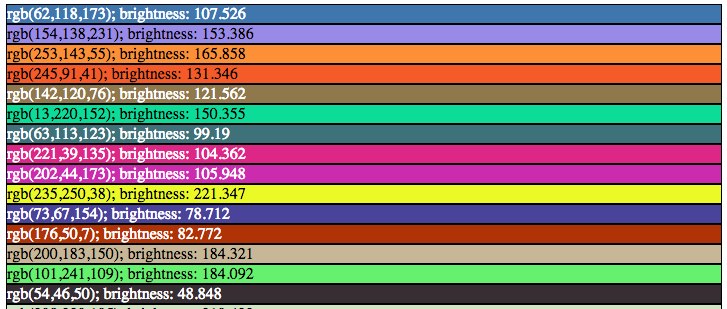
Choosing label colours other than black or white is like making a dynamic mouse cursor that inverts the colours underneath it: it fails horribly in the low contrast regions, and looks very strange on pink-noise backgrounds.
This approach is uses black and white depending on the perceived brightness:
[WayBack] How to automatically choose a label color to contrast with background | TrendCT:
What would data viz be without labels? Just viz, that’s what. This guide aimed at web designers discusses how to choose a label text color with enough contrast.
Via: [WayBack] For all those people incapable of choosing the right color combinations. – Thomas Mueller (dummzeuch) – Google+
–jeroen
Posted in Algorithms, Color (software development), Development, Software Development, Usability, User Experience (ux) | Leave a Comment »
Posted by jpluimers on 2018/06/18
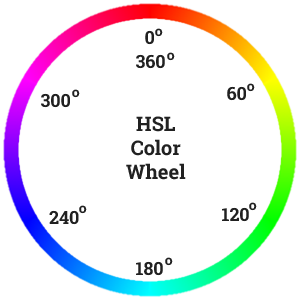 Recommented reading and playing: [Archive.is] Practical Color Theory for People Who Code which is not just about the colour wheel, but also about:
- desaturation
- mixing
- contrast for tints and shades
Oh: don’t forge the “Party Mode” (:
–jeroen
PS:
Posted in Color (science), Color (software development), Development, LifeHacker, Power User, science, Software Development, UI Design | Leave a Comment »
Posted by jpluimers on 2016/05/17
This post summarises it nicely: [Wayback/Archive.is] Push a solid colored background to a Windows Server 2012 or later | Tidbits of Information from Virot.
I already knew about the one below, but the post above gives a more complete picture with:
- Background color
- Wallpaper
- tells how to set the menu and
These I already knew:
–jeroen
Posted in Agile, Color (software development), Development, Power User, Software Development, Windows, Windows 7, Windows 8, Windows 8.1, Windows 9, Windows Server 2003, Windows Server 2003 R2, Windows Server 2008, Windows Server 2008 R2, Windows Server 2012, Windows Server 2012 R2, Windows Vista, Windows XP | Leave a Comment »
Posted by jpluimers on 2014/12/24
Once every while you still do WinForms work, and bump into something you hadn’t bumped into before.
This time it was trying to set ForeColor = Color.Red on a ReadOnly TextBox for displaying error messages:
- Using a TextBox means the user can still copy the text to the clipboard.
- Using a Red foreground draws enough attention (it’s was an app with a really busy user interface).
When setting a TextBox from ReadOnly = false to true sets the BackColor from SystemColors.Window (usually white) to SystemColors.Control (usually light grey), and leaves the ForeColor to SystemColors.WindowText (usually black).
Setting ForeColor = Color.Red (funny there is a plural in SystemColors but not in Color) it doesn’t display it as such:
To my surprise, the TextBox had ReadOnly text (you could copy, but not modify it), which showed with a a grey (SystemColors.Control) BackColor and a black (SystemColors.WindowText) ForeColor: the defaults for a ReadOnly TextBox, not using my ForeColor = Color.Red;
I vaguely remembered there was some odd way of solving this, but since I hadn’t written a blog article about it back then (somewhere around .NET 1.x or 2.0 I didn’t have a blog yet), I was glad that Cheetah posted this answer on StackOverflow: Read the rest of this entry »
Posted in .NET, .NET 1.x, .NET 2.0, .NET 3.0, .NET 3.5, .NET 4.0, .NET 4.5, C#, C# 1.0, C# 2.0, C# 3.0, C# 4.0, C# 5.0, Color (software development), Development, Software Development, VB.NET, VB.NET 10.0, VB.NET 11.0, VB.NET 7.0, VB.NET 7.1, VB.NET 8.0, VB.NET 9.0, Visual Studio 11, Visual Studio 2002, Visual Studio 2003, Visual Studio 2005, Visual Studio 2008, Visual Studio 2010, Visual Studio and tools, WinForms | Leave a Comment »


 The Wiert Corner - irregular stream of stuff