There has been quite a discussion on the PowerShell Core repository on the rename, but I think it is for a good reason.
Too bad that during part of the beta, the old name powershell was used, but beta-time means things break every now and then.
PowerShell Core is sufficiently different from prior PowerShell versions to warrant a name change. This also makes it a lot easier to use them side-by-side.
Many other names (like posh, pcsh or psh) were considered, usually because of naming conflicts with existing tools (like posh) or easy confusion with existing shells (like pcsh and csh). A benefit on Linux/macOS is that it now ends with sh like virtually all other shells.
But I still think it’s a wise idea to switch away from the Cmd and to PowerShell as with PowerShell you get way more consistent language features, far better documentation, truckloads of new features (of which I like the object pipeline and .NET interoperability most) and far fewer quirks.
Ah, C. The best lingua franca we have… because we have no other lingua francas. Linguae franca. Surgeons general? C is fairly old — 44 years, now! — and comes from a time when there were possibly more architectures than programming languages. It works well for what it is, and what it is is a relatively simple layer of indirection atop assembly. Alas, the popularity of C has led to a number of programming languages’ taking significant cues from its design, and parts of its design are… slightly questionable. I’ve gone through some common features that probably should’ve stayed in C and my justification for saying so. The features are listed in rough order from (I hope) least to most controversial. The idea is that C fans will give up when I call it “weakly typed” and not even get to the part where I rag on braces. Wait, crap, I gave it away.
I’ve got a bunch of PowerShell projects in a solution. In some of them, I can include new files, in others I get the below error.
The diff of a good/bad project is below as well.
Two questions:
Does anybody know how to work around this?
Does anybody know how to find the actual error for this?
---------------------------

Microsoft Visual Studio

---------------------------

The operation could not be completed

---------------------------

OK

---------------------------
Lets start with the second problem: There are various ways to redirect PowerShell output to a file.
Shell redirect with a greater than sign (>) to create/overwrite output or two greater than signs (>>) to append output.
Use Out-File [WayBack] with a filename and either -FilePath (default, similar to >) or -Append (similar >>).
I write “similar” as they are not fully equivalent. That’s where Format-Table [WayBack] with the -AutoSize parameter comes in (with or without a -Wrap parameter).
Apart from Format-Table displaying only 10 columns by default (see below), the -AutoSize will change columns presentation depending not just on the -Wrap parameter but also to the total width it thinks it has available.
Since then I had to maintain too many locales running Windows 10. So here is the batch file:
for /f "delims=" %%A in ('PowerShell -Command "(Get-Culture).Name"') do explorer "%LocalAppData%\Packages\windows.immersivecontrolpanel_cw5n1h2txyewy\LocalState\Indexed\Settings\%%A\AAA_SystemSettings_MusUpdate_UpdateActionButton.settingcontent-ms"
PowerShell 4.0 is madly in love with “English (United States)”
A long time ago I started writing up my blog post like this in March 2015 when I bumped into this the first time when upgrading from PowerShell 2 to PowerShell 4:
Good and not so good news: after reading the below linked posts, this is what works:
PowerShell 4 and up works fine with any [Wayback] Lucida Console size (including 12) and boldness
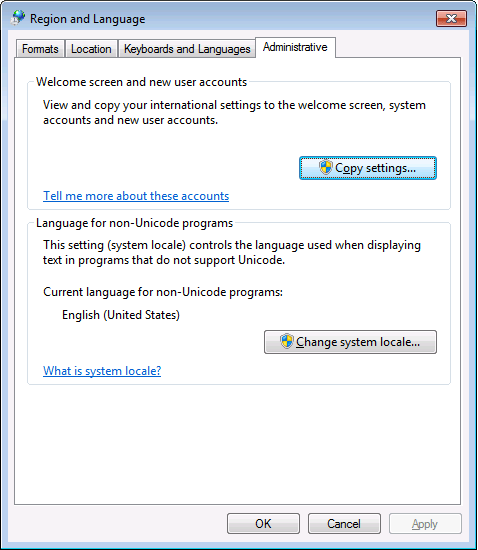
only when the “Language for non-Unicode programs” is set to “English (United States)”.
PowerShell 4 works fine with [Wayback] Consolas on any size and boldness
for any “Language for non-Unicode programs”
So if you’re like me and switch between “Dutch (Netherlands)” and “English (Ireland)” a lot (both use the EURO as currency, but have distinct enough other locale settings to cover a lot of European stuff) then you need to get used to the Consolas font.
This file contains hidden or bidirectional Unicode text that may be interpreted or compiled differently than what appears below. To review, open the file in an editor that reveals hidden Unicode characters. Learn more about bidirectional Unicode characters
@echo off
:: http://superuser.com/questions/768984/show-exe-path-of-running-processes-on-the-command-line-in-windows
  if [%1] == [] goto :help
  PowerShell Get-Process %* ^| Format-List Path
goto :eof
:help
  echo Syntax:
  echo   %0 ProcessName
  echo Shows the full EXE paths of any running process with the ProcessName name.
  echo Example:
  echo   %0 DevEnv
  echo Shows the paths of running Visual Studio processes



 The Wiert Corner - irregular stream of stuff