Posted by jpluimers on 2021/04/14
I could not find a syntax for “current changeset”, but since cm log accepts the output of cm status as changeset identifier:
for /F "tokens=*" %l in ('call cm status --nochanges') do (call cm log %l --itemformat )
Or in batch file form:
for /F "tokens=*" %%l in ('call cm status --nochanges') do (call cm log %%l --itemformat )
Two important parts of the trick that ensure each command only outputs what is needed:
- The empty
--itemformat specification for cm log indicates that no details about files should be logged.Without it, cm log will list both the changeset information and information about each item in the changeset.
- The other trick is
--nochanges for cm status: it only shows the status line, and no other changes.Without it, cm status will emit one line per changed file.
–jeroen
Read the rest of this entry »
Posted in Development, Encoding, PlasticSCM, Software Development, Source Code Management | Leave a Comment »
Posted by jpluimers on 2021/03/26
For my link archive: [WayBack] Encode/Decode Quoted Printable – Webatic.
It did a splendid job at decoding email files in MIME format Quoted-printable.
–jeroen
Posted in *nix, *nix-tools, Communications Development, Development, eMail, Encoding, Internet, Internet protocol suite, Power User, sendmail, SMTP, SocialMedia, Software Development | Leave a Comment »
Posted by jpluimers on 2021/03/17
Most searches for “ASCII emoticons” get you Unicode ones:
Luckily most are ASCII in List of emoticons – Wikipedia.
There are also shortcodes, which do not visually represent an emoji, but usually get translated to the image or Unicode character.
A few lists on them:
–jeroen
Posted in ASCII, Development, Encoding, LifeHacker, Power User, Software Development, Unicode | Leave a Comment »
Posted by jpluimers on 2021/03/16
[WayBack] Undo changes to a hidden changes item from CLI – General – Plastic SCM Community.
Maybe I should start an undocumented Plastic SCM series just like I did for Delphi. (:
As soon as you have entries in your hidden_changes.conf, then entries matching will show up in your Plastic SCM GUI, but not included in the cm status --all command.
Luckily there is an the --hiddenchanged switch (maybe to keep naming inconsistent with the hidden_changes.conf file) which is only documented in cm changed --help, not on-line).
So my new cm-show-status.bat file contains this line:
cm status --all --hiddenchanged %*
Maybe more switches can be deducted from [WayBack] Plastic SCM version control · The Plastic SCM API: GET PENDING CHANGES IN WORKSPACE:
GET /api/v1/wkspaces/:wkname/changes
Parameters
| Name |
Type |
Description |
| types |
string |
A comma-separated list detailing the desired change types to display in the response. Available types: added, checkout, changed, copied, replaced, deleted, localdeleted, moved, localmoved, private, ignored, hiddenchanged, controlledchanged, all |
Read the rest of this entry »
Posted in Development, Encoding, PlasticSCM, Power User, Software Development, Source Code Management | Leave a Comment »
Posted by jpluimers on 2021/02/19
As a follow-up on Still looking for base64url decoding tools, both on-line and for MacOS homebrew: this is in Python, works on MacOS, Linux and Windows, and can be integrated in a web page.
It is based on the ideas in [WayBack] Python-Twitter-Hacks/websiteScreenshot.py at master · edent/Python-Twitter-Hacks · GitHub, which was more like a code snippet with hard coded literals.
It downloads a jpeg web-site screenshot using the Google PageSpeed API V1, which generates the screenshot as a base64url encoded blob inside a JSON structure.
Python does not have native Python base64url support, but the concept of it is fairly straightforward: [WayBack] RFC 4648 – The Base16, Base32, and Base64 Data Encodings: Base 64 Encoding with URL and Filename Safe Alphabet, which allows data to be passed inside URLs without reverting to [WayBack] Percent-encoding – Wikipedia.
My changes work, but are by no means in canonical form or Idiomatic Python. I have a long way to go to reach that level of Python.
So I forked the repository, and fixed the script basing it on Python 3.
I might make it V2 compatible in the future. More information on V2 in [WayBack] Google APIs Explorer: Services > PageSpeed Insights API v2 > pagespeedonline.pagespeedapi.runpagespeed
Content is in the below gist.
–jeroen
Read the rest of this entry »
Posted in base64, base64url, Development, Encoding, Python, Scripting, Software Development | Leave a Comment »
Posted by jpluimers on 2021/02/11
 Remember the screenshot on the right from yesterdays post Kristian Köhntopp explaining theories?
In the end, I:
- saved that tweet
- in archive.is
- then took the screenshot image from there (see below)
- cut out the grey parts, then posted the middle part
I much more would have used the screenshot functionality of Google as described here by Terence Eden:
[WayBack] twitter – How to convert a tweet to image – Stack Overflow
Google has a secret screenshot API
For example, you can use it to get a screenshot of a tweet like this
https://www.googleapis.com/pagespeedonline/v1/runPagespeed?screenshot=true&strategy=mobile&url=https%3a%2f%2ftwitter.com%2fedent%2fstatus%2f661570680253755392
At the bottom of that JSON response, you’ll see
"screenshot": {
     "data": "_9j_4AAQSkZJRgAB.....=",
     "height": 569,
     "mime_type": "image/jpeg",
     "width": 320
 }
You will need to Base64 decode it using the URL and Filename safe alphabet.
That will give you a JPG screenshot of the Tweet.
I was hoping for an on-line way, so I followed [WayBack] Google’s Secret Screenshot API – Terence Eden’s Blog.
The blog post pointed me to a Python based script ([WayBack] Python-Twitter-Hacks/websiteScreenshot.py at master · edent/Python-Twitter-Hacks · GitHub) but had no online way.
So I tried out a few on-line things myself that failed:
Then I found out the script was just a proof of concept with hard coded URL and filename.
So I forked the repository, and fixed the script basing it on Python 3.
More on that next week.
Related:
- [WayBack] RFC 4648 – The Base16, Base32, and Base64 Data Encodings: Base 64 Encoding with URL and Filename Safe Alphabet:
   The Base 64 encoding with an URL and filename safe alphabet has been
   used in [12].
...
   An alternative alphabet has been suggested that would use "~" as the
   63rd character.  Since the "~" character has special meaning in some
   file system environments, the encoding described in this section is
   recommended instead.
...
   This encoding may be referred to as "base64url".  This encoding
   should not be regarded as the same as the "base64" encoding and
   should not be referred to as only "base64".
...
   This encoding is technically identical to the previous one, except
   for the 62:nd and 63:rd alphabet character, as indicated in Table 2.
...
         Table 2: The "URL and Filename safe" Base 64 Alphabet

     Value Encoding  Value Encoding  Value Encoding  Value Encoding
         0 A            17 R            34 i            51 z
         1 B            18 S            35 j            52 0
         2 C            19 T            36 k            53 1
         3 D            20 U            37 l            54 2
         4 E            21 V            38 m            55 3
         5 F            22 W            39 n            56 4
         6 G            23 X            40 o            57 5
         7 H            24 Y            41 p            58 6
         8 I            25 Z            42 q            59 7
         9 J            26 a            43 r            60 8
        10 K            27 b            44 s            61 9
        11 L            28 c            45 t            62 - (minus)
        12 M            29 d            46 u            63 _
        13 N            30 e            47 v           (underline)
        14 O            31 f            48 w
        15 P            32 g            49 x
        16 Q            33 h            50 y         (pad) =
–jeroen
Read the rest of this entry »
Posted in Apple, Development, Encoding, Home brew / homebrew, Mac OS X / OS X / MacOS, Power User, Software Development, Web Browsers | Leave a Comment »
Posted by jpluimers on 2021/01/21
I should have had the below answer when writing about StUF – receiving data from a provider where UTF-8 is in fact ISO-8859.
A while ago, a co-worker did not believe when I told that default XML encoding really is UTF-8 (and tried to force it to utf-8), and that if the content had byte sequences different from the (either specified or default) encoding, it was a problem.
I though I blogged about the default, and where to find it, but apparently, I did not.
My blog had (and has <g>) a truckload of articles mentioning UTF-8, less articles containing UTF-8, encoding and xml, but the ones having UTF-8, default, encoding and xml did not actually tell about a standard that really defines XML uses UTF-8 as default encoding when there is no other encoding information – like BOM (byte order mark), HTTP, or MIME encoding) available.
W3C indeed specifies it. [WayBack] utf 8 – How default is the default encoding (UTF-8) in the XML Declaration? – Stack Overflow has a summary (thanks James Holderness!):
The Short Answer
Under the very specific circumstances of a UTF-8 encoded document with no external encoding information (which I understand from the comments is what you’re interested in), there is no difference between the two declarations.
The long answer is far more interesting though.
and an elaboration:
Read the rest of this entry »
Posted in Development, Encoding, Software Development, UTF-8, UTF8, XML, XML/XSD | Leave a Comment »
Posted by jpluimers on 2020/10/01
For my link archive:
Back-ticks can be very useful for instance when you need to specifying json tags.
References for that:
–jeroen
Posted in Development, Encoding, Go (golang), JavaScript/ECMAScript, JSON, Scripting, Software Development | Leave a Comment »
Posted by jpluimers on 2020/09/14
I needed to get myself an OOB license for the BIOS update over the IPMI console or SUM (Supermicro Update Manager). An IPMI update can be done without an OOB license from the IPMI console, but the BIOS requires a license.
Links that initially helped me with that to get a feel for what I needed:
I thought that likely I need to purchase a key for it:
Obtain the license code from your IPMI BMC MAC address
But then I found out the below links on reverse engineering.
From those links, I checked both the Perl and Linux OpenSSL versions. Only the Perl version works on MacOS.
Then I fiddled with the bash version: unlike the OpenSSL version above, this one printed output. It wrongly printed the last groups of hex digits instead of the first groups of hex digits that the Perl script prints.
Here is the corrected bash script printing the first groups of hex digits (on my systems, I have an alias supermicro_hash_IPMI_BMC_MAC_address_to_get_OOB_license_for_BIOS_update for it):
#!/bin/bash
function hash_mac {
  mac="$1"
  key="8544e3b47eca58f9583043f8"
  sub="\x"
  #convert mac to hex
  hexmac="\x${mac//:/$sub}"
  #create hash
  code=$(printf "$hexmac" | openssl dgst -sha1 -mac HMAC -macopt hexkey:"$key")
  #DEBUG
  echo "$mac"
  echo "$hexmac"
  echo "$code"

  echo "${code:0:4}-${code:4:4}-${code:8:4}-${code:12:4}-${code:16:4}-${code:20:4}"
}
Steps
Reverse engineering links
- [WayBack] The better way to update Supermicro BIOS is via IPMI – VirtualLifestyle.nl
Another way to update the BIOS via the Supermicro IPMI for free is simply calculating the license key yourself as described here: https://peterkleissner.com/2018/05/27/reverse-engineering-supermicro-ipmi/ [WayBack].
- [WayBack] Reverse Engineering Supermicro IPMI – peterkleissner.com
Algorithm:
MAC-SHA1-96(INPUT: MAC address of BMC, SECRET KEY: 85 44 E3 B4 7E CA 58 F9 58 30 43 F8)
Update 1/14/2019: The Twitter user @astraleureka posted this code perl code which is generating the license key:
#!/usr/bin/perl
use strict;
use Digest::HMAC_SHA1 'hmac_sha1';
my $key  = "\x85\x44\xe3\xb4\x7e\xca\x58\xf9\x58\x30\x43\xf8";
my $mac  = shift || die 'args: mac-addr (i.e. 00:25:90:cd:26:da)';
my $data = join '', map { chr hex $_ } split ':', $mac;
my $raw  = hmac_sha1($data, $key);
printf "%02lX%02lX-%02lX%02lX-%02lX%02lX-%02lX%02lX-%02lX%02lX-%02lX%02lX\n", (map { ord $_ } split '', $raw);
Update 3/27/2019: There is also Linux shell version that uses openssl:
echo -n 'bmc-mac' | xxd -r -p | openssl dgst -sha1 -mac HMAC -macopt hexkey:8544E3B47ECA58F9583043F8 | awk '{print $2}' | cut -c 1-24
- [WayBack] Modular conversion, encoding and encryption online — Cryptii
Web app offering modular conversion, encoding and encryption online. Translations are done in the browser without any server interaction. This is an Open Source project, code licensed MIT.
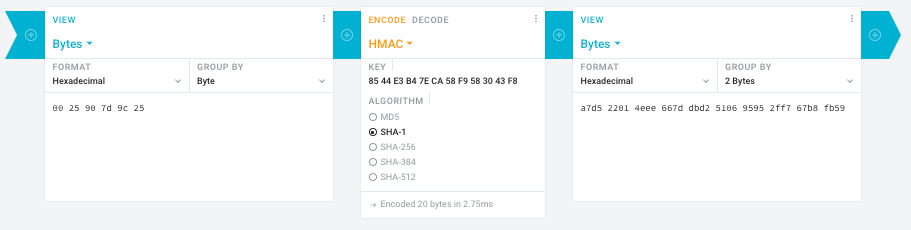
Steps:
- In the left pane, select the “View” drop-down to be “Bytes”, then paste the HEX bytes of your IPMI MAC address there (like
00 25 90 7d 9c 25)
- In the middle pane, select the drop-down to become “HMAC” followed by the radio-group to be “SHA1“, then paste these bytes into the “Key” field:
85 44 E3 B4 7E CA 58 F9 58 30 43 F8
- In the right pane, select the drop-down to become “Bytes”, then the “Group by” to become “2 bytes”, which will you give the output (where the bold part is the license key: 6 groups of 2 bytes):
a7d5 2201 4eee 667d dbd2 5106 9595 2ff7 67b8 fb59
Result:
- Michael Stapelberg’s private website, containing articles about computers and programming, mostly focused on Linux.[WayBack] Securing SuperMicro’s IPMI with OpenVPN
- [WayBack] GitHub – ReFirmLabs/binwalk: Firmware Analysis Tool
- [WayBack] The better way to update Supermicro BIOS is via IPMI – VirtualLifestyle.nl
Ahh…..a few corrections :-P
#!/bin/bash
function hash_mac {
  mac="$1"
  key="8544e3b47eca58f9583043f8"
  sub="\x"
  #convert mac to hex
  hexmac="\x${mac//:/$sub}"
  #create hash
  code=$(printf "$hexmac" | openssl dgst -sha1 -mac HMAC -macopt hexkey:"$key")
  #DEBUG
  echo "$mac"
  echo "$hexmac"
  echo "$code"
  echo "${code:9:4} ${code:13:4} ${code:17:4} ${code:21:4} ${code:25:4} ${code:29:4}"
}
#hex output with input
hash_mac "$1"

#Look out for the quotes, they might get changed by different encoding
- [WayBack] The better way to update Supermicro BIOS is via IPMI – VirtualLifestyle.nl
Thanks Peter. For anyone interested, here’s a bash script that takes the MAC as the only argument and outputs the activation key:
#!/bin/bash
function hash_mac {
  mac="$1"
  key="8544e3b47eca58f9583043f8"
  sub="\x"
  #convert mac to hex
  hexmac="\x${mac//:/$sub}"
  #create hash
  code=$(printf "$hexmac" | openssl dgst -sha1 -mac HMAC -macopt hexkey:"$key")
  ## DEBUG
  echo "$mac"
  echo "$hexmac"
  echo "$code"
  echo "${code:9:4} ${code:13:4} ${code:17:4} ${code:21:4} ${code:25:4} ${code:29:4}"
}
## hex output with input
hash_mac "$1"
–jeroen
Read the rest of this entry »
Posted in Development, Encoding, Hardware, Hashing, HMAC, Mainboards, OpenSSL, Power User, Security, SHA, SHA-1, Software Development, SuperMicro, X10SRH-CF | Leave a Comment »


 The Wiert Corner - irregular stream of stuff