Archive for the ‘Encoding’ Category
Posted by jpluimers on 2020/10/13
The Delphi compiler does not see a unicode non-breaking space (0x00A0 as whitespace, and the Delphi IDE does not warn you about it: [WayBack] Delphi revelations #2 – Space characters are not just space characters.
Given that this character was introduced in 1993, I wonder how the compiler tests look like.
These also will not be recognised as whitespace:
Related, as many other tools also do not properly support various whitespace characters:
Via: [WayBack] A Delphi “Aha” experience – Kim Madsen – Google+
–jeroen
Posted in Delphi, Development, Software Development, Unicode | Leave a Comment »
Posted by jpluimers on 2020/10/01
For my link archive:
Back-ticks can be very useful for instance when you need to specifying json tags.
References for that:
–jeroen
Posted in Development, Encoding, Go (golang), JavaScript/ECMAScript, JSON, Scripting, Software Development | Leave a Comment »
Posted by jpluimers on 2020/09/14
I needed to get myself an OOB license for the BIOS update over the IPMI console or SUM (Supermicro Update Manager). An IPMI update can be done without an OOB license from the IPMI console, but the BIOS requires a license.
Links that initially helped me with that to get a feel for what I needed:
I thought that likely I need to purchase a key for it:
Obtain the license code from your IPMI BMC MAC address
But then I found out the below links on reverse engineering.
From those links, I checked both the Perl and Linux OpenSSL versions. Only the Perl version works on MacOS.
Then I fiddled with the bash version: unlike the OpenSSL version above, this one printed output. It wrongly printed the last groups of hex digits instead of the first groups of hex digits that the Perl script prints.
Here is the corrected bash script printing the first groups of hex digits (on my systems, I have an alias supermicro_hash_IPMI_BMC_MAC_address_to_get_OOB_license_for_BIOS_update for it):
#!/bin/bash
function hash_mac {
  mac="$1"
  key="8544e3b47eca58f9583043f8"
  sub="\x"
  #convert mac to hex
  hexmac="\x${mac//:/$sub}"
  #create hash
  code=$(printf "$hexmac" | openssl dgst -sha1 -mac HMAC -macopt hexkey:"$key")
  #DEBUG
  echo "$mac"
  echo "$hexmac"
  echo "$code"

  echo "${code:0:4}-${code:4:4}-${code:8:4}-${code:12:4}-${code:16:4}-${code:20:4}"
}
Steps
Reverse engineering links
- [WayBack] The better way to update Supermicro BIOS is via IPMI – VirtualLifestyle.nl
Another way to update the BIOS via the Supermicro IPMI for free is simply calculating the license key yourself as described here: https://peterkleissner.com/2018/05/27/reverse-engineering-supermicro-ipmi/ [WayBack].
- [WayBack] Reverse Engineering Supermicro IPMI – peterkleissner.com
Algorithm:
MAC-SHA1-96(INPUT: MAC address of BMC, SECRET KEY: 85 44 E3 B4 7E CA 58 F9 58 30 43 F8)
Update 1/14/2019: The Twitter user @astraleureka posted this code perl code which is generating the license key:
#!/usr/bin/perl
use strict;
use Digest::HMAC_SHA1 'hmac_sha1';
my $key  = "\x85\x44\xe3\xb4\x7e\xca\x58\xf9\x58\x30\x43\xf8";
my $mac  = shift || die 'args: mac-addr (i.e. 00:25:90:cd:26:da)';
my $data = join '', map { chr hex $_ } split ':', $mac;
my $raw  = hmac_sha1($data, $key);
printf "%02lX%02lX-%02lX%02lX-%02lX%02lX-%02lX%02lX-%02lX%02lX-%02lX%02lX\n", (map { ord $_ } split '', $raw);
Update 3/27/2019: There is also Linux shell version that uses openssl:
echo -n 'bmc-mac' | xxd -r -p | openssl dgst -sha1 -mac HMAC -macopt hexkey:8544E3B47ECA58F9583043F8 | awk '{print $2}' | cut -c 1-24
- [WayBack] Modular conversion, encoding and encryption online — Cryptii
Web app offering modular conversion, encoding and encryption online. Translations are done in the browser without any server interaction. This is an Open Source project, code licensed MIT.
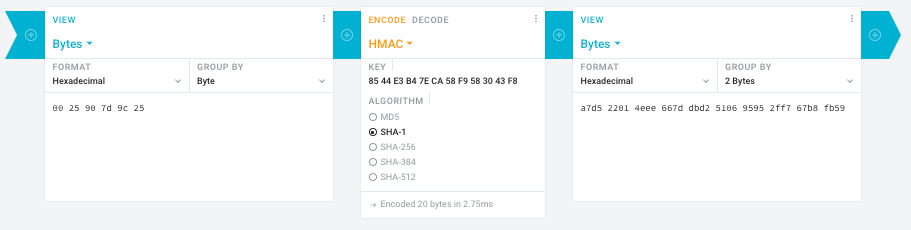
Steps:
- In the left pane, select the “View” drop-down to be “Bytes”, then paste the HEX bytes of your IPMI MAC address there (like
00 25 90 7d 9c 25)
- In the middle pane, select the drop-down to become “HMAC” followed by the radio-group to be “SHA1“, then paste these bytes into the “Key” field:
85 44 E3 B4 7E CA 58 F9 58 30 43 F8
- In the right pane, select the drop-down to become “Bytes”, then the “Group by” to become “2 bytes”, which will you give the output (where the bold part is the license key: 6 groups of 2 bytes):
a7d5 2201 4eee 667d dbd2 5106 9595 2ff7 67b8 fb59
Result:
- Michael Stapelberg’s private website, containing articles about computers and programming, mostly focused on Linux.[WayBack] Securing SuperMicro’s IPMI with OpenVPN
- [WayBack] GitHub – ReFirmLabs/binwalk: Firmware Analysis Tool
- [WayBack] The better way to update Supermicro BIOS is via IPMI – VirtualLifestyle.nl
Ahh…..a few corrections :-P
#!/bin/bash
function hash_mac {
  mac="$1"
  key="8544e3b47eca58f9583043f8"
  sub="\x"
  #convert mac to hex
  hexmac="\x${mac//:/$sub}"
  #create hash
  code=$(printf "$hexmac" | openssl dgst -sha1 -mac HMAC -macopt hexkey:"$key")
  #DEBUG
  echo "$mac"
  echo "$hexmac"
  echo "$code"
  echo "${code:9:4} ${code:13:4} ${code:17:4} ${code:21:4} ${code:25:4} ${code:29:4}"
}
#hex output with input
hash_mac "$1"

#Look out for the quotes, they might get changed by different encoding
- [WayBack] The better way to update Supermicro BIOS is via IPMI – VirtualLifestyle.nl
Thanks Peter. For anyone interested, here’s a bash script that takes the MAC as the only argument and outputs the activation key:
#!/bin/bash
function hash_mac {
  mac="$1"
  key="8544e3b47eca58f9583043f8"
  sub="\x"
  #convert mac to hex
  hexmac="\x${mac//:/$sub}"
  #create hash
  code=$(printf "$hexmac" | openssl dgst -sha1 -mac HMAC -macopt hexkey:"$key")
  ## DEBUG
  echo "$mac"
  echo "$hexmac"
  echo "$code"
  echo "${code:9:4} ${code:13:4} ${code:17:4} ${code:21:4} ${code:25:4} ${code:29:4}"
}
## hex output with input
hash_mac "$1"
–jeroen
Read the rest of this entry »
Posted in Development, Encoding, Hardware, Hashing, HMAC, Mainboards, OpenSSL, Power User, Security, SHA, SHA-1, Software Development, SuperMicro, X10SRH-CF | Leave a Comment »
Posted by jpluimers on 2020/04/08
After a 2018 discussion with a “zorgkantoor” (Dutch for office that arranges for special long term health care needs, successor of AWBZ) about their very low (10 megabyte) SMTP message size limit – even though they expect scanned PDF documents.
Their web-care team posed this limit as normal, so I made a list of limits in their peer group, common world-wide and well-ranked Dutch internet providers.
My plan is to check the progression of these limits over time.
Note these are the bruto message sizes including encoded attachments. Since encoding in [WayBack] MIME Base64 – Wikipedia has a overhead of at least 37% (encoded size is at least 1.37 the original size), the unencoded maximum size is less than 73% of what is listed below.
References:
2018
Read the rest of this entry »
Posted in base64, Communications Development, Development, eMail, Encoding, Internet protocol suite, MIME, Power User, Python, Scripting, SMTP, SocialMedia, Software Development, TCP | Leave a Comment »
Posted by jpluimers on 2020/03/11
Bad surprise of the day: SysUtils.TEncoding in XE2+ defaults to ANSI, while in XE it defaulted to UTF-8 .Among other things this means that TStringList… – Eric Grange – Google+
Source: Bad surprise of the day: SysUtils.TEncoding in XE2+ defaults to ANSI, while i…
Delphi

+Stefan Glienke Indeed, you’re right. The issue must be deeper somewhere. Don’t have time to investigate too much, I’m bypassing the RTL now (also have to work around the limitation that for utf-8 the TEncoding.GetString method returns an empty string if one character in the buffer isn’t utf-8)

I wouldn’t trust the RTL at all with loading non-ascii text, we’ve had it hang on invalid UTF-8 codes more than once.
–jeroen
Posted in Ansi, Delphi, Development, Encoding, Software Development, UTF-8, UTF8 | Leave a Comment »
Posted by jpluimers on 2020/02/24
From quite some time ago, but still very relevant as encoding issues keep occurring:
A while ago, I saw the text “v3/43/4r” in a document.I know it comes from “vóór” (the acute accent emphasises in Dutch), and wonder which encoding failure was applied to get this wrong.
Source: [WayBack] Which encoding failure did encode “vóór” into “v3/43/4r”? – Stack Overflow
From the [WayBack] answer by rodrigo:
- ó: is U+00F3, and occupies the same codepoint (0xF3) in a lot of different encodings (most ISO-8859-* and most western Windows-*).
- In CP850 the codepint 0xF3 is ¾ (U+00BE), that is the three-quarters character. It is the same in other, less used, codepages (CP775, CP856, CP857, CP858).
- The ¾ is sometimes transliterated to 3/4 when the character is not directly available.
And there you are! “vóór” -> “v¾¾r” -> “v3/43/4r”.
The first part (ó -> ¾) is the usual corruption of ANSI vs. OEM codepages in the Western Windows versions (in my country ANSI=Windows-1252, OEM=CP850). You can see it easily creating a file with NOTEPAD, writing vóór and dumping it in a command prompt with type.
–jeroen
Posted in CP850, Development, Encoding, Software Development, UTF-8, UTF8, Windows-1252 | Leave a Comment »
Posted by jpluimers on 2020/01/27
Not all fonts have Unicode character ☰ [WayBack] Unicode Character ‘TRIGRAM FOR HEAVEN’ (U+2630) as it is in a less common block.
More fonts have Unicode character ≡ [WayBack] Unicode Character ‘IDENTICAL TO’ (U+2261)
The latter is slightly shorter and slightly narrower than the former, but works in way more places.
Via [WayBack] html – Unicode ☰ hamburger not displaying in Android & Chrome – Stack Overflow
I’ve worked around this problem by using the UNICODE character UNICODE U+2261 (8801), ≡ IDENTICAL TO as illustrated below rather than the UNICODE U+2630 (9776) ☰ TRIGRAM FOR HEAVEN which
–jeroen
Posted in Development, Encoding, LifeHacker, Power User, Software Development, Unicode | Leave a Comment »
Posted by jpluimers on 2020/01/13
The manual for the CSL Bearware 302658 clock that uses the DCF77 signal is at [WayBack] Bearware_Manual-302658-20161220FZ004.pdf.
I like the relatively large 3.3 inch display and the blue background.
You can get the clock here:
More on the signal, transmitter and encoding: DCF77 – Wikipedia.
–jeroen
Read the rest of this entry »
Posted in DCF77, DCF77, Development, Encoding, Hardware, LifeHacker, Power User, Software Development | Leave a Comment »
Posted by jpluimers on 2019/12/31
A while back there were a few G+ threads sprouted by David Heffernan on decoding big files into line-ending splitted strings:
Code comparison:
Python:
with open(filename, 'r', encoding='utf-16-le') as f:
  for line in f:
    pass
Delphi:
for Line in TLineReader.FromFile(filename, TEncoding.Unicode) do
  ;
This spurred some nice observations and unfounded statements on which encodings should be used, so I posted a bit of history that is included below.
Some tips and observations from the links:
- Good old text files are not “good” with Unicode support, neither are TextFile Device Drivers; nobody has written a driver supporting a wide range of encodings as of yet.
- Good old text files are slow as well, even with a changed SetTextBuffer
- When using the TStreamReader, the decoding takes much more time than the actual reading, which means that [WayBack] Faster FileStream with TBufferedFileStream • DelphiABall does not help much
- TStringList.LoadFromFile, though fast, is a memory allocation dork and has limits on string size
- Delphi RTL code is not what it used to be: pre-Delphi Unicode RTL code is of far better quality than Delphi 2009 and up RTL code
- Supporting various encodings is important
- EBCDIC days: three kinds of spaces, two kinds of hyphens, multiple codepages
- Strings are just that: strings. It’s about the encoding from/to the file that needs to be optimal.
- When processing large files, caching only makes sense when the file fits in memory. Otherwise caching just adds overhead.
- On Windows, if you read a big text file into memory, open the file in “sequential read” mode, to disable caching. Use the FILE_FLAG_SEQUENTIAL_SCAN flag under Windows, as stated at [WayBack] How do FILE_FLAG_SEQUENTIAL_SCAN and FILE_FLAG_RANDOM_ACCESS affect how the operating system treats my file? – The Old New Thing
- Python string reading depends on the way you read files (ASCII or Unicode); see [WayBack] unicode – Python codecs line ending – Stack Overflow
Though TLineReader is not part of the RTL, I think it is from [WayBack] For-in Enumeration – ADUG.
Encodings in use
It doesn’t help that on the Windows Console, various encodings are used:
Good reading here is [WayBack] c++ – What unicode encoding (UTF-8, UTF-16, other) does Windows use for its Unicode data types? – Stack Overflow
Encoding history
+A. Bouchez I’m with +David Heffernan here:
At its release in 1993, Windows NT was very early in supporting Unicode. Development of Windows NT started in 1990 where they opted for UCS-2 having 2 bytes per character and had a non-required annex on UTF-1.
UTF-1 – that later evolved into UTF-8 – did not even exist at that time. Even UCS-2 was still young: it got designed in 1989. UTF-8 was outlined late 1992 and became a standard in 1993
Some references:
–jeroen
Read the rest of this entry »
Posted in Delphi, Development, Encoding, PowerShell, PowerShell, Python, Scripting, Software Development, The Old New Thing, Unicode, UTF-16, UTF-8, Windows Development | Leave a Comment »
Posted by jpluimers on 2019/12/23
Posted in *nix, *nix-tools, Development, Encoding, Google, GoogleWebP, Image Editing, Power User, Software Development, The Gimp, WebP | Leave a Comment »


 The Wiert Corner - irregular stream of stuff