Archive for the ‘Visual Studio and tools’ Category
Posted by jpluimers on 2012/08/29
Just found a glitch in the unmap support for tf workfold (and found out it has already been reported).
First what I tried to do:
- move
D:\develop.TFS02 into D:\develop\CodePlex\TFS02 using tf map (which BTW allows you to do in place branch switching).
- unmap
D:\develop.TFS02\besharp from TFS
First a few things; the first one succeeded (as it implicitly uses the /map command), the last ones failed because /unmap is ambivalent on the /collection parameter: on the one hand it wants to do without, but when it discovers it cannot do without, it wrongly indicates it requires it.
D:\develop.TFS02\besharp>tf workfold /collection:https://tfs.codeplex.com/tfs/tfs02 /workspace:%COMPUTERNAME% $/ D:\develop\CodePlex\TFS02

D:\develop.TFS02\besharp>tf workfold /collection:https://tfs.codeplex.com/tfs/tfs02 /workspace:%COMPUTERNAME% /unmap $BeSharp
The option collection is not allowed.

D:\develop.TFS02\besharp>tf workfold /unmap /collection:https://tfs.codeplex.com/tfs/tfs02 /workspace:%COMPUTERNAME% D:\develop.TFS02\besharp
The option collection is not allowed.

D:\develop.TFS02\besharp>tf workfold /unmap D:\develop.TFS02\besharp
Unable to determine the workspace. You may be able to correct this by running 'tf workspaces /collection:TeamProjectCollectionUrl'.

D:\develop.TFS02\besharp>tf workfold /unmap /workspace:%COMPUTERNAME% D:\develop.TFS02\besharp
Multiple workspaces exist with the name T61PJWP.
Please specify the Team Foundation Server or qualify the name with the owner.
Workaround
The workaround is to
- start Visual Studio,
- unmap $/,
- recursively map $/ to D:\develop\CodePlex\TFS02,
- perform a get latest.
–jeroen
Via:
Posted in .NET, Development, Software Development, Source Code Management, TFS (Team Foundation System), Visual Studio 2010, Visual Studio and tools | Leave a Comment »
Posted by jpluimers on 2012/08/28
Dang; I thought this had long left the posting queue, but somehow it ended in the drafts (:
Since then, many more event videos made it to Channel 9, including Build 2011, and TechDays 2012.
Anyway, here it is:
Microsoft’s PDC 2010 was held at the end of October 2010 in Redmond, WA, USA.
For the people that could not attend, it is very nice to view the sessions using the PDC10 player (it seems still people didn’t learn and start stripping the century parts from years again!).
Even if you are not using Visual Studio, .NET Azure or other Microsoft Technologies, there are a lot of interesting sessions showing the directions that Microsoft is taking.
Comparing that to what you do today is always a good thing to do: it helps you reflect, an important part of your personal development.
A few things I found interesting (in no particular order):
- Asynchrony support in C# 5 and VB.NET 11 based on the Task Parallel Library
- The choice to favour HTML 5 over SilverLight, even though Internet Explorer 9 and Microsoft’s HTML 5 authoring/development tools are far from ready
- Azure reporting: is reporting the next big thing on clouds?
- Offline versus online in the cloud world
- NuPack – does it bring package management to the same level as Ruby or *nix?
- XNA for XBox, Windows and Windows Phone
Enjoy!
–jeroen
Posted in .NET, .NET 4.5, C#, C# 4.0, C# 5.0, Channel9, Cloud Development, Database Development, Delphi, Development, HTML, HTML5, Mobile Development, SilverLight, SocialMedia, Software Development, Visual Studio 11, Visual Studio 2010, Visual Studio and tools, Web Development, Windows Azure, Windows Phone Development, XNA | 2 Comments »
Posted by jpluimers on 2012/08/23
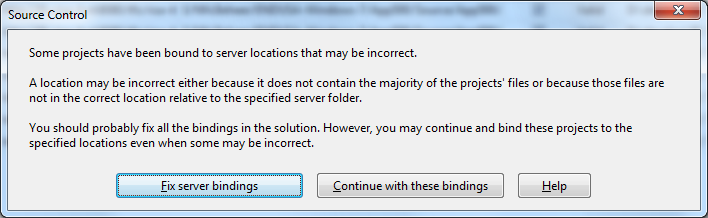
 A while ago, I inherited a bunch of C# and VB.NET projects. One of them always generated the below error when including it in Team Foundation System (yes, the original projects were salvaged from Visual Source Shredder version 6.0c):
[Source Control]

Some projects have been bound to server locations that may be incorrect.

A location may be incorrect either because it does not contain the majority of the projects' files or because those files are not in the correct location relative to the specified server folder.

You should probably fix all the bindings in the solution. However, you may continue and bind these projects to the specified locations even when some may be incorrect.

[Fix server bindings] [Continue with these bindings] [Help]
First I tried the Help button: it links to a Help page on MSDN explaining the error can be cause with some statistics on projects not being in the source control system. Since all projects were, there, I looked for more information.
I tried finding a “Fix Server Bindings” or a 2010 “Some projects have been bound to server locations that may be incorrect” link that fitted my use case (getting projects from VSS into TFS), but the solutions I tried eventually all led to the same issue.
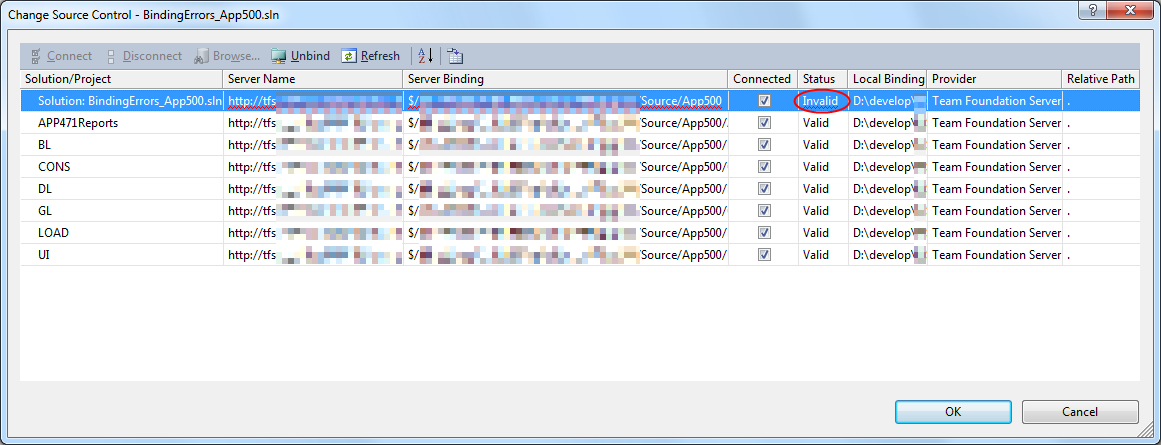
Fixing the server bindings would always fail: the solution (which itself is also a project) would get the status Invalid.

The next steps were these:
- add an empty solution in the same directory as the original one,
- add that solution to TFS
- add the projects from the original solution to this solution one by one
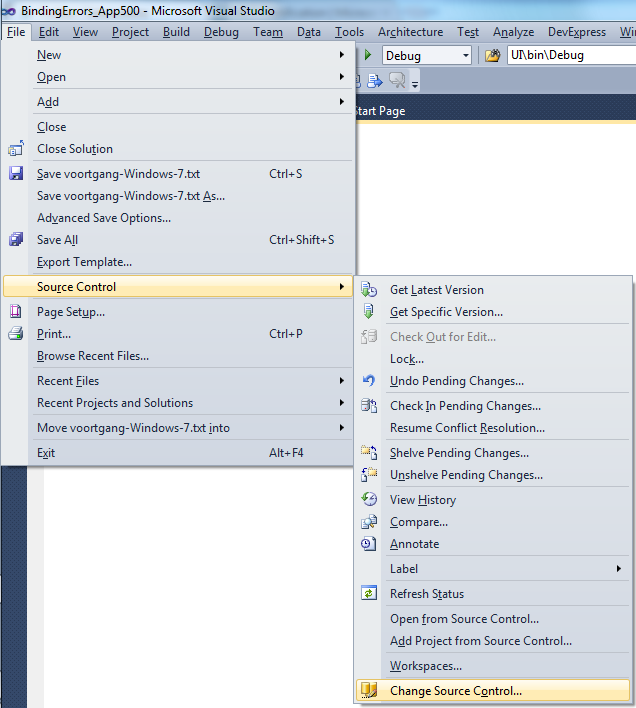
- check after each addition of the bindings were still OK using the “File”, “Source Control”, “Change Source Control” sequence on the right.
(note that you don’t always see “Change Source Control”, if you don’t select the solution in the Solution Explorer before going to the File menu).
- text compare both .SLN solution files
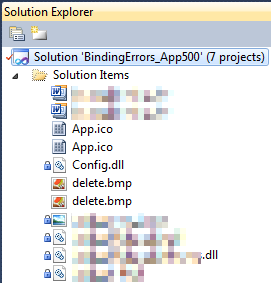
- observe that “Solution Items” actually is a project just like the others:
Project("{2150E333-8FDC-42A3-9474-1A3956D46DE8}") = "Solution Items", "Solution Items", "{8D9964D4-6129-4B8F-9238-F9161A02B968}"

ProjectSection(SolutionItems) = preProject

...

Framework\Config.dll = Framework\Config.dll

...

EndProjectSection

EndProject
- add the existing solution item from the original solution to this solution one by one, check
- check after each addition of the bindings were still OK using the “File”, “Source Control”, “Change Source Control” sequence on the right.
(note that you don’t always see “Change Source Control”, if you don’t select the solution in the Solution Explorer before going to the File menu).
- copy the non-existing solution items to the solution one by one using the text compare tool (yes, a lot of the projects are dirty and contain references to files that are not in the version control system)
save after every copy, then reload the project in Visual Studio
- check after each addition of the bindings were still OK using the “File”, “Source Control”, “Change Source Control” sequence on the right.
(note that you don’t always see “Change Source Control”, if you don’t select the solution in the Solution Explorer before going to the File menu).
- after a few files, suddenly the “Invalid” appeared, so the issue has to do with missing files.
Reading the Help more carefully, with in the back of my mind keeping “Solution Items” all as projects, I finally got the cause:
When some percentage of Solution Items cannot be found locally, and are not in the version control system, Visual Studio marks the solution binding to the version control system as “Invalid”.
 The temporary solution is to ignore the error, until I have found all the missing files (they are scattered around some network shares), or made sure they are not needed at all.
There are many of those (you recognize them from the missing padlock icon in the Solution Explorer).
Version control rot is just like link rot, that’s why one of the high priority action items is to introduce for build automation at this client, then deploy those as clean builds into the Develop and Test stages of the DTAP, then verify if the solutions still work).
–jeroen
Posted in .NET, C#, C# 1.0, C# 2.0, C# 3.0, C# 4.0, C# 5.0, Development, Internet, link rot, Power User, Software Development, Source Code Management, TFS (Team Foundation System), VB.NET, Visual Studio 2010, Visual Studio and tools, WWW - the World Wide Web of information | Leave a Comment »
Posted by jpluimers on 2012/08/18
A question like How do you clear your MRU list in Visual Studio? is why I still like Stack Overflow.
The answers explain how to solve this in a version neutral way, including other MRU lists, and as a bonus point you to handy Visual Studio tools.
–jeroen
via: registry – How do you clear your MRU list in Visual Studio? – Stack Overflow.
Posted in Development, Software Development, Visual Studio 11, Visual Studio 2002, Visual Studio 2003, Visual Studio 2005, Visual Studio 2008, Visual Studio 2010, Visual Studio and tools | Leave a Comment »
Posted by jpluimers on 2012/08/15
A few weeks ago, Bill Karwin did a must watch webinar on the prevention SQL Injection titled “SQL Injection Myths and Fallacies“.
Bill Karwin (twitter, new blog, old blog, Amazon) is famous for much work in the SQL database community, including InterBase/Firebird, mySQL, Oracle and many more.
He also:
Anyway, his webinar is awesome. Be sure to get the slides, watch the replay, and read the questions follow up.
Watching it you’ll get a better understanding of defending against SQL injection.
A few very valuable points he made: Read the rest of this entry »
Posted in .NET, .NET 3.5, .NET 4.5, .NET ORM, ASP.NET, Batch-Files, C#, C# 1.0, C# 2.0, C# 3.0, C# 4.0, C# 5.0, C++, Cloud Development, COBOL, CommandLine, Database Development, Delphi, Delphi for PHP, Delphi x64, Delphi XE2, Development, EF Entity Framework, F#, Firebird, FireMonkey, History, InterBase, iSeries, Java, JavaScript/ECMAScript, Jet OLE DB, LINQ, LLBLGen, MEF, Microsoft Surface, Mobile Development, PHP, PowerShell, Prism, Scripting, SharePoint, SilverLight, Software Development, SQL, SQL Server, SQL Server 2000, SQL Server 2005, SQL Server 2008, SQL Server 2008 R2, SQL Server 2012, SQL Server 7, VB.NET, VBS, Visual Studio 11, Visual Studio 2002, Visual Studio 2003, Visual Studio 2005, Visual Studio 2008, Visual Studio 2010, Visual Studio and tools, Web Development, Windows Azure, WinForms, WPF, XAML, xCode/Mac/iPad/iPhone/iOS/cocoa | 1 Comment »
Posted by jpluimers on 2012/08/02
Your CodeRush SolutionCache folder (which is in your roaming profile, how bad!) can grow to multi-gigabyte proportions as it is not auto-cleaned.
This can lead to very long times for doing logon/logoff in a corporate network.
Mike Christian describes how to clean it.
Note that as of a few versions ago, the AssemblyCache is now a subfolder inside the SolutionCache folder.
Another reason to clean it is when CodeRush starts acting weird.
–jeroen
via: The Curly Brace: How to Clear DevExpress CodeRush Assembly and Solution Cache.
Posted in .NET, C#, Development, Software Development, VB.NET, Visual Studio 11, Visual Studio 2005, Visual Studio 2008, Visual Studio 2010, Visual Studio and tools | Leave a Comment »
Posted by jpluimers on 2012/07/25
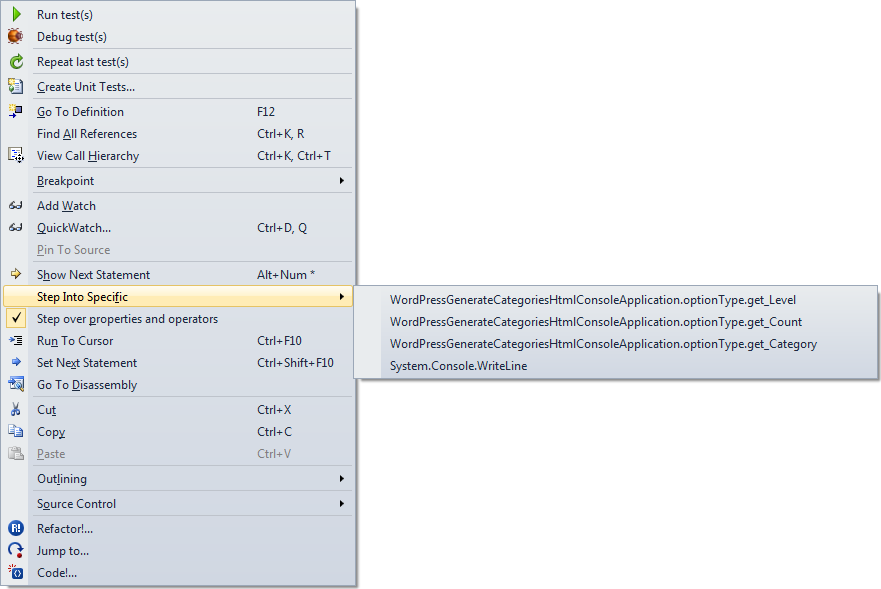
Boy I wish Visual Studio had a “Step into first property or operator” command. You can only do this through the context menu, and that is awfully cumbersome to use.
Just look at the context menu at the end of the post to see why.
Luckily, the option below it is “Step over properties and operators”, which you can easily disable. I usually have it disabled, so for me it is the way to temporarily enable it when I want to skip properties and operators.
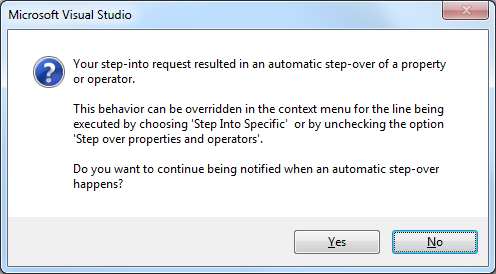
If you don’t then you get this message when tracing into properties (or operators) :
:
[Microsoft Visual Studio]

Your step-into request resulted in an automatic step-over of a property or operator.

This behavior can be overridden in the context menu for the line being executed by choosing 'Step Into Specific' or by unchecking the option 'Step over properties and operators'.

Do you want to continue being notified when an automatic step-over happens?

[Yes] [No]
–jeroen

Posted in .NET, Development, Software Development, Visual Studio 11, Visual Studio 2005, Visual Studio 2008, Visual Studio 2010, Visual Studio and tools | Leave a Comment »
Posted by jpluimers on 2012/07/17
There are features you rarely use. I once screwed up my Visual Studio desktop. Resetting to the default is easy, if you remember it is in the import/export settings dialog, which I didn’t (:
This is how I got back to the default:
To reset your settings
- On the Tools menu, click Import and Export Settings.
- On the Welcome to the Import and Export Settings Wizard page, click Reset all settings and then click Next.
- If you want to save your current settings combination, click Yes, save my current settings, specify a file name, and then click Next.
—or—
If you want to delete your current settings combination, choose No, just reset settings, overwriting my current settings, and then click Next. This option does not delete default settings, which will still be available the next time you use the wizard.
- In Which collection of settings do you want to reset to, select a settings collection from the list.
- Click Finish.
The Reset Complete page alerts you to any problems encountered during the reset.
–jeroen
via: How to: Reset Your Settings.
Posted in .NET, Development, Software Development, Visual Studio 11, Visual Studio 2005, Visual Studio 2008, Visual Studio 2010, Visual Studio and tools | Leave a Comment »
Posted by jpluimers on 2012/07/11
One of the clients has tightened up their web proxy so much that Visual Studio 2010 does not want to connect to the HTTP 8080 port on the external TFS server (yes, I will switch to HTTPS if the workaround appears stable enough).
The problem is that Visual Studio often just tells you it cannot connect. No further error details.
 Well, after you get most things working, you get this error every now and then:
[Microsoft Visual Studio]

Error

Team Foundation services are not available from server tfs.some-domain\PREFIX.

Technical information (for administrator):

HTTP code 407: Proxy Authentication Required

[OK]
There are a few problems involved:
- Visual Studio does not allow you to enter credentials for the Proxy server.
- Visual Studio doesn’t fully use the proxy settings from Internet Explorer either.
- Visual Studio (unlike Internet Explorer) seems to loose the proxy session and or proxy authentication for that session over time.
All in all, it is fishy, even editing the devenv.exe.config proxy settings didn’t work (maybe I haven’t found the right combination of settings yet: that’s part of the research I need to do).
Workaround
So far, these are the current workaround steps (I will post a new entry when I found the solution or shortened the steps).
The workaround includes HTTP Fiddler, and sometimes doesn’t work without. HTTP Fiddler helps anyway as it shows the HTTP traffic (including error messages from the proxy server) between Visual Studio and TFS. Read the rest of this entry »
Posted in .NET, Development, Fiddler, Software Development, Visual Studio 2010, Visual Studio and tools, Web Development | 3 Comments »
Posted by jpluimers on 2012/07/05
Recently I was asked to investigate a performance problem with a certain .NET application.
The first error I got when getting the app to build in Visual Studio 2010, and then run it was like this:
System.ComponentModel.InvalidAsynchronousStateException was caught
  Message=An error occurred invoking the method.  The destination thread no longer exists.
  Source=System.Windows.Forms
  StackTrace:
       at System.Windows.Forms.Control.WaitForWaitHandle(WaitHandle waitHandle)
       at System.Windows.Forms.Control.MarshaledInvoke(Control caller, Delegate method, Object[] args, Boolean synchronous)
       at System.Windows.Forms.Control.Invoke(Delegate method, Object[] args)
       at UI.Splash.SetStatus(String status) in C:\...\Splash.cs:line 395
       at UI.Menu.Main() in C:\...\Menu.cs:line 4275
  InnerException:
Someone built their own splash logic with multi-threading.
Funny that today, this got answered on StackOverflow by [WayBack] mgie: [WayBack] multithreading – TMonitor synchronization / Application.ProcessMessages – Stack Overflow.
Though that is a Delphi link (and points to the nice libraries [Archive.is] AsynCalls and [WayBack] OmniThreadLibrary), the most important link it contains is to [WayBack] Borland Newsgroup Archive :: borland.public.delphi.internet.winsock :: Re: Disconnect TIdHttp in thread.
That sounds like a Delphi link too, but the subtitle “‘Ways to get into avoidable trouble with threads, V1.2′” hints the essence: it is a post that describes in an environment-agnostic way how to avoid multi-threading problems.
Recommended reading!
Anyway: Building multi-threaded code is hard. Even harder fleshing out all the corner cases and potential error conditions.
No matter what kind of programming environment: If you have not done lots of multi-threaded programming, then please don’t do it yourself: go ask someone that does know how to do it. Or better, try to avoid it.
I try to let libraries to the handling of multi-threading for me, if I use multi-threading at all, as others are far better at this than I am.
–jeroen
Posted in .NET, C#, C# 1.0, C# 2.0, C# 3.0, C# 4.0, C# 5.0, Conference Topics, Conferences, Delphi, Development, Event, Java, Software Development, VB.NET, VBS, Visual Studio 2010, Visual Studio and tools, WinForms | 6 Comments »





 The Wiert Corner - irregular stream of stuff