The Wiert Corner – irregular stream of stuff

Jeroen W. Pluimers on .NET, C#, Delphi, databases, and personal interests

  • My badges

  • Twitter Updates

  • My Flickr Stream

  • Pages

  • All categories

  • Enter your email address to subscribe to this blog and receive notifications of new posts by email.

    Join 1,839 other subscribers

Archive for the ‘Scripting’ Category

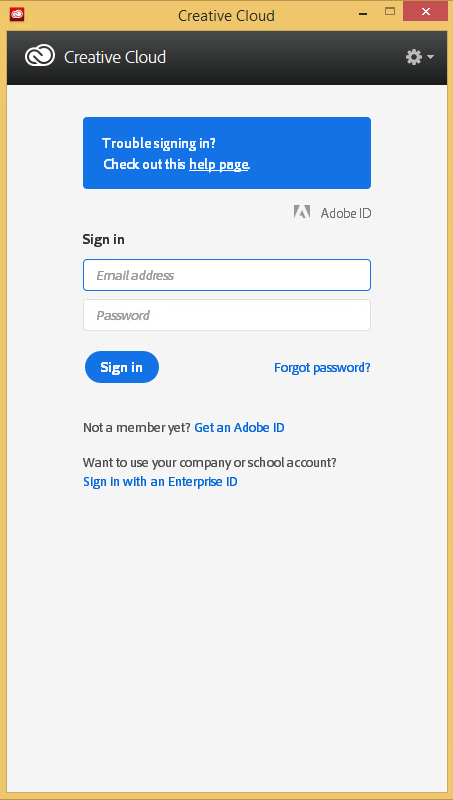
Automating the closing of the Creative Cloud signing and ABBY FindReader for ScanSnap 5.0 dialogs

Posted by jpluimers on 2021/01/06

Every time my scan VM logs on I get the dialog on the right.

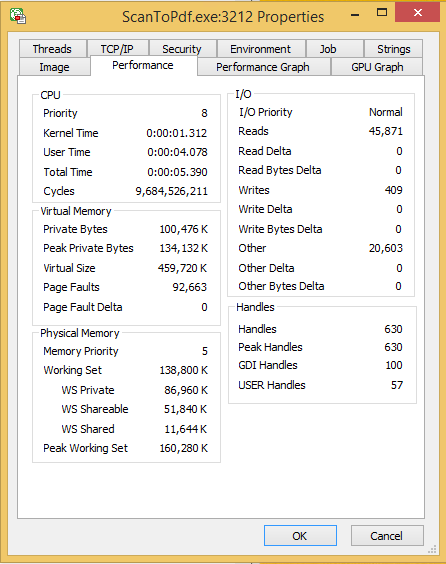
Every time I finish an OCR scan, I get the dialog below.
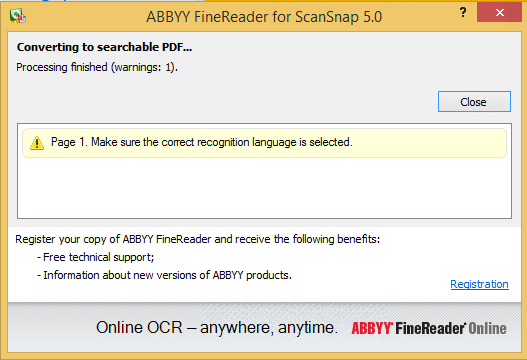
There are two reasons I want to close the ABBY dialog:

  1. While open, it will keep both the original PDF and OCR PDF files alive.When after a while, Windows updates auto-reboots the machine, before clicking the OK buttons I have to manually check if the conversion succeeded before removing the non-OCR PDF.This is time consuming.
  2. While open, it still consumes a lot of system resources: about 100 megabyte for a simple single monochrome A4 page. Much more for complex, multi-page or colour documents.When scanning a lot of document this causes the system to run out of memory, after becoming much much slower because the truckload of Window handles and underlying threads drags Windows down.
I do not want to fully get rid of these dialogs, as often being aware of the progress is important, and I always forget how to re-enable things. If you can do without the dialogs, then try these:

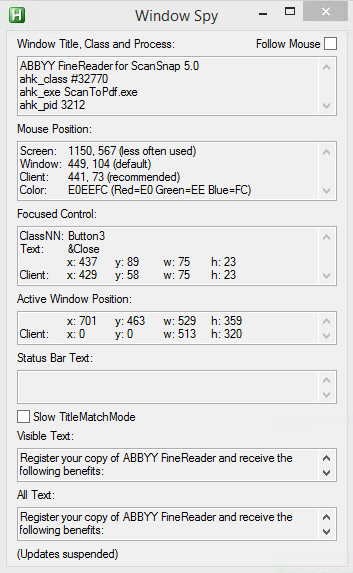
Finding the Windows and controls

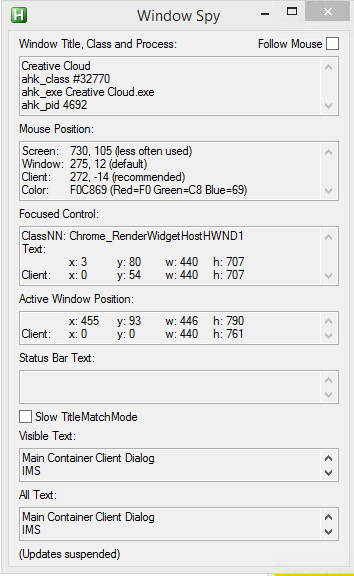
I did use one nice feature of AutoHotKey: their Windows Spy utility, which is implemented as a AHK script: [WayBack] AutoHotKey-scripts/WindowSpy.ahk at master · elig0n/AutoHotKey-scripts · GitHub. In the past this was a separate executable, so do not start looking for that any more. You can get it either after a full install of the [WayBack] Releases · Lexikos/AutoHotkey_L · GitHub, or by extracting from the most current AutoHotKey.zip from [Archive.is] AutoHotkey Downloads.

Related:

This gets these for the Create Cloud and ABBY windows:
Automating the click

I contemplated about using AutoIt (freeware, but closed source) or AutoHotKey_L (the current active fork of AutoHotKey).

AutoIt is now closed source, forked in the past as AutoHotKey, which has a lot of half backed – usually poorly documented – scripts needing you to learn a new API wrapper around existing Windows API functionality.

So I reverted back to using the Windows API using Delphi: a simple repeat loop, to check for the existence of the underlying processes, windows and controls, plus some logic to terminate then the user stops the application (Ctrl-C, Ctrl-Break), logs off, or Windows shuts down.

Releated Windows API  keywords and posts:


I could have used AutoHotKey with these hints to get it working:

MacOS

Note that when you run on MacOS, you need an alternative like for instance the video below shows via [WayBack] Stop ScanSnap From Prompting You When You Scan.

–jeroen

Read the rest of this entry »

Posted in Development, Fujitsu ScanSnap, Hardware, ix100, ix500, Power User, Scanners, Scripting, Software Development, Windows, Windows 10, Windows 8.1 | Leave a Comment »

Batch files: deleting first/middle/ending parts of environment variables

Posted by jpluimers on 2021/01/06

Batch files are often a pain to write, but you cannot always rewrite them in PowerShell.

The pain below is about deleting parts of environment variables in batch files.

I’ll just redirect to and quote from posts that can way better describe this than I do:

  • [WayBack] Check if Batch variable starts with “…” – Stack Overflow made me find
  • [WayBack] windows – Batch – Delete Characters in a String – Super User
  • [WayBack] CMD Variable edit replace – Windows CMD – SS64.com

    The variable _test containing 12345abcabc is used for all the following examples:

    ::Replace '12345' with 'Hello '
       SET _test=12345abcabc
       SET _result=%_test:12345=Hello %
       ECHO %_result%          =Hello abcabc
    
    ::Replace the character string 'ab' with 'xy'
       SET _test=12345abcabc
       SET _result=%_test:ab=xy%
       ECHO %_result%          =12345xycxyc
    
    ::Delete the character string 'ab'
       SET _test=12345abcabc
       SET _result=%_test:ab=%
       ECHO %_result%          =12345cc
    
    ::Delete the character string 'ab' and everything before it
       SET _test=12345abcabc
       SET _result=%_test:*ab=% 
       ECHO %_result%          =cabc
    
    ::Replace the character string 'ab' and everything before it with 'XY'
       SET _test=12345abcabc
       SET _result=%_test:*ab=XY% 
       ECHO %_result%          =XYcabc
    
    
    :: To remove characters from the right hand side of a string is 
    :: a two step process and requires the use of a CALL statement
    :: e.g.
    
       SET _test=The quick brown fox jumps over the lazy dog
    
       :: To delete everything after the string 'brown'  
       :: first delete 'brown' and everything before it
       SET _endbit=%_test:*brown=%
       Echo We dont want: [%_endbit%]
    
       ::Now remove this from the original string
       CALL SET _result=%%_test:%_endbit%=%%
       echo %_result%

    All the examples on this page assume the default Expansion of variables, if you are using DelayedExpansion then you can choose to change the variable references to !_variable! instead of %_variable%

    One advantage of DelayedExpansion is that it will allow you to replace the % character, it will still have to be escaped as %% but the replace action will then treat it like any other character:

    Replace the letter P with a percent symbol:
    Setlocal EnableDelayedExpansion
    _demo=somePdemoPtextP
    _demo=!_demo:P=%%!

    Remove spaces from a text string

    To delete space characters use the same syntax as above:

    SET _no_spaces=%_some_var: =%

–jeroen

Posted in Batch-Files, Development, Scripting, Software Development | Leave a Comment »

Batch file: check for (non-)existence of registry key

Posted by jpluimers on 2021/01/05

Small batch file that only deletes a registry key if it exists:

:DeleteKeyIfItExists
reg query %1 >nul 2>&1
if %errorlevel% equ 0 reg delete %1 /f
goto :eof

It is based on:

  • redirecting both stderr and stdout to nul (the >nul 2>&1 bit)
  • checking reg query with the appropriate errorlevel value for equality (equ operator) for 0 (existence); you can also use 1 for non-existence.

Based on:

–jeroen

Posted in Batch-Files, Development, Scripting, Software Development | Leave a Comment »

Windows command prompt: decrementing loop

Posted by jpluimers on 2020/12/30

I needed a decrementing loop on the Windows command prompt, but that seems very hard from batch files without programming your own kind of while loop:

PowerShell to the rescue to loop back from and including 463 down to and including 290:

PowerShell -Command "for ($i=463; $i -ge 290; $i--) { Write-Host "Value " $i}"

This outputs:

Value 463
Value 462
...
Value 291
Value 290

In a similar way, you can execute a cmd command, but then you need to be careful on how to pass parameters: the \" is important to you can have quotes within quoted strings..

PowerShell -Command "for ($i=463; $i -ge 290; $i--) { & echo \"Value $i\"}"

gives this:

Value 463
Value 462
...
Value 291
Value 290

Read the rest of this entry »

Posted in Batch-Files, CommandLine, Console (command prompt window), Development, PowerShell, PowerShell, Scripting, Software Development, Windows | 1 Comment »

Spinettaro’s Blog: Delphi Flux application architecture

Posted by jpluimers on 2020/12/16

On my list of things to try: [WayBack] Spinettaro’s Blog: Delphi Flux application architecture.

It is about a Delphi implementation of the Facebook Flux application architecture.

Related:

Via: [WayBack] Delphi Flux application architecture A good application architecture Finding a good application architecture is not easy, but defining an architecture f… – Daniele Spinetti – Google+

Note that by using the [WayBack] CodeRage 2018 Replay | Embarcadero Academy, you are disallowed using any of what you learn in a commercial way.

Embarcadero evangelists told the public that for the Community Edition, similar terms would not be upheld, but then the sales department started sending out nasty emails to people registering Community Edition using their work email address.

[WayBackhttps://www.embarcaderoacademy.com/p/terms:

under this license you may not:

  1. modify or copy the materials;
  2. use the materials for any commercial purpose, or for any public display (commercial or non-commercial);
  3. attempt to decompile or reverse engineer any software contained on the School’s web site;
  4. remove any copyright or other proprietary notations from the materials; or
  5. transfer the materials to another person or ‘mirror’ the materials on any other server.

–jeroen

Read the rest of this entry »

Posted in Delphi, Development, JavaScript/ECMAScript, Scripting, Software Development, Systems Architecture, TypeScript | Leave a Comment »

On Windows 7 and 8.x too: Completely disable Windows 10 telemetry collection – twm’s blog

Posted by jpluimers on 2020/12/10

From [WayBack] Completely disable Windows 10 telemetry collection – twm’s blog:

So I don’t forget: According to an article in c’t magazine, disabling the “DiagTrack” service (“Connected User Experience and Telemetry”) will completely disable user tracking in Windows 10. They also say that they did not see any negative effects.

Source: [WayBack] Telefonierverbot in c’t 01/2019 page 172 (in German)

I saw at least one system where the service is not shown when you run Services.msc: it did not list DiagTrack, nor Connected User Experience and Telemetry. How awful is that!

The service can also be installed non older Windows versions: [WayBack] Just found DiagTrack running in Services – Tips and Tricks

Sometimes, it gets re-enabled. I think this happens during major Windows updates.

To inspect, stop and disable

Run all commands from the console the below bold commands. The non-bold text was the output on my system. If instead of the cmd.exe console, you run a PowerShell console, then remove the bits PowerShell -Command " and " at the start and end of each command.

The first command does not require an Administrative (UAC Elevated) command prompt; the last one does.

However, the first command, needs the | Select-Object * bit as otherwise most of the fields will not be displayed, excluding for instance StartType.

powershell -Command "Get-Service -Name DiagTrack | Select-Object *"


Name                : DiagTrack
RequiredServices    : {RpcSs}
CanPauseAndContinue : False
CanShutdown         : True
CanStop             : True
DisplayName         : Connected User Experiences and Telemetry
DependentServices   : {}
MachineName         : .
ServiceName         : DiagTrack
ServicesDependedOn  : {RpcSs}
ServiceHandle       :
Status              : Running
ServiceType         : Win32OwnProcess
StartType           : Automatic
Site                :
Container           :

On an Administrative command-prompt:

powershell -Command "Set-Service -Name DiagTrack -StartUpType Disabled"
powershell -Command "Get-Service -Name DiagTrack | Stop-Service"

Two notes:

Read the rest of this entry »

Posted in Batch-Files, CommandLine, Development, Power User, PowerShell, PowerShell, Scripting, Software Development, Windows | Leave a Comment »

GitHub – DevExpress/testcafe: A Node.js tool to automate end-to-end web testing.

Posted by jpluimers on 2020/12/09

In my list of things to play with: [WayBack] GitHub – DevExpress/testcafe: A Node.js tool to automate end-to-end web testing.:

A Node.js tool to automate end-to-end web testing.
Write tests in JS or TypeScript, run them and view results.

https://devexpress.github.io/testcafe


  • Works on all popular environments: TestCafe runs on Windows, MacOS, and Linux. It supports desktop, mobile, remote and cloud browsers (UI or headless).
  • 1 minute to set up: You do not need WebDriver or any other testing software. Install TestCafe with one command, and you are ready to test: npm install -g testcafe
  • Free and open source: TestCafe is free to use under the MIT licensePlugins provide custom reports, integration with other tools, launching tests from IDE, etc. You can use the plugins made by the GitHub community or make your own.

Related:

  • [WayBack] A node.js tool to automate end-to-end web testing | TestCafe:

    Use TestCafe to write tests in JS or TypeScript, run them and view results. TestCafe runs on Windows, MacOS, and Linux and takes 1 minute to set up.

  • [WayBack] TestCafe: Web Testing Framework | DevExpress

    100% web-based functional testing framework with integrated visual test recorder, remote device testing, and natural JavaScript API

    • From download to recording your first test in less than 5 minutes — installer automatically configures your environment.
    • With TestCafe, you can run tests in any browser that supports HTML5 (including IE9+, Chrome, Firefox, Safari, Opera).
    • TestCafe is operating system agnostic so you can run tests on Windows, Mac or Linux machines.
    • Run tests on remote computers and mobile devices.
    • Run tests in multiple browsers and on multiple machines in parallel.
    • Run tests in the background on any machine.
    • TestCafe allows you to test web pages that require Basic and Windows HTTP Authentication.

Via:

Screen materials below the fold.

–jeroen

Read the rest of this entry »

Posted in Development, JavaScript/ECMAScript, LifeHacker, Power User, Scripting, Software Development, Testing, Web Development | Leave a Comment »

Making it dead simple to implement @haveibeenpwnd in your applications, including strength warning if found in @troyhunt’s password collection.

Posted by jpluimers on 2020/12/02

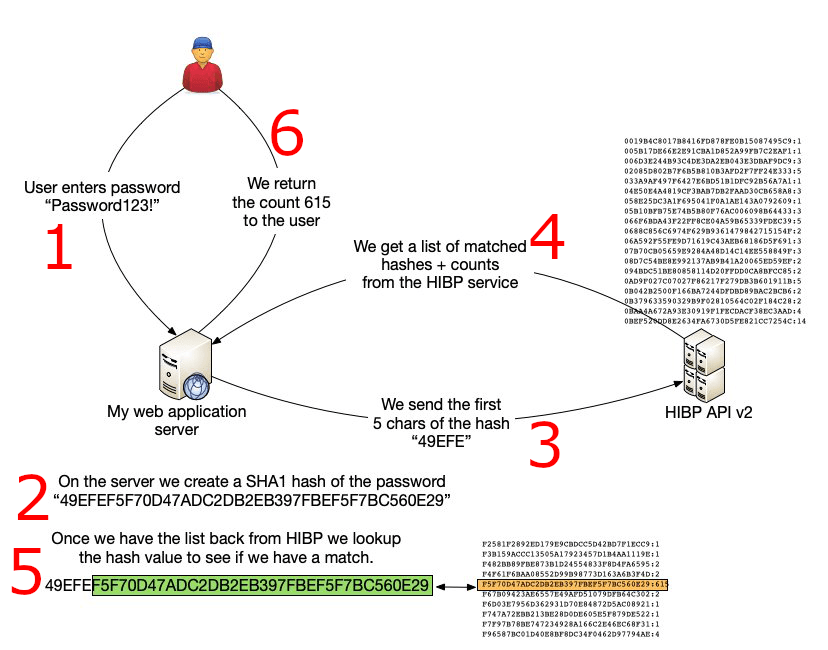
I wasn’t aware that Troy Hunt created an API [WayBack] for [WayBack] Have I Been Pwned: Check if your email has been compromised in a data breach.

He did, as I noticed through [WayBack] Michelangelo van Dam on Twitter: “Making it dead simple to implement @haveibeenpwnd in my applications, including strength warning if found in @troyhunt’s password collection. Check out to try it out yourself. #ImproveSecurity #haveibeenpwnd”.

There are in fact plenty of other packages, web-sites and apps using the API as seen on [WayBack] Have I Been Pwned: API consumers.

Many people ask “if it is safe” (often assuming passwords are sent in clear, or hashes are sent in full; my fear is that those people implement security somewhere).

It is safe:

PHP source is at [WayBack] GitHub – DragonBe/hibp: A composer package to verify if a password was previously used in a breach using Have I Been Pwned API.

There is also a [WayBack] composer package at [WayBack] dragonbe/hibp – Packagist.

A really cool thing on it is this:

This project was also the subject of my talk [WayBack] Mutation Testing with Infection where the code base was not only covered by unit tests, but also was subjected to Mutation Testing using [WayBack] Infection to ensure no coding mistakes could slip into the codebase.

Apart from the tests, the most important source is at [WayBack] hibp/Hibp.php at master · DragonBe/hibp · GitHub

Related:

–jeroen

Posted in Development, Mobile Development, PHP, Python, Scripting, Software Development, Web Development | Leave a Comment »

`exit /b #`: set `errorlevel` to `#`, then exit batch file or subroutine – via: Errorlevel – Windows CMD – SS64.com

Posted by jpluimers on 2020/11/25

I seem to always forget how to set an error leve in side a batch file, but [WayBack] Errorlevel – Windows CMD – SS64.com tells how:

  • When ending a [WayBacksubroutine, you can use EXIT /b N to set a specific ERRORLEVEL N.
  • You can make a [WayBackbatch file return a non-zero exit code by using the [WayBackEXIT command.

    Exit 0
    Exit /B 5

    To force an ERRORLEVEL of 1 to be set without exiting, run a small but invalid command like [WayBack]COLOR 00 

    There is a key difference between the way .CMD and .BAT batch files set errorlevels:

    An old .BAT batch script running the ‘new’ internal commands: APPEND, ASSOC, PATH, PROMPT, FTYPE and SET will only set ERRORLEVEL if an error occurs. So if you have two commands in the batch script and the first fails, the ERRORLEVEL will remain set even after the second command succeeds.

    This can make debugging a problem BAT script more difficult, a CMD batch script is more consistent and will set ERRORLEVEL after every command that you run [[archive.is]source].

It looks like I already used a bare EXIT /B without explaining it in Source: stop/start IIS.

Further reading, including the difference between subroutines, blocks and batch files:

Finally saving Google Groups messages in the way back machine:

  1. Convert the URL
  2. Save the latter in archive.is

–jeroen

Posted in Batch-Files, Development, Software Development | Leave a Comment »

powershell – Format-Table forgets some properties, but Format-List shows them all. Why? – Stack Overflow

Posted by jpluimers on 2020/11/12

Reminder to self: finish the script that initiated this 2013 question (yes ages ago!) [WayBack] powershell – Format-Table forgets some properties, but Format-List shows them all. Why? – Stack Overflow.

The question was based on code I was really happy I saved in the WayBack machine: WayBack: how-to: Print/List installed programs/applications sorted by date | Tech Off | Forums | Channel 9

So here the question and the answer.

Read the rest of this entry »

Posted in .NET, CommandLine, Development, PowerShell, PowerShell, Scripting, Software Development | Leave a Comment »