Archive for the ‘Web Development’ Category
Posted by jpluimers on 2022/05/03
[Wayback/Archive.is] capitaltg/thea: Certificate Checker
Certificate Checker provides an easy-to-use solution to check certificates, certificate chains, and TLS configurations. To run Certificate Checker for publicly-accessible web sites you can go to:
https://certchecker.app and enter in there a URL to check.
Users can easily run Certificate Checker in an internal network to validate or troubleshoot their TLS configuration. To run it on a local network you can run the Docker image as described below. You can also build the application and deploy it on an existing server.
It runs on [Wayback/Archive.is] Certificate Checker.
I used it to check various certificates and chains, including those for my GitHub Pages explained last week in Setting up a GitHub project so it is served over https as a custom subdomain.
–jeroen
Posted in Communications Development, Development, Encryption, HTTPS/TLS security, Internet protocol suite, Let's Encrypt (letsencrypt/certbot), Power User, Security, Software Development, TCP, TLS, Web Development | Leave a Comment »
Posted by jpluimers on 2022/04/28
Sometimes you want to have an iframe covering the full page, so for my link archive:
Notes:
–jeroen
Posted in Development, Software Development, Web Development | Leave a Comment »
Posted by jpluimers on 2022/04/27
Some links that helped me getting this working:
Read the rest of this entry »
Posted in Cloud, Cloudflare, Communications Development, Development, Encryption, GitHub, HTML, HTTP, HTTPS/TLS security, Infrastructure, Internet protocol suite, Let's Encrypt (letsencrypt/certbot), Power User, Security, Software Development, Source Code Management, TCP, TLS, Web Development | Leave a Comment »
Posted by jpluimers on 2022/04/14
[Wayback] How to view the html page source of a website in Safari – Macintosh How To
You can enable the extra menu in Safari by selecting ‘Preferences’ under Safari in the OS X menu bar and then under the ‘Advanced’ pane select the checkbox that says ‘Show Develop menu in menu bar.’
…
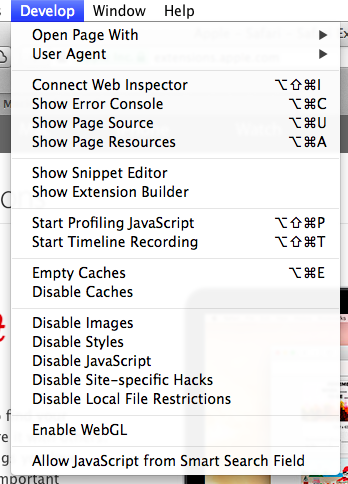
This is the option you need:
a
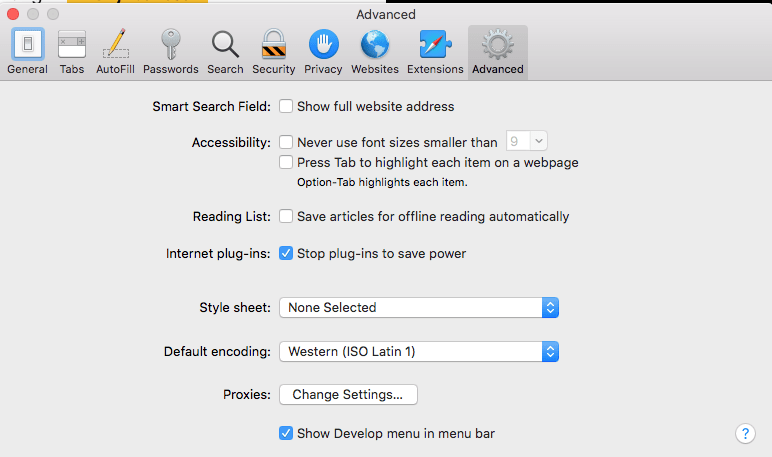
MacOS – Safari – Show Develop menu in menu bar
–jeroen
Posted in Apple, Development, Mac OS X / OS X / MacOS, Power User, Safari, Software Development, Web Browsers, Web Development | Leave a Comment »
Posted by jpluimers on 2022/04/05
I’ve written about link rot quite a few times (it even has a category on my blog).
Preventing it is important, as it improves user experience.
For most users this is an unconscious thing when it works and becomes consciously annoying when it fails.
Some user groups are vocal enough to force you to fix link rot after the fact, causing brand reputation damage.
One good example was last year: [Wayback] Users condemn Microsoft for removing KB IDs from some bug documentation | Computerworld.
Read the rest of this entry »
Posted in Bookmarklet, Development, Internet, link rot, Power User, Software Development, Web Browsers, Web Development, Windows, WWW - the World Wide Web of information | Leave a Comment »
Posted by jpluimers on 2022/03/29
A while ago, WordPress.com heavily started to de-emphasise the Classic Editor in order to boost the Gutenberg editor which is bloaty (in both browser DOM usage (heavily slowing down editing) and content (lots of meta tags that are added to blog source) and is missing essential features (especially nesting of blocks often breaks things).
With 7000+ blog posts in the Classic Editor format (a few in still supported markdown format: that experiment failed horribly!) that still require editing (especially because of link rot)
So here is the Bookmarklet code to switch back an editing URL that you can use for as long as the Classic Editor is there:
javascript:location.href=document.location.href+'&classic-editor';
Yup, it is that simple: it appends &classic-editor to the URL.
Read the rest of this entry »
Posted in Bookmarklet, Classic editor, Development, Gutenberg editor, Internet, link rot, Power User, Software Development, Web Browsers, Web Development, WordPress, WWW - the World Wide Web of information | Leave a Comment »
Posted by jpluimers on 2022/03/28
Suddenly, a while ago, because of a stuck modifier key I suddenly had the WordPress classic editor running in full screen without any indication to go back, nor an opportunity to save the content.
It wasn’t the usual “Shift-Alt-W” [Wayback] Distraction Free Writing – Make WordPress Support (which still allows you to hover over the sidebars to make them visible, and has a visual indication of the mode).
After lot’s of trying, I figured out the toggle “Shift-Ctrl-F” toggles between normal and full screen mode. It seems unavailable in the new editor, so that might be a reason ([Wayback] Keyboard Shortcuts | WordPress.org)
The shortcut is odd too, as in most tooling “Ctrl-F” modifications like “Shift-Ctrl-F” have something to do with find or replace operations.
It was quite tough finding any reference to this shortcut, as my initial search revealed none: [Wayback] “WordPress” “Shift-Ctrl-F” full screen – Google Search.
Later I reversed the modifiers in [Wayback] “WordPress” “Ctrl-Shift-F” full screen – Google Search and found [Wayback] How to disable non-system hotkeys on Windows – gHacks Tech News
Simple Disable Key is a free software program for Microsoft Windows devices that enables you to block non-system hotkeys.
…
Not all hotkeys are useful however. When I work on a WordPress site for instance, I sometimes press the shortcut Ctrl-Shift-F by accident. This switches the editor to full screen view which I never use.
First time I invoked the full screen editor I had to look up the shortcut as I could not reproduce it.
–jeroen
Posted in Development, SocialMedia, Software Development, Web Development, WordPress, WordPress | Leave a Comment »
Posted by jpluimers on 2022/03/18
For my link list as WordPress.com is actively hiding them:
- Posts:
- Categories:
- Tags:
- Comments:
- Pages:
- Blogroll???
- Post:
Notes
You can see the old versus new infrastructure by comparing these branches:
WordPress.com does not have the “Classic Editor” plugin, but just gradually discourages use of the old infrastructure which is far more feature rich, thereby screwing old users.
Some of these features from the old infrastructure that are gone (despite the pretentious name of the Gutenberg editor):
- Posts/Pages/Tags/Categories/Comments overviews are paginated, can be filtered and have bulk-actions
- Classic-Editor has lots of useful keyboard shortcuts and allows for nested quotes
For reference, WordPress – Wikipedia: Gutenberg versus classic-editor:
WordPress 5.0 “Bebo”[edit]
The December 2018 release of WordPress 5.0, “Bebo”, is named in homage to the pioneering Cuban jazz musician Bebo Valdés.[90]
It included a new default editor “Gutenberg” – a block-based editor; it allows users to modify their displayed content in a much more user friendly way than prior iterations. Blocks are abstract units of markup that, composed together, form the content or layout of a web page.[91] Past content that was created on WordPress pages is listed under what is referred to as a Classic Block.[92] Prior to Gutenberg, there were several block-based editors available as WordPress plugins, e.g. Elementor, and following the release of Gutenberg Elementor was compared to existing plugins.[93][94]
Classic Editor plugin[edit]
The Classic Editor Plugin was created as a result of User preferences and helped website developers maintain past plugins only compatible with WordPress 4.9.8, giving plugin developers time to get their plugins updated & compatible with the 5.0 release. Having the Classic Editor plugin installed restores the “classic” editing experience that WordPress has had up until the WordPress 5.0 release.[95] The Classic Editor Plugin will be supported at least until 2022.[96]
The Classic Editor plugin is active on over 5,000,000 installations of WordPress.[97]
–jeroen
Posted in Classic editor, Development, Gutenberg editor, Power User, SocialMedia, Software Development, Web Development, WordPress, WordPress | Leave a Comment »
Posted by jpluimers on 2022/02/24
IoT devices still often use the ‘Basic’ HTTP Authentication Scheme for authorisation, see [Wayback] RFC7617: The ‘Basic’ HTTP Authentication Scheme (RFC ) and [Wayback] RFC2617: HTTP Authentication: Basic and Digest Access Authentication (RFC ).
Often this authentication is used even over http instead of over https, for instance the Egardia/Woonveilig alarm devices I wrote about yesterday at Egardia/Woonveilig: some notes about logging on a local gateway to see more detailed information on the security system. This is contrary to guidance in:
- RFC7617:
   This scheme is not considered to be a secure method of user
   authentication unless used in conjunction with some external secure
   system such as TLS (Transport Layer Security, [RFC5246]), as the
   user-id and password are passed over the network as cleartext.
- RFC2617:
   "HTTP/1.0", includes the specification for a Basic Access
   Authentication scheme. This scheme is not considered to be a secure
   method of user authentication (unless used in conjunction with some
   external secure system such as SSL [5]), as the user name and
   password are passed over the network as cleartext.
Fiddling with those alarm devices, I wrote these two little bash functions (with a few notes) that work both on MacOS and in Linux:
# `base64 --decode` is platform neutral (as MacOS uses `-D` and Linux uses `-d`)
# `$1` is the encoded username:password
function decode_http_Basic_Authorization(){
  echo $1 | base64 --decode
  echo
}

# `base64` without parameters encodes
# `echo -n` does not output a new-line
# `$1` is the username; `$2` is the password
function encode_http_Basic_Authorization(){
  echo $1:$2 | base64
}
The first decodes the <credentials> from a Authorization: Basic <credentials> header into a username:password clean text followed by a newline.
The second one encodes a pair of username and password parameters into such a <credentials> string.
They are based on these initial posts that were not cross platform or explanatory:
- [Wayback] Decode HTTP Basic Access Authentication – Stack Pointer
- [Wayback] Create Authorization Basic Header | MJ’s Web Log
–jeroen
Posted in *nix, *nix-tools, Apple, Authentication, bash, bash, Communications Development, Development, HTTP, Internet protocol suite, Linux, Mac OS X / OS X / MacOS, Power User, Scripting, Security, Software Development, TCP, Web Development | Leave a Comment »




 The Wiert Corner - irregular stream of stuff