I need to give the various solutions here some thought: [Wayback/Archive] Shortcut to open specific bookmark / URL in Chrome – Super User
–jeroen
Posted by jpluimers on 2023/06/12
I need to give the various solutions here some thought: [Wayback/Archive] Shortcut to open specific bookmark / URL in Chrome – Super User
–jeroen
Posted in Chrome, Firefox, Power User, Web Browsers | Leave a Comment »
Posted by jpluimers on 2022/11/29
For my link archive: [Wayback/Archive] google chrome devtools – Use JavaScript to set value of textbox when .value and events don’t seem to work – Stack Overflow
Sometimes fields are blocked from pasting values.
Normally a trick like this works in the chrome development panel console:
document.getElementById('nonPasteElementID').value = 'myValueFromTheClipboard'
With some web development environments this does not work.
For react, after finding the react render name for the input (in the case of the answer, it was “reactNameForInputElement“) this is a solution:
To make it work you will need this:
const input = document.getElementById('nonPasteElementID'); const event = new Event('reactNameForInputElement', { bubbles: true }); input.value = '1'; input.dispatchEvent(event);
–jeroen
Posted in Chrome, Chrome, Development, Google, JavaScript/ECMAScript, Power User, Scripting, Software Development, Web Browsers, Web Development | Leave a Comment »
Posted by jpluimers on 2022/08/31
Especially on Archive, but also on Android and other mobile operating systems, mobile apps can have their in-app browsers to circumvent the OS provided wrapper around the system browser.
On iOS, the Safari is the only system browser engine whereas on Android you can have other engines too, so less Android applications have in-app browsers.
Most of those in-app browsers are in social media applications that go to great length to keep their users inside a walled garden.
The site [Wayback/Archive] inAppBrowser.com helps checking how severely information is leaked through the in-app browser as those potentially have a lot of control. TikTok is worst capturing all input including credentials like user names and passwords.
Posted in Chrome, Conference Topics, Conferences, Development, Event, Firefox, iOS Development, JavaScript/ECMAScript, Mobile Development, Power User, Privacy, Safari, Scripting, Security, Software Development, Web Browsers, Web Development | Leave a Comment »
Posted by jpluimers on 2022/07/19
A while ago, I had a web page showing the logo as inline svg xml code.
Edit 20231209: [Wayback/Archive] Render SVG to PNG: Edit fiddle – JSFiddle – Code Playground (explained in [Wayback/Archive] html – Convert embedded SVG to PNG in-place – Stack Overflow by [Wayback/Archive] User anatoly techtonik – Stack Overflow) works way better than the InfoHeap link:
svg element in it (but keep the id="inputSvg" attribute!),Original content
It took a while to find a place to convert that on-line: [Wayback/Archive.is] inline svg xml to png – online html sandbox – InfoHeap (via [Wayback/Archive.is] Convert svg xml text to png image using canvas – InfoHeap):
The solution is a bit of JavaScript (quoted below) that you can run-online: modify the svg bit in it, then run it, scroll down in the result and verify if the canvas fits (when not: adapt the canvas side, then re-run).
The svg xml code needs to be all on one line, so remove any line breaks in it before running.
I have tested it in Chrome, but it should work in non-Chromium browsers like Firefox as well.
The inner workings of the JavaScript conversion code is explained in [Wayback/Archive.is] html – Convert embedded SVG to PNG in-place – Stack Overflow with more demo code at [Archive.is] Rasterizing In-Document SVG (thanks [Wayback] Phrogz!).
Related: [Archive.is] Jeroen Wiert Pluimers on Twitter: “Nieuwe logo, oude logo. Vrijwel alle werknemers werden een halve dag naar huis gestuurd om ruimte te maken voor de genodigden voor de zodat die de introductie van naam en logo konden bijwonen. Heel goed om verbinding te verliezen met je echte doelgroep. … “
--jeroen
| <div id="diagram_image"> | |
| <svg id="inputSvg" xmlns="http://www.w3.org/2000/svg" xmlns:inkspace="http://www.inkscape.org/namespaces/inkscape" xmlns:xlink="http://www.w3.org/1999/xlink" viewBox="0 0 640 120"> | |
| <defs id="defs_block"> | |
| <filter height="1.504" id="filter_blur" inkspace:collect="always" width="1.1575" x="-0.07875" y="-0.252"> | |
| <feGaussianBlur id="feGaussianBlur3780" inkspace:collect="always" stdDeviation="4.2" /> | |
| </filter> | |
| </defs> | |
| <title>blockdiag</title> | |
| <desc/> | |
| <rect fill="rgb(0,0,0)" height="40" stroke="rgb(0,0,0)" style="filter:url(#filter_blur);opacity:0.7;fill-opacity:1" width="128" x="67" y="46" /> | |
| <rect fill="rgb(0,0,0)" height="40" stroke="rgb(0,0,0)" style="filter:url(#filter_blur);opacity:0.7;fill-opacity:1" width="128" x="259" y="46" /> | |
| <rect fill="rgb(0,0,0)" height="40" stroke="rgb(0,0,0)" style="filter:url(#filter_blur);opacity:0.7;fill-opacity:1" width="128" x="451" y="46" /> | |
| <rect fill="rgb(255,255,255)" height="40" stroke="rgb(0,0,0)" width="128" x="64" y="40" /> | |
| <text fill="rgb(0,0,0)" font-family="sans-serif" font-size="11" font-style="normal" font-weight="normal" text-anchor="middle" textLength="55" x="128" y="66">discovery</text> | |
| <rect fill="rgb(255,255,255)" height="40" stroke="rgb(0,0,0)" width="128" x="256" y="40" /> | |
| <text fill="rgb(0,0,0)" font-family="sans-serif" font-size="11" font-style="normal" font-weight="normal" text-anchor="middle" textLength="55" x="320" y="66">execution</text> | |
| <rect fill="rgb(255,255,255)" height="40" stroke="rgb(0,0,0)" width="128" x="448" y="40" /> | |
| <text fill="rgb(0,0,0)" font-family="sans-serif" font-size="11" font-style="normal" font-weight="normal" text-anchor="middle" textLength="55" x="512" y="66">reporting</text> | |
| <path d="M 192 60 L 248 60" fill="none" stroke="rgb(0,0,0)" /> | |
| <polygon fill="rgb(0,0,0)" points="255,60 248,56 248,64 255,60" stroke="rgb(0,0,0)" /> | |
| <path d="M 384 60 L 440 60" fill="none" stroke="rgb(0,0,0)" /> | |
| <polygon fill="rgb(0,0,0)" points="447,60 440,56 440,64 447,60" stroke="rgb(0,0,0)" /> | |
| </svg> | |
| </div> | |
| <img id="outputPngImage" src="data:image/png;base64,iVBORw0KGgoAAAANSUhEUgAAAAUAAAAFCAYAAACNbyblAAAAHElEQVQI12P4 | |
| //8/w38GIAXDIBKE0DHxgljNBAAO9TXL0Y4OHwAAAABJRU5ErkJggg=="/> | |
| <span id="outputPngLinkSpan"> | |
| <a href="">PNG (Save link as..)</a> | |
| </span> |
| class SVGtoPNGDataURL { | |
| constructor() { | |
| this.canvas = document.createElement('canvas'); // Not shown on page | |
| this.canvas2DContext = this.canvas.getContext('2d'); | |
| this.loaderImage = new Image; // Not shown on page | |
| } | |
| // Generate PNG data URL from SVG and send it to callback function when ready | |
| go(svgElement, dataUrlCallback) { | |
| var svgAsXML = (new XMLSerializer).serializeToString( svgElement ); | |
| this.loaderImage.width = this.canvas.width = svgElement.clientWidth; | |
| this.loaderImage.height = this.canvas.height = svgElement.clientHeight; | |
| var self = this; | |
| this.loaderImage.onload = function() { | |
| self.canvas2DContext.drawImage( self.loaderImage, 0, 0, self.loaderImage.width, self.loaderImage.height ); | |
| dataUrlCallback(self.canvas.toDataURL()); | |
| }; | |
| this.loaderImage.src = 'data:image/svg+xml,' + encodeURIComponent( svgAsXML ); | |
| } | |
| }; | |
| var converter = new SVGtoPNGDataURL(); | |
| var inputSvgElement = document.querySelector('#inputSvg'), // Inline SVG element | |
| outputPngImage = document.querySelector('#outputPngImage'), // Where to draw the result | |
| outputPngLink = document.querySelector('#outputPngLinkSpan a'); | |
| converter.go(inputSvgElement, dataUrlCallback=function(dataURL) { | |
| outputPngImage.src = dataURL; | |
| outputPngLink.href = dataURL; | |
| }); |
Posted in Chrome, Development, Firefox, JavaScript/ECMAScript, Power User, Scripting, Software Development, Web Browsers, Web Development | Leave a Comment »
Posted by jpluimers on 2022/07/14
Below is a cool solution to refresh a page using a bookmarklet is to embed it into an iframe, then automatically reload it every interval.
It for instance works for the [Wayback/Archive.is] Woonveilig and often in Fritz!Box environments.
[Wayback] Jon described the below method as a solution for his own question, 6 years after asking it in [Wayback/Archive.is] Automatically reload page in Chrome without plugin – Super User.
So I made this a bookmark:
| javascript:document.getElementsByTagName("body")[0].innerHTML = "<iframe id=\"testFrame\" src=\""+window.location.toString()+"\" style=\"position: absolute; top:0; left:0; right:0; bottom:0; width:100%; height:100%;\"><\/iframe>";reloadTimer = setInterval(function(){ document.getElementById("testFrame").src=document.getElementById("testFrame").src },5*60*1000) |
(it is in a gist as the WordPress editors keep killing the embedded html code, despite it being escaped within <code> tags.
–jeroen
Posted in Bookmarklet, Chrome, Chrome, Development, Firefox, Google, HTML, JavaScript/ECMAScript, Power User, Scripting, Software Development, Web Browsers, Web Development | Leave a Comment »
Posted by jpluimers on 2022/05/27
A while ago [Archive.is] Adam Jacob on Twitter: “Let’s say nice things about technology today. I’ll start. If it wasn’t for @lkanies and @puppetize, there is no way we would have been able to adapt as an industry to the rise of the cloud. Quote tweet me with your own.” sparked some interesting threads.
First posts are below; click on them to see the full threads.
Posted in Chrome, Configuration Management, Development, DevOps, Firefox, History, IaC - Infrastructure as Code, Infocom and Z-machine, Infrastructure, KVM Kernel-based Virtual Machine, LSI/3ware, Open Source, PDP-11, Power User, PowerShell, Puppet, Python, Qemu, Rust, Safari, Scripting, Software Development, UCSD Pascal, Vagrant, Veewee, Virtualization, Web Browsers, Xen | Leave a Comment »
Posted by jpluimers on 2022/02/25
When downloading Windows 10 builds, I usually want them as ISO files because I test them out as Virtual Machines before running on real hardware.
Downloading can be done from [WayBack] www.microsoft.com/en-us/software-download/windows10, however what you get depends on what machine you start browsing.
The above WayBack link, because it got archived from a non-Windows machine redirects from https://web.archive.org/web/20210321163339/https://www.microsoft.com/en-us/software-download/windows10 to https://web.archive.org/web/20210321143203/https://www.microsoft.com/en-us/software-download/windows10ISO.
On Windows systems the redirect goes from https://web.archive.org/web/20210321143203/https://www.microsoft.com/en-us/software-download/windows10ISO to https://web.archive.org/web/20210321163339/https://www.microsoft.com/en-us/software-download/windows10
By default, when you are on a Windows machine, the download link only provides the Media Creation tool. This forces an extra step into getting the ISO file on the virtual machine host.
When downloading from a non-Windows machine, you get a possibility to download the ISO file directly after selecting which kind of build and language you need. This provides you with a time limited https link to download the ISO (in practice this seems to last at least an hour).
I didn’t dig into this before, but luckily others did, and the difference is as easy as changing the User-Agent in your browser, as these posts describe:
Luckily, since ESXi 6.7, VMware ESXi added https as protocol to wget, so now you can download the https link you get via the above trick without hassle.
Oh, this answers my question from a few years back too: How can I get Win10_1511_1_English_x64.iso or Win10_1511_1_EnglishInternational_x64.iso ?
Posted in Chrome, ESXi6.7, Power User, Virtualization, VMware, VMware ESXi, Web Browsers, Windows, Windows 10 | Leave a Comment »
Posted by jpluimers on 2022/02/22
I an with [Wayback] Craig Buckler to consider Dark Patterns being wider than the strict sense.
For me anything that costs a user extra time or makes accessibility harder is a Dark Pattern.
So I agree with the issues he explains at [Wayback] The Web’s Most Annoying Dark Patterns – SitePoint
Does the web delight or displease you? Craig lists his least favourite UI and marketing dark patterns. Have you developed on the dark side?

Paste is enabled, but does not function
Having had RSI, I’m dependent on keeping my hands and arms in good shape. This means minimising the use of pointing devices and also trying to minimise typing.
In addition, I have heavily segmented my use of email addresses (among others for cutting down SPAM). Basically any point of contact gets a new email address.
This means I realy on tooling like password managers and email address generators. It means copying and pasting information.
So I bumped into a web-site that disallowed pasting the (unique and long!) email address into the email verification field.
[Archive.is] Jeroen Wiert Pluimers on Twitter: “The @olvg #mijnOLVG site is now on my Dark Patterns list as they make #accessibility harder by blocking pasting into the email address verification field. Blocking the paste-blocker. CC some people advocating mijnolvg.nl @MauricevdBosch @ronklitsie63 @kyntha”
Despite the popup menu, paste didn’t work. Chrome autofill did, but didn’t have the information for this particular (new and unique) email address yet, so could not be used yet.
It is relatively easy to disable a paste block. In this case, I was using chrome, but this can be done with any browser. Some browsers even have optional extensions that can do this for you.
In the case of Chrome, when right clicking, there is an “Inspect” option
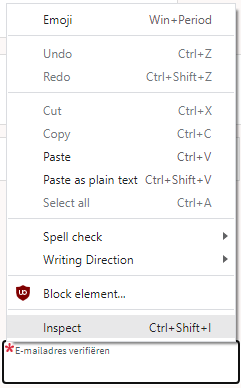
Inspect is enabled and actually works.
It inspects the current element, which on this site looks like this:

The element does not contain event handlers. But the code hooks them behind our backs.
On the “Event Listeners” tab on the right, you can see there are two JavaScript methods hooked to the paste handler:

The paste handlers. The first is OK, the second blocks paste.
The first one is OK, though I did not really look into what the proxy does.
Second paste event handler: remove this one.

First paste event handler: keep this one.
The second is not OK, as it effectively prevents the event from being handled any further at all by calling preventDefault

Second paste event handler: remove this one.
- [Wayback] Event.preventDefault() – Web APIs | MDN
The Event interface’s preventDefault() method tells the user agent that if the event does not get explicitly handled, its default action should not be taken as it normally would be.
By clicking on the second Remove button above, the paste blocker is gone and you can paste again.
–jeroen
Posted in Chrome, Chrome, Dark Pattern, Development, Google, JavaScript/ECMAScript, Power User, Scripting, Software Development, User Experience (ux), Web Browsers | Leave a Comment »
Posted by jpluimers on 2022/01/20
For quite some time now, Chrome (think years) refuses to prompt for saving passwords whereas Firefox and Safari do prompt and save them, even for site types that it used to save passwords for in the past.
It has been annoying enough for too long now that I tried to do better than the Google searches I used back when I saw this happen first.
Below are some links based on new searches (starting with [Wayback] adding a password in chrome settings – Google Search); hopefully I can try them after I made a list of sites that Chrome does not show the password save prompt for.
Solutions I tried that failed (but maybe useful for others):
input field being marked with type="password", and if not add it.Solutions still to try:
Posted in Chrome, Chrome, Communications Development, Development, Encryption, ESXi6, ESXi6.5, ESXi6.7, Firefox, Fritz!, Fritz!Box, Fritz!WLAN, Google, https, HTTPS/TLS security, Internet, Internet protocol suite, Let's Encrypt (letsencrypt/certbot), Power User, routers, Safari, Security, TCP, TLS, Virtualization, VMware, VMware ESXi, Web Browsers, Web Development | Leave a Comment »
Posted by jpluimers on 2022/01/14
If use the Chrome web browser, it’s fairly likely you will find Chrome autofill suggestions recommending things for various forms and text entry points. Sometimes those autofill suggestions c…
[Wayback] How to Delete Specific Chrome Autofill Suggestions
Most important are the steps:
- Open the related website which has a form entry where autofill suggestions appear
- Start typing so that the suggestion shows up as an option in Chrome
- Using the keyboard arrows, navigate down the suggestion list to the item(s) you want to remove from the Chrome autofill suggestions
- With the suggestion highlighted, use the appropriate keystroke sequence to delete the Chrome suggestion:
- Mac:
Shift+FN+Delete- Windows:
Shift+Delete- Chromebook / Chrome OS:
Alt+Shift+Delete- Repeat with other suggestions to delete if desired
Via: [WayBack] edit google chrome autocomplete list – Google Search
–jeroen
Posted in Chrome, Chrome, Google, Power User, Web Browsers | Leave a Comment »