Archive for the ‘Hardware’ Category
Posted by jpluimers on 2010/08/16
I know that ESXi 4.1 requires VT (the Intel support for hardware assisted virtualization) to be enabled to run x64 VMs.
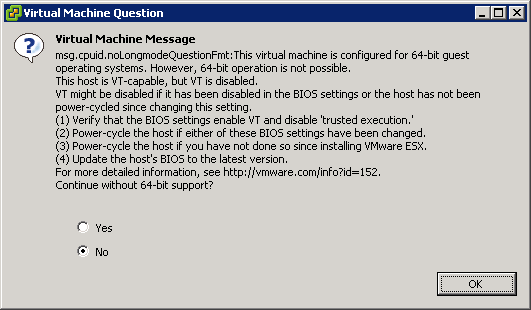
This is the warning that you get when starting an x64 VM, and you don’t have VT enabled:
[Window Title]
Virtual Machine Message
[Main Instruction]
Virtual Machine Message
msg.cpuid.noLongmodeQuestionFmt: This virtual machine is configured for 64-bit guest
operating systems. However, 64-bit operation is not possible.
This host is VT-capable, but VT is disabled.
VT might be disabled if it has been disabled in the BIOS settings or the host has not been
power-cycled since changing this setting.
(1) Verify that the BIOS settings enable VT and disable ‘trusted execution.’
(2) Power-cycle the host if either of these BIOS settings have been changed.
(3) Power-cycle the host if you have not done so since installing VMware ESX.
(4) Update the hosts’s BIOS to the latest version.
For more detailed information, see http://vmware.com/info?id=152
Continue without 64-bit support?
[Yes] [No] [OK]
Read the rest of this entry »
Posted in BIOS, Boot, ESXi4, Hardware, HP XW6600, Power User, Virtualization, VMware, VMware ESXi | 3 Comments »
Posted by jpluimers on 2010/08/10
It is good to see the cross breeding effect works:
Last week, the Visual Studio 2010 Productivity Power Tools added Quick Access Extension, which is the Visual Studio equivalent of the Delphi RAD Studio IDE Insight.
It is a keyboard shortcut (Delphi: F6 or Ctrl-.; Visual Studio: Ctrl+3) to search and execute things defined by the environment:
- menu options
- configuration options
- templates
- …
Delphi has a few options that Visual Studio hasn’t and vice versa, but it comes really close.
–jeroen
Posted in .NET, Delphi, Development, Keyboards and Keyboard Shortcuts, Power User, Software Development, Visual Studio and tools | 2 Comments »
Posted by jpluimers on 2010/07/30
From the comments on Nick’s excellent post (that instantly made me feel hungry <g>):
If you find your developers bringing in their own equipment to work then you know there is a problem.
That reminds me of this story: Read the rest of this entry »
Posted in About, Keyboards and Keyboard Shortcuts, Opinions, Personal, Power User, RSI, ThinkPad, UltraNav keyboards | Leave a Comment »
Posted by jpluimers on 2010/07/16
Quite a few web sites have fields where you cannot paste with Ctrl-V.
I don’t know why: pasting text input is a great way to speed up your work.
A solution for most of them: Read the rest of this entry »
Posted in Chrome, Firefox, Hardware, IBM SAA CUA, Internet Explorer, Keyboards and Keyboard Shortcuts, KVM keyboard/video/mouse, Power User, Web Browsers, Windows | 1 Comment »
Posted by jpluimers on 2010/07/12
At home, I have 7 screens on 3 computers on the same desk.
That sounds like a clutter, but all these keyboards and mice hooked up to them add even more clutter.
Until I found out about [Wayback] Input Director a while ago: a (virtual) Software KVM to Control Multiple Computers.
It took only a few minutes to setup, and works like a breeze.
I have played around with it for about 2 months now, and it is great: I did not have to change any settings since the initial – and easy – setup.
Now I just use the keyboard/mouse that are most convenient to my situation: all keyboard/mice can control all computers and monitors.
A breeze indeed!
–jeroen
Posted in Keyboards and Keyboard Shortcuts, Power User | Leave a Comment »
Posted by jpluimers on 2010/07/09
A while ago, I posted about Windows 7: new shortcut keys (windows hotkeys and more).
When you are in Vista or XP, you can feel a bit ‘lost’ missing those new keyboard shortcuts.
I just learned there is a tool that supplies the new Windows 7 keyboard shortcuts in Vista and XP :-)
–jeroen
Posted in Keyboards and Keyboard Shortcuts, Power User | Leave a Comment »
Posted by jpluimers on 2010/06/08
Below are some links for (at the moment of writing) current HDD testing tools from various HDD manufacturers. Read the rest of this entry »
Posted in Hardware, Power User | 2 Comments »
Posted by jpluimers on 2010/05/18
I’ve had an annoying beep on my thinkpad whenever I tried to write CD quickly.
It particularly shows when you press these three keys at the same time:
Shift+CD
Recently, I googled for the symptom to find out the cause.
Below are a few links I found, but this is the actual cause (thanks Kriston!): Read the rest of this entry »
Posted in Keyboards and Keyboard Shortcuts, Power User | Leave a Comment »
Posted by jpluimers on 2010/05/17
 For every (re)install, IE8 is usually part of the installation.
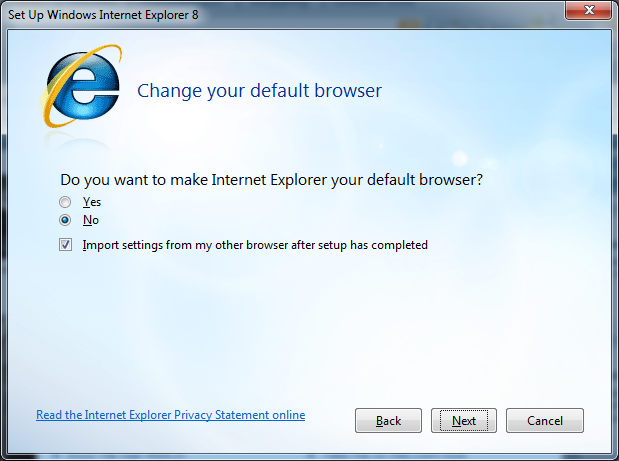
So, for the upteenth time, I came across the dialog on the right.
This time Alt-N is bound to both the “No” choice as well as the “Next” button.
–jeroen; wishing UI designers would learn to pay more attention to keyboard users…
Via: 20100516-UI-Duplicate-Shortcuts-IE8 on Flickr – Photo Sharing!.
Posted in Development, Keyboards and Keyboard Shortcuts, Power User, Software Development, UI Design | Leave a Comment »
Posted by jpluimers on 2010/05/06
In the past there were already a lot of shortcuts, including a few including the windows key.
SEO Consultants has a good overview of both lists.
Microsoft has the classic list.
Windows 7 introduced quite a few more, which I’ll list below.
Read the rest of this entry »
Posted in Conference Topics, Conferences, Event, Keyboards and Keyboard Shortcuts, Power User | 5 Comments »





 The Wiert Corner - irregular stream of stuff