Archive for the ‘Internet’ Category
Posted by jpluimers on 2022/01/20
For quite some time now, Chrome (think years) refuses to prompt for saving passwords whereas Firefox and Safari do prompt and save them, even for site types that it used to save passwords for in the past.
It has been annoying enough for too long now that I tried to do better than the Google searches I used back when I saw this happen first.
Below are some links based on new searches (starting with [Wayback] adding a password in chrome settings – Google Search); hopefully I can try them after I made a list of sites that Chrome does not show the password save prompt for.
Solutions I tried that failed (but maybe useful for others):
Solutions still to try:
Read the rest of this entry »
Posted in Chrome, Chrome, Communications Development, Development, Encryption, ESXi6, ESXi6.5, ESXi6.7, Firefox, Fritz!, Fritz!Box, Fritz!WLAN, Google, https, HTTPS/TLS security, Internet, Internet protocol suite, Let's Encrypt (letsencrypt/certbot), Power User, routers, Safari, Security, TCP, TLS, Virtualization, VMware, VMware ESXi, Web Browsers, Web Development | Leave a Comment »
Posted by jpluimers on 2021/12/31
TL;DR
This fails:
brew update drawio
brew upgrade drawio
This works:
brew cask upgrade drawio
Read the rest of this entry »
Posted in Apple, Cloud Apps, draw.io, Home brew / homebrew, Internet, Power User | Leave a Comment »
Posted by jpluimers on 2021/12/31
A few notes:
- WinBox configuration files are under
%APPDATA%\Mikrotik\Winbox
- The subdirectory
sessions contains binary *.viw files that seem to represent “view” configurations (the positions, dimensions and other properties of the open Windows in a Winbox session) where the * of the name seems to be an IPv4 address of a machine.
- Directories named like
6.40.3-2932358209 and 6.43.13-695307561 contain configuration files that seem to determine what WinBox features a certain RouterOS version should reveal; files in those directories seem to always be these:
advtool.crc / advtool.jgdhcp.crc / dhcp.jghotspot.crc / hotspot.jgicons.crc / icons.pngmpls.crc / mpls.jgppp.crc / ppp.jgroteros.crc / roteros.jgroting4.crc / roting4.jgsecure.crc / secure.jgwlan6.crc / wlan6.jg
- There are binary files
Addresses.cdb and settings.cfg.viw
- A text file named
sessionpath contains the expanded path %APPDATA%\Mikrotik\Winbox\sessions
The *.crc files contain a CRC code, presumably on the contents of the correspoding *.jg file. The *.jg files seem to contain some kind of JSON.
Some links I found:
–jeroen
Posted in Development, Internet, MikroTik, Power User, RouterOS, routers, Scripting, Software Development | Leave a Comment »
Posted by jpluimers on 2021/12/20
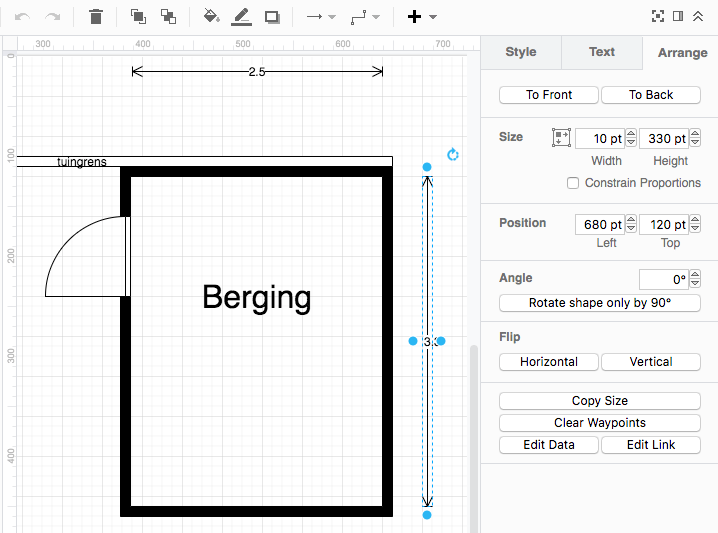 I needed a way to draw floor plans.
PowerPoint solutions were to cumbersome, but then I remembered draw.io: it has [WayBack] draw.io Floorplan stencils – draw.io
Have you tried the floorplan stencils in draw.io? You can open the library directly by using the libs parameter, www.draw.io/?libs=floorplan. Or, you can enable them in your library section by clicking “more shapes” (bottom right) and ticking “floorplans”, then apply:
I configured draw.io to show measurements in points, then took 100 points per meter as scale.
At first I most of my measurements were wrong because the I thought the “fat” grid lines were every 50 points. They are not:
- Light grid lines are 10 points
- Fat grid lines are 40 points
- Ruler has small marks every 10 points
- Ruler has large marks every 50 points
- Ruler has numbers every 100 points
How confusing!
–jeroen
Read the rest of this entry »
Posted in Cloud Apps, draw.io, Internet, Power User | Leave a Comment »
Posted by jpluimers on 2021/12/13
I wanted access to a supposedly reset a MikroTik [WayBack] MikroTik CRS109-8G-1S-2HnD-IN, but the default credentials did not work. Somehow, keeping the reset button pushed for almost 20 seconds also did not reset+reboot it.
Luckily, the default PIN code was still 1234 ([WayBack] Manual:LCD TouchScreen: PIN code – MikroTik Wiki) so I could reset it ([WayBack] Manual:LCD TouchScreen: Reboot and Reset Configuration – MikroTik Wiki).
After this, I changed credentials and PIN, documented configuration and credentials, and ensured there is a back-up of that documentation available.
Note: fiddling with power and reset button might have worked, though it is odd the CRS109 documentation does not mention this. PIN code worked faster, so that’s what solved my issue first.
Related:
–jeroen
Posted in Hardware, Internet, MikroTik, Network-and-equipment, Power User, routers | Leave a Comment »
Posted by jpluimers on 2021/11/05
Somehow naming of DNS resource record types and cylindrical battery types might seem for most parts mutually exclusive:
But the A and AAAA battery types, though uncommon, do exist.
–jeroen
Read the rest of this entry »
Posted in DNS, History, Internet, Power User | Leave a Comment »
Posted by jpluimers on 2021/10/24
Today, 20 years ago, the Wayback Machine started to unlock the archived content that the Internet Archive had been crawling since 1996 and make it accessible for the public at large.
Thanks Brewster Kahle for making all of this possible for such a long time!
Read the rest of this entry »
Posted in History, Internet, InternetArchive, Power User, WayBack machine | Leave a Comment »
Posted by jpluimers on 2021/10/22
If you think download speeds are slow for large downloads (or multi-media playback is slow or quality is low) on a fast link, then consider your DNS.
Many people report that using one of the centralised DNS services (like Google/Cloudflare/…) causes slowness because they direct CDN lookups to a small pool of servers that get overloaded.
Some links:
Via [WayBack] How to check whether DNS is working through a browser? – Super User
Google DNS also allows for interactive querying, for example [WayBack] Google Public DNS
Read the rest of this entry »
Posted in Cloud, Cloudflare, DNS, Hardware, Infrastructure, Internet, Network-and-equipment, Power User | Leave a Comment »


 The Wiert Corner - irregular stream of stuff