Archive for the ‘Linux’ Category
Posted by jpluimers on 2017/09/15
I totally missed this announcement 2 months ago:
after this update, zypper dup will default to –no-allow-vendor-change, whichhas been the recommended way for Tumbleweed for a long time now.
Source: Re: [opensuse-factory] dup –no-allow-vendor-change is now default
So Dominique was glad to “rub the salt” a bit (:
[WayBack/Archive.is] Dominique / DimStar @DimStar Replying to @sysrich @jpluimers: for the record: –no-allow-vendor-change has become the default in Tumbleweed, see also http://dominique.leuenberger.net/blog/2017/06/review-of-the-week-201726/
It was documented at least on these places:
- [Archive.is] Review of the week 2017/26 – Dominique a.k.a. DimStar (Dim*):
libzypp: change of default setting for ‘allow vendor change to false’ during zypper dup (just a change in the default shipped zypp.conf file)
- [WayBack] openSUSE News: Tumbleweed Snapshots Update AppStream, Mesa, Frameworks – July 13th, 2017 by Douglas DeMaioThe 20170708 snapshot had a big change to
libzypp 16.13.0. The new version update hides the switch of the default for zypper dup; after this update, zypper dup will default to --no-allow-vendor-change, which has been the recommended way for Tumbleweed for a long time now, according to an email post on the openSUSE Factory Mailing List from Dominique Leuenberger. That is if the user did not change /etc/zypp/zypp.conf -.
- [WayBack] [opensuse-factory] New Tumbleweed snapshot 20170708 released!
– Adjust zypp.conf for openSUSE Tumbleweed (bsc#1031756)
- [WayBack] Re: [opensuse-factory] dup –no-allow-vendor-change is now default
– Adjust zypp.conf for openSUSE Tumbleweed (bsc#1031756)
^^^^ This change hides the switch of the default for zypper dup: after
this update, zypper dup will default to –no-allow-vendor-change, which
has been the recommended way for Tumbleweed for a long time now.
NOTE: This will ONLY update your default configuration if you did not
touch /etc/zypp/zypp.conf – If you had local modifications, rpm will
have put a file NEXT to it (zypp.conf.rpmnew), in which case you have
to adjust the settings manually (or you likely already did)
Hope this will eliminate a good part of the issues people kept on
reporting about updates – bringing Tumbleweed one step closer to what
you expect it to do in all situations.
–jeroen
Read the rest of this entry »
Posted in *nix, Linux, openSuSE, Power User, SuSE Linux, Tumbleweed | Leave a Comment »
Posted by jpluimers on 2017/09/13
If you see error message like below when performing zypper refresh or zypper dist-upgrade, then please inform the opensuse team (for instance Twitter or the #openSUSE-factory IRC channel) as this is part of the aftermath of the download.opensuse.org trouble that started last week.
Permission to access 'http://download.opensuse.org/ports/aarch64/tumbleweed/repo/oss/suse/setup/descr/appdata-icons.tar.gz' denied.
What happened to me with Raspberry Pi 3 and Tumbleweed is below and fixed because after I got in touch: the data restore had worked out OK, but the permissions didn’t.
I got there as the search for “Permission to access ‘http://download.opensuse.org/ports/aarch64/” got me to [WayBack] TUMBLEWEED Zypper Permission to access:
Unfortunately there was a catastrophic issue last week with the openSUSE download system (read: stuff is still broken and not all mirrors are fully functional).
–jeroen
Read the rest of this entry »
Posted in *nix, Linux, openSuSE, Power User, SuSE Linux, Tumbleweed | Leave a Comment »
Posted by jpluimers on 2017/09/12
At the time of discovering Welcome to workaround.org via More ISP Mail saveback – Joe C. Hecht – Google+:
The famous ISP-style mail server tutorials live here. Learn how to set up your own fully-functional mail server using Postfix, Dovecot IMAP/POP3 and MySQL backend on a Debian server just like your favorite mail or website hosting provider.
I have been maintaining the ISPmail tutorial since Debian Woody. However those older Debian versions are no longer supported. If you still like to read the old versions I have provided PDF versions of the tutorials for Squeeze, Lenny, Etch, Sarge andWoody.
My daily work leads to various discoveries and insights. Some were petty but others really brightened my day.
I am a system administrator and programmer. In my nerdy spare time I work on web applications, Python and Ruby programs, write articles or explore new software technologies. On workaround.org you can find news, solutions and hints on my findings and get help. Of course your feedback is welcome.
These are some projects I am currently working on:
- IRC is a great medium for getting instant help (at least on the freenode IRC network). I have collected some tips about Getting help on IRC to help you get help instead of getting barbecued.
- knoba’s factoids
I run a bot called knoba (short for knowledge base) on the freenode IRC network. Two channels I visit frequently are #postfix and #squid. So I have fed the bot with lots of factoids that you can query using !foobar in the channel. These are the factoids understood in #squid and #postfix. Please don’t play with the bot publicly. Send it a “/msg knoba help" and learn how it works.
My daily work leads to various discoveries and insights. Some were petty but others really brightened my day.
Squid is a powerful open-source web proxy. I was responsible for a large Squid installation at a former employer. Maybe the following articles help you save time in your daily work.
Padrino is an lean Ruby web framework. It is an interesting alternative to the heavier Ruby-on-Rails. I spent quite some time with it and created a couple of articles about it:
Zabbix is a mighty open-source monitoring software. If you need a serious system for your organisation and manage to condone its creepy web interface it is hands down the the most superior software I have ever seen. And I have been dealing with monitoring software since Nagios was called Netsaint.
These articles should help you in your daily work maintaining a monitoring system:
–jeroen
Posted in *nix, BIOS, Boot, Development, Linux, Open Source, Power User, Software Development | Leave a Comment »
Posted by jpluimers on 2017/08/28
This is so cool, but will take some time for lot’s of tooling to become compatible:
Starting with v197 systemd/udev will automatically assign predictable, stable network interface names for all local Ethernet, WLAN and WWAN interfaces. This is a departure from the traditional interface naming scheme (“eth0”, “eth1”, “wlan0”, …), but should fix real problems.
–jeroen
Posted in *nix, *nix-tools, Linux, Power User, systemd | Leave a Comment »
Posted by jpluimers on 2017/08/21
I didn’t notice this bind change for a while, but some time ago after doing an rcnamed restart it would split out this error message:
the working directory is not writable
It seems harmless as BIND still starts:
Starting name server BIND ..done
Anyway, some links that helped me solve it:
The last entry provides the solution:
rcnamed stop

chown named:named /var/lib/named/ -R

rcnamed start

rcnamed status
The latter didn’t show any error message.
–jeroen
Posted in *nix, bind-named, Linux, openSuSE, Power User, SuSE Linux | Leave a Comment »
Posted by jpluimers on 2017/08/17
Reproduction of A start job is running for dev-disk-by... – Google Photos / Oops. Let’s see if I can reproduce it, as I think this is related: https://…
Reproducible steps below.
Related:
Tried tips from last link: fails as well
These are the modifications of the steps further on based on the last link above.
- After first boot, verify the WiFi drivers are there:
# rpm -qa | grep bcm43xx

bcm43xx-firmware-20170410-2.1.noarch
- After editing
/etc/dracut.conf.d/raspberrypi_modules.conf, perform sudo mkinitrd without any -f
- After reboot, same error
Error result
At boot time:
 A start job is running for dev-disk-by\…
After waiting:
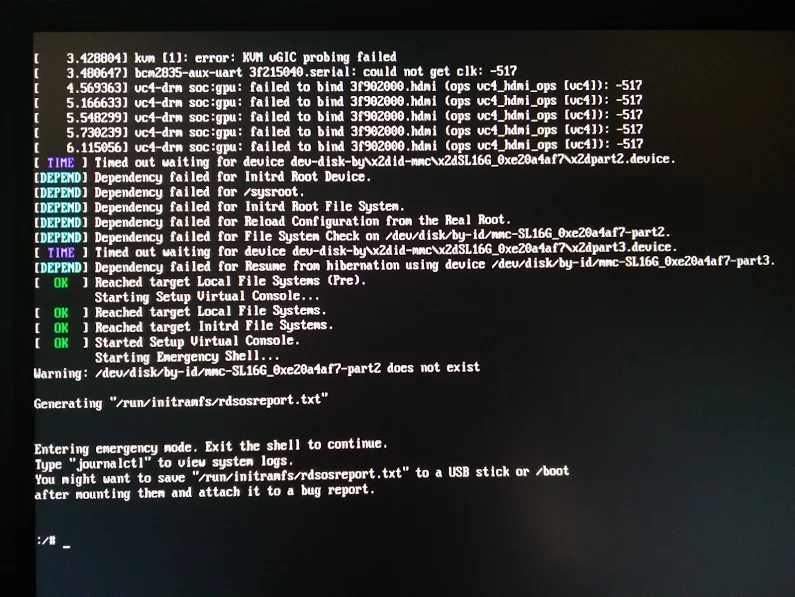
Reproducible steps
- download (or a more recent one) from http://download.opensuse.org/repositories/devel:/ARM:/Factory:/Contrib:/RaspberryPi3/images/ :
- Install them on a MicroSD card
- Put in Raspberry Pi 3 and boot
- Get the IP address of the machine, then SSH into it (
ssh root@ip-address, password linux)
- Follow the steps from [WayBack] openSUSE on Raspberry Pi 3: From Zero to Functional System in a Few Easy Steps – SUSE Blog | SUSE Communities to get WiFi working:
- Edit
/etc/dracut.conf.d/raspberrypi_modules.conf and remove the sdhci-iproc from the first and # on the last line:From :
add_drivers+=" sdhci-iproc bcm2835-sdhost bcm2835_dma mmc_block dwc2 "
# Workaround for Wifi
#omit_drivers+=" sdhci-iproc"
To :
add_drivers+=" bcm2835-sdhost bcm2835_dma mmc_block dwc2 "
# Workaround for Wifi
omit_drivers+=" sdhci-iproc"
- Run these commands:
mkinitrd -f
reboot
- Check in
Yast if wlan0 exists in System -> Network Settings, then assign an SSIS plus credentials to it
- Verify the list contains
BCM43430 WLAN card
- Select it
- Click the
Edit button
- Put the check mark next to
Dynamic Address then select DHCP and the kind of DHCP (in my caseboth version 4 and 6)
- Click the
Next button
- Keep
Operating Mode as Managed
- Click the
Scan Network button
- Select
Network Name (ESSID) from the list
- Select
Authentication Mode from the list
- Put the check mark for
Key Input Type as Passphrase
- Enter the
Encryption Key
- Click the
Next button
- Click the
OK button
- Quit
Yast
- Wait a few moments, then very with
ip a that wlan0 got an IP address
- Update the system:
zypper refresh
zypper dist-upgrade
- Reboot
- Wait for the error to occur on the HDMI screen (USB keyboard does not work there, so I cannot copy logs)
Gist log until 7. is below.
IRC chat transcript opensuse-factory
[10:40am] <wiert> TL;DR: Tumbleweed on Rpi3; enable WiFi according to site and forum instructions; zypper dist-upgrade; boot failure.
[10:41am] <wiert> without enabling WiFi everything is fine.
[10:41am] <wiert> spare RPi3s get in next week, so I’ll configure this one for my brother without WiFi for now.
[10:43am] <fvogt> Hm, that guide can’t actually work that way (unless something changed significantly)
[10:43am] <wiert> it worked in the sense that it got WiFi working. it failed in the sense that you cannot upgrade any more (:
[10:43am] <fvogt> The omit_drivers line removed the driver for the sd card controller, so it’s no surprise that it doesn’t boot anymore. It needs a different device tree
[10:44am] <fvogt> I guess you upgraded the kernel + DT? You must not do that
[10:44am] <wiert> funny as after the mkinitrd, a reboot went fine.
[10:44am] <wiert> it’s only that after a zypper dup it fails.
[10:44am] <mnowak__> DimStar, I wan’t $$ only on Windows, I should not have to re-define $prompt_sign. I guess I need to move the second $prompt_sign to the if-clause below
[10:45am] <fvogt> wiert: Ah, so it ships with a WiFi enabled DT + Kernel with the TW image
[10:45am] <fvogt> If you zypper dup then, it’ll switch to the DT + Kernel from plain TW, breaking everything
[10:46am] <wiert> What’s DT?
[10:46am] <wiert> driver-tree?
[10:46am] <fvogt> Close, device-tree
[10:46am] <wiert> (that gist has all the steps I performed)
[10:46am] <fvogt> It contains the assignment of memory and other HW resources to each other and drivers
[10:47am] <fvogt> That’s most likely the issue
[10:48am] <fvogt> You can recover from that by downloading the right .dtb file and putting it on the sd card manually
[10:48am] <fvogt> Alternatively, the u-boot embedded one should still work, so you can delete the DT on the SD and it should boot again (with some missing peripherals though)
[10:51am] <wiert> I’ve already put a fresh disk image on it and I’m in the midst of configuring it for my brother (he’s mentally retarded and I’m putting it behind his TV so he can view his agenda electronically to see if that gives him more stability in organising his life; I need to be at his place in 2 hours)
[11:27am] <wiert> @fvogt: I will add this part of the IRC chat to that blog post and try to get your suggestions done when the spare RPI3s get in.
–jeroen
Read the rest of this entry »
Posted in *nix, Development, Hardware Development, Linux, openSuSE, Power User, Raspberry Pi, SuSE Linux, Tumbleweed | Leave a Comment »
Posted by jpluimers on 2017/08/07
sslh accepts connections on specified ports, and forwards them further based on tests performed on the first data packet sent by the remote client.
Probes for HTTP, SSL, SSH, OpenVPN, tinc, XMPP are implemented, and any other protocol that can be tested using a regular expression, can be recognised. A typical use case is to allow serving several services on port 443 (e.g. to connect to ssh from inside a corporate firewall, which almost never block port 443) while still serving HTTPS on that port.
Hence sslh acts as a protocol demultiplexer, or a switchboard. Its name comes from its original function to serve SSH and HTTPS on the same port.
sslh supports IPv6, privilege dropping, transparent proxying, and more.
Interesting…
–jeroen
Posted in *nix, https, Linux, OpenSSL, OpenVPN, Power User, Security | Leave a Comment »
Posted by jpluimers on 2017/07/31
I could not find many potential anti-virus and -malware tools for OpenSuSE Tumbleweed despite they would be useful not only for non-Linux clients like Windows and Mac OS X.
These I found:
–jeroen
Posted in *nix, Linux, openSuSE, Power User, SuSE Linux, Tumbleweed | Leave a Comment »
Posted by jpluimers on 2017/07/14
Old (somehow it was blocked in the post queue), but sometimes still relevant for more modern services as, well sysv versus systemd war still are not over yet…
Interesting: systemctl gives flaky results for many services.
chkconfig nfs

chkconfig nfs on
Source: [WayBack] SUSE 12.3 – How to auto start services…?
This is on my system:
revue:~ # systemctl is-enabled shellinabox
shellinabox.service is not a native service, redirecting to systemd-sysv-install
Executing /usr/lib/systemd/systemd-sysv-install is-enabled shellinabox
shellinabox  off
enabled
revue:~ # rcshellinabox status
Checking for service shellinabox                                                       unused
● shellinabox.service - LSB: shellinabox
Loaded: loaded (/etc/init.d/shellinabox)
Active: inactive (dead)
Docs: man:systemd-sysv-generator(8)
revue:~ # rcshellinabox start
redirecting to systemctl start shellinabox.service
revue:~ # chkconfig shellinabox
shellinabox  off
revue:~ # chkconfig shellinabox on
revue:~ # chkconfig shellinabox
shellinabox  on
–jeroen
Posted in *nix, openSuSE, Power User, SuSE Linux | Leave a Comment »
Posted by jpluimers on 2017/06/28
I had this strange break down of Apache 2 after updating to the most recent openSuSE Tumbleweed in the /var/log/apache2/error_log:
[Wed Jun 28 10:04:19.955991 2017] [ssl:info] [pid 27786] AH01887: Init: Initializing (virtual) servers for SSL
[Wed Jun 28 10:04:19.962449 2017] [ssl:info] [pid 27786] AH01876: mod_ssl/2.4.26 compiled against Server: Apache/2.4.26, Library: OpenSSL/1.0.2k
AH00558: httpd-prefork: Could not reliably determine the server's fully qualified domain name, using 127.0.0.1. Set the 'ServerName' directive globally to suppress this message
[Wed Jun 28 10:04:20.029863 2017] [core:crit] [pid 27786] (22)Invalid argument: AH00069: make_sock: for address [::]:443, apr_socket_opt_set: (IPV6_V6ONLY)
(98)Address already in use: AH00072: make_sock: could not bind to address [::]:443
(98)Address already in use: AH00072: make_sock: could not bind to address 0.0.0.0:443
[Wed Jun 28 10:04:20.029935 2017] [mpm_prefork:alert] [pid 27786] no listening sockets available, shutting down
This didn’t give any results for processes having port 443 open:
# /usr/bin/netstat --verbose --all --numeric | grep 443
The commands below didn’t help much either.
So I started digging in port 443 binding:
Read the rest of this entry »
Posted in *nix, Apache2, etckeeper, Linux, openSuSE, Power User, SuSE Linux | Leave a Comment »


 The Wiert Corner - irregular stream of stuff