


Time to try out the 3 months old release and see how much got fixed in the mean time.
–jeroen
via: all mine!: openSUSE 12.3 is out!.
Posted by jpluimers on 2013/06/13
Time to try out the 3 months old release and see how much got fixed in the mean time.
–jeroen
via: all mine!: openSUSE 12.3 is out!.

Posted in *nix, Linux, openSuSE, Power User, SuSE Linux | Leave a Comment »
Posted by jpluimers on 2013/06/11
Today my router had an IP-address change, but didn’t update the DynDNS.org information in my My Host Services | My Dyn Account. Which meant I could not “phone home”, as I didn’t know the new IP-address**.
Lesson re-learned:
During initial router configuration, watch the router logs, as you might have accidentally updated the DynDNS.org by hand, not by your router
Had this in the ASUS Wireless Router RT-N66U – General Log:
Jun 11 08:01:53 notify_rc : restart_ddns
Jun 11 08:01:53 ddns: clear ddns cache file for server setting change
Jun 11 08:01:53 ddns update: connected to members.dyndns.org (204.13.248.111) on port 80.
Jun 11 08:01:53 ddns update: server output: HTTP/1.1 200 OK^M Date: Tue, 11 Jun 2013 06:01:53 GMT^M Server: Apache^M X-UpdateCode: X^M Content-Length: 7^M Connection: close^M ^M notfqdn
Jun 11 08:01:53 ddns update: malformed hostname: myhostname
The problem: hostname should not only be the name of the host, but the FQDN of the host. Read the rest of this entry »
Posted in ASUS RT-N66U, Network-and-equipment, openSuSE, Power User, SuSE Linux | Tagged: computer, ddns, ip address change, software, technology | 2 Comments »
Posted by jpluimers on 2013/05/13
Edit:
After writing this, DSA got deprecated then later removed. See [WayBack] Secure Secure Shell.
When working with SSH private/public keys (often because of ssh-keygen), and using DSA for auhtentication, these are the relevant files:
Important:
Be sure to transfer the contents of the local $HOME/.ssh/id_dsa.pub file to the remote system in a secure way.
–jeroen
via ssh-keygen – Wikipedia, the free encyclopedia.
Posted in *nix, Apple, Cygwin, Endian, Linux, Mac, Mac OS X / OS X / MacOS, Mac OS X 10.4 Tiger, Mac OS X 10.5 Leopard, Mac OS X 10.6 Snow Leopard, Mac OS X 10.7 Lion, OS X 10.8 Mountain Lion, Power User | Leave a Comment »
Posted by jpluimers on 2012/12/30
 Just noticed that in openSUSE 12.x, A plain halt will not shutdown the system properly.
On my system, it would leave the screen as shown on the right:
Only halt -p works, none of the other hints in the shutdown does not power off thread work, nor the acpi=off or acpi=oldboot settings.
The odd thing: a plain reboot still works properly.
If someone knows a better workaround: please let me know in the comments.
I hope they will fix this in a future openSUSE version; at least for 12.1 they have a “CHECKIT” marker in the documentation, but it has disappeared as of the 2.3 docs, but still fails:
5.4. systemd: System Shutdown
CHECKIT for 12.3. Is this entry still required?
To halt and poweroff the system when using systemd, issue halt -p or shutdown -h now on the command-line or use the shutdown button provided by your desktop environment.
Note: A plain halt will not shutdown the system properly.
Luckily, my openSUSE is a VM, which I can reboot from the ESXi host.
On a physical system, you will end up without any option to resurrect the system.
After installing antivir, a plain halt works sort of: it says it is halted, but ESXi still thinks it is not:

After installing antivir, a plain halt appears to work, but it doesn’t.
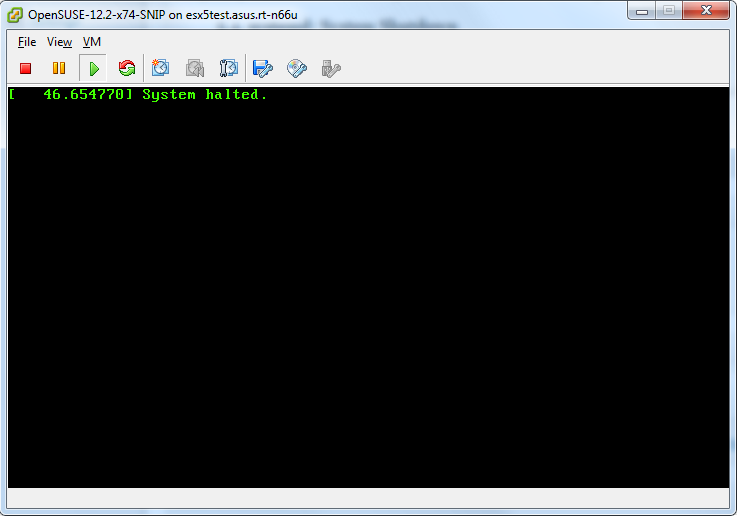
ESXi is sure the system didn’t actually power down.
–jeroen

Posted in *nix, Linux, openSuSE, Power User, SuSE Linux | Tagged: acpi, computer, desktop environment, documentation, odd, openSUSE, reboot, shutdown button, software, SUSE, system shutdown, technology, thread work, vm | 4 Comments »
Posted by jpluimers on 2012/09/29
If I read Inappropriate Use of Adobe Code Signing Certificate my conclusion is that anything signed by the Adobe Code Signing Certificate since 2012-07-10 potentially can be malware.
As a precaution, I will manually revoke the certificate on all my systems (that’ll take a while!). If anyone knows how to automate that process, please post a comment showing how to.
Hitching on a trusted certificate of a big software company comes close to the ultimate hack: trojaning signed malware in the distribution of an OS vendor.
–jeroen
Posted in *nix, Adobe, Android Devices, Apple, HTC, HTC Sensation, iOS, iPad, iPhone, iPod, iPod touch, Linux, Mac, Mac OS X / OS X / MacOS, Mac OS X 10.4 Tiger, Mac OS X 10.5 Leopard, Mac OS X 10.6 Snow Leopard, Mac OS X 10.7 Lion, Opinions, OS X 10.8 Mountain Lion, Power User, Windows, Windows 7, Windows 8, Windows Server 2000, Windows Server 2003, Windows Server 2003 R2, Windows Server 2008, Windows Server 2008 R2, Windows Vista, Windows XP | Tagged: adobe software, conclusion, engineering team, precaution, secure software, software, software company, software engineering, technology, ultimate hack | Leave a Comment »
Posted by jpluimers on 2012/09/17
Link rot stroke again: New link for Mastering the VI editor.
These are useful too:
–jeroen
via *nix – Mastering the VI editor « The Wiert Corner – irregular stream of Wiert stuff.
Posted in *nix, Cygwin, Endian, Internet, link rot, Linux, Power User, vi, WWW - the World Wide Web of information | Leave a Comment »
Posted by jpluimers on 2012/08/27
Hmm, time to disable Java for a while:
–jeroen
Posted in *nix, Apple, Chrome, Google, Linux, Mac, Mac OS X / OS X / MacOS, Mac OS X 10.4 Tiger, Mac OS X 10.5 Leopard, Mac OS X 10.6 Snow Leopard, Mac OS X 10.7 Lion, MacBook, MacBook-Air, MacBook-Pro, Power User | 3 Comments »
Posted by jpluimers on 2012/08/20
No more UUCP at xs4all: Afscheid van UUCP | XS4ALL Weblog.
Boy, the first time I got UUCP working was a hell of a job (:
Back then it was the best way to copy files (including email) in a kind of system independent way.
The end of a remarkable time frame (:
–jeroen
Posted in *nix, Internet, Linux, Power User | Leave a Comment »
Posted by jpluimers on 2012/08/17
Sometimes when you are at a Linux site, there is no one available with the right credential information for doing emergency maintenance.
There is a way around it: boot your Linux in Single user mode. Then it will not ask for a password, and boot straight into the user root.
When you are lucky, your linux site:
Modern systems usually use GRUBand you can follow the steps in Read the rest of this entry »
Posted in *nix, Linux, Power User | Leave a Comment »
Posted by jpluimers on 2012/08/03
Another research item:
Need to provide access through OpenVPN to the same LAN as where the OpenVPN server runs on.
This is unusual, and requires a bridged OpenVPN solution.
Jürgen Schmidt wrote a nice article on this in 2008.
Endian community edition seems to support this out of the box:
Server configuration
In this panel you can enable the OpenVPN server and define in which zone it should run.
OpenVPN server enabled
Click this to make sure the OpenVPN server is started.
Bridged
If you want to run the OpenVPN server in one of the existing zones check this box. ..
note:
If the OpenVPN server is not bridged you must set the

firewall rules in the VPN firewall to make sure clients

can access any zone - unless you do not want them to.
VPN subnet
This option is only available if you disable bridged mode, which allows you to run the OpenVPN server in its own subnet that can be specified here.
Bridge to
If bridged mode has been selected here you can choose to which zone the OpenVPN server should be bridged.
Dynamic IP pool start address
The first possible IP address in the network of the selected zone that should be used for the OpenVPN clients.
Dynamic IP pool end address
The last possible IP address in the network of the selected zone that should be used for the OpenVPN clients.
–jeroen
via: The VPN Menu — Endian UTM Appliance v2.4 documentation.
Posted in *nix, Endian, Linux, OpenVPN, Power User | Leave a Comment »
 The Wiert Corner - irregular stream of stuff