The Wiert Corner – irregular stream of stuff

Jeroen W. Pluimers on .NET, C#, Delphi, databases, and personal interests

  • My badges

  • Twitter Updates

  • Pages

  • All categories

  • Enter your email address to subscribe to this blog and receive notifications of new posts by email.

    Join 1,854 other subscribers

Archive for the ‘Power User’ Category

Hamburger menu character on unicode: use U+2261 instead of U+2630

Posted by jpluimers on 2020/01/27

Not all fonts have Unicode character ☰ [WayBack] Unicode Character ‘TRIGRAM FOR HEAVEN’ (U+2630) as it is in a less common block.

More fonts have Unicode character ≡ [WayBack] Unicode Character ‘IDENTICAL TO’ (U+2261)

The latter is slightly shorter and slightly narrower than the former, but works in way more places.

Via [WayBack] html – Unicode ☰ hamburger not displaying in Android & Chrome – Stack Overflow

I’ve worked around this problem by using the UNICODE character UNICODE U+2261 (8801), ≡ IDENTICAL TO as illustrated below rather than the UNICODE U+2630 (9776) ☰ TRIGRAM FOR HEAVEN which

–jeroen

Posted in Development, Encoding, LifeHacker, Power User, Software Development, Unicode | Leave a Comment »

GitHub – Nike-Inc/gimme-aws-creds: A CLI that utilizes Okta IdP via SAML to acquire temporary AWS credentials

Posted by jpluimers on 2020/01/27

Since I will likely need something like this one day: [WayBackGitHub – Nike-Inc/gimme-aws-creds: A CLI that utilizes Okta IdP via SAML to acquire temporary AWS credentials

I think I got this via Kristian Köhntopp a while ago.

–jeroen

Posted in Amazon.com/.de/.fr/.uk/..., Cloud, Cloud Development, Infrastructure, Power User, Software Development | Leave a Comment »

Mapping US-English Keyboard keys to Turkish

Posted by jpluimers on 2020/01/27

I wrote about Delphi, IBX and the Turkish I problem about a year and a half ago. Back then, I could use a US-English system to reproduce the problem. This time, I had a problem on a Turkish system running an embedded version of Windows with hardly any UI tools available (especially no Windows Explorer).

Luckily, I had the command prompt, but it looked like this:

X:\>mode con codepage

Status for device CON:
----------------------
    Code page:      857

X:\>mode con codepage select 437
Invalid parameter - select

X:\>mode con codepage select=437
Invalid parameter - select

Status for device CON:
----------------------
    Lines:          300
    Columns:        120
    Keyboard rate:  31
    Keyboard delay: 1
    Code page:      437

X:\>

I tried the [WayBack] modecommand to change from [WayBack] code page 857(Turkish) to [WayBack] code page 437(IBM PC or OEM-US) which is the default on US-English systems, but that did not change the keyboard locale, not even for the command prompt.

Read the rest of this entry »

Posted in Development, internatiolanization (i18n) and localization (l10), Power User, Software Development | Leave a Comment »

Windows – chance display/screen/monitor resolution from the console

Posted by jpluimers on 2020/01/24

Links:

TODO: find out the differences in both qres tools.

–jeroen

Posted in Power User, Windows | Leave a Comment »

Richard P Feynman – FUN TO IMAGINE (full)

Posted by jpluimers on 2020/01/24

On my watch list: Richard P Feynman – FUN TO IMAGINE (full) – YouTube

The first 5 minutes are already so great and full of imagination, that I need to find time to watch it once more after already watching it 2 times in full with some time in-between to reflect.

Via: [WayBack] Richard P Feynman – FUN TO IMAGINE (full) – DoorToDoorGeek “Stephen McLaughlin” – Google+

–jeroen

Read the rest of this entry »

Posted in LifeHacker, Power User, science | Leave a Comment »

Viewing certbot installed certificates and their expiry dates

Posted by jpluimers on 2020/01/24

A simple tip on the certbot command-line from [WayBackUser Guide — Certbot 0.19.0.dev0 documentation – Managing certificates (Automatically enable HTTPS on your website with EFF’s Certbot, deploying Let’s Encrypt certificates.):

To view a list of the certificates Certbot knows about, run the certificates subcommand:

certbot certificates

This returns information in the following format:

Found the following certs:
  Certificate Name: example.com
    Domains: example.com, www.example.com
    Expiry Date: 2017-02-19 19:53:00+00:00 (VALID: 30 days)
    Certificate Path: /etc/letsencrypt/live/example.com/fullchain.pem
    Private Key Path: /etc/letsencrypt/live/example.com/privkey.pem

Via: [WayBack] It there a command to show how many days certificate you have? – Server – Let’s Encrypt Community Support

–jeroen

Posted in Encryption, Let's Encrypt (letsencrypt/certbot), Power User, Security | Leave a Comment »

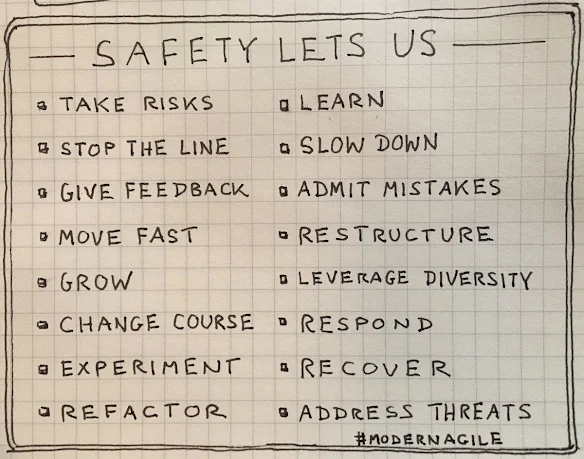
Of Course Psychological Safety…But How? – John Cutler – Medium

Posted by jpluimers on 2020/01/23

On my reading list: [WayBackOf Course Psychological Safety…But How? – John Cutler – Medium

Medium indicates it is an 8 minute tread, but since I’m more on the non-people side of the spectrum, digesting it will take quite some time needing multiple reeds.

Via: [WayBack] Of Course Psychological Safety…But How? – John Cutler – Medium – Marjan Venema – Google+

Marjan is a great coach on the personal and agility side of things.

–jeroen

Posted in Agile, Development, LifeHacker, Power User | Leave a Comment »

Bloemencorso Bollenstreek vanwege warme winters voortaan een week eerder | NOS

Posted by jpluimers on 2020/01/22

Dit jaar is het corso als vanouds op 25 april. Volgend jaar rijden de praalwagens op 17 april. Afgesproken is wel dat het evenement nooit tijdens Pasen zal worden georganiseerd.

[WayBack] Bloemencorso Bollenstreek vanwege warme winters voortaan een week eerder | NOS

Interferentie met mijn verjaardag (29 april!) gaat dus nooit meer gebeuren (:

–jeroen

Posted in About, Adest Musica, LifeHacker, Personal, Power User | Leave a Comment »

How to change the control of a Somfy RTS roller blind from 2 to 1 remote – Projectionscreen.net

Posted by jpluimers on 2020/01/20

This procedure works for Somfy RTS motors to:

  • removing an additional channel
  • removing an additional remote

The trick is to have one remote/channel that you want to keep working as you need that one to initiate the deletion process:

  1. On the channel/remote you want to delete
    • Test with the up/down button that it is indeed the one you want to delete
  2. On the channel/remote you want to keep
    1. Test with up/down button
      • The Somfy RTS motor show now work
    2. Press the  small button with a pen
      • The Somfy RTS motor now should “wiggle”
  3. On the channel/remote you want to delete
    1. Press the  small button with a pen
      • The Somfy RTS motor now should “wiggle” again
    2. Test with up/down button
      • The somfy RTS motor should now do nothing
  4. On the channel/remote you want to keep
    1. Test with up/down button
      • The Somfy RTS motor show still work

Via: [WayBack] How to change the control of a Somfy RTS roller blind from 2 to 1 remote – Projectionscreen.net

Videos below the fold:

–jeroen

Read the rest of this entry »

Posted in Hardware, LifeHacker, Power User | Leave a Comment »

OpenSuSE: location of cron jobs

Posted by jpluimers on 2020/01/20

When you look at how to find listed cron jobs, usually the answer is cron -l or cron -u username -l.

However, on OpenSuSE systems, cron jobs can be in different places, and the sysconfig settings have influence on them too.

These files and directories all influence cron:

Directories:

/etc/cron.d/
/etc/cron.daily/
/etc/cron.hourly/
/etc/cron.monthly/
/etc/cron.weekly/

Files:

/etc/sysconfig/cron
/etc/init.d/rc2.d/K01cron
/etc/init.d/rc2.d/S14cron
/etc/init.d/rc3.d/K01cron
/etc/init.d/rc3.d/S14cron
/etc/init.d/rc5.d/K01cron
/etc/init.d/rc5.d/S14cron
/etc/init.d/cron
/etc/news/crontab.sample
/etc/pam.d/crond
/etc/systemd/system/multi-user.target.wants/cron.service
/etc/omc/srvinfo.d/cron.xml
/etc/cron.deny
/etc/crontab

Most are available for other Linux distributions as well, but each one might have slightly different configurations (especially for the directories). Some background reading:

Some details:

  • The crontab -l will only list what is in /etc/crontab.
  • These directories are influenced by/etc/sysconfig/cron, especially the DAILY_TIME variable (see below) for the daily jobs.
    All of the directories are checked every 15 minutes through /usr/lib/cron/run-crons:/etc/cron.daily/
    /etc/cron.hourly/
    /etc/cron.monthly/
    /etc/cron.weekly/
  • That script then uses these files for checking when to run:/var/spool/cron/lastrun/cron.weekly
    /var/spool/cron/lastrun/cron.daily
    /var/spool/cron/lastrun/cron.hourly

The DAILY_TIME variable:

## Type: string
## Default: ""
#
# At which time cron.daily should start. Default is 15 minutes after booting
# the system. Example setting would be "14:00".
# Due to the fact that cron script runs only every 15 minutes,
# it will only run on xx:00, xx:15, xx:30, xx:45, not at the accurate time
# you set.
DAILY_TIME=""

–jeroen


Posted in *nix, *nix-tools, cron, Linux, openSuSE, Power User, SuSE Linux, Tumbleweed | Leave a Comment »