The Wiert Corner – irregular stream of stuff

Jeroen W. Pluimers on .NET, C#, Delphi, databases, and personal interests

  • My badges

  • Twitter Updates

  • My Flickr Stream

  • Pages

  • All categories

  • Enter your email address to subscribe to this blog and receive notifications of new posts by email.

    Join 1,839 other subscribers

Archive for the ‘Power User’ Category

Many people realised that “You are right” cuts short of a lot of discussions. But it has made coaching my brother as a custodian lot harder.

Posted by jpluimers on 2018/01/22

This actually is become more and more of a problem, so any hints to handle situations like this are more than welcome.

The problem is that my mentally retarded brother found this out all by himself some 18 months ago, which makes it extremely hard to coach him and be his custodian.

Source: [WayBack] #lifehack Source: @sindresorhus on Twitter  – Jeroen Wiert Pluimers – Google+

Via: [WayBack] #lifehack Source: @sindresorhus on Twitter  – Jan Wildeboer – Google+

–jeroen


Posted in About, LifeHacker, Personal, Power User | Leave a Comment »

When clonezilla shows “overlayfs missing workdir” during boot, then hangs

Posted by jpluimers on 2018/01/22

Clonezilla is a nice partition cloning tool, but sometimes booting it just gives you this message on the screen:

overlayfs missing workdir

As it’s the first message during boot, searching for clonezilla “overlayfs missing workdir” returns no meaningful results towards the top of the list.

From what I could trace back from the search results is that somewhere before 2.4.x this started to happen in the “stable” branch.

There are actually two branches that in practice are stable on the http://clonezilla.org/downloads.php:

  • alternative stable (which doesn’t have a version number but a YYYYMMDD date followed by -yakketty)
  • stable (which has a version number)

I think because of the naming, people usually start downloading the stable version. That doesn’t boot on most of the physical and virtual machines I’ve tried.

In my experience however, alternative stable doesn’t suffer from the overlay missing workdir issue on all the physical and virtual machines I’ve tried booting it with so far.

So I did some digging:

  • alternative stable is often referred to a alternative but it’s an Ubuntu-based branch running the same clonezilla software as the stable branch
  • stable is the Debian-based branch.
  • Ubuntu is based on Debian but Ubuntu releases in a much faster pace than the release frequency of Debian Stable.
  • Ubuntu has support for more recent hardware than Debian

TL;DR: Use alternative stable when stable fails to boot.

–jeroen

Posted in *nix, Debian, Power User, Ubuntu | Leave a Comment »

How can I reset a PC if I forgot the administrator password? – The Old New Thing

Posted by jpluimers on 2018/01/22

What I reboot three times is true.

[WayBackHow can I reset a PC if I forgot the administrator password? – The Old New Thing:

There is an emergency reset button that you can activate like this:

  • Turn off the computer.
  • Turn on the computer, but while it is booting, turn off the power.
  • Turn on the computer, but while it is booting, turn off the power.
  • Turn on the computer, but while it is booting, turn off the power.
  • Turn on the computer and wait.

After three failed reboot attempts, Windows goes into recovery mode and one of the options there is to reset the computer. One of the reasons for that option is to address this specific problem of finding an old machine that you forgot the password to, and you want to just reset the PC and start over clean.

–jeroen

Posted in Development, Power User, Software Development, The Old New Thing, Windows, Windows Development | Leave a Comment »

Notifications – Google+

Posted by jpluimers on 2018/01/20

As I keep forgetting the Notifications – Google+ URL and G+ kills “older” notifications: https://plus.google.com/notifications/all

–jeroen

Posted in G+: GooglePlus, Google, Power User, SocialMedia | Leave a Comment »

openSUSE – Review of the week 2018/03 – Dominique a.k.a. DimStar (Dim*) – be sure to review your openssh config!

Posted by jpluimers on 2018/01/20

Before upgrading Tumbleweed this week, you need to review your openssh config.

This is not mentioned in Review of the week 2018/03 – Dominique a.k.a. DimStar (Dim*), but very important.

So be sure to read these before upgrading:

If you forget to review /etc/ssh/sshd_config, you get this in journalctl if you have specified your own MACs for instance when hardening according to [WayBack including rimemd160] Secure Secure Shell:

Read the rest of this entry »

Posted in *nix, *nix-tools, Communications Development, Development, Internet protocol suite, Power User, SSH, TCP | Leave a Comment »

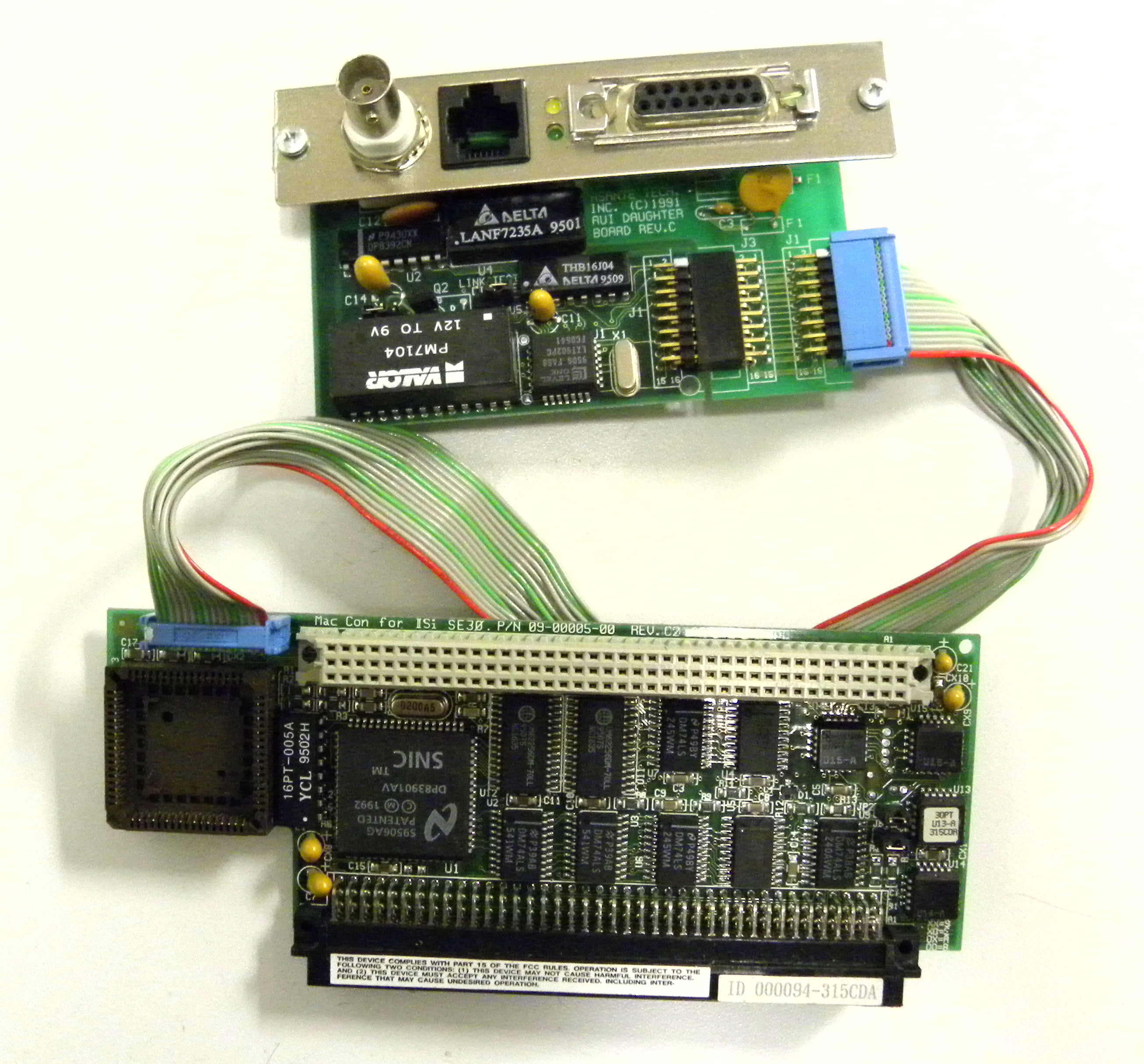
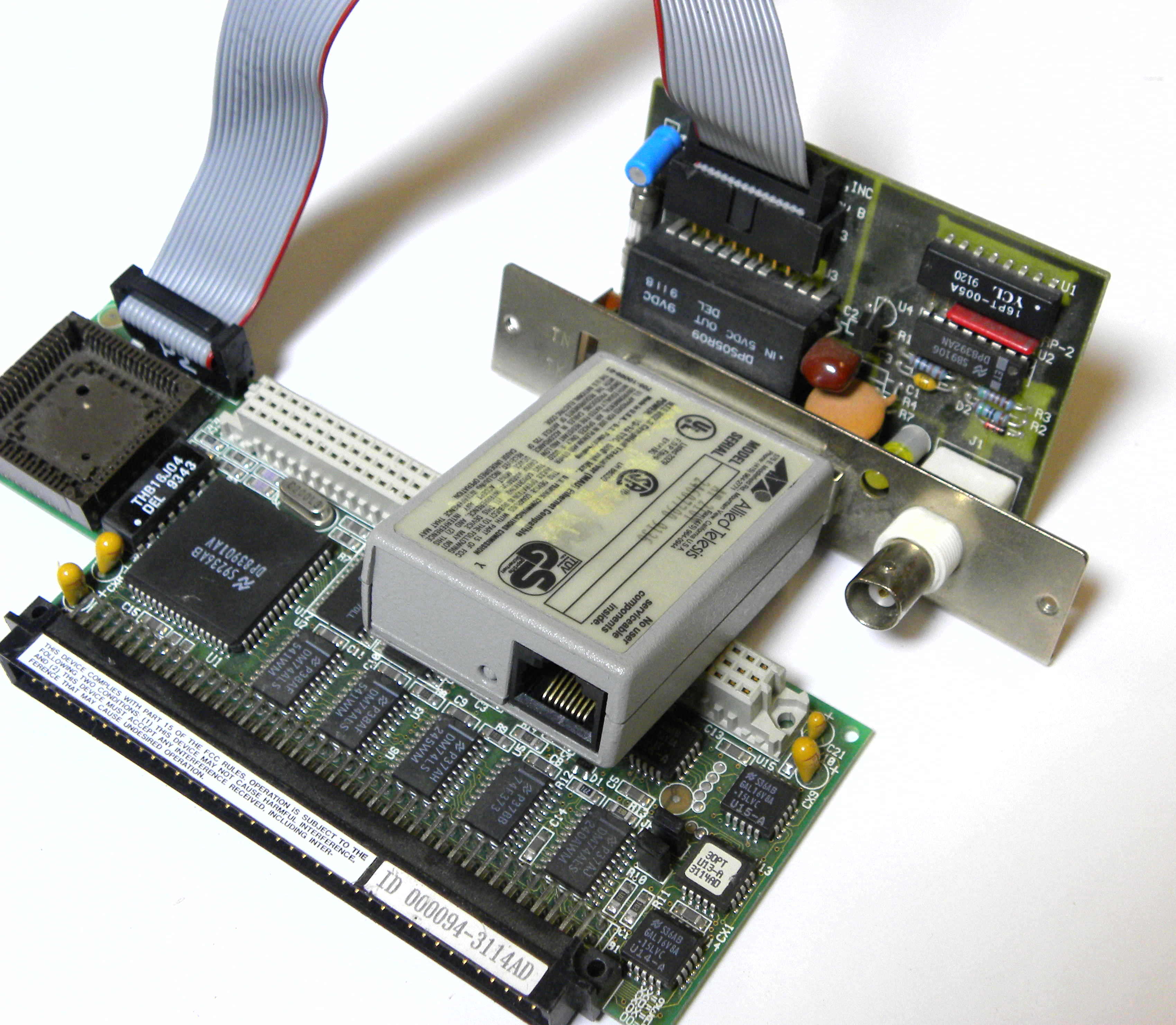
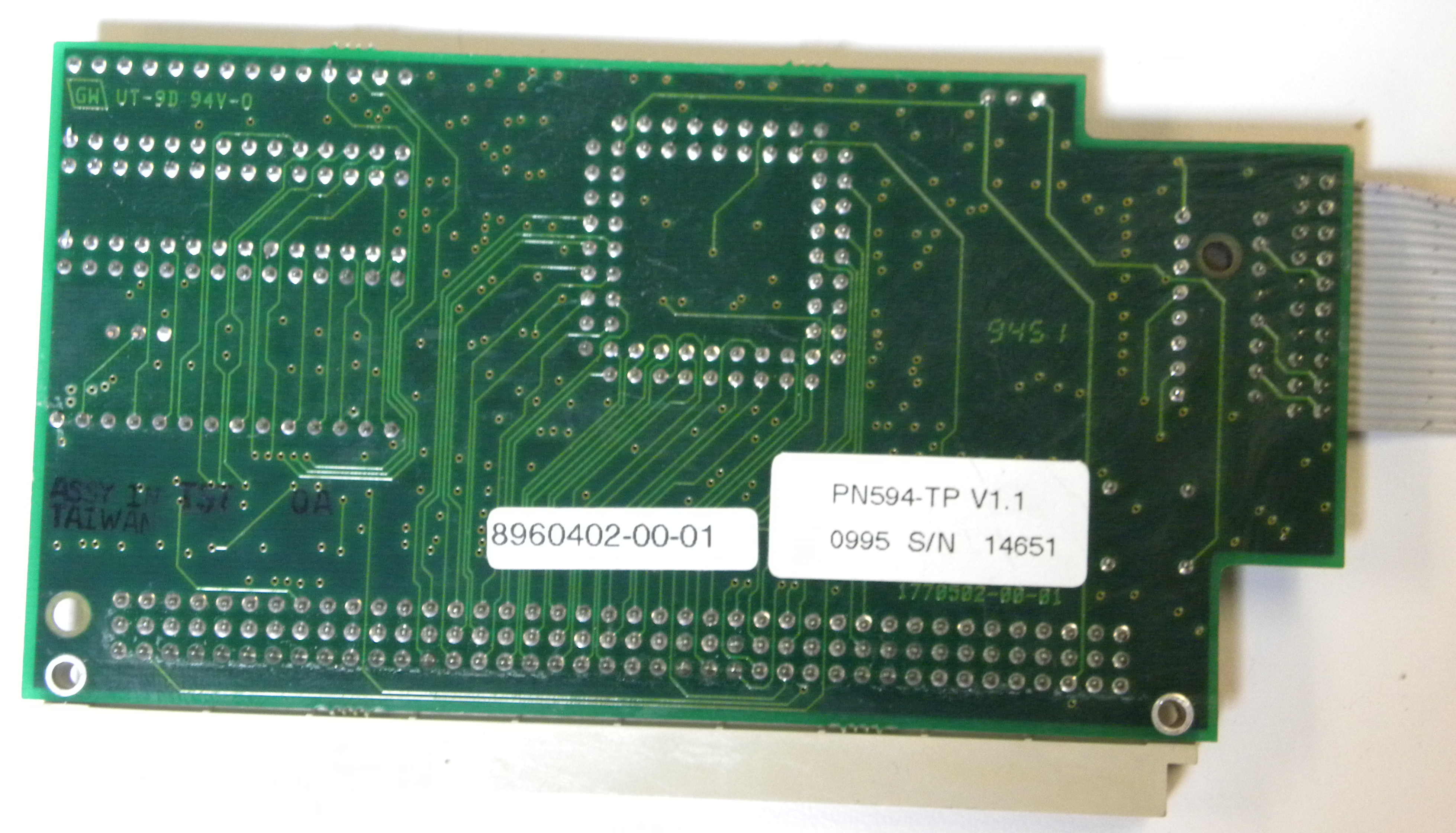
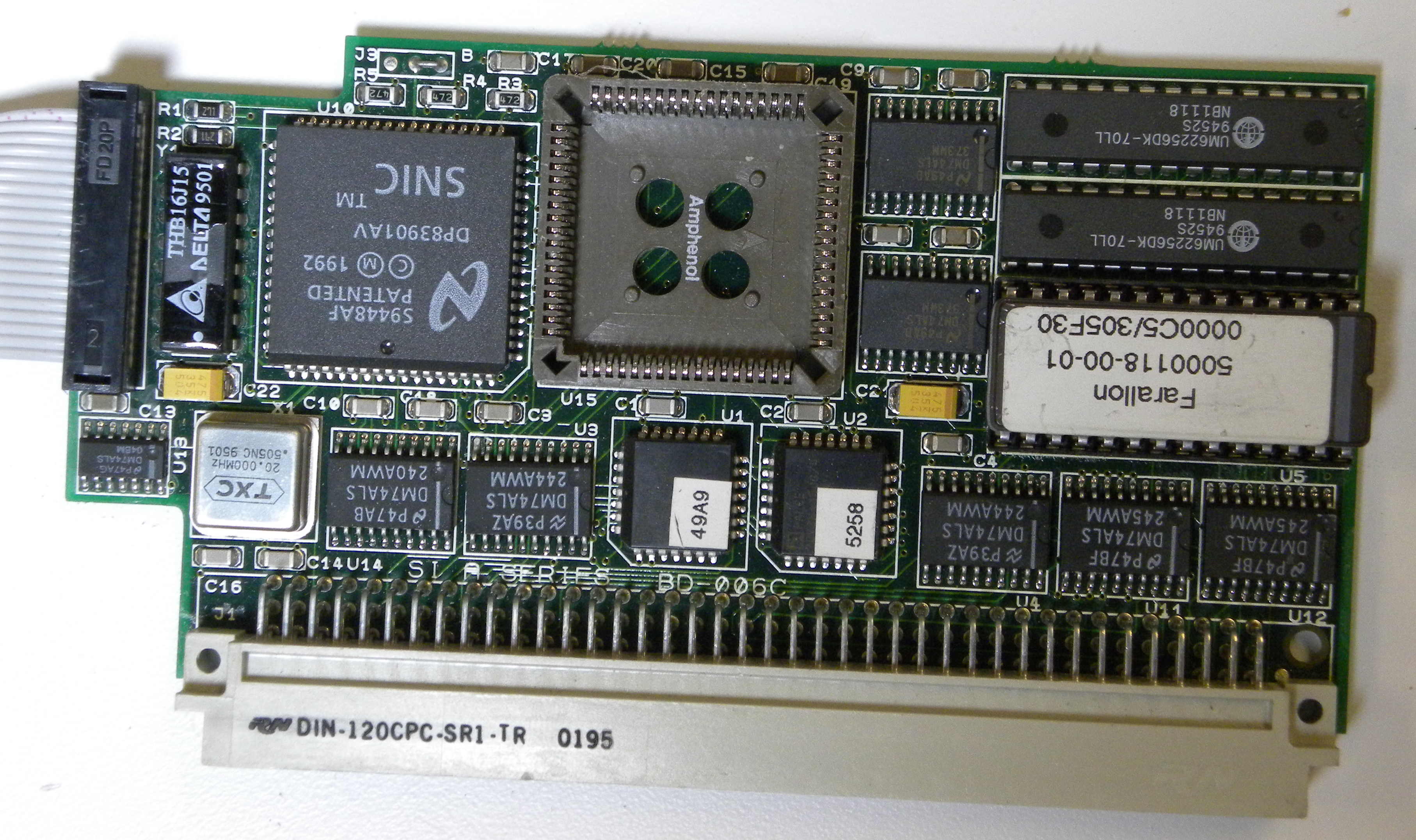
Installing A Maccon Card In A Macintosh Se/30 – Asante MacCon Family Ethernet Network Cards For The Macintosh Installation Manual [Page 29]

Posted by jpluimers on 2018/01/19

To get started:

Pictures, binary driver image from Index of /pdf/apple/nubus/asante/MacCon_SE30

Index of /pdf/apple/nubus/asante/MacCon_SE30

[ICO] Name Last modified Size Description

[PARENTDIR] Parent Directory
[   ] 5000118-00-01.BIN 2018-01-11 10:16 16K
[IMG] Asante_MacCon_SE30_1.JPG 2018-01-10 14:24 545K
[IMG] Asante_MacCon_SE30_2.JPG 2018-01-10 14:24 418K
[IMG] Asante_MacCon_SE30_3.JPG 2018-01-11 10:17 573K
[IMG] Asante_MacCon_SE30_4.JPG 2018-01-11 10:17 543K
[IMG] Asante_MacCon_SE30_5.JPG 2018-01-11 10:17 439K
[IMG] Farallon_SI_A_Series_b.JPG 2018-01-11 10:17 438K
[IMG] Farallon_SI_A_Series_f.JPG 2018-01-11 10:17 637K

Apache/2.4.18 (Ubuntu) Server at bitsavers.trailing-edge.com Port 80


–jeroen

Posted in Apple, Classic Macintosh, History, Macintosh SE/30, Power User | Leave a Comment »

mtr does ping and traceroute in one go – bold/red lines are for non-responding hosts

Posted by jpluimers on 2018/01/19

I learned about mtr via [WayBackBufferbloat Demystified – Andrew Clunis which I found via  [WayBack] Älterer Artikel, der Bufferbload und https://en.wikipedia.org/wiki/CoDel erklärt. – Kristian Köhntopp – Google+

mtr is cool:

mtr combines the functionality of the ‘traceroute’ and ‘ping’ programs in a single network diagnostic tool.

Running it, I saw occasional bold lines that were not mentioned in the README, but after a search in the repo I found it to be in documented NEWS:

Draw names in red (GTK) or bold (Curses) if host doesn’t respond.

Some times from here across to California back when I still had ADSL:

Read the rest of this entry »

Posted in *nix, *nix-tools, Power User | Leave a Comment »

Microsoft guided walk through to Fix Windows Update errors

Posted by jpluimers on 2018/01/19

This one helped me to fix a 0x80243004 error: somehow the virtual network adapter didn’t work well and a reboot worked.

Use our guided walk through to help you resolve Windows Update issues using the error code you got while updating your version of Windows.

Source: Fix Windows Update errors

–jeroen

Posted in Power User, Windows, Windows 7 | Leave a Comment »

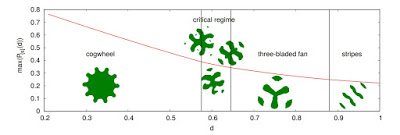
Backreaction: Pure Nerd Fun: The Grasshopper Problem

Posted by jpluimers on 2018/01/18

For the love of math and physics science [WayBackBackreaction: Pure Nerd Fun: The Grasshopper Problem.

Background material and videos:

–jeroen

Read the rest of this entry »

Posted in LifeHacker, Power User, science | Leave a Comment »

Using hardware security tokens cross-platform is only slightly more complicat…

Posted by jpluimers on 2018/01/17

Thanks for the excellent comment explaining how to use hardware tokens as a comment to [WayBack] Using hardware security tokens cross-platform is only slightly more complicated than piloting a Space Shuttle. ##sarcasm – Jan Wildeboer – Google+

Jan Wildeboer:

+Jeroen Wiert Pluimers OK. Let’s look a bit at how this works. There are several competing standards/ways to use a security token. Typically you’ll decide between the two most used ones. As a CCID device AKA SmartCard with OpenSC or using gpg-agent. And that’s an either/or question. Some of the security tokens can only work with gpg-agent, some can do both (but not at the same time) and some are only useful as CCID style (e.g. the Nitrokey HSM).

OK. So now we look at platforms. CCID using OpenSC mostly works everywhere, but you might need to install some additional software depending on your OS. Older versions of MacOS X were notoriously bad, since (High) Sierra it has become better.

On Linux it again really depends. The gnome-keyring-agent that is active in a Gnome session really messes everything up, so better deactivate that. Which is not really trivial. But you have to have a socket for ssh-agent to pick up the key, so some stuff goes to your .bash.rc and you have to make some changes to Gnome config.

If you want to use a Yubikey for 2FA, note that it cannot do TOTP (Time based One Time Password) which Amazon wants for AWS auth. So you need another helper app on your computer.

Here’s some articles that explain it in detail:

The middle two links are actually part of the series [WayBack] Yubikey All The Things | EngineerBetter | More than Cloud Foundry specialists which has a third post [WayBack] Yubikeys for Static Secrets | EngineerBetter | More than Cloud Foundry specialists

–jeroen

Posted in *nix, *nix-tools, Communications Development, Development, Internet protocol suite, Power User, Security, SSH, TCP | Leave a Comment »