The Wiert Corner – irregular stream of stuff

Jeroen W. Pluimers on .NET, C#, Delphi, databases, and personal interests

  • My badges

  • Twitter Updates

  • My Flickr Stream

  • Pages

  • All categories

  • Enter your email address to subscribe to this blog and receive notifications of new posts by email.

    Join 1,839 other subscribers

Archive for the ‘Power User’ Category

when apple.com != apple.com – Phishing with Unicode Domains – Xudong Zheng

Posted by jpluimers on 2017/04/21

Vulnerability in Chrome, Firefox, and Opera makes users susceptible to phishing with Unicode domains.

Source: [Archive.isPhishing with Unicode Domains – Xudong Zheng

Basically these are not the same sites:

Depending on the font used, you might notice it if you look very careful.

Keywords: Unicode codepoints, visual similarity, codepoint to character mapping in fonts, Punycode

Via: [WayBack] Same URL, two websites? (notice the difference)1. https://www.аррӏе.com/2. https://www.apple.com/ – Jean-Luc Aufranc – Google+

References:

–jeroen

Posted in Power User, Security | Leave a Comment »

Tested the CastBuddy extension from the Chrome Web Store: nice, but high CPU usage even when no videos

Posted by jpluimers on 2017/04/21

CastBuddy – Chrome Web Store:

This extension finds videos on the web sites you are browsing and allows you to play them on your Chromecast device.

Works nice if you need it, but uses a lot of CPU (on my Retina MacBook with latest chrome: about 75% of one CPU core) so it drains battery fast.

You can view this high CPU usage in the Chrome Task Manager (which used to be available through chrome://tasks, but this is one of the use full Find Hidden Features On Chrome’s Internal Chrome:// Pages features they removed). Fire up the Chrome Task Manager through the Window menu.

Verdict

Enable only when you need it. Disable after use in chrome://extensions

–jeroen

via: CastBuddy – Chrome Web Store:

When it finds Chromecast comptible videos ( .webm, .mp4, .mkv etc), count of videos is shown over extension’s menubar icon, which you can click to Select a video and extension will send it to your Chromecast device. Once a casting session is established, you can control video playback from Extension’s popup page.

Posted in Chrome, Google, Power User | 2 Comments »

use vmrun – via How do I find the IP address of a virtual machine using VMware Fusion? – Super User

Posted by jpluimers on 2017/04/20

Note this works only when the VMs have VMware Tools installed (more on that below):

VMWare provides, not surprisingly, a built in tool for this, vmrun. It’s under /Applications/VMware Fusion.app/Contents/Library/vmrun although it has moved around in other Fusion releases a bit.

🍺 vmrun list Total running VMs: 1 .docker/machine/machines/myvm.vmx
🍺 vmrun getGuestIPAddress ~/.docker/machine/machines/myvm.vmx 172.16.213.128

via: How do I find the IP address of a virtual machine using VMware Fusion? – Super User [WayBack]

vmrun [WayBack] is barely documented and most of is in PDF of which this is the most recent I could find: www.vmware.com/pdf/vix180_vmrun_command.pdf [WayBack]

Based on the above path, I added this to my ~/.bash_profile file:

alias vmrun='/Applications/VMware\ Fusion.app/Contents/Library/vmrun'
alias vmrun-list-running-VMs='vmrun list | grep vmx'
vmrun-list-ipv4-of-running-VMs()
{
  vmrun-list-running-VMs | while read line ; do echo $line && vmrun getGuestIPAddress $line; done
}

Now I can do this:

$ vmrun-list-ipv4-of-running-VMs
/Users/jeroenp/VM/W81Entx64DelphiRegression.vmwarevm/W81Entx64.vmx
172.16.172.135
/Users/jeroenp/VM/diaspore-opensuse-Tumbleweed-x64.vmwarevm/diaspore-opensuse-Tumbleweed-x64.vmx
Error: The VMware Tools are not running in the virtual machine: /Users/jeroenp/VM/diaspore-opensuse-Tumbleweed-x64.vmwarevm/diaspore-opensuse-Tumbleweed-x64.vmx
$ vmrun-list-ipv4-of-running-VMs
/Users/jeroenp/VM/diaspore.opensuse-Tumbleweed-x64/diaspore.opensuse-Tumbleweed-x64.vmx
Error: Unable to get the IP address
/Users/jeroenp/VM/W81Entx64DelphiRegression.vmwarevm/W81Entx64.vmx
172.16.172.135
$ vmrun-list-ipv4-of-running-VMs
/Users/jeroenp/VM/diaspore.opensuse-Tumbleweed-x64/diaspore.opensuse-Tumbleweed-x64.vmx
Error: Unable to get the IP address
/Users/jeroenp/VM/W81Entx64DelphiRegression.vmwarevm/W81Entx64.vmx
172.16.172.135
$ vmrun-list-ipv4-of-running-VMs
/Users/jeroenp/VM/diaspore.opensuse-Tumbleweed-x64/diaspore.opensuse-Tumbleweed-x64.vmx
172.16.172.134
/Users/jeroenp/VM/W81Entx64DelphiRegression.vmwarevm/W81Entx64.vmx
172.16.172.135
$ vmrun-list-ipv4-of-running-VMs
/Users/jeroenp/VM/diaspore.opensuse-Tumbleweed-x64/diaspore.opensuse-Tumbleweed-x64.vmx
172.16.172.134
/Users/jeroenp/VM/W81Entx64DelphiRegression.vmwarevm/W81Entx64.vmx
172.16.172.142

These are the messages I observed:

Error: The VMware Tools are not running in the virtual machine: /Users/jeroenp/VM/diaspore-opensuse-Tumbleweed-x64.vmwarevm/diaspore-opensuse-Tumbleweed-x64.vmx
Error: Unable to get the IP address
172.16.172.135

The first one means a machine is running but has no VMware Tools installed. For an OpenSuSE machine you can install it with zypper install open-vm-tools, for other Linux systems read VMware Tools auf Ubuntu, Mint, CentOS oder openSUSE installieren | ITrig [WayBack]

Some more examples of vmrun for VMware Fusion are at Control VMware Fusion from the Command Line | James Reuben Knowles [WayBack]

–jeroen

Posted in *nix, bash, Development, Fusion, openSuSE, Power User, Scripting, Software Development, SuSE Linux, Tumbleweed, Virtualization, VMware | Leave a Comment »

(35) Introducing Macintosh System 7.5 Product Overview – July 15, 1994 – Apple VHS Archive – YouTube

Posted by jpluimers on 2017/04/20

Some 23 years ago…

Posted in Apple, Classic Macintosh, History, Macintosh SE/30, Power User | Leave a Comment »

“Galiad Computers Ltd.” that provided software in the 1990s to Polyvroom for vector based font design (plus some dry transfer lettering history)

Posted by jpluimers on 2017/04/19

Every now and then I complete more pieces of my early 1990s vector fonts era. This time I’ve found back the name of the company that provided some parts of the software that we used at Polyvroom to produce vector fonts (both PostScript and TrueType): “Galiad Computers Ltd.” from Israel. I don’t remember Eitan Mizrotsky though.

At the time of writing, http://galiad.co.il/ seems down, but the Web Archive has old copies of it. I totally forgot they did some more public Border Software as well.

Another party involved back then was Visualogik. They still exist, so I will get in touch with them one day.

Mecanorma, LetterPress and Letraset dry tansfer lettering (click to enlarge).

Mecanorma, LetterPress and Letraset dry tansfer lettering (click to enlarge).

I also learned that Trip Productions has reorganised a few years ago and now the letter rubbing part of Polyvroom (that they made for/with Mecanorma, LetterPress and Letraset lettering you could rub off: dry transfer lettering – image via @GraphicsVectors) is now licensed to ProCraft BV. The text is not completely accurate (Trip took over late 1994 when Polyvroom went belly up), bug gives a good impression:

Mecanorma was a French company and leading manufacture of instant lettering. The rub down lettering was manufactured by a Dutch company called Polyvroom BV. Around 1985 the company called Trip Productions took over Mecanorma and Polyvroom. In the following years Trip Productions BV developed digital fonts and produced the rub down lettering from Lisse in The Netherlands.

The main product of Mecanorma was always the production of the rub down lettering. It was not easy to to scale down the company when the market of the rub down lettering did almost disappear because of the new technology in the world. Many of the production lines for the rub down lettering were closed down. The rub down lettering is a decal technology and to survive Trip Productions did try to focus on that technology for a long time with success.

In 2012 the decision was made that they had to turn the company around. A new company was formed called Trip Licenses BV and they focus on the license of the Fonts and Patents the company has. The production and sales of the rub down lettering is still active and licensed to ProCraft BV in The Netherlands. The digital fonts are licensed to House of Type (ITF Inc.) in the USA.

I also found this about the Mecanorma Collection on MyFonts which has a more accurate timeline:

Mecanorma Collection

FollowAlong with Letraset, the French company Mecanorma was one of the major vendors of instant rub-down lettering. Along with licensing typefaces from other vendors, Mecanorma commissioned original typeface designs.

From 1989 until 1994, Mecanorma worked with another Dutch company Visualogik to create digital versions of their typefaces. These typefaces were released in Type 1 format, bearing a “MN” suffix. In addition, Monotype licensed and digitized some of Mecanorma’s typefaces. In 1995, Mecanorma stepped back from the professional graphics market and entered into other areas such as home decoration. During that time, their decorative materials, including their instant rub-down lettering, were manufactured by the now defunct Dutch company, Trip Productions BV.

In 2004, International TypeFounders (ITF) licensed the digital typefaces from Trip Productions BV and released them as the Mecanorma Collection. This helped to preserve one of the finest digital font libraries of display typefaces around, combining real arts and crafts into the tools of today.

In 2014, International TypeFounders entered into a permanent agreement with Trip Consultants BV, the legal successor of the French type foundry Mecanorma. As the exclusive worldwide digital rights owners of the collection, ITF have now republished the Mecanorma Collection in OpenType for the first time.

–jeroen

via:

Posted in Font, History | Leave a Comment »

(NL) Hoe de ABN-AMRO hun user-experience van de web-site sterk kan verbeteren

Posted by jpluimers on 2017/04/18

Beste ABN-AMRO,

Ik geef jullie in dit stuk een aantal belangrijke user experience tips die voor vele van jullie kanten het gebruik van jullie site het downloaden van afschriften en overzichten een stuk makkelijker maken. Hiervoor reken ik niets, maar ik weet zeker dat [WayBackStichting Zevensprong – die sport en recreatie voor gehandicapten organiseert – een bijdrage van jullie kan gebruiken dat ze [WayBackhebben ANBI status, dus dat moet voor jullie appeltje-eitje zijn.

Eerst even de aanleiding

Als curator van een verstandelijk beperkte broer moet ik jaarlijks voor de belastingdienst en de rechtbank aangifte doen en verantwoording afleggen.

Daarvoor heb ik alle finianciële gegevens die betrekking hebben over afgelopen boekjaar nodig.

Jullie assembleren de bijbehorende afschriften en overzichten van en met ongeveer december in het jaar daarvoor tot en met ongeveer maart in het jaar daarna. Een tijdspanne van pakweg 16 maanden, afgerond 18 maanden, dus anderhalf jaar.

Het jaaroverzicht hiervoor is niet gedetailleerd genoeg, dus ik moet de onderliggende stukken voor dat boekjaar allemaal voor alle rekeningen downloaden.

Ik heb al eens een kort voorschot genomen hoe dit bij de diverse banken enorm uiteeinloopt: (NL) fijn al die electronische rekeningafschriften, maar je moet ze of downloaden of 7 jaar bij je bank blijven @ABNAMRO @ingnl @Rabobank.

Tijd om wat specifieke zaken van ABN AMRO toe te lichten

Wat ik het liefste zou willen is met 1 knop:

Wat ik het liefste zou willen is met 1 knop, voor een bepaalde contracthouder:

  • een jaar selecteren en
    alle stukken downloaden
  • van alle rekeningen
  • voor een periode van 18 maanden rondom dat jaar

ABN AMRO maakt het downloaden een tijdrovend proces

Die ene knop is er helaas niet, maar als je handmatig de overzichten bij elkaar wilt downloaden ben je eindeloos lang bezig.

Hier heb ik al eens wat Twitter conversaties met het ABN-AMRO web-care team over gehad, telkens met een doodlopend resultaat. Die staan helemaal onderaan deze post: ter lering en vermaak.

Als je voor veel rekeningen over een lange periode de afschriften en overzichten wilt downloaden loop je teze deze beperkingen aan:

  1. De titel zegt het al “kies het gewenste afschrift of overzicht”. Wat het meest gedownloade is over het algemeen een “Rekeningoverzicht”.

    Daarom hier twee tips:

    • Onthoud altijd de meest recente keuzes onder het item dat de gebruiker als laatste wijzigt want dit scheelt enorm veel invulwerk:
      • Wijzigt een gebruiker “gewenste afschrift of overzicht”, toon dan de laatste keuze voor:
        1. “periode”
        2. details van de “periode” (zoals “jaar”, “volgnummer”, “van en met” datum en “tot en met” datum)
      • Wijzigt een gebruiker “rekeningnummer”, toon dan de laatste keuze voor:
        1. “gewenste afschrift of overzicht”
        2. “periode”
        3. details van de “periode” (zoals “jaar”, “volgnummer”, “van en met” datum en “tot en met” datum)
      • Wijzigt een gebruiker “rekening” (wat eigenlijk “rekeningsoort” zou moeten zijn, want je kunt hier niet direct de rekening zelf kiezen), toon dan de laatste keuze voor:
        1. “gewenste afschrift of overzicht”
        2. “rekeningnummer”
        3. “periode”
        4. details van de “periode” (zoals “jaar”, “volgnummer”, “van en met” datum en “tot en met” datum)
      • Wijzigt een gebruiker “wie” (de “contracthouder”), toon dan de laatste keuze voor:
        1. “rekening”
        2. “gewenste afschrift of overzicht”
        3. “rekeningnummer”
        4. details van de “periode” (zoals “jaar”, “volgnummer”, “van en met” datum en “tot en met” datum)
      • Als een gebruiker “wie”, “rekening”  “rekening
    • Kan dat allemaal niet, kies dan in ieder geval “Rekeningafschrift” in plaats van de huidige alfabetisch eerste in het lijstje “gewenste afschrift of overzicht”
  2. Over rendering en auto-refresh:
    1. Bij het kiezen van deze onderdelen ververst *bija* het hele scherm; laden en rendering kost ongeveer vier en een halve seconden:
      • “wie” (de “contracthouder”)
      • “rekening”
      • “rekeningnummer”
    2. Het enige stuk dat niet rendert is de lijst met PDF documenten (hoewel totale laadtijd met en zonder die lijst vrijwel even lang is: scheelt ongeveer 100-200 milliseconden op ongeveer vier en een halve seconde)
    3. Gebruikers klikken daarom meteen na het maken van een selectie uit de keuzelijstjes op de “OK” button om
    4. Als de gebruiker dan bovenaan het scherm

      verwacht en dat niet krijgt, klikt hij automatisch op de plek waar de “OK” button zou staan. Maar inmiddels staat daar “vraag dan een kopie aan”

      en komt de gebruiker na klikken hier terecht: https://www.abnamro.nl/nl/prive/betalen/bij-en-afschrijvingen/f_kopie-rekeningafschrift.html
  3. Je kunt slechts een periode van 6 maanden kiezen.
    Om aansluiting te hebben met vorige/volgende boekjaar moet je dus minimaal 3 perioden kiezen; om 2016 met aansluiting te hebben kom je dan uit op deze perioden (allemaal in dd-mm-yyyy formaat):

    • van en met 01-11-2015 tot en met 01-05-2016
    • van en met 01-05-2016 tot en met 01-11-2016
    • van en met 01-11-2016 tot en met 01-05-2017
  4. Bij het kiezen van 1 periode treden er meteen onduidelijkheden op: 
    • zonder afkorting wordt “van” gebruikt terwijl daar eigenlijk “van en met” bedoeld is. In het spraakgebruik wordt dat ook meestal bedoeld, maar het is goed dat eenduidig aan te geven.
    • met afkorting wordt “t/m” gebruikt; gebruik hier dan meteen “tot en met”
  5. Voor het makkelijk selecteren van de drie perioden zou het enorm makkelijk zijn om een einddatum in de toekomst te kiezen, dan krijg je echter een pop-up: 
    • Dit is onhandig want:
      • je moet die eerst moet wegklikken (extra werk)
      • daarna moet je de datum van vandaag intikken (nog meer extra werk)
      • later (bij de volgende rekeningsoort/rekening) die datum weer vervangen in een vorm 01-05 of 01-11 moet vervangen (het patroon “extra werk” *blijft* terug komen)
    • Veel makkelijker zou zijn als je:
      • een tekst bij de foute datum ziet waarom die fout is
      • de back-end ervoor zorgt dat het nooit afschriften/overzichten uit de toekomst kunt downloaden (de kans dat iemand tijdreizen realiseert zijn heel klein, dus die overzichten bestaan sowieso niet).
  6. De periode tussen begin- en einddatum mag maximaal 6 maanden beslaan:

    • Dat is eigenlijk niet meer van deze tijd:
      1. ten eerste niet omdat inmiddels de back-end de informatie binnen driekwart seconde als web-pagina genereert en over de lijn stuurt; dit valt in het niet bij de totale page-load cyclus van ongeveer vier en een halve seconde (zee screenshot helemaal onderaan).
      2. ten tweede omdat jullie conculega’s al lang afscheid van de “6 maanden” grens genomen hebben; voorbeeld ruim 7 jaar:

        • Deze conculega genereert en rendert deze totale periode trouwens sneller dan jullie 6 maanden doen.
    • Helaas vangt de back-end dit zelf ook af, want je kunt de parameters van de web-pagina via een achterdeur aanpassen en dan toch meer dan 6 maanden opvragen, maar dan krijg je dit bovenin de pagina: 
  7. Van diverse producten zijn veel overzichten niet eens beschikbaar, dus geef dan ook meteen aan dat ze er niet zijn.
    • Bijvoorbeeld voor de combinatie rekening “effectendepots” en rekeningnummer “Beleggingspolis” komt
      • bij dit keuzelijstje

        over het algemeen dit resultaat:
      • Het zou heel handig zijn meteen al in het keuzelijstje te tonen in welke perioden de resultaten er überhaupt zijn.
      • Hetzelfde geldt voor andere lijstjes zoals bijvoorbeeld voor diverse spaarproducten ik deze gezien heb terwijl alleen “Rekeningafschrift” daar relevant is:

  8. De eerste stap heb ik voor het laatst bewaard omdat die ontzettend goed het “van binnen naar buiten denken” weergeeft terwijl je een on-line platform “van buiten naar binnen” moet ontwikkelen: 
    • Overal wordt hier alles voluitgeschreven behalve bij “Fin.” De punt geeft ofwel einde zin ofwel einde term aan. Een “Fin” woont in Finland. Dus je kunt hier kennelijk drie dingen downloaden:
      • Afschriften
      • Fin
      • Jaaroverzicht
    • Als de tekst te groot is voor een button, maak dan een nieuwe button aan: er is plek zat om zowel een “Afschriften” als “Financieel jaaroverzichten” button onder “Downloaden” te hebben
    • Het is raar dat je voor “Mutaties” niet met een e-dentifier hoeft in te loggen, maar voor “Afschriften” wel (mutaties geven hetzelfde inzicht).

Een eindgebruiker zou dit allemaal kunnen ondervangen door op 1 mei, 1 november en 1 mei aan het einde van de de overzichten te downloaden.

Maar zeg nou eerlijk: welke eindgebruiker leeft nou zo’n geregeld leven? En de belastingdienst vind het niet leuk dat je pas na 1 mei aangifte doet.

Voorbeelden van de Twitter conversaties:

Page load bij 6 maanden aan data van een normale betaalrekening:

Posted in Power User, User Experience (ux) | 1 Comment »

When PV Bean Counter stops publishing Sunny Boy 2500TL results to the net

Posted by jpluimers on 2017/04/17

Every once in a while, PV Bean Counter stops reporting results of by Sunny Boy 2500TL. Usually the problem is with the SUNNY EXPLORER software which has (at least) two irritating bugs:

  1. Easy to spot: it can truncate the SunnyExplorer.sx2 file
  2. Harder to spot: corrupted SunnyExplorer.sx2 file

The latter results in these log messages from PV Bean Counter:

9/2/2016 8:16:34 PM :T12 DeviceMgr_SE - Inf :DeviceMgr_SE: Sunny Explorer - CSV Export Failed
9/2/2016 8:16:34 PM :T12 DeviceMgr_SE - Inf :DeviceMgr_SE: UpdateFromDirectory - SunnyExplorer did not retrieve the expected date: 9/1/2016 12:00:00 AM
9/2/2016 8:16:34 PM :T12 DeviceMgr_SE - Inf :DeviceMgr_SE: UpdateFromDirectory - SunnyExplorer did not retrieve the expected date: 9/2/2016 12:00:00 AM

My usual follow up is to open the .sx2 file in Sunny Explorer. In this case this resulted in a MessageBox containing Cannot find Central Directory. It indicates that Sunny Explorer uses SharpZipLib and the .sx2 file is likely using ZIP compression.

In this case, the SunnyExplorer.sx2 file was not truncated, but filled with zero bytes.

Luckily that file gets backed-up often, so it was easy to restore:

  1. Stop the PV Bean Counter service
  2. Restore the .sx2 file
  3. Start the PV Bean Counter service
  4. Wait a while before reports start trickling in.

–jeroen

via: Hooking up a Sunny Boy 2500TL to the net « The Wiert Corner – irregular stream of stuff

Posted in LifeHacker, Power User | Leave a Comment »

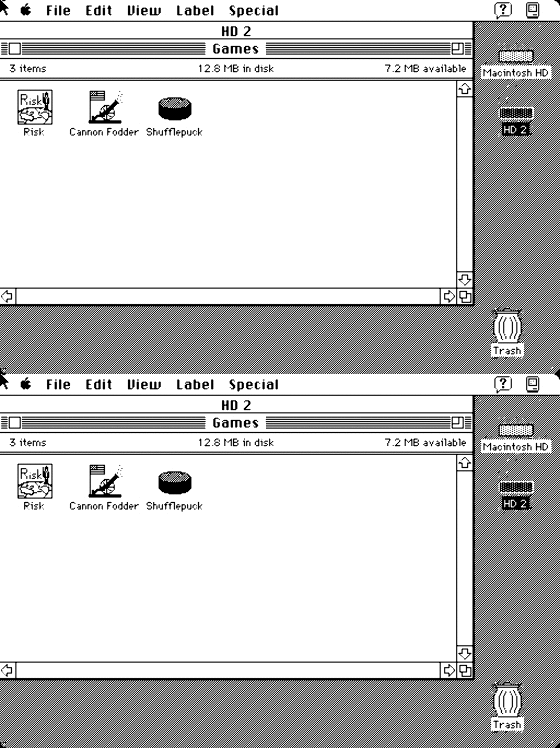
MacOS System 7.0.1 Compilation : Apple Computer : Free Download & Streaming : Internet Archive

Posted by jpluimers on 2017/04/17

Cool stuff to compare when I have my Macintosh SE/30 up and running again: [Archive.isMacOS System 7.0.1 Compilation : Apple Computer : Free Download & Streaming : Internet Archive

Everything can either:

There is quite a bite included:

System Programs: Applications: Games: Utilities: Toys:
HyperCard, BBEdit Lite, Risk, HD Setup, Alarm
Macintosh MacDraw, Cannon Fodder, Disinfectant, Clock,
Basics, MacPaint, Shufflepuck. Disk Copy, Calculator,
Control Panels. Microsoft Excel, ResEdit, Note Pad,
Microsoft Word, TeachText, Puzzle,
Microsoft Works, Compact Pro, Mac Gzip,
Orion, Mar, Scrapbook.
Pagemaker, Stuffit Expander,
ZTerm. Stuffit Lite.

The [Archive.is] downloads:

../
00_coverscreenshot.jpg                          04-Apr-2017 04:51     50.9K
00_coverscreenshot_thumb.jpg                    04-Apr-2017 04:51     3.0K
_screenshot.gif                                 04-Apr-2017 04:51     62.7K
hd1.img                                         04-Apr-2017 04:12     20.4M
hd2.img                                         04-Apr-2017 04:12     20.4M
mac_MacOS_7.0.1_compilation.gif                 04-Apr-2017 04:51     4.2K
mac_MacOS_7.0.1_compilation_archive.torrent     16-Apr-2017 21:33     4.5K
mac_MacOS_7.0.1_compilation_files.xml           16-Apr-2017 21:33     3.8K
mac_MacOS_7.0.1_compilation_meta.sqlite         04-Apr-2017 04:51     14.0K
mac_MacOS_7.0.1_compilation_meta.xml            04-Apr-2017 05:49     4.2K
mac_MacOS_7.0.1_compilation_reviews.xml         16-Apr-2017 21:33     633.0B
screenshot_00.jpg                               04-Apr-2017 04:51     50.9K
screenshot_00_thumb.jpg                         04-Apr-2017 04:51     3.0K

–jeroen

Via (and more background info at): [WayBackIn-browser Mac OS 7.0.1 emulation, compatible software suite arrives at the Internet Archive

A pair of 20MB hard drive compilations contain a full MacOS 7.0.1 environment that runs in a browser, and contains an assortment of applications spanning from 1984 to 1991 has appeared on the Internet Archive, with the entire bundle able to be run inside Safari.


Posted in Apple, Classic Macintosh, History, Macintosh SE/30, Power User | Leave a Comment »

Launch & Run Multiple Instances of Any Application in Mac OS X

Posted by jpluimers on 2017/04/17

I needed a second instance of Atom to run on a second monitor:

open -n /Applications/Atom.app

Or even shorter:

open -na Atom

I got there via: Launch & Run Multiple Instances of Any Application in Mac OS X

The reason is that searching for Mac OS X start second Atom instance does not reveal satisfactory results, as the tips in these links all fail:

–jeroen


Posted in Apple, atom editor, Mac OS X / OS X / MacOS, OS X 10.10 Yosemite, OS X 10.11 El Capitan, OS X 10.9 Mavericks, Power User, Text Editors | Leave a Comment »

Windows update errors you get when you have a bad network connection: 80244019 and

Posted by jpluimers on 2017/04/14

A while ago I had some intermittent network issues resulting in these Windows Update error numbers:

  • 80244019 (some traffic made it through)
  • 80072EE2 (no traffic made it through)
  • 8??????? (DNS traffic didn’t make it through)

–jeroen

Posted in Power User, Windows, Windows 10, Windows 7, Windows 8, Windows 8.1 | Leave a Comment »