The Wiert Corner – irregular stream of stuff

Jeroen W. Pluimers on .NET, C#, Delphi, databases, and personal interests

  • My badges

  • Twitter Updates

  • My Flickr Stream

  • Pages

  • All categories

  • Enter your email address to subscribe to this blog and receive notifications of new posts by email.

    Join 1,839 other subscribers

Archive for the ‘Power User’ Category

james-atkinson/speedcomplainer: A python app that will test your internet connection and then complain to your service provider (and log to a data store if you’d like)

Posted by jpluimers on 2016/11/29

Cool: james-atkinson/speedcomplainer: A python app that will test your internet connection and then complain to your service provider (and log to a data store if you’d like)

It can auto-tweet your status to an ISP.

via:

–jeroej

Posted in Development, Internet, Power User, Python, Scripting, Software Development | Leave a Comment »

Disable TR-069 on a Fritz!Box and check if that was succesful – translated from a post by Hartmut Goebel 

Posted by jpluimers on 2016/11/29

Just in case you got scared by the TR-064 hack and likely causality to the German Telekom ISP outage yesterday as some modems expose TR-064 via the TR-069 WAN access, here is how to disable TR-069 in your Fritz!Box: [WayBackTR-069 auf Fritzbox ausschalten und Ergebnis prüfen — Hartmut Goebel · CISSP, CSSLP · Berater für Information-Security-Management

Note that for Fritz!Box the TR-069 implementation is not as bad as some Speedport devices used by Telekom, but you might want to consider turning TR-069 off:

If you trust yourself to keep the Fritz!Box firmware *and* settings up-to-date better than your ISP does, below are the translated steps.

Steps to disable TR-069 on a Fritz!Box router

  1. Activate telnetd on your Fritz!Box via a connected phone by dialing #96*7*
  2. Connect to your Fritz!Box over telnet at using telnet fritz.box or instead of fritz.box., use the IP-address of your Fritz!Box device
    • the password is the same as the password in the Fritz!Box web interface
  3. Disable TR-069 by typing this command: ctlmgr_ctl w tr069 settings/enabled 0
  4. Verify the TR-069 is off by looking at configuration file with this command: cat /var/flash/tr069.cfg
    • Check that at the start there is a line with enabled = no
  5. Disable telnetd on your Fritz!Box via a connected by by dialing  #96*8*
Note that even without a phone you can enable/disable telnetd as described by [WayBack] FRITZ!Box VoIP password extraction 

–jeroen

References:

Posted in Fritz!, Fritz!Box, Network-and-equipment, Power User | 2 Comments »

Google drawing AI – My first “Quick, Draw!” attempt – Jeroen Wiert Pluimers – Google+

Posted by jpluimers on 2016/11/28

Not your grandma’s QuickDraw, but a one of the new Google AI experiments by their AI research team:

Can a neural network learn to recognize doodles? See how well it does with your drawings and help teach it, just by playing.

Source: Quick, Draw!

On the right is my first “Quick, Draw!” attempt.
Too bad the canoe didn’t work out; parrot and firetruck are pretty hard with either a mouse or a trackpad.

Source: [WayBackMy first Quick Draw attempt – Jeroen Wiert Pluimers – Google+

Other A.I. Experiments (g.co/aiexperiments):

–jeroen

Via:

Posted in Draw!, Google, Google AI, LifeHacker, Power User, Quick | Leave a Comment »

APC UPS battery replacement for Smart-UPS 1500 (SUA1500) and XL 3000 (SUA3000XLT): batteries RBC7 and RBC55

Posted by jpluimers on 2016/11/28

On the right and bottom how the APC SmartUPS 1500 looked before cleaning. Despite APC claims of being non-spillable, lead acid batteries do eventually leak. APC just doesn’t tell you when (they say there is some fine print about replacing them, but hey – if the UPS doesn’t complain about capacity loss…).

Like I mentioned in my first post about the leaking, I cleaned the inside with sodium bicarbonate (easily to get – even in The Netherlands – as “baking soda” or “zuiveringszout” in most grocery shops. “zuiveringszout” is the same but much cheaper).

So after cleaning, you need to assemble a new battery pack and reinstall it. The RBC7 stock battery packs from APC are very expensive and since warranty expired on the UPS and APC batteries leaks anyway, it is much cheaper to re-assemble your own battery pack from a pair of UB12180 batteries. The same holds for the RBC55 (which are just basically two pairs of assembled UB12180 batteries). The decoding of these battery numbers are fairly easy: 12V holding 18.0 Ah of charge. Different battery manufacturers use different battery size nomenclature usually with a similar structure.

Disassembling and re-assembling the packs is fairly easy. Be sure to do this carefully: replacement sets of the APC battery connector wiring harness and fuse will set you back another USD/EUR 15-20 excluding shipping.

The below youtube videos are much clearer on this than any picture series I could have made, plus a series of Tweets figuring out the correct fuses to use.

Read the rest of this entry »

Posted in APC Smart-UPS, LifeHacker, Power User, UPS | Leave a Comment »

xyzzy, Relay Conferencing before IRC even existed

Posted by jpluimers on 2016/11/28

Edit 20260607/20260608: added more archived links and noted which links have died because of link rot, added 2 relay hosts; moved MIT net-directory links to a new location.

A while ago, I remembered [Wayback/Archive] xyzzy by David Bolen: a VAX/VMS program for the BITNET Relay conference system on BITNET/EARN. Yes, relay chat before IRC. Even ELIZA did operate [Wayback/Archive] as a chatbot on BITNET Relay.

I was part of it from the late 80s until the early 90s and vividly remember the chat rooms where at one time you could have smart people from all around the world participating: Asia, Middle East, Europe, North America and other regions.

All people had one thing in common: an enthusiastic vibe as they had immediately recognised what the benefits of near instant feedback were. World Wide before you had the WWW. It was addictive too (:

The most important Dutch relay node was HEARN which was named unlike the HNYKUN patterns at the University in Nijmegen (now Radboud Universiteit, but previously known as Katholieke Universiteit Nijmegen hence the KUN in the HNYKUN pattern).

Read the rest of this entry »

Posted in archive.is / archive.today, Archiving, BITNET Relay, Chat, History, Internet, InternetArchive, IRC, Power User, SocialMedia, WayBack machine | Leave a Comment »

Amazon 2FA Account Recovery HOWTO I had enabled 2FA on my amazon.de account,…

Posted by jpluimers on 2016/11/25

[WayBackAmazon 2FA Account Recovery HOWTO I had enabled 2FA on my amazon.de account,… – Kristian Köhntopp – Google+

Quoted in full as it is too important to forget where I put this:

Amazon 2FA Account Recovery HOWTO

I had enabled 2FA on my amazon.de account, and the device running the only copy of the TOTP seed has been destroyed. I wanted to disable 2FA on my account in order to be able to access the account until a replacement phone was available.

To enable 2FA on an amazon.de account, you have to login to amazon.com using your amazon.de credentials and then go through the 2FA procedure.

Calling the german hotline for help did not work. They did not know about 2FA disablement and were unable to help me. They did know about 2FA in general, have been able to verify and validate my identity and were generally friendly. They have been calling me back repeatedly.

I later remembered how I enabled the 2FA and did try to login to amazon.com, giving my german credentials and ended up on the “Enter 2FA code” screen. There is a link at the bottom, “Did not receive code”.

Clicking that link takes you to a screen where you can choose between Google Authenticator and SMS identification.

I chose SMS auth, did receive a 6 digit code, entered that and was able to auth. I then was able to temporarily disable 2FA and regain control of my US account. This also disabled 2FA for my german account, and I now have my German account back.

–jeroen


Posted in Amazon.com/.de/.fr/.uk/..., Cloud, Infrastructure, Power User | Leave a Comment »

zypper installing from a non-standard repository

Posted by jpluimers on 2016/11/25

I got a bit lost in the woods of implicit URLs between various places.

All I wanted is to install software.opensuse.org: Install package server:monitoring / lnav preferably from the link http://software.opensuse.org/ymp/server:monitoring/openSUSE_Tumbleweed/lnav.ymp

It’s the OpenSuSE package for The Log File Navigator which I found based on the recommendation “The Log File Navigator – Joe C. Hecht – Google+“.

The package was in a non-standard repository “server:monitoring”, but shortening the package link doesn’t get you there:

These do however (thanks tacit):

From both, it’s just a couple of clicks away to the lnav packages:

Zypper doesn’t allow you to install one-click install ymp links like http://software.opensuse.org/ymp/server:monitoring/openSUSE_Tumbleweed/lnav.ymp

But OCICLI (one-click install CLI) does. And yes, unlike most console commands IT’S IN UPPERCASE. You can use it like this (note the warning):

OCICLI http://software.opensuse.org/ymp/server:monitoring/openSUSE_Tumbleweed/lnav.ymp

OCICLI is fully compatible with zypper as OCICLI uses YaST and libzypp as underlying technology and zypper uses libzypp.

The yml files are metadata offering to add one or more repositories and install one or more packets or patterns. OCICLI automates that process.

Another option is to manually add the repository using zypper, then install lnav from zypper. There is no URL to this (again; are these the virtues of Web 2.0?) you have to click a few times:

  1. Go to https://software.opensuse.org/download.html?project=server:monitoring&package=lnav
  2. Click on openSUSE
  3. Click on Add repository and install manually
  4. Under openSUSE Tumbleweed, look for this code

zypper addrepo http://download.opensuse.org/repositories/server:monitoring/openSUSE_Tumbleweed/server:monitoring.repo
zypper refresh
zypper install lnav

Installing using OCICLI

As currently there is a bug in OCICLI, it will show a warning: Warning: unable to close filehandle properly: Bad file descriptor, <STDIN> line 7 during global destruction (#1) which I reported:

Read the rest of this entry »

Posted in *nix, Linux, openSuSE, Power User, SuSE Linux, Tumbleweed | Leave a Comment »

The Typeface Mechanics series by Frere Jones is genius!

Posted by jpluimers on 2016/11/25

Awesome Typeface Mechanics series.

Below are just the first two episodes; search the above link for more.

I bumped into this via

In which we / I learn where the ‘x’ in ‘x-height’ comes from – Kirill Grouchnikov – Google+

–jeroen

Posted in Font, Power User | Leave a Comment »

Internet Archive Wayback machine – New Beta Release Allows Users to Keyword Search

Posted by jpluimers on 2016/11/24

I totally missed this because most of my WayBack activity is through the JavaScript buttons on my Chrome toolbar, so here it is:

A month ago, the WayBack machine introduced a new beta that allows for searching inside the archives.

Some links:

There actually seem to be two betas going on at the same time:

–jeroen

Posted in InternetArchive, Power User, WayBack machine | Leave a Comment »

Recursion

Posted by jpluimers on 2016/11/23

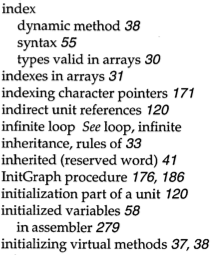
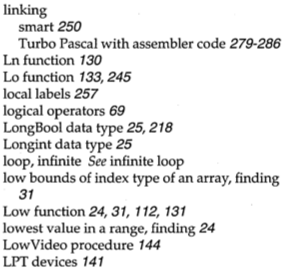
Apple fanboys all know about 1 Infinite Loop. Turbo Pascal adepts about the index entries “infinite loop See loop, infinite” and “loop, infinite See infinite loop”.

Google as a more direct approach: www.google.com/search?q=recursion

Read the rest of this entry »

Posted in Algorithms, Apple, Borland Pascal, Design Patterns, Development, Google, Pascal, Power User, Software Development, Turbo Pascal | Leave a Comment »