Archive for the ‘Hashing’ Category
Posted by jpluimers on 2025/12/11
Nog niet gecontroleerd, maar wellicht werkt dit ook voor (fragmenten van) radiouitzendingen?
Edit 20260313: redirect toegevoegd voor SEO, en sectie over redirect-checker.
Uit een draad over het liedje “Met puntjes” van Joke Bruijs die een paar maanden terug enkele dagen na haar boezem vriend en ex-man Gerard Cox overleed¹.
Ionica Smeets schreef over het liedje op Mastodon², maar de link naar de audio van de podcast [Wayback/Archive] Andermans Veren – Beluister Andermans Veren zondag 14 januari 2018 | Podcasts | NPO Radio 5 verdween al snel.
Omdat ik al eerder een probleem had met de audio van [Wayback/Archive] Keihard de Beste – NPO Podcast te downloaden, dook ik in de CDN die de NPO gebruikt.
De archivers hadden er wat problemen mee dus het staat in 2 stukken:
- [Wayback/Archive] Jeroen Wiert Pluimers: “@ionica ik ga het je proberen uit te leggen. En dan kan jij het vast in veel simpeler bewoording weer terug uitleggen zodat anderen het ook begrijpen. …” – Mastodon
- …
- [Wayback/Archive] Jeroen Wiert Pluimers: “@ionica hopelijk heb ik je een beetje kunnen helpen met je opmerkingen in…” – Mastodon
- …
- ³
Er waren wat zijstapjes naar onder meer hoe je een goede vraag op het internet moet stellen, dus de draad werd lang (:
Hieronder de volledige tekst, aangevuld met wat gearchiveerde links. Maar eerst twee versies van het liedje “Met puntjes” van Joke Bruijs: opnamen van 1986 en 1988:
Read the rest of this entry »
Posted in Authentication, CDN (Content Delivery Network), Cloud, CSS, Development, Hashing, HMAC, HTML, Infrastructure, Power User, Security, Software Development, Web Development | Leave a Comment »
Posted by jpluimers on 2024/12/26
On my research list [Wayback/Archive] HInvoke and avoiding PInvoke | drakonia’s blog.
A very minimalistic approach of calling .net runtime functions or accessing properties using only hashes as identifiers. It does not leave any strings or import references since we dynamically resolve the required member from the mscorlib assembly on runtime.
Read the rest of this entry »
Posted in .NET, C#, Development, Encryption, Hashing, Power User, Red team, Security, Software Development | Tagged: CyberSecurity, dinvoke, hinvoke, infosec, maldev, pentest, Pentesting, redteam | Leave a Comment »
Posted by jpluimers on 2024/07/12
 There is a Blast-RADIUS exploit that makes many uses of RADIUS vulnerable as they depend on MD5, and MD5 collisions have been sped up considerably. Basically only RADIUS TLS seems safe now.
The Blast-RADIUS logo on the right reminded me about using grenades in a game 40+ years old, so lets digress: Archive.org is such a great site, with for instance the original Apple ][ Manual of Castle Wolfenstein by MUSE Software (the manual is written in Super-Text which they also sold):
The PDF from [Archive] Instruction Manual: Castle Wolfenstein from Muse Software : Free Download, Borrow, and Streaming : Internet Archive is at
[Archive.org PDF view/Archive.is] archive.org/download/1982-castle-wolfenstein/1982-castle-wolfenstein.pdf
Screenshot
The trick in that game when entering a room full of SS-officers was to throw a grenade into a chest of grenades in the middle of that room, then quickly leaving the room, waiting a few seconds then re-entering that room.
Not many moves further, you would find the chest with the war plans and find the exit, then finish the game.
Back to Blast RADIUS
Read the rest of this entry »
Posted in 6502, Apple, Apple ][, Authentication, Hashing, History, md5, Power User, Security | Leave a Comment »
Posted by jpluimers on 2022/09/08
I’ve mentioned this in the past, but not sure I did that on my blog yet, so here it goes:
Avoid writing the deep security layers of your software yourself, as it is hard, even for seasoned security software developers.
Push as much as you can to well tested external libraries.
See for instance [Wayback/Archive.is] GHSL-2021-1012: Poor random number generation in keypair – CVE-2021-41117 | GitHub Security Lab
Three went wrong, leading to easy to guess RSA security keys:
- The library has an insecure random number fallback path. Ideally the library would require a strong CSPRNG instead of attempting to use a LCG and
Math.random.
- The library does not correctly use a strong random number generator when run in NodeJS, even though a strong CSPRNG is available.
- The fallback path has an issue in the implementation where a majority of the seed data is going to effectively be zero.
The most important thing that went wrong was seeding the random number generator, cascading
Via:
–jeroen
Posted in Development, Encryption, Hashing, Power User, Security, Software Development | Leave a Comment »
Posted by jpluimers on 2022/06/23
[Wayback/Archive.is] CyberChef:
a simple, intuitive web app for carrying out all manner of “cyber” operations within a web browser. These operations include simple encoding like XOR or Base64, more complex encryption like AES, DES and Blowfish, creating binary and hexdumps, compression and decompression of data, calculating hashes and checksums, IPv6 and X.509 parsing, changing character encodings, and much more.
Source code at [Wayback/Archive.is] gchq/CyberChef: The Cyber Swiss Army Knife – a web app for encryption, encoding, compression and data analysis.
Via [Archive.is] Jilles🏳️🌈 on Twitter: “Hidden in plain sight. Rot13 cross word. Hidden Barcodes. Qr codes. Barely any InfoSec skill required. Still a hand full. Usually my to go place is: Cyberchef. I did a fun one for cyberklaas using ansi art.… “
Jilles also pointed to the solving part in [Archive.is] Jilles🏳️🌈 on Twitter: “See also, for solving: SCWF… “
The [Wayback/Archive.is] Solve Crypto with Force! needs to run without most script blockers, so best run it in an anonymous/private browser window.
Source code for SCWF is at [Wayback/Archive.is] DaWouw/SCWF: CTF tool for identifying, brute forcing and decoding encryption schemes in an automated way.
Screen shot of Cyberchef example “Perform AES decryption, extracting the IV from the beginning of the cipher stream” [Archive.is]:
Read the rest of this entry »
Posted in Barcode, Cyberchef, Development, EAN, Encoding, Encryption, Hashing, Power User, QR code, Security, Software Development | Leave a Comment »
Posted by jpluimers on 2021/05/13
Sometimes an install is not just as simple as C:\>choco install --yes oracle-sql-developer.
Edit 20210514:
Note that most of the below pain will be moot in the future as per [Archive.is] Jeff Smith 🍻 on Twitter: “we’re working on removing the SSO requirement, it’s already done for @oraclesqlcl – see here … “ referring to [Wayback] SQLcl now under the Oracle Free Use Terms and Conditions license | Oracle Database Insider Blog
SQLcl, the modern command-line interface for the Oracle Database, can now be downloaded directly from the web without any click-through license agreement.
It means the Oracle acount restriction will be lifted, and downloads will be a lot simpler.
I started with the below failing command, tried a lot of things, then finally almost gave up: Oracle stuff does not want to be automated, which means I should try to less of their stuff.
First of all you need an Oracle account (I dislike companies doing that for free product installs; I’m looking at Embarcadero too) by going to profile.oracle.com:
[WayBack] Chocolatey Gallery | Oracle SQL Developer 18.4.0 (also: gist.github.com/search?l=XML&q=oracle-sql-developer)
Notes
- This version supports both 32bit and 64bit and subsequently does not have a JDK bundled with it. It has a
dependency on the jdk8 package to meet the application’s JDK requirement.
- An Oracle account is required to download this package. See the “Package Parameters” section below for
details on how to provide your Oracle credentials to the installer. If you don’t have an existing account, you can
create one for free here: https://profile.oracle.com/myprofile/account/create-account.jspx
Package Parameters
The following package parameters are required:
* /Username: – Oracle username
* /Password: – Oracle password
(e.g. choco install oracle-sql-developer --params "'/Username:MyUsername /Password:MyPassword'")
To have choco remember parameters on upgrade, be sure to set choco feature enable -n=useRememberedArgumentsForUpgrades.
Then the installation failed fail again: ERROR: The response content cannot be parsed because the Internet Explorer engine is not available, or Internet Explorer's first-launch configuration is not complete. Specify the UseBasicParsing parameter and try again.
The trick is to RUN IEXPLORE.EXE AS ADMINISTRATOR ONCE BEFORE INSTALLING FROM CHOCOLATEY. Who would believe that.
The reason is that the package uses Invoke-WebRequest which requires Internet Explorer and PowerShell 3. Chocolatey packages however need to be able to run on just PowerShell 2 without Invoke-WebRequest.
Maybe using cURL can remedy that; adding a dependency to is is possible, as cURL can be installed via chocolatey: [WayBack] How to Install cURL on Windows – I Don’t Know, Read The Manual. Another alternative might be [WayBack] Replace Invoke-RestMethod in PowerShell 2.0 to use [WayBack] WebRequest Class (System.Net) | Microsoft Docs.
Read the rest of this entry »
Posted in CertUtil, Chocolatey, CommandLine, Database Development, Development, DVCS - Distributed Version Control, git, Hashing, OracleDB, Power User, PowerShell, Security, SHA, SHA-1, Software Development, Source Code Management, Windows, XML, XML/XSD | Leave a Comment »
Posted by jpluimers on 2020/09/14
I needed to get myself an OOB license for the BIOS update over the IPMI console or SUM (Supermicro Update Manager). An IPMI update can be done without an OOB license from the IPMI console, but the BIOS requires a license.
Links that initially helped me with that to get a feel for what I needed:
I thought that likely I need to purchase a key for it:
Obtain the license code from your IPMI BMC MAC address
But then I found out the below links on reverse engineering.
From those links, I checked both the Perl and Linux OpenSSL versions. Only the Perl version works on MacOS.
Then I fiddled with the bash version: unlike the OpenSSL version above, this one printed output. It wrongly printed the last groups of hex digits instead of the first groups of hex digits that the Perl script prints.
Here is the corrected bash script printing the first groups of hex digits (on my systems, I have an alias supermicro_hash_IPMI_BMC_MAC_address_to_get_OOB_license_for_BIOS_update for it):
#!/bin/bash
function hash_mac {
  mac="$1"
  key="8544e3b47eca58f9583043f8"
  sub="\x"
  #convert mac to hex
  hexmac="\x${mac//:/$sub}"
  #create hash
  code=$(printf "$hexmac" | openssl dgst -sha1 -mac HMAC -macopt hexkey:"$key")
  #DEBUG
  echo "$mac"
  echo "$hexmac"
  echo "$code"

  echo "${code:0:4}-${code:4:4}-${code:8:4}-${code:12:4}-${code:16:4}-${code:20:4}"
}
Steps
Reverse engineering links
- [WayBack] The better way to update Supermicro BIOS is via IPMI – VirtualLifestyle.nl
Another way to update the BIOS via the Supermicro IPMI for free is simply calculating the license key yourself as described here: https://peterkleissner.com/2018/05/27/reverse-engineering-supermicro-ipmi/ [WayBack].
- [WayBack] Reverse Engineering Supermicro IPMI – peterkleissner.com
Algorithm:
MAC-SHA1-96(INPUT: MAC address of BMC, SECRET KEY: 85 44 E3 B4 7E CA 58 F9 58 30 43 F8)
Update 1/14/2019: The Twitter user @astraleureka posted this code perl code which is generating the license key:
#!/usr/bin/perl
use strict;
use Digest::HMAC_SHA1 'hmac_sha1';
my $key  = "\x85\x44\xe3\xb4\x7e\xca\x58\xf9\x58\x30\x43\xf8";
my $mac  = shift || die 'args: mac-addr (i.e. 00:25:90:cd:26:da)';
my $data = join '', map { chr hex $_ } split ':', $mac;
my $raw  = hmac_sha1($data, $key);
printf "%02lX%02lX-%02lX%02lX-%02lX%02lX-%02lX%02lX-%02lX%02lX-%02lX%02lX\n", (map { ord $_ } split '', $raw);
Update 3/27/2019: There is also Linux shell version that uses openssl:
echo -n 'bmc-mac' | xxd -r -p | openssl dgst -sha1 -mac HMAC -macopt hexkey:8544E3B47ECA58F9583043F8 | awk '{print $2}' | cut -c 1-24
- [WayBack] Modular conversion, encoding and encryption online — Cryptii
Web app offering modular conversion, encoding and encryption online. Translations are done in the browser without any server interaction. This is an Open Source project, code licensed MIT.
Steps:
- In the left pane, select the “View” drop-down to be “Bytes”, then paste the HEX bytes of your IPMI MAC address there (like
00 25 90 7d 9c 25)
- In the middle pane, select the drop-down to become “HMAC” followed by the radio-group to be “SHA1“, then paste these bytes into the “Key” field:
85 44 E3 B4 7E CA 58 F9 58 30 43 F8
- In the right pane, select the drop-down to become “Bytes”, then the “Group by” to become “2 bytes”, which will you give the output (where the bold part is the license key: 6 groups of 2 bytes):
a7d5 2201 4eee 667d dbd2 5106 9595 2ff7 67b8 fb59
Result:
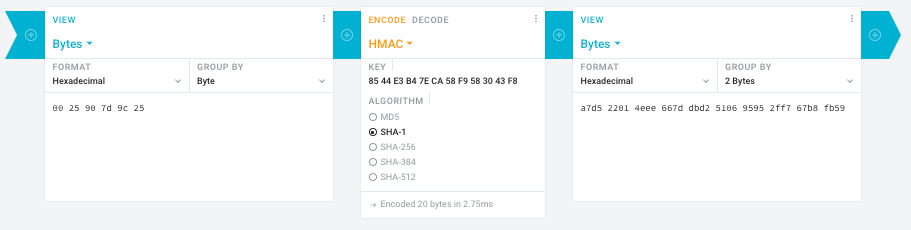
- Michael Stapelberg’s private website, containing articles about computers and programming, mostly focused on Linux.[WayBack] Securing SuperMicro’s IPMI with OpenVPN
- [WayBack] GitHub – ReFirmLabs/binwalk: Firmware Analysis Tool
- [WayBack] The better way to update Supermicro BIOS is via IPMI – VirtualLifestyle.nl
Ahh…..a few corrections :-P
#!/bin/bash
function hash_mac {
  mac="$1"
  key="8544e3b47eca58f9583043f8"
  sub="\x"
  #convert mac to hex
  hexmac="\x${mac//:/$sub}"
  #create hash
  code=$(printf "$hexmac" | openssl dgst -sha1 -mac HMAC -macopt hexkey:"$key")
  #DEBUG
  echo "$mac"
  echo "$hexmac"
  echo "$code"
  echo "${code:9:4} ${code:13:4} ${code:17:4} ${code:21:4} ${code:25:4} ${code:29:4}"
}
#hex output with input
hash_mac "$1"

#Look out for the quotes, they might get changed by different encoding
- [WayBack] The better way to update Supermicro BIOS is via IPMI – VirtualLifestyle.nl
Thanks Peter. For anyone interested, here’s a bash script that takes the MAC as the only argument and outputs the activation key:
#!/bin/bash
function hash_mac {
  mac="$1"
  key="8544e3b47eca58f9583043f8"
  sub="\x"
  #convert mac to hex
  hexmac="\x${mac//:/$sub}"
  #create hash
  code=$(printf "$hexmac" | openssl dgst -sha1 -mac HMAC -macopt hexkey:"$key")
  ## DEBUG
  echo "$mac"
  echo "$hexmac"
  echo "$code"
  echo "${code:9:4} ${code:13:4} ${code:17:4} ${code:21:4} ${code:25:4} ${code:29:4}"
}
## hex output with input
hash_mac "$1"
–jeroen
Read the rest of this entry »
Posted in Development, Encoding, Hardware, Hashing, HMAC, Mainboards, OpenSSL, Power User, Security, SHA, SHA-1, Software Development, SuperMicro, X10SRH-CF | Leave a Comment »


 The Wiert Corner - irregular stream of stuff